Network layout question??

DxxS

New member
Power User
Local time
12:55 AM
Messages
112
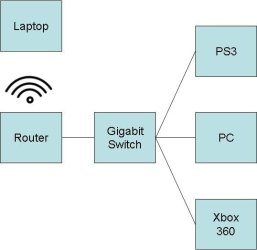
Hi, I have a wireless modem router, the routers ports only do 10/100, my idea is to set up like the diagram, will doing it this way allow my pc/ps3/xbox/and any other PC's on the wired network to transfer data (mostly music and films) at gigabit speeds or will all data still go through the router limiting the speed? the laptops will connect via wireless to the router.

Thanks in advance.
 

Attachments

  • Network.JPG
    Network.JPG
    14.6 KB · Views: 35

My Computer

OS
Windows 7 Ultimate 64-bit
CPU
Intel Core 2 Duo E8400 3GHz
Motherboard
ASUS P5Q PRO Turbo
Memory
OCZ Gold DDR2 1066MHz/PC2-8500 8GB (4x2GB)
Graphics Card(s)
BFG GTS250 OC 1GB GDDR3
Monitor(s) Displays
Dual (x2) Samsung SM2033SW 20"TFT
Hard Drives
120GB OCZ Agility 3 SSD (OS Drive)
350GB - Internal (Storage)
500GB - Internal (Storage)
1TB - Internal (Storage)
500GB - External (Storage)
PSU
OCZ Stealth XStream 700W PSU
Case
Casecom KB-5510 Black/Silver Blue LED Mid Tower Case
Cooling
Zalman CNPS7500-ALCU LED
As long as they are hooked to the gigabit switch you will get full speed from pc to xbox and ps3. Any traffic going threw the slow router will be limited (wireless client to wired PC).
 

My Computer

OS
Windows 7 Ultimate x64 Retail RTM, Ubuntu 9.10
PC will communicate with game consoles at Gigabit, which is pretty much unnecessary for streaming anything. A solid 100 mbps is fine unless really heavily used concurrently. A standard average DVD streaming is only like 6-8 mbps. Blu-ray unripped could get triple or quadruple that. Typical DivX or XviD DVDRips, like 1-2 mbps.

PC will communicate with internet and laptop at 100 mbps. Internet obviously will be limited by ISP as always.

Edit: Now that I think about it more, those game consoles might not be Gigabit capable either, anyhow.
 

My Computer

Computer Manufacturer/Model Number
self built
OS
7600.20510 x86
CPU
P4 550 3.4 GHz HT running at 3.5 GHz
Motherboard
MSI PM8M3-V (MS-7211 v1.x) Micro-ATX mainboard
Memory
OCZ 2 GB(2x1GB) DDR400mHz running @ 414 mHz
Graphics Card(s)
HIS Radeon HD 3850 IceQ 3 Turbo HDMI Dual DL-DVI AGP
Sound Card
MOTU Traveler firewire studio interface 192 kHz 24 bit
Monitor(s) Displays
22" widescreen Acer X223W LCD, 17" Compaq P75 CRT
Screen Resolution
1680x1050 and 1280x1024
Hard Drives
SATA I x2 WD, 400 GB and 120 GB, SATA 2 WD Caviar Black 1 TB
PSU
350W generic
Case
Cybertronpc, it glows blue
Cooling
stock cpu fan, Ice-Q 3 gpu and system, many case fans
Keyboard
Logitch Classical Keyboard 200
Mouse
Logitech Mediaplay cordless
Internet Speed
1792/448 kbits/sec
Other Info
SATA II PCI fake RAID adapter, 1 GB Readyboost, original ATI Remote Wonder (even works with WMC perfectly), Logitech Rumblepad 2 game controller x2
Thanks guys, I thought as much but wanted confirmation before I paid out for a switch and bits,

One last thing, would i need cat6 cable or will cat5e handle gigabit?

Thanks,
 

My Computer

OS
Windows 7 Ultimate 64-bit
CPU
Intel Core 2 Duo E8400 3GHz
Motherboard
ASUS P5Q PRO Turbo
Memory
OCZ Gold DDR2 1066MHz/PC2-8500 8GB (4x2GB)
Graphics Card(s)
BFG GTS250 OC 1GB GDDR3
Monitor(s) Displays
Dual (x2) Samsung SM2033SW 20"TFT
Hard Drives
120GB OCZ Agility 3 SSD (OS Drive)
350GB - Internal (Storage)
500GB - Internal (Storage)
1TB - Internal (Storage)
500GB - External (Storage)
PSU
OCZ Stealth XStream 700W PSU
Case
Casecom KB-5510 Black/Silver Blue LED Mid Tower Case
Cooling
Zalman CNPS7500-ALCU LED
Cat5e is gigabit ready. You're welcome. I worked in Wire & Cable division at uL. lol crush tests.

On a side note, I was project manager and handled Verizon's test submission samples right before they started rolling out fiber. Cost them 200k+ to certify the optic cable they used haha. The engineers had fun.
 

My Computer

Computer Manufacturer/Model Number
self built
OS
7600.20510 x86
CPU
P4 550 3.4 GHz HT running at 3.5 GHz
Motherboard
MSI PM8M3-V (MS-7211 v1.x) Micro-ATX mainboard
Memory
OCZ 2 GB(2x1GB) DDR400mHz running @ 414 mHz
Graphics Card(s)
HIS Radeon HD 3850 IceQ 3 Turbo HDMI Dual DL-DVI AGP
Sound Card
MOTU Traveler firewire studio interface 192 kHz 24 bit
Monitor(s) Displays
22" widescreen Acer X223W LCD, 17" Compaq P75 CRT
Screen Resolution
1680x1050 and 1280x1024
Hard Drives
SATA I x2 WD, 400 GB and 120 GB, SATA 2 WD Caviar Black 1 TB
PSU
350W generic
Case
Cybertronpc, it glows blue
Cooling
stock cpu fan, Ice-Q 3 gpu and system, many case fans
Keyboard
Logitch Classical Keyboard 200
Mouse
Logitech Mediaplay cordless
Internet Speed
1792/448 kbits/sec
Other Info
SATA II PCI fake RAID adapter, 1 GB Readyboost, original ATI Remote Wonder (even works with WMC perfectly), Logitech Rumblepad 2 game controller x2
Thanks guys, I thought as much but wanted confirmation before I paid out for a switch and bits,

One last thing, would i need cat6 cable or will cat5e handle gigabit?

Thanks,


Cat 5E will but cat 6 is still prefered especially if you are going to be cutting the cable to length.. Btw why dont you just buy a router that is gigabit? you are adding another device and more cables than you need.
 

My Computer

Computer Manufacturer/Model Number
HP Pavillion dv-7 1005 Tx
OS
Win 8 Release candidate 8400
CPU
[email protected]
Memory
4 gigs
Graphics Card(s)
Nvidia 9600M
Sound Card
HD built-in
Monitor(s) Displays
17" Wxga
Screen Resolution
1440x900
Cooling
none
Internet Speed
45Mb down 5Mb up
Im switching to another ISP (Virgin Media) who give a free wireless router and from what i have found it does not support gigabit, and from what I have found can get a switch cheaper than a router.

just out of curiosity, why is cat 6 preferred over 5e if cutting it to length? does this make a difference?

Thanks.
 

My Computer

OS
Windows 7 Ultimate 64-bit
CPU
Intel Core 2 Duo E8400 3GHz
Motherboard
ASUS P5Q PRO Turbo
Memory
OCZ Gold DDR2 1066MHz/PC2-8500 8GB (4x2GB)
Graphics Card(s)
BFG GTS250 OC 1GB GDDR3
Monitor(s) Displays
Dual (x2) Samsung SM2033SW 20"TFT
Hard Drives
120GB OCZ Agility 3 SSD (OS Drive)
350GB - Internal (Storage)
500GB - Internal (Storage)
1TB - Internal (Storage)
500GB - External (Storage)
PSU
OCZ Stealth XStream 700W PSU
Case
Casecom KB-5510 Black/Silver Blue LED Mid Tower Case
Cooling
Zalman CNPS7500-ALCU LED
Cat6 is only necessary or recommended for very long runs such as 300+ feet. Otherwise, it offers absolutely no benefit to a home user, is more expensive and harder to terminate.

Until there are 10 gbps adapters and routers, Cat6 is useless unless as Ive said, for very long runs.
 

My Computer

Computer Manufacturer/Model Number
self built
OS
7600.20510 x86
CPU
P4 550 3.4 GHz HT running at 3.5 GHz
Motherboard
MSI PM8M3-V (MS-7211 v1.x) Micro-ATX mainboard
Memory
OCZ 2 GB(2x1GB) DDR400mHz running @ 414 mHz
Graphics Card(s)
HIS Radeon HD 3850 IceQ 3 Turbo HDMI Dual DL-DVI AGP
Sound Card
MOTU Traveler firewire studio interface 192 kHz 24 bit
Monitor(s) Displays
22" widescreen Acer X223W LCD, 17" Compaq P75 CRT
Screen Resolution
1680x1050 and 1280x1024
Hard Drives
SATA I x2 WD, 400 GB and 120 GB, SATA 2 WD Caviar Black 1 TB
PSU
350W generic
Case
Cybertronpc, it glows blue
Cooling
stock cpu fan, Ice-Q 3 gpu and system, many case fans
Keyboard
Logitch Classical Keyboard 200
Mouse
Logitech Mediaplay cordless
Internet Speed
1792/448 kbits/sec
Other Info
SATA II PCI fake RAID adapter, 1 GB Readyboost, original ATI Remote Wonder (even works with WMC perfectly), Logitech Rumblepad 2 game controller x2
Cat6 is only necessary or recommended for very long runs such as 300+ feet. Otherwise, it offers absolutely no benefit to a home user, is more expensive and harder to terminate.

Until there are 10 gbps adapters and routers, Cat6 is useless unless as Ive said, for very long runs.

Thats good to know as i have a box of cat 5e in my loft, was worried it would go to waste.
 

My Computer

OS
Windows 7 Ultimate 64-bit
CPU
Intel Core 2 Duo E8400 3GHz
Motherboard
ASUS P5Q PRO Turbo
Memory
OCZ Gold DDR2 1066MHz/PC2-8500 8GB (4x2GB)
Graphics Card(s)
BFG GTS250 OC 1GB GDDR3
Monitor(s) Displays
Dual (x2) Samsung SM2033SW 20"TFT
Hard Drives
120GB OCZ Agility 3 SSD (OS Drive)
350GB - Internal (Storage)
500GB - Internal (Storage)
1TB - Internal (Storage)
500GB - External (Storage)
PSU
OCZ Stealth XStream 700W PSU
Case
Casecom KB-5510 Black/Silver Blue LED Mid Tower Case
Cooling
Zalman CNPS7500-ALCU LED
My set up is just like your picture, works like a charm. Gigabit is the way to go it makes network shares nearly as fast as internal drives. Noticeably faster than USB external drives!
 

My Computer

Computer Manufacturer/Model Number
ultraplanet - model 23
OS
Windows 7
CPU
P4 3.0 HT
Motherboard
Intel DQ965GF
Memory
4 gigs of Crucial DDR2
Graphics Card(s)
nVidia GeForce 7800GT 256MB 256-bit w/ ACCELS1 Rev 2
Sound Card
on board
Monitor(s) Displays
HP 2509m
Screen Resolution
1920x1080
Hard Drives
2x 320gb Seagate Barracuda's - SATA 3Gbit/s - RAID-0 array
PSU
650 watt
Case
Antec
Cooling
Cool Master
Keyboard
Logitech diNovo Media Desktop
Mouse
see keyboard
Internet Speed
comcast cable
Other Info
7 Ultimate and 7 Pro twice each at home - Gigabit on the Network - Tomato on the Linksys - I freely share my wireless with my neighbors (8-10 additional devices)
Can anyone offer any advise as to which sort of switch to get, Managed/unmanaged/smart?

Thanks.
 

My Computer

OS
Windows 7 Ultimate 64-bit
CPU
Intel Core 2 Duo E8400 3GHz
Motherboard
ASUS P5Q PRO Turbo
Memory
OCZ Gold DDR2 1066MHz/PC2-8500 8GB (4x2GB)
Graphics Card(s)
BFG GTS250 OC 1GB GDDR3
Monitor(s) Displays
Dual (x2) Samsung SM2033SW 20"TFT
Hard Drives
120GB OCZ Agility 3 SSD (OS Drive)
350GB - Internal (Storage)
500GB - Internal (Storage)
1TB - Internal (Storage)
500GB - External (Storage)
PSU
OCZ Stealth XStream 700W PSU
Case
Casecom KB-5510 Black/Silver Blue LED Mid Tower Case
Cooling
Zalman CNPS7500-ALCU LED
Back
Top