
Hi
I'm trying to homegroup up two W7 laptops, the network map from each system is shown as follows
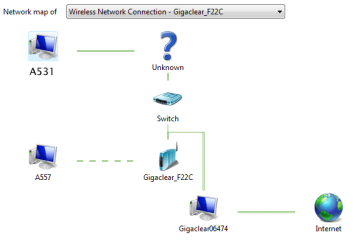
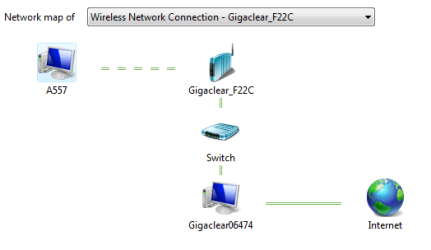
The A531 is the "master" laptop with the homegroup defined, with the A557 as the one I want to "connect to existing homegroup" but as the screenshots show, for some reason the A557 isn't seeing the A531 -- whereas the A531 can appear to find both laptops (with one line dotted)
Network map from the A531 "master"
Network map from the A557 "slave" - or "join homegroup" system
I don't know what that "unknown" link is - I have VPN software running on both but the VPN's aren't active on either at the moment
The purpose of wanting to find both on the same network is for the A557 to join the A531's homegroup
Any advice welcome
- - - Updated - - -
Update....
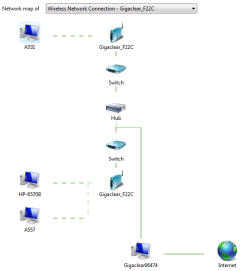
One reboot later, this is what the network map looks like. The A557 isn't seeing the homegroup created by the A531. I.......don't know why there are the hubs and switches in this layout? that is, I don't know why they aren't directly connected to each other with 1x hub and 1x switch as needed....
I'm trying to homegroup up two W7 laptops, the network map from each system is shown as follows
The A531 is the "master" laptop with the homegroup defined, with the A557 as the one I want to "connect to existing homegroup" but as the screenshots show, for some reason the A557 isn't seeing the A531 -- whereas the A531 can appear to find both laptops (with one line dotted)
Network map from the A531 "master"
Network map from the A557 "slave" - or "join homegroup" system
I don't know what that "unknown" link is - I have VPN software running on both but the VPN's aren't active on either at the moment
The purpose of wanting to find both on the same network is for the A557 to join the A531's homegroup
Any advice welcome
- - - Updated - - -
Update....
One reboot later, this is what the network map looks like. The A557 isn't seeing the homegroup created by the A531. I.......don't know why there are the hubs and switches in this layout? that is, I don't know why they aren't directly connected to each other with 1x hub and 1x switch as needed....
My Computers
-
At a glance
W10 unfortunately, that's why I'm here- OS
- W10 unfortunately, that's why I'm here
-
- Computer type
- PC/Desktop
