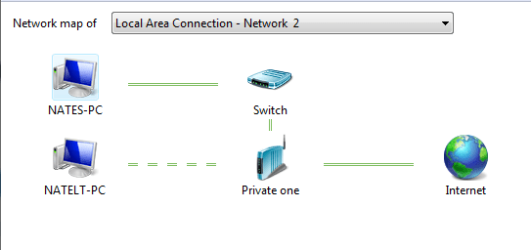
Network map - should it look like this?

nate42nd

Learning every day
Guru
Gold Member
VIP
Local time
9:05 AM
Messages
2,036
Location
The Wild West
I just flashed a router with some "3rd party firmware" today. my network map seems to have changed. Before the flash, the internet came in...went to the router, then to the switch (or network, I can't remember) then to the network and out to the machines.

Now the internet comes in from the wall and goes directly to the network as you can see below. Is this configuration okay? Do I need to make some change?

The names of the networks are different because the desktop is not on the wireless network. The computers are networked together fine. Everything is working great....in fact....I now have a router that has MANY more features than the old one did with a simple firmware change.

From Laptop (left) and desktop (right)
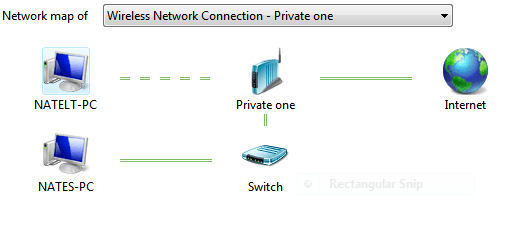
mapofnetwork.PNG networkmap.PNG
 

My Computer

Computer Manufacturer/Model Number
Keeps changing - (Custom)
OS
Windows 7 Professional x64
CPU
Intel Core i7 860
Motherboard
Gigabyte GA-P55-UD4P
Memory
4GB DDR3 Mushkin 1600Mhz @ 7-8-7-20
Graphics Card(s)
MSI GTS250 1GB DDR3 Twin Frozr
Sound Card
Onboard realtek
Monitor(s) Displays
Samsung SyncMaster 24" P2450 + Samsung 20" 2033
Screen Resolution
1920 X 1080 and 1600 X 900 (#2 system 1440 X 900)
Hard Drives
Patriot Inferno 120GB SSD + 3 WD Blue 640GB drives
PSU
Corsair 750 HX Modular
Case
Lancool PC-K62
Cooling
Cooler Master TX3 CPU cooler and 4-140mm and 1-120mm case
Keyboard
Gigabyte USB keyboard
Mouse
Microsoft wireless laser mouse 5000
Internet Speed
7 Mb down 1.5 up
Other Info
System #2: AMD Phenom II X6 1055T (Freezer 7 Pro cooler) - Gigabyte 880GMA-UD2H - WD 500GB Black - 9500GT (1GB) 500W OCZ modular PSU - Antec 200 case. System #3 (LapTop) Core 2 Duo T6670 - 320GB 7200RPM HD - 4GB DDR3 RAM.
Looks absolutely perfect to me, if you think of it as where you're comming from and where you're going to. Computer to switch, switch to router, router out to the world. Ideal.
Perhaps, the confusion may be that the firmware update added some UPnP feature that allowed the router to place the switch properly in the map, couldn't say for sure. But it certainly looks good.
 

My Computer

Computer Manufacturer/Model Number
PartsIsParts
OS
Windows 7 Ultimate 64bit
CPU
Intel Pentium D 3Ghz
Motherboard
ASRock G31M-S
Memory
4 Gigs PC 6400
Graphics Card(s)
Nvidia GeForce 8500 GT
Sound Card
Realtek High Definition Audio Integrated
Monitor(s) Displays
AOC 19inch X2
Screen Resolution
1024 X 768 (I'm Old)
Hard Drives
Segate ST3160815AS Serial ATAII
Western Digital WD1600AAJA-75PSA0 Serial ATAII
PSU
500 watt..don't know mfg.
Case
Giant Black 4u rackmount I've had for years
Cooling
Stock CPU extra 120s in case
Keyboard
Generic Made in China
Mouse
Logitech USB Optical Scroll
Internet Speed
What ever comcast decides to give me usually 21Mbps up/5mbps
Looks absolutely perfect to me, if you think of it as where you're comming from and where you're going to. Computer to switch, switch to router, router out to the world. Ideal.
Perhaps, the confusion may be that the firmware update added some UPnP feature that allowed the router to place the switch properly in the map, couldn't say for sure. But it certainly looks good.

This is true, this firmware took a router and made it a FAR more powerful network appliance. I don't know much about UPnP (universal plug and play as I recall) but you're probably right. I was just surprised to see changes on the map. It's a totally different router now....i will have to learn about all these new features.

If anyone knows about DD-WRT on Linksys "N" routers, let me know how it will interact with Windows 7.
 

My Computer

Computer Manufacturer/Model Number
Keeps changing - (Custom)
OS
Windows 7 Professional x64
CPU
Intel Core i7 860
Motherboard
Gigabyte GA-P55-UD4P
Memory
4GB DDR3 Mushkin 1600Mhz @ 7-8-7-20
Graphics Card(s)
MSI GTS250 1GB DDR3 Twin Frozr
Sound Card
Onboard realtek
Monitor(s) Displays
Samsung SyncMaster 24" P2450 + Samsung 20" 2033
Screen Resolution
1920 X 1080 and 1600 X 900 (#2 system 1440 X 900)
Hard Drives
Patriot Inferno 120GB SSD + 3 WD Blue 640GB drives
PSU
Corsair 750 HX Modular
Case
Lancool PC-K62
Cooling
Cooler Master TX3 CPU cooler and 4-140mm and 1-120mm case
Keyboard
Gigabyte USB keyboard
Mouse
Microsoft wireless laser mouse 5000
Internet Speed
7 Mb down 1.5 up
Other Info
System #2: AMD Phenom II X6 1055T (Freezer 7 Pro cooler) - Gigabyte 880GMA-UD2H - WD 500GB Black - 9500GT (1GB) 500W OCZ modular PSU - Antec 200 case. System #3 (LapTop) Core 2 Duo T6670 - 320GB 7200RPM HD - 4GB DDR3 RAM.
Back
Top