JavaScript is disabled. For a better experience, please enable JavaScript in your browser before proceeding.
You are using an out of date browser. It may not display this or other websites correctly.
You should upgrade or use an
alternative browser .
Network mapping goofiness
Four computers, two (1&2) wired and two (3&4) wireless all connect to the same router.
1&2 are on the same homegroup - the others can't join. Previously 3&4 were on the same Homegroup and the others couldn't join.
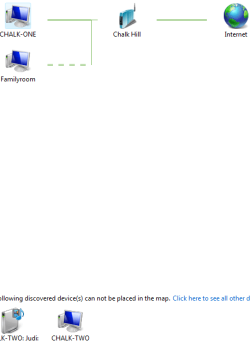
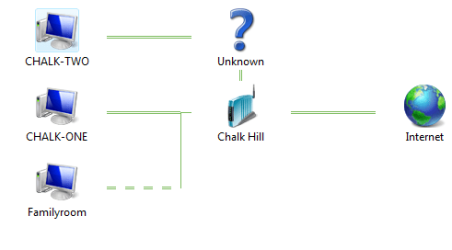
1&2 can't map each other on the Network map.
First snip is from Comp1 and the second is from Comp2
Capture.PNG
9.4 KB
· Views: 6
Computer type PC/Desktop Computer Manufacturer/Model Number Custom OS 7 x64 Ultimate CPU AMD Ryzen 5 Motherboard Gigabyte GA-AB350-Gaming Memory 16GB DDR4 Graphics Card(s) Radeon R7 360 Monitor(s) Displays 2 x Dell U2518D Screen Resolution 2560x1440 2560x1440 Hard Drives WD 500GB x2 PSU Antec 500 Cooling Hyper 212 EVO Keyboard Logitech cordless K800 Mouse Logitech M510 Antivirus Avira
I have the same arrangement. 2 wired and 2 wireless, all W7 and all can see each other on a homegroup.
Computer Manufacturer/Model Number Dell C521 OS W7 Ultimate 64bit W7 Premium 64bit W7 Premium 32bit WXP Home 32bit CPU Athlon 64X2 5000+ Motherboard Dell Memory 4GB Graphics Card(s) ATI X1300 Sound Card On Board Monitor(s) Displays Dell 19" Flat Screen Resolution 1280x1024 Hard Drives 500GB Western Digital Caviar Green Mouse Microsoft Wireless Intellimouse Explorer 2.0 Internet Speed SBC DSL - 6Mbps
I would delete the homegroup and leave it out, test the network setup first and see if all machines can ping one another. Homegroup as i have put it isn't required for networking in the sense of network mapping.
Computer Manufacturer/Model Number Lenovo ThinkPad T60 OS Windows 7 Ultimate 64Bit CPU GenuineIntel Intel(R) Core(TM) DuoCore T2400 @ 1.83GHz Motherboard Intel(R) 82801G (ICH7 Family) Memory 2.00 GB Graphics Card(s) Mobile Intel(R) 945 Express Chipset Sound Card SoundMAX Integrated Digital HD Audio Monitor(s) Displays ThinkPad Display Screen Resolution 1400x1050 Hard Drives 100Gb SATA Keyboard Standard Keyboard Mouse HID-compliant Mouse Internet Speed Cable Broadband - 54Mbps Other Info Intel(R) PRO/1000 PL Network Connection
Computer type PC/Desktop Computer Manufacturer/Model Number Home built OS Windows 7 Ult, Windows 8.1 Pro, CPU Q9650-4.275GHz, E8600 4.5GHz, E6750-3.8GHz Motherboard Evga 780i FTW Memory G.Skill PC2 9600 1200Mhz 5 5 5 15 2T Graphics Card(s) GTX480 Sound Card Asus Xonar D2 Monitor(s) Displays HannsG Screen Resolution 1680X1050 Hard Drives GSkill Phoenix Pro 120GB SSD PSU ThermalTake Toughpower 1000Watt modular Case ThermalTake XaserV Cooling Xigmatek S1283 Keyboard Logitech G15 Mouse Logitech G9 Internet Speed T1
I would delete the homegroup and leave it out, test the network setup first and see if all machines can ping one another. Homegroup as i have put it isn't required for networking in the sense of network mapping.
I may be wrong but I
think he refers to the actual network map and not mapping of resources. Your suggestion is a good idea either way though.
Computer Manufacturer/Model Number Dell C521 OS W7 Ultimate 64bit W7 Premium 64bit W7 Premium 32bit WXP Home 32bit CPU Athlon 64X2 5000+ Motherboard Dell Memory 4GB Graphics Card(s) ATI X1300 Sound Card On Board Monitor(s) Displays Dell 19" Flat Screen Resolution 1280x1024 Hard Drives 500GB Western Digital Caviar Green Mouse Microsoft Wireless Intellimouse Explorer 2.0 Internet Speed SBC DSL - 6Mbps
New member
Pro User
Thread Starter
That is the same thing I told him a month ago when he first had this problem LOL. I'm sure Roger must have tried all that by now.
The more things change the more they stay the same ...
I added a new windows 7 computer, left the homegroup and started all over. This time around the ones that used to connect don't and vice versa. But before the maps were right.
I'll check those links.
Computer type PC/Desktop Computer Manufacturer/Model Number Custom OS 7 x64 Ultimate CPU AMD Ryzen 5 Motherboard Gigabyte GA-AB350-Gaming Memory 16GB DDR4 Graphics Card(s) Radeon R7 360 Monitor(s) Displays 2 x Dell U2518D Screen Resolution 2560x1440 2560x1440 Hard Drives WD 500GB x2 PSU Antec 500 Cooling Hyper 212 EVO Keyboard Logitech cordless K800 Mouse Logitech M510 Antivirus Avira
That is strange indeed. I only had this problem once but it was with a Homegroup wireless setup, it seemed like leaving and rejoining fixed it but I'm not sure why.
Computer type PC/Desktop Computer Manufacturer/Model Number Home built OS Windows 7 Ult, Windows 8.1 Pro, CPU Q9650-4.275GHz, E8600 4.5GHz, E6750-3.8GHz Motherboard Evga 780i FTW Memory G.Skill PC2 9600 1200Mhz 5 5 5 15 2T Graphics Card(s) GTX480 Sound Card Asus Xonar D2 Monitor(s) Displays HannsG Screen Resolution 1680X1050 Hard Drives GSkill Phoenix Pro 120GB SSD PSU ThermalTake Toughpower 1000Watt modular Case ThermalTake XaserV Cooling Xigmatek S1283 Keyboard Logitech G15 Mouse Logitech G9 Internet Speed T1
If all the machines are setup correctly then according to W7, the map will look ok. If there is something wrong in the map, then that means there is something wrong with the setup of the machines.
Computer Manufacturer/Model Number Lenovo ThinkPad T60 OS Windows 7 Ultimate 64Bit CPU GenuineIntel Intel(R) Core(TM) DuoCore T2400 @ 1.83GHz Motherboard Intel(R) 82801G (ICH7 Family) Memory 2.00 GB Graphics Card(s) Mobile Intel(R) 945 Express Chipset Sound Card SoundMAX Integrated Digital HD Audio Monitor(s) Displays ThinkPad Display Screen Resolution 1400x1050 Hard Drives 100Gb SATA Keyboard Standard Keyboard Mouse HID-compliant Mouse Internet Speed Cable Broadband - 54Mbps Other Info Intel(R) PRO/1000 PL Network Connection
New member
Pro User
Thread Starter
I deleted the original idstore.sst , and left the idstore.sst.new files. The Peer services were already started; no appreciable difference.
Computer type PC/Desktop Computer Manufacturer/Model Number Custom OS 7 x64 Ultimate CPU AMD Ryzen 5 Motherboard Gigabyte GA-AB350-Gaming Memory 16GB DDR4 Graphics Card(s) Radeon R7 360 Monitor(s) Displays 2 x Dell U2518D Screen Resolution 2560x1440 2560x1440 Hard Drives WD 500GB x2 PSU Antec 500 Cooling Hyper 212 EVO Keyboard Logitech cordless K800 Mouse Logitech M510 Antivirus Avira
New member
Pro User
Thread Starter
If all the machines are setup correctly then according to W7, the map will look ok. If there is something wrong in the map, then that means there is something wrong with the setup of the machines.
Maybe my ipso facto has corrupted my ergo.
Computer type PC/Desktop Computer Manufacturer/Model Number Custom OS 7 x64 Ultimate CPU AMD Ryzen 5 Motherboard Gigabyte GA-AB350-Gaming Memory 16GB DDR4 Graphics Card(s) Radeon R7 360 Monitor(s) Displays 2 x Dell U2518D Screen Resolution 2560x1440 2560x1440 Hard Drives WD 500GB x2 PSU Antec 500 Cooling Hyper 212 EVO Keyboard Logitech cordless K800 Mouse Logitech M510 Antivirus Avira
Computer Manufacturer/Model Number Lenovo ThinkPad T60 OS Windows 7 Ultimate 64Bit CPU GenuineIntel Intel(R) Core(TM) DuoCore T2400 @ 1.83GHz Motherboard Intel(R) 82801G (ICH7 Family) Memory 2.00 GB Graphics Card(s) Mobile Intel(R) 945 Express Chipset Sound Card SoundMAX Integrated Digital HD Audio Monitor(s) Displays ThinkPad Display Screen Resolution 1400x1050 Hard Drives 100Gb SATA Keyboard Standard Keyboard Mouse HID-compliant Mouse Internet Speed Cable Broadband - 54Mbps Other Info Intel(R) PRO/1000 PL Network Connection