- Local time
- 6:06 PM
- Messages
- 637
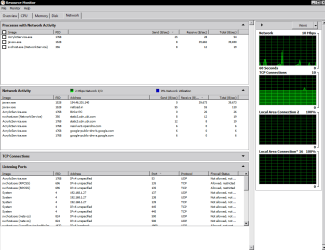
l was just wondering if there is a good way to monitor networking.
long story short l booted up my laptop and the network suddenly becomes very slow for some reason, lve looked on my firewall and it tells me lm maxing out the connection, the strange part is that l dont know where!! because it seems to be a service rather than from my direct activity which is pretty confusing which is why l want to know which exact service was causing the issue so l know why my download speed is being hogged!.
long story short l booted up my laptop and the network suddenly becomes very slow for some reason, lve looked on my firewall and it tells me lm maxing out the connection, the strange part is that l dont know where!! because it seems to be a service rather than from my direct activity which is pretty confusing which is why l want to know which exact service was causing the issue so l know why my download speed is being hogged!.
My Computer
At a glance
Windows 7 Professional (64bit)Intel i5 4440 3.10ghzCorsair 32GB (4x8GB) DDR3 1600MHz Vengeance M...Intel Graphics 4600 (on board)
- Computer type
- PC/Desktop
- Computer Manufacturer/Model Number
- Custom build
- OS
- Windows 7 Professional (64bit)
- CPU
- Intel i5 4440 3.10ghz
- Motherboard
- Gigabyte GA-H97M-D3H
- Memory
- Corsair 32GB (4x8GB) DDR3 1600MHz Vengeance Memory Kit 1.5V
- Graphics Card(s)
- Intel Graphics 4600 (on board)
- Sound Card
- External Creative Soundblaster
- Monitor(s) Displays
- 32" TV
- Screen Resolution
- 1360*768
- Hard Drives
- Kingston SSDNow UV400 240GB 2.5inch SATAIII SSD
1 1TB WD WD10EADS
3 1TB WD WD10EZEX
- PSU
- Coolermaster GM-Series 550W Semi Modular
- Case
- Aerocool X-Predator X1 Devil Red
- Cooling
- 5x 120mil (Arctic F12)
- Keyboard
- Microsoft Curve 2000 v1
- Mouse
- Trust MaxTrack Mini Mouse - 6 button(s) - wired - USB
- Internet Speed
- 34Meg
- Antivirus
- Bitdefender 2017
- Browser
- Firefox