Solved Network Name

Roderunner

Exterminator
Hi Folks,

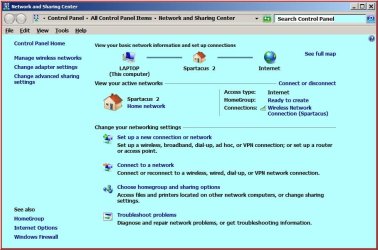
My original network name was Spartacus on my 2 computers. My Netgear router died and was replaced with a TalkTalk router. I gave that Network a different name. I liked the TT router so much, I bought a new Netgear router & decided to reuse Spartacus as it's SSID. I now get this:-
RR.jpg

Is there anyway I can delete Spartacus 2 and just have it as Spartacus.
-
My Desktop pc is also showing it, plus it shows as Local Area Network 3.
 

My Computer

Computer Manufacturer/Model Number
Look in my Signature.
OS
Win7 H.Prem. 32bit+SP1

My Computer

Computer Manufacturer/Model Number
Custom Built
OS
Windows 7 Ultimate 32-Bit & Windows 7 Ultimate 64-Bit
CPU
Intel Core i7 CPU 950 @ 3.07GHz
Motherboard
ASUS P6T DELUXE V2
Memory
OCZ 6GB (3 x 2GB) 240-Pin DDR3 SDRAM DDR3 1600 OCZ3X1600R2
Graphics Card(s)
ATI Radeon HD 5700 Series
Sound Card
OnBoard
Hard Drives
WD6400AACS-00M3B0 (640GB SATA )
PSU
CORSAIR 850w
Case
NZXT LEXA
Cooling
Intel Stock Heatsink Fan
Keyboard
Microsoft Wireless Laser Keyboard 7000
Mouse
Microsoft Wireless Laser Mouse 7000
Hi Folks,

My original network name was Spartacus on my 2 computers. My Netgear router died and was replaced with a TalkTalk router. I gave that Network a different name. I liked the TT router so much, I bought a new Netgear router & decided to reuse Spartacus as it's SSID. I now get this:-

View attachment 263811

Is there anyway I can delete Spartacus 2 and just have it as Spartacus.
-
My Desktop pc is also showing it, plus it shows as Local Area Network 3.


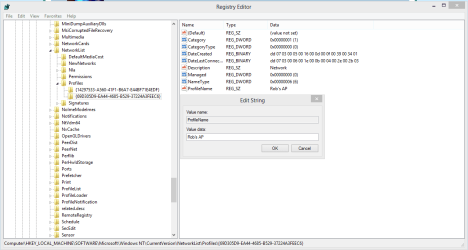
Just in case you asking about the Network2 name and onwards etc. showing up on the network adaptors after changing routers. You can fix that in the registry easily enough. This problem drives me crazy as well.

Type regedit into run box "but you know that".

Computer\HKEY_LOCAL_MACHINE\SOFTWARE\Microsoft\WindowsNT\CurrentVersion\NetworkList\Profiles\ then highlight top or bottom number string then right click Profile Name to Modify in order to change the Network profile name. ,

I'm not completely sure if you need to change the wireless network name or wired name.

The top number string at profiles is to change the regular wired Network profile name, "worked for me", and the lower number string is for changing the wireless profile name.

Back up registry first but I had no problems here.
 

Attachments

  • NETWORK NAME CHANGE REGISTRY FIX 1.PNG
    NETWORK NAME CHANGE REGISTRY FIX 1.PNG
    73.4 KB · Views: 4
  • Change wireless network name.PNG
    Change wireless network name.PNG
    72.6 KB · Views: 3
Last edited:

My Computer

Computer type
PC/Desktop
Computer Manufacturer/Model Number
Home built
OS
Windows 7 Ult, Windows 8.1 Pro,
CPU
Q9650-4.275GHz, E8600 4.5GHz, E6750-3.8GHz
Motherboard
Evga 780i FTW
Memory
G.Skill PC2 9600 1200Mhz 5 5 5 15 2T
Graphics Card(s)
GTX480
Sound Card
Asus Xonar D2
Monitor(s) Displays
HannsG
Screen Resolution
1680X1050
Hard Drives
GSkill Phoenix Pro 120GB SSD
PSU
ThermalTake Toughpower 1000Watt modular
Case
ThermalTake XaserV
Cooling
Xigmatek S1283
Keyboard
Logitech G15
Mouse
Logitech G9
Internet Speed
T1
I followed the link to the tutorial by VistaKing and it worked perfectly.
 

My Computer

Computer Manufacturer/Model Number
Look in my Signature.
OS
Win7 H.Prem. 32bit+SP1
I followed the link to the tutorial by VistaKing and it worked perfectly.

Yes you only need to click on the little house to change that one, this is one of those, "if it was a snake it would have bit you" moments, and it's hardly something you need a tutorial for.

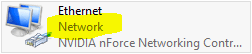
The one I was referring to changes the name that appears on the adaptors as highlighted in the picture.

There is no way to change this one without editing the registry.

This is the one that typically changes when you install a different router, yes it's happened to me, and it was saying Network 2 until I changed it.
 

Attachments

  • Change network name.PNG
    Change network name.PNG
    6.2 KB · Views: 28

My Computer

Computer type
PC/Desktop
Computer Manufacturer/Model Number
Home built
OS
Windows 7 Ult, Windows 8.1 Pro,
CPU
Q9650-4.275GHz, E8600 4.5GHz, E6750-3.8GHz
Motherboard
Evga 780i FTW
Memory
G.Skill PC2 9600 1200Mhz 5 5 5 15 2T
Graphics Card(s)
GTX480
Sound Card
Asus Xonar D2
Monitor(s) Displays
HannsG
Screen Resolution
1680X1050
Hard Drives
GSkill Phoenix Pro 120GB SSD
PSU
ThermalTake Toughpower 1000Watt modular
Case
ThermalTake XaserV
Cooling
Xigmatek S1283
Keyboard
Logitech G15
Mouse
Logitech G9
Internet Speed
T1
The one I was referring to changes the name that appears on the adaptors as highlighted in the picture.
This is how mine looks on my Laptop.

RR.JPG
 

My Computer

Computer Manufacturer/Model Number
Look in my Signature.
OS
Win7 H.Prem. 32bit+SP1
Back
Top