Network NAT problems and Xbox 360

tsampson

New member
Local time
2:23 AM
Messages
17
Okay so I need some help with some networking problems. I have tried many things but nothing seems to help. The main problem is I don't know the network hardware setup. I pulled up the network map and got this...
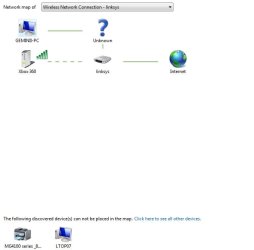
Network Map.jpg
The first problem is I have no idea what that unknown device is.
I connect to a wireless router (linksys WRT54G) and have tried to open the NAT by opening the ports suggested by xbox live
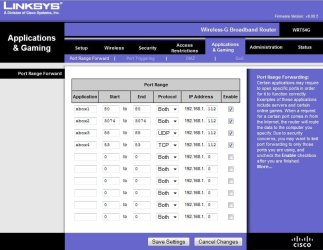
linksys apps and gaming.jpg
I have set the xbox to a static IP, xxx.xxx.x.112. I then restarted the router and the NAT remains closed. I also tried setting the DMZ and changing the xbox static IP to that value, this also did not work.
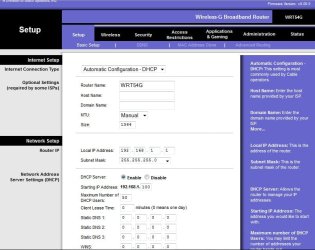
linksys basic setup.jpg
This is the basic setup for by router, the ISP is xplornet. I can't seem to fix the NAT problems for gaming.
If any information not provided is needed, let me know and I will do the best I can.
Thanks!
 

My Computer

Computer Manufacturer/Model Number
HP G62
OS
Windows 7 Home Premium 64 bit
CPU
ACPI x64-based PC
Graphics Card(s)
AMD M889G with ATI Mobility Radeon HD 4250
Sound Card
Realtek High Definition Audio
Ah the good ol' WRT54G, I have one of those kicking about somewhere. Just kidding, it's downstairs in the living room!

So to summarise, your xbox is having trouble connecting to Live through your router, and this is because the NAT type is listed simply as closed. I had a similar problem, although this was on an old Belkin and the port forwarding solved it for me so this is where our experience differs.
To continue you have sensibly followed the guides given and opened the ports as required with no change. You've also given the xbox a fixed IP within the router's allowed range and given it an entry in the DMZ. All of this has met with no success.

The only thing I can suggest is that it seems the fault doesn't lay with your router. The last time I had problems with my xbox is when I'd replaced my primary router (I have a primary modem-router and a secondary which serves as a switch upstairs). I had forgotten to amend the settings on the xbox because of course, with the change in router configuration came a change in IP range.

I would double check that your xbox is looking for the gateway at 192.168.1.1 with a subnet of 255.255.255.0. It's IP should be 192.168.1.112 and the primary DNS server 192.168.1.1

So that's:
Gateway and Primary DNS : 192.168.1.1 (your router)
IP Address : 192.168.1.112 (your xbox)
Subnet mask : 255.255.255.0 (no one knows what a subnet mask is, seriously)
Secondary DNS server can be blank.


That's about all the help I can give I'm afraid.
 

My Computer

Computer Manufacturer/Model Number
Custom
OS
Windows 7 Ultimate 64-bit
CPU
AMD Phenom II X4 955 Black OC'ed 4.0GHz
Motherboard
Asus M5A88-V EVO
Memory
8GB Mushkin Enhanced Silverline (2x4GB) 1333
Graphics Card(s)
XFX Radeon HD6870 1024MB GDDR5 OC'ed 945MHz; 1151MHz
Sound Card
Soundblaster X-Fi Xtreme PCIe
Monitor(s) Displays
32" Hannspree SE32LMNB
Screen Resolution
1920 x 1080
Hard Drives
250GB Hitachi Deskstar (OS); 2TB Western Digital Elements
PSU
650W XFX XXX Edition 80PLUS Bronze Modular
Case
Cougar 6GR1 Evolution
Cooling
Corsair H60 p/p 120mm; Zalman VF3000A; x4 120mm; x1 140mm
Keyboard
Logitech G510
Mouse
CM Storm Sentinel Advance Zero-G
Internet Speed
Not fast enough :I
Other Info
No matter what your specs, my PC is better.
I guess I should have posted my manual network confirguration on the xbox.
192.168.1.112
255.255.255.0
192.168.1.1

192.168.175.2
142.166.86.18
 

My Computer

Computer Manufacturer/Model Number
HP G62
OS
Windows 7 Home Premium 64 bit
CPU
ACPI x64-based PC
Graphics Card(s)
AMD M889G with ATI Mobility Radeon HD 4250
Sound Card
Realtek High Definition Audio
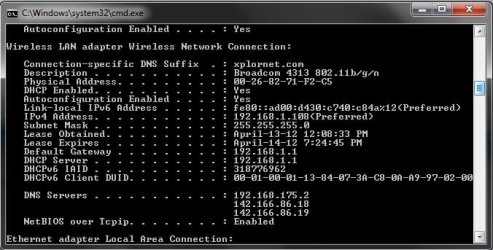
That 175.2 is your DNS server?
 

My Computer

Computer Manufacturer/Model Number
Custom
OS
Windows 7 Ultimate 64-bit
CPU
AMD Phenom II X4 955 Black OC'ed 4.0GHz
Motherboard
Asus M5A88-V EVO
Memory
8GB Mushkin Enhanced Silverline (2x4GB) 1333
Graphics Card(s)
XFX Radeon HD6870 1024MB GDDR5 OC'ed 945MHz; 1151MHz
Sound Card
Soundblaster X-Fi Xtreme PCIe
Monitor(s) Displays
32" Hannspree SE32LMNB
Screen Resolution
1920 x 1080
Hard Drives
250GB Hitachi Deskstar (OS); 2TB Western Digital Elements
PSU
650W XFX XXX Edition 80PLUS Bronze Modular
Case
Cougar 6GR1 Evolution
Cooling
Corsair H60 p/p 120mm; Zalman VF3000A; x4 120mm; x1 140mm
Keyboard
Logitech G510
Mouse
CM Storm Sentinel Advance Zero-G
Internet Speed
Not fast enough :I
Other Info
No matter what your specs, my PC is better.
Here the ipconfig...
ipconfig.jpg
 

My Computer

Computer Manufacturer/Model Number
HP G62
OS
Windows 7 Home Premium 64 bit
CPU
ACPI x64-based PC
Graphics Card(s)
AMD M889G with ATI Mobility Radeon HD 4250
Sound Card
Realtek High Definition Audio
Hunh, that's weird. On every network I've set up the DNS server and gateway have always been the same. Just for giggles try setting the xbox's primary dns to 192.168.1.1, and leave the secondary blank.
 

My Computer

Computer Manufacturer/Model Number
Custom
OS
Windows 7 Ultimate 64-bit
CPU
AMD Phenom II X4 955 Black OC'ed 4.0GHz
Motherboard
Asus M5A88-V EVO
Memory
8GB Mushkin Enhanced Silverline (2x4GB) 1333
Graphics Card(s)
XFX Radeon HD6870 1024MB GDDR5 OC'ed 945MHz; 1151MHz
Sound Card
Soundblaster X-Fi Xtreme PCIe
Monitor(s) Displays
32" Hannspree SE32LMNB
Screen Resolution
1920 x 1080
Hard Drives
250GB Hitachi Deskstar (OS); 2TB Western Digital Elements
PSU
650W XFX XXX Edition 80PLUS Bronze Modular
Case
Cougar 6GR1 Evolution
Cooling
Corsair H60 p/p 120mm; Zalman VF3000A; x4 120mm; x1 140mm
Keyboard
Logitech G510
Mouse
CM Storm Sentinel Advance Zero-G
Internet Speed
Not fast enough :I
Other Info
No matter what your specs, my PC is better.
Set the DNS to xxx.xxx.1.1 on the xbox primary, still not fixed. Still have xbox live connection though.

I don't know if this helps but here is how I am checking the NAT.
First i test xbox live connection on the dashboard, then what usually happens is a message pops up saying "the network configuration is not optimal... etc". Then I play a game disc (Halo: Reach) and check the network status where it says "NAT Rating: CLOSED" and on a side note, "Upstream Bandwidth: WARNING" is displayed. I am assuming, and hoping, that when one problem is fixed the other one will be too.

Another thing that could be obstructing some things is my own lack of knowledge of my own network.
I live in a downstairs apartment and the people upstairs say that the router is the only thing that was set up when the internet was hooked up by xplornet. Could the WRT54G also act as a modem? Or is there a modem somewhere that they dont know about that must be rebooted?I am wondering because the default xbox troubleshoot message just says to unplug all network devices and then plug them back in.
 

My Computer

Computer Manufacturer/Model Number
HP G62
OS
Windows 7 Home Premium 64 bit
CPU
ACPI x64-based PC
Graphics Card(s)
AMD M889G with ATI Mobility Radeon HD 4250
Sound Card
Realtek High Definition Audio
also another thing I thought I would add is that I can't get the xbox to find my computer to allow for media streaming. I have tried media center extenders and homegroup, many, many things. Having a lot of trouble.
 

My Computer

Computer Manufacturer/Model Number
HP G62
OS
Windows 7 Home Premium 64 bit
CPU
ACPI x64-based PC
Graphics Card(s)
AMD M889G with ATI Mobility Radeon HD 4250
Sound Card
Realtek High Definition Audio
Well now you mention Halo I can say that I get the same warnings about upstream but am still able to play; but the NAT should definitely be open.

The WRT54g is a modem-router if your internet is provided through your telephone line (evidenced by an RJ11 cable in the back of the router).

The media streaming is (theoretically) easily solved. In WMP's library screen toward the top left corner you should see three options, Organise, Stream and Create Playlist. Clicking Stream, make sure that "Allow devices to play my media" is ticked and then head in to "More streaming options". In the window that will pop up you can see all devices which have streamed or attempted to stream from your PC. Your xbox will be called unsurprisingly "Xbox360" and even have a little Xbox icon. It should say "Allowed access using default settings" but what we're going to do highlight the xbox and head in to the Customise clickable.
In here, untick the box "Use default settings" and instead tick "Make all of the media in my library available to this device". If you have further problems you can also specify the ratings "1 star and above" which basically forces the PC to allow your Xbox to stream. I had the same problem when I first set it up.
After doing what you need to do, click Ok and then Ok again in the main Streaming Options window.
 

My Computer

Computer Manufacturer/Model Number
Custom
OS
Windows 7 Ultimate 64-bit
CPU
AMD Phenom II X4 955 Black OC'ed 4.0GHz
Motherboard
Asus M5A88-V EVO
Memory
8GB Mushkin Enhanced Silverline (2x4GB) 1333
Graphics Card(s)
XFX Radeon HD6870 1024MB GDDR5 OC'ed 945MHz; 1151MHz
Sound Card
Soundblaster X-Fi Xtreme PCIe
Monitor(s) Displays
32" Hannspree SE32LMNB
Screen Resolution
1920 x 1080
Hard Drives
250GB Hitachi Deskstar (OS); 2TB Western Digital Elements
PSU
650W XFX XXX Edition 80PLUS Bronze Modular
Case
Cougar 6GR1 Evolution
Cooling
Corsair H60 p/p 120mm; Zalman VF3000A; x4 120mm; x1 140mm
Keyboard
Logitech G510
Mouse
CM Storm Sentinel Advance Zero-G
Internet Speed
Not fast enough :I
Other Info
No matter what your specs, my PC is better.
Checked all that info out and it was already set to the settings you provided. Thanks for trying!
 

My Computer

Computer Manufacturer/Model Number
HP G62
OS
Windows 7 Home Premium 64 bit
CPU
ACPI x64-based PC
Graphics Card(s)
AMD M889G with ATI Mobility Radeon HD 4250
Sound Card
Realtek High Definition Audio
Just thought I would share this little bit, my laptop that is connected to the homegroup can stream media fine from my desktop PC.
Could it be something to do with the xbox's own settings? or its wireless receiver?
 

My Computer

Computer Manufacturer/Model Number
HP G62
OS
Windows 7 Home Premium 64 bit
CPU
ACPI x64-based PC
Graphics Card(s)
AMD M889G with ATI Mobility Radeon HD 4250
Sound Card
Realtek High Definition Audio
We certainly seem to have ruled out the router but I'm hard pressed to think of anything wrong with the settings on the xbox. This might be a silly question but have you tried resetting the router (power off for a minute, then power back on); and then trying to have the xbox set up the network automatically?
That did actually once solve it for me. My router was hanging on to some old settings and my xbox was insisting on connecting to a specific IP that my router thought was assigned to another device. Resetting the router wiped its memory of IP addresses, and then when the xbox requested the one it thought it should have, it got its wish :D

So basically they were both being douchebags with one another, but were made to kiss and make up.
 

My Computer

Computer Manufacturer/Model Number
Custom
OS
Windows 7 Ultimate 64-bit
CPU
AMD Phenom II X4 955 Black OC'ed 4.0GHz
Motherboard
Asus M5A88-V EVO
Memory
8GB Mushkin Enhanced Silverline (2x4GB) 1333
Graphics Card(s)
XFX Radeon HD6870 1024MB GDDR5 OC'ed 945MHz; 1151MHz
Sound Card
Soundblaster X-Fi Xtreme PCIe
Monitor(s) Displays
32" Hannspree SE32LMNB
Screen Resolution
1920 x 1080
Hard Drives
250GB Hitachi Deskstar (OS); 2TB Western Digital Elements
PSU
650W XFX XXX Edition 80PLUS Bronze Modular
Case
Cougar 6GR1 Evolution
Cooling
Corsair H60 p/p 120mm; Zalman VF3000A; x4 120mm; x1 140mm
Keyboard
Logitech G510
Mouse
CM Storm Sentinel Advance Zero-G
Internet Speed
Not fast enough :I
Other Info
No matter what your specs, my PC is better.
Back
Top