Network not connected (but really is)

Raider186

New member
Local time
6:08 AM
Messages
4
Location
Portland
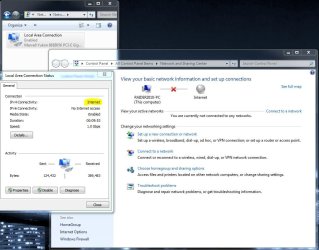
Windows says I'm not connected to a network yet here I am magically posting this tread.

I'm connected to a Netgear WNDR3700v2 via Ethernet cable and not in the uplink port.

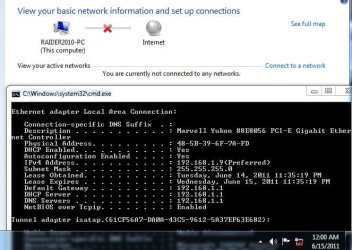
I have an ip I can see it in ipconfig however Network & Sharing center has no active connections. I can't connect to the homegroup however I can see all of the devices on the network in windows explorer.

I have the newest driver for my NIC and have uninstalled and re-installed it. I have plugged in to another switch with the same results.

If I try to "See full map" I get the following message "Windows cannot create the network map because the network's location type is Public. In order to view the network map, you must set the network's location type to Home or Work in the Network and Sharing Center"

I don't have any connections listed to be able to change it's location....

I looked in: HKEY_LOCAL_MACHINE\SOFTWARE\Microsoft\Windows NT\CurrentVersion\NetworkList\Profiles, it was empty no Network GUIDs were listed at all so I can't change the location there...

Any Ideas?
 

Attachments
  • Network.JPG
    Network.JPG
    55.7 KB · Views: 56

My Computer

Computer Manufacturer/Model Number
Self Built
OS
Windows 7 Home Premium 64bit
CPU
Intel Core i7 970
Motherboard
Asus P6X58D-E
Memory
Corsair 12GB DDR3
Graphics Card(s)
EVGA GTX580 SC x2
Sound Card
on Board
Monitor(s) Displays
3x Acer GD235HZ
Screen Resolution
5760x1080
Hard Drives
OCZ PCIe 160Gb SSD, WD Caviar Black 1TB
PSU
Thermaltake
Case
Antec Nine Hundred 2
Cooling
Corsair H60
Keyboard
Saitek Eclipse II
Mouse
Saitek R.A.T. 7
Internet Speed
Xfinity 50Mbps
Other Info
[URL=http://www.speedtest.net][IMG]http://www.speedtest.net/result/1341899854.png[/IMG][/URL]
I'm assuming you have another computer on the network?
Also, try this. Navigate to:
Control Panel\System and Security\System
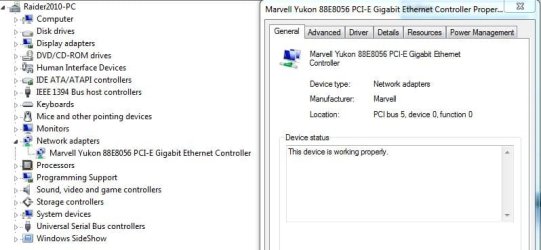
Click on Device Manager. Under the 'Network Adapters' tab, can you see your network adapter? I've attached an example, just in case.

Untitled.png
 

My Computer

Computer Manufacturer/Model Number
Custom Build
OS
Windows 7 Ultimate x64/Windows 8 Consumer Preview x64/Ubuntu 11.04
CPU
Intel Pentium Dual Core E6700 3.2GHz
Motherboard
ASUS P5G41T-M LX
Memory
Strontium 8192MB DDR3 1333Mhz
Graphics Card(s)
msi GeForce N560GTX-M2D1GD5 1GB
Sound Card
Realtek HD Audio
Monitor(s) Displays
CHIMEI CMV 221D 22"
Screen Resolution
1680x1050
Hard Drives
Seagate Barracuda LP Green 3.5'' 2TB Internal HDD 5900RPM + WD Elements Desktop 1TB External HDD 7200RPM
PSU
SHAW Viper-1500w Gaming PSU
Case
Black eMaxx ATX Mini Tower Case
Keyboard
Microsoft Wireless Keyboard 1000
Mouse
Microsoft Wireless Optical Mouse 2000
Internet Speed
100GB @ 4.76Mbps
It is

Yes NIC shows up in device manager :)
 

Attachments

  • NIC.JPG
    NIC.JPG
    47.5 KB · Views: 48

My Computer

Computer Manufacturer/Model Number
Self Built
OS
Windows 7 Home Premium 64bit
CPU
Intel Core i7 970
Motherboard
Asus P6X58D-E
Memory
Corsair 12GB DDR3
Graphics Card(s)
EVGA GTX580 SC x2
Sound Card
on Board
Monitor(s) Displays
3x Acer GD235HZ
Screen Resolution
5760x1080
Hard Drives
OCZ PCIe 160Gb SSD, WD Caviar Black 1TB
PSU
Thermaltake
Case
Antec Nine Hundred 2
Cooling
Corsair H60
Keyboard
Saitek Eclipse II
Mouse
Saitek R.A.T. 7
Internet Speed
Xfinity 50Mbps
Other Info
[URL=http://www.speedtest.net][IMG]http://www.speedtest.net/result/1341899854.png[/IMG][/URL]
I'm not sure what the problem is.... What other computers are on the network and what OS is installed on them? You might have to do an in-place upgrade/repair but don't do it yet. Do you have a restore point available?
 

My Computer

Computer Manufacturer/Model Number
Custom Build
OS
Windows 7 Ultimate x64/Windows 8 Consumer Preview x64/Ubuntu 11.04
CPU
Intel Pentium Dual Core E6700 3.2GHz
Motherboard
ASUS P5G41T-M LX
Memory
Strontium 8192MB DDR3 1333Mhz
Graphics Card(s)
msi GeForce N560GTX-M2D1GD5 1GB
Sound Card
Realtek HD Audio
Monitor(s) Displays
CHIMEI CMV 221D 22"
Screen Resolution
1680x1050
Hard Drives
Seagate Barracuda LP Green 3.5'' 2TB Internal HDD 5900RPM + WD Elements Desktop 1TB External HDD 7200RPM
PSU
SHAW Viper-1500w Gaming PSU
Case
Black eMaxx ATX Mini Tower Case
Keyboard
Microsoft Wireless Keyboard 1000
Mouse
Microsoft Wireless Optical Mouse 2000
Internet Speed
100GB @ 4.76Mbps
Several devices

I have several...

Wired:
Desktop - XP
XBOX 360
TV
Blu-Ray Player

Wireless:
Laptop - 7
Netbook - 7
Printer

Wired Via Wireless bridge:
Desktop - 7
TV

I can see them in windows explorer along with the router.

no restore points from prior to when I noticed the problem
 

My Computer

Computer Manufacturer/Model Number
Self Built
OS
Windows 7 Home Premium 64bit
CPU
Intel Core i7 970
Motherboard
Asus P6X58D-E
Memory
Corsair 12GB DDR3
Graphics Card(s)
EVGA GTX580 SC x2
Sound Card
on Board
Monitor(s) Displays
3x Acer GD235HZ
Screen Resolution
5760x1080
Hard Drives
OCZ PCIe 160Gb SSD, WD Caviar Black 1TB
PSU
Thermaltake
Case
Antec Nine Hundred 2
Cooling
Corsair H60
Keyboard
Saitek Eclipse II
Mouse
Saitek R.A.T. 7
Internet Speed
Xfinity 50Mbps
Other Info
[URL=http://www.speedtest.net][IMG]http://www.speedtest.net/result/1341899854.png[/IMG][/URL]
Hi!

I've had a similar problem.
And I found a fix, only until recently.

Try doing this. Open regedit then navigate to HKLM\SOFTWARE\Microsoft\Windows NT\CurrentVersion\NetworkList
Then right click and click Permissions.

Click advanced then check "replace all child object permissions.."

click okay then disconnect and connect again.

See if that works. Good luck.
 

My Computer

OS
Windows 7 Home Premium x64
Graphics Card(s)
Intel HD Graphics
Screen Resolution
1366 x 768
Nope

Tried it still no effect :(
 

Attachments

  • Status.JPG
    Status.JPG
    89.8 KB · Views: 128

My Computer

Computer Manufacturer/Model Number
Self Built
OS
Windows 7 Home Premium 64bit
CPU
Intel Core i7 970
Motherboard
Asus P6X58D-E
Memory
Corsair 12GB DDR3
Graphics Card(s)
EVGA GTX580 SC x2
Sound Card
on Board
Monitor(s) Displays
3x Acer GD235HZ
Screen Resolution
5760x1080
Hard Drives
OCZ PCIe 160Gb SSD, WD Caviar Black 1TB
PSU
Thermaltake
Case
Antec Nine Hundred 2
Cooling
Corsair H60
Keyboard
Saitek Eclipse II
Mouse
Saitek R.A.T. 7
Internet Speed
Xfinity 50Mbps
Other Info
[URL=http://www.speedtest.net][IMG]http://www.speedtest.net/result/1341899854.png[/IMG][/URL]
Not Conected but Really Connected -- Yellow Asterisk(or star)

I have the exact same diagram you show...red x in the network map, can't show the full network for very same reasons -- it's apparently "public" must be change to home or work(but can't do that either), there a yellow asterisk in the wireless icon in the system tray(always at boot up). NIC adapter(s) have been uninstalled and reinstalled several times, and obviously the network map is wrong since I'm connected.

Know this thread is 1665 days old, but was this ever resolved ?
1.) Why the yellow asterisk? and how to get rid of it easily.
2.) Why am I still connected, yet network map shows I'm not
3.) This is driving be nuts....any help would be greatly appreciated

surely there must be a registry entry that can fix this?

Thanks in advance!
 

My Computer

Computer type
Laptop
Computer Manufacturer/Model Number
HP-dm4-3050US a6x73ua3aba
OS
Windows 7 64bit Home Premium
CPU
Intel Core i5-2450M 2.5Ghz
Motherboard
1793
Memory
4G (soon to be 8G)
Hard Drives
750G
Antivirus
System Center End Point
Browser
Chrome & IE
lease

Well according to your screenshot its lease ran out in 2011!!!
You need to go into the router and change the settings.

Roy
 

My Computer

Computer type
PC/Desktop
Computer Manufacturer/Model Number
medionl/Aspire 6930G/acer x55a
OS
W7 home premium 32bit/W7HP 64bit/w10 tp insider ring
CPU
E5300 dual core
Motherboard
medion MS7366
Memory
3gb
Graphics Card(s)
Nvidia Geforce 7100 Nforce 630i
Monitor(s) Displays
avixc
Internet Speed
n (isp resticted to 72)
Antivirus
mse/pands
Browser
palemoon
Other Info
Belkin Fd7050 n USB using Railink RT2870 drivers, more upto date
Back
Top