Solved Network Password,

Jamal NUMAN

New member
Network Password,

I got a switch and I connected two laptops to it by cables then another cable coming from the internet provider is connected to this switch (attached).

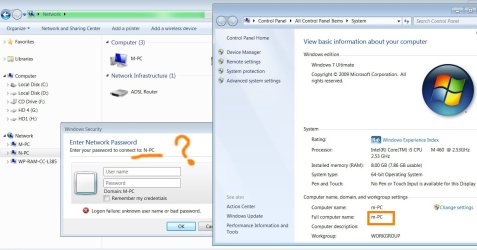
[FONT=&quot]1. [/FONT]Why I’m required to enter the “network password” (attached)? Originally, how this password is set?

[FONT=&quot]2. [/FONT]How permissions are given to users of other machine? For example, if I’m working on machine named (m-pc), then how can I give a user on the second machine (named n-pc) to access it (m-pc)?

[FONT=&quot]3. [/FONT]What “cmd” command that is used to see all the machines connected on the network?

Thank you

Best

Jamal
 

Attachments
  • Clip_33.jpg
    Clip_33.jpg
    243.3 KB · Views: 30
  • Clip_34.jpg
    Clip_34.jpg
    172.1 KB · Views: 31
  • Clip_35.jpg
    Clip_35.jpg
    198.6 KB · Views: 26

My Computer

OS
Windows 7 Ultimate x64
On your last picture. You can only add other PC's if your connected to a domain, So you also wont see any other user accounts for the same reason.

To enable you to log on without a password you need do one of the following.

1. Use the same username and password for each PC.
2. Add the User account of the other PC's to each other. (Put the user account from n-pc on m-pc)
3. In the NTFS (security tab) permissions set permissions for "Everyone".
 

My Computer

OS
Windows 7 Ultimate x64
On your last picture. You can only add other PC's if your connected to a domain, So you also wont see any other user accounts for the same reason.

To enable you to log on without a password you need do one of the following.

1. Use the same username and password for each PC.
2. Add the User account of the other PC's to each other. (Put the user account from n-pc on m-pc)
3. In the NTFS (security tab) permissions set permissions for "Everyone".

Many thanks for the answer.

[FONT=&quot]1. [/FONT]The users of the first machine are attached


[FONT=&quot]2. [/FONT]The users of the first machine are attached


[FONT=&quot]3. [/FONT]I have added a user “m” to the “n-pc” machine and a user “n” to the “m-pc” machine with the same password “123” (attached)

[FONT=&quot]4. [/FONT]The problem is still there (attached)!

[FONT=&quot]5. [/FONT]For example, the “net support school” can’t see all the machines connected to the network (attached)!

All what I need is to have full access between these two machines with full permissions

Best

[FONT=&quot]Jamal[/FONT]
 

Attachments

My Computer

OS
Windows 7 Ultimate x64
;When you created the account you had a checkmark on (user must change his password at first logon). You can see it on clip_48.

Remove that then try.

-Edit-
On the N machine you should also add the M users to the permissions to allow access.

If you want to connect with the user account like shown you can also add "authenticated users" with the permissions required.
 
Last edited:

My Computer

OS
Windows 7 Ultimate x64
(again) Network Password,

(Again) Network Password,

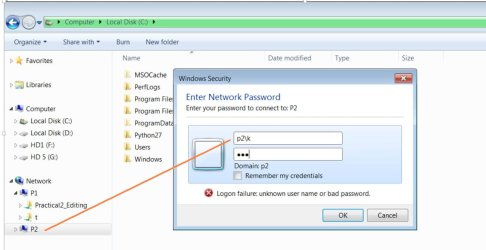
[FONT=&quot]1. [/FONT]I got two laptops named “P1” and “P2” (attached),

[FONT=&quot]2. [/FONT]I got a switch to get these two laptops connected,

[FONT=&quot]3. [/FONT]Both these laptops appear on the network

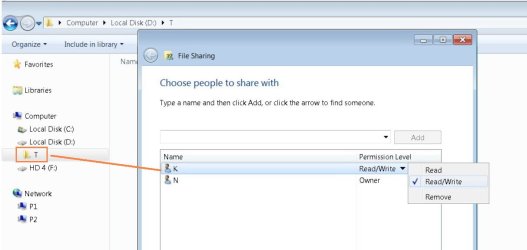
[FONT=&quot]4. [/FONT]I created a folder (named T) on the D drive on the laptop “P2”,

[FONT=&quot]5. [/FONT]I shared this folder (T) to be “EVERYONE

[FONT=&quot]6. [/FONT]Now, I tried to access the T folder from the P1 laptop but the system asked for a “network password”!!! (the firewall is made off on both laptops)

What might be the issue?

[FONT=&quot]7. [/FONT]Is there a way to have full access between these two laptops such that all the drives of the P1 can be accessed from the P2 and vice-versa?


Thank you

Best
 

Attachments

My Computer

OS
Windows 7 Ultimate x64
Easiest way is to setup a homegroup and set access the everyone. Then join the other laptop to the homegroup.

Network type must be set to home for a homegroup to work.

The only other way to never receive a password is to set NTFS permissions to everyone which is insecure and not advised.

You can also use the username and password for the machine and click save credentials. Then you wont be asked again.
 

My Computer

OS
Windows 7 Ultimate x64
Easiest way is to setup a homegroup and set access the everyone. Then join the other laptop to the homegroup.

Network type must be set to home for a homegroup to work.

The only other way to never receive a password is to set NTFS permissions to everyone which is insecure and not advised.

You can also use the username and password for the machine and click save credentials. Then you wont be asked again.


Many thanks Parman for the help,

I managed to access the P2 machine from the P1 machine using the credentials of any standard user (say k) on the P2 machine provided that this standard user has permission on that particular folder.


Best

Jamal
 

Attachments

  • Clip_14.jpg
    Clip_14.jpg
    139.8 KB · Views: 10
  • Clip_15.jpg
    Clip_15.jpg
    97.6 KB · Views: 10

My Computer

OS
Windows 7 Ultimate x64
Back
Top