
Hello,
I am having trouble playing games as I experience a lot of rubberbanding (significant lag). My ping and network connection are particularly.
By doing a google search on this issue I found that this problem could be related to network performance throttling (a feature of Win 7 64 bit).
More specifically,
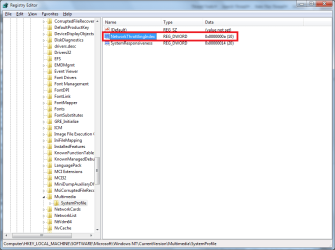
In the registry I should be able to change:
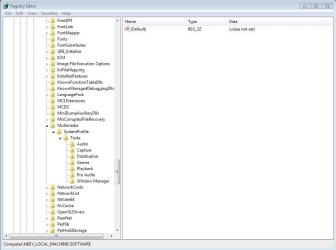
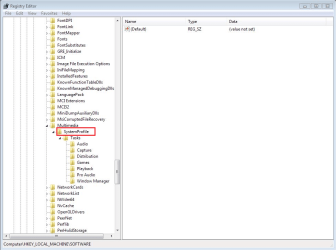
HKEY_LOCAL_MACHINE\SOFTWARE\Microsoft\WindowsNT\CurrentVersion\Multimedia\SystemProfile
And then an entry on the right for 'network performance throttling'
At this position I do not find an entry for network performance throttling.
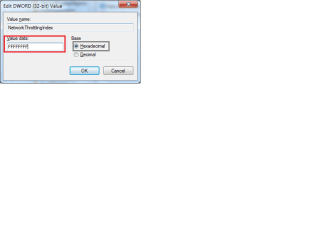
I should be able to change the value from '10' to '0xFFFFFFFF' for network performance throttling.
How do I add this please? Can I add this to the registry?
Thanks,
Nevica
I am having trouble playing games as I experience a lot of rubberbanding (significant lag). My ping and network connection are particularly.
By doing a google search on this issue I found that this problem could be related to network performance throttling (a feature of Win 7 64 bit).
More specifically,
In the registry I should be able to change:
HKEY_LOCAL_MACHINE\SOFTWARE\Microsoft\WindowsNT\CurrentVersion\Multimedia\SystemProfile
And then an entry on the right for 'network performance throttling'
At this position I do not find an entry for network performance throttling.
I should be able to change the value from '10' to '0xFFFFFFFF' for network performance throttling.
How do I add this please? Can I add this to the registry?
Thanks,
Nevica
My Computer
At a glance
Windows 10 Home Edition 64 BitSandyBridge 2500K (oc @ 4.2 GHz)8GB 1600MHzGainward NVidia GTX680
- Computer type
- PC/Desktop
- Computer Manufacturer/Model Number
- Home Made
- OS
- Windows 10 Home Edition 64 Bit
- CPU
- SandyBridge 2500K (oc @ 4.2 GHz)
- Motherboard
- MSI P67-GD53 (B3 stepping)
- Memory
- 8GB 1600MHz
- Graphics Card(s)
- Gainward NVidia GTX680
- Monitor(s) Displays
- Samsung SyncMaster S23A700 120 Hz LED backlit
- Hard Drives
- Crucial M4 500GB SSD
- PSU
- CoolerMaster 750W 85%
- Case
- Antec 3
- Cooling
- Corsair H50 in push-pull configuration
- Keyboard
- CM Storm Quickfire TK Cherry MX red
- Mouse
- Razer Abyssus mouse, Razer Sphex mousemat


 post back and let me know


