Network printer won't print

dlk7107

New member
Member
Local time
3:43 PM
Messages
30
I am able to add a network printer to my laptop using a wireless homegroup; however, when I send a test page, nothing happens at the printer. The printer is attached to a desktop in another room. Both the laptop & the desktop use Windows 7. The system worked OK when the laptop used Windows 7 & the dektop had Vista. Did I miss a step at the desktop printer end, or is the problem at the remote laptop side? Here are the steps I used to install the printer at the laptop:

<Start>, <Control Panel>, <Add a printer>, <Add a network, wireless printer>, [URL="file://\\Donald-PC\HP Photosmart C5100 series"]<\\Donald-PC\HP Photosmart C5100 series[/URL]>, <Next>, <Install driver>, <Next>, <Print a test page>.

Please help. Thanks.
 

My Computer

Computer Manufacturer/Model Number
HP Pavilion dv9500t laptop
OS
Windows 7 home premium 32 bit
CPU
Intel Core 2 Duo CPU 2.00 MHz
Memory
2.00 GB
Graphics Card(s)
NVIDIA
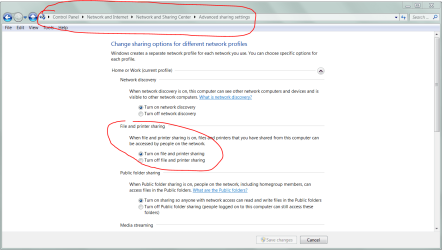
What does this look like on both PCs?
 

Attachments

  • Capture.PNG
    Capture.PNG
    47.2 KB · Views: 3,491

My Computer

Computer Manufacturer/Model Number
Asus P5B
OS
Windows 7 Ultimate
CPU
Intel Q9550
Motherboard
Asus P5B
Memory
4x2GB HyperX
Graphics Card(s)
ATI HD3850 512
Sound Card
Creative X-Fi Platinum
Monitor(s) Displays
Samsung 50 / Samsung 24
Screen Resolution
1920*1080 / 1920*1200
Hard Drives
Multiple RAID volumes
PSU
ThermalTake ToughPower
Case
Armor
Cooling
Liquid
Keyboard
$6 2.4 gHz desktop
Internet Speed
Just this side of fast enough.
I am able to add a network printer to my laptop using a wireless homegroup; however, when I send a test page, nothing happens at the printer. The printer is attached to a desktop in another room. Both the laptop & the desktop use Windows 7. The system worked OK when the laptop used Windows 7 & the dektop had Vista. Did I miss a step at the desktop printer end, or is the problem at the remote laptop side? Here are the steps I used to install the printer at the laptop:

<Start>, <Control Panel>, <Add a printer>, <Add a network, wireless printer>, [URL="file://\\Donald-PC\HP Photosmart C5100 series"]<\\Donald-PC\HP Photosmart C5100 series[/URL]>, <Next>, <Install driver>, <Next>, <Print a test page>.

Please help. Thanks.

You might want to try the steps outlined in the link below by Jimbo. Usually you can get the printer working this way.
http://www.sevenforums.com/network-sharing/4602-xp-7-printer-sharing.html
 

My Computer

Computer type
PC/Desktop
Computer Manufacturer/Model Number
Home built
OS
Windows 7 Ult, Windows 8.1 Pro,
CPU
Q9650-4.275GHz, E8600 4.5GHz, E6750-3.8GHz
Motherboard
Evga 780i FTW
Memory
G.Skill PC2 9600 1200Mhz 5 5 5 15 2T
Graphics Card(s)
GTX480
Sound Card
Asus Xonar D2
Monitor(s) Displays
HannsG
Screen Resolution
1680X1050
Hard Drives
GSkill Phoenix Pro 120GB SSD
PSU
ThermalTake Toughpower 1000Watt modular
Case
ThermalTake XaserV
Cooling
Xigmatek S1283
Keyboard
Logitech G15
Mouse
Logitech G9
Internet Speed
T1
I solved the printer problem. I noticed that "Enabel bidirectional support" was NOT checked. In fact, it was grayed out. Fortunately, I had made an image backup just after installing Windows 7. Restoring back to that point allowed me to install a network printer which has "Enable bidirectional support" checked. The network printer now works.
 

My Computer

Computer Manufacturer/Model Number
HP Pavilion dv9500t laptop
OS
Windows 7 home premium 32 bit
CPU
Intel Core 2 Duo CPU 2.00 MHz
Memory
2.00 GB
Graphics Card(s)
NVIDIA
I thought BiDirectional was a LPT port thing?
 

My Computer

Computer Manufacturer/Model Number
HP Pavilion Elite HPE-410f
OS
Windows 7 Ultimate x64
CPU
AMD Phenom x6 1045t
Motherboard
N/A
Memory
8 GB
Graphics Card(s)
ATI Radeon HD 5570
Sound Card
Realtek Highdefinition Audio / 5.1 Dolby Setup
Monitor(s) Displays
HP w2207h Widescreen
Screen Resolution
1680*1050
Hard Drives
1 TB (fixed), 320 Portable maxtor, Server Hard drives
PSU
350 Watt
Case
HP CASE
Cooling
Bass
Keyboard
Logitech MX 5500
Mouse
Logitech MX 5500
Internet Speed
ROAD RUNNER 16MB D/512 U
I have a desktop pc with win XP and and an attached deskjet 5550. I have shared this printer. I just got a win 7 laptop and was able to attach the printer using the \\pc name\printer name for the port as a local printer. It worked for about 4 days then suddenly all of the print jobs hang in the queue and don't get sent to the printer. I have run trouble shooting on the printer from the laptop and it can see the printer, validate the driver and find no problem. Where should I check next?
 

My Computer

OS
Windows 7 Home Premiun 64bit
I had the same problem. Installed host printer fine. Installed remote printer fine. HP 1020. It seems to have no problem printing everything BUT a test page. The reliable 1020 is seven years old. I don't think HP wants us to use this printer with Windows 7. It wants us to buy a new, Windows-7-snazzy printer. If you can live without the test page, the rest seems to work okay.
 

My Computer

OS
Windows 7 Professional 32 bit; Windows 7 HP 64 bit
Back
Top