Network Printer

windowsfree

New member
Local time
7:35 PM
Messages
84
Location
Pennsylvania
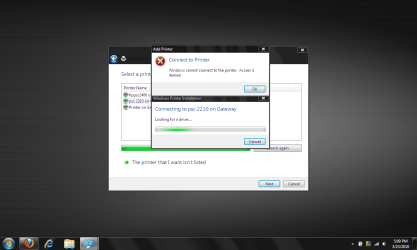
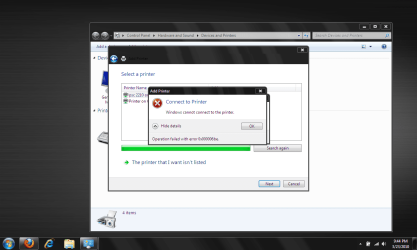
I have a small network consisting of a Desktop (XP), a laptop (XP), a laptop (Linux) and another laptop (win7ultimate). The desktop is sharing a HP 2210 printer. All the machines except the Win7Ultimate can connect to it and print. I tried the way of making a virtual local port also to see if I could connect, but that doesn't work.
Any suggestions. Error message in screen-shots attached.
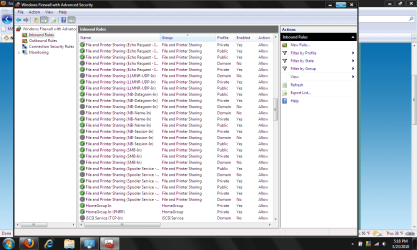
I tried turning Windows Firewall off and got the same as shown in screenshots.

Thank you for reading this.
 

Attachments

  • printer0.png
    printer0.png
    55.1 KB · Views: 17
  • Printer1.png
    Printer1.png
    58.8 KB · Views: 19
  • printer2.png
    printer2.png
    50.4 KB · Views: 16
Last edited:

My Computer

Computer Manufacturer/Model Number
Xplorer X6-2900 Notebook
OS
Win7PRo/Ubuntu9.04
CPU
i5-520 Intel
Motherboard
Intel(R) PM55 Chipset Mainboard
Memory
4.0 gig
Graphics Card(s)
Geforce GT330M
Sound Card
BUILT-IN AC 97 SOUND
Screen Resolution
1280X768
Hard Drives
320 gig 7200rpm
Other Info
Built-in 1.3 Mega Pixel Webcam
Well dont use homegroup. and also make sure the workgroup is named the same as xp eg MSHOME (RIGHT CLICK COMPUTER). Go to Control Panel - Network and Sharing - Change Advanced sharing settings on left -
try these settings
1 network discovery - turn on
2 file and printer sharing - turn on
3 public folder sharing - turn off (optional)
4 media streaming - turn off (optional)
5 file sharing connections - use 128 bit
6 password protect - turn off
7 homegroup connections - use user accounts and passwords

Lastly you need the driver on w7 laptop if all else fails download the w7 driver - disconnect the printer from the desktop and connect it to the laptop - read install instructions firstly - install drivers - then connect it back to the desktop.
 

My Computer

OS
XP, Vista, W7 64bit Home Premium
CPU
Intel Core Duo 6850 3.0 ghz @ 3.7 ghz
Motherboard
Asus P5E
Memory
4GB Corsair DDR 2 PC-6400
Graphics Card(s)
Ati 4870 1ghz
Sound Card
Supreme FX 11
Monitor(s) Displays
View Sonic VX1962wm
Screen Resolution
1680 X1050
Hard Drives
3 Seagate Sata Drives 160gb 250gb 500gb
PSU
Thermaltake 600 watt
Case
NZXT Alpha
Cooling
3X120cm Fans
Keyboard
Microsoft Digital Media Pro Keyboard
Mouse
Microsoft Wheel Mouse Optical
Internet Speed
1.5Mb to 8Mb/384k
reply

Thanks for the suggestion, It seemed to have gone further than before but I did get an error message (see screen shot).

I guess I won't upgrade the other windows computers and maybe even scrap 7 on the laptop and go back to XP.

Thanks for your help
 

Attachments

  • printer3.png
    printer3.png
    45.6 KB · Views: 14

My Computer

Computer Manufacturer/Model Number
Xplorer X6-2900 Notebook
OS
Win7PRo/Ubuntu9.04
CPU
i5-520 Intel
Motherboard
Intel(R) PM55 Chipset Mainboard
Memory
4.0 gig
Graphics Card(s)
Geforce GT330M
Sound Card
BUILT-IN AC 97 SOUND
Screen Resolution
1280X768
Hard Drives
320 gig 7200rpm
Other Info
Built-in 1.3 Mega Pixel Webcam
Try this method. The original post was about sharing the printer between XP and Seven, but I'm sure you understand the point.

Kari
 

My Computer

Computer type
Laptop
Computer Manufacturer/Model Number
HP ENVY 17-1150eg
OS
Windows 10 Pro x64 EN-GB
CPU
1.6 GHz Intel Core i7-720QM Processor
Memory
6 GB
Graphics Card(s)
ATI Mobility Radeon HD 5850 Graphics
Sound Card
Beats sound system with integrated subwoofer
Monitor(s) Displays
17" laptop display, 22" LED and 32" Full HD TV through HDMI
Screen Resolution
1600*900 (1), 1920*1080 (2&3)
Hard Drives
Internal: 2 x 500 GB SATA Hard Disk Drive 7200 rpm
External: 2TB for backups, 3TB USB3 network drive for media
Cooling
As Envy runs a bit warm, I have it on a Cooler Master pad
Keyboard
Logitech diNovo Media Desktop Laser (bluetooth)
Mouse
Logitech Performance Mouse MX
Internet Speed
50/10 Mbps VDSL
Antivirus
Windows Defender 4.3.9431.0
Browser
Maxthon 3.5.2., IE11
no good

I created that port, I eluded to that in the first post, that does not work either.
I can't believe even a linux machine can print to this and I can't get another windows machine to print to it. I used the latest drivers from HP who says it will work with Windows 7 (they probably mean locally). Oh well, I can see it will cost to much to upgrade the other machines which work great the way they are. I guess I will just put those files on a thumb drive and take them to the desktop to print. I am very disappointed with Microsoft on this "non feature". Thanks for your suggestion.
 

My Computer

Computer Manufacturer/Model Number
Xplorer X6-2900 Notebook
OS
Win7PRo/Ubuntu9.04
CPU
i5-520 Intel
Motherboard
Intel(R) PM55 Chipset Mainboard
Memory
4.0 gig
Graphics Card(s)
Geforce GT330M
Sound Card
BUILT-IN AC 97 SOUND
Screen Resolution
1280X768
Hard Drives
320 gig 7200rpm
Other Info
Built-in 1.3 Mega Pixel Webcam
Back
Top