
I've noticed this on some (not all) of my machines here at work. System in example is an Dell Latitude E6530 running fully up to date Windows 7 64bit on our domain.
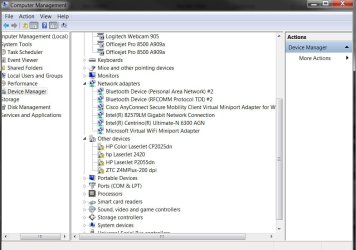
When a user logs on, the system decides it wants to detect network printers for some reason. It then tries to unsuccessfully install said network printers. Systems are already connected to other various network printers, and don't need these printers installed.
Is there some option that is checked that is making the computer search for these devices? If you remove them, then hit scan for hardware changes, it doesn't pick them up. However, when you login, it starts all over again..
When a user logs on, the system decides it wants to detect network printers for some reason. It then tries to unsuccessfully install said network printers. Systems are already connected to other various network printers, and don't need these printers installed.
Is there some option that is checked that is making the computer search for these devices? If you remove them, then hit scan for hardware changes, it doesn't pick them up. However, when you login, it starts all over again..
Attachments
My Computer
At a glance
Windows 7 64bitAMD Phenom II X4 955 Black Edition Deneb CoreKingston HyperX 4GB DDR3 1600ASUS EN9500GT
- OS
- Windows 7 64bit
- CPU
- AMD Phenom II X4 955 Black Edition Deneb Core
- Motherboard
- ASUS M4A79XTD EVO
- Memory
- Kingston HyperX 4GB DDR3 1600
- Graphics Card(s)
- ASUS EN9500GT
- Sound Card
- Internal
- Monitor(s) Displays
- ASUS 23" LCD
- Hard Drives
- Western Digital Caviar Black WD6401AALS 640GB
- PSU
- Antec CP-850 850W
- Case
- Antec P183
- Cooling
- ARCTIC COOLING Freezer 64 Pro

 Still trying to install them...
