ok i get my internet threw charter and got a webstar modem from them
i connect it to my router about 90% of the time but when i disconnect my router and hook internet str8 to my pc it will work i had to reboot my pc thou
should i have to do that in win. 7 also same issue with my router but when i rebooted it didnt pick it up my internet stayed disconnected for a good min. saying there was no conection should i just give it about 20 min. next time and see if it connects or is this a windows 7 problem or network
if its win7 or ntwork how to speed the recognize of internet up
My Computer
OS
Microsoft Windows 7 Home Premium 32-bit
CPU
Intel(R) Pentium(R) D CPU 3.40GHz
Motherboard
Wolfdale 1333-D667 P1.40 w/ onboard sound and LAN, 4USB port
Memory
3.00 GB
Graphics Card(s)
mobo
Sound Card
High Definition Audio Device
Hard Drives
Western Digital 320GB-WDC WD3200AAKS-00VYA0 ATA Device
Seagate FA GoFlex Desk USB Device-External hard disk media-1.82 TB
(1) WDC WD3200AAKS-00VYA0 ATA Device (2) Seagate FA GoFlex Desk USB Device
if you disconnect your router (why would you?) then connect to modem--it's NOT necessary to reboot---just go to Device Manager--choose your 'network adapter'--disable it--then enable it
Attachments
Capture.JPG
28.5 KB
· Views: 4
My Computer
Computer Manufacturer/Model Number
SALEON model 2.2b
OS
win7 ultimate 32bit
CPU
core2 Extreme QX6850-OCd to 3.15 GHz
Motherboard
ASUS P5G41-M LE
Memory
4 GB
Graphics Card(s)
NVidia 8600 GT
Monitor(s) Displays
23" acer
Hard Drives
one SATA 250GB partitioned equally in half
one SATA 160GB-internal storage
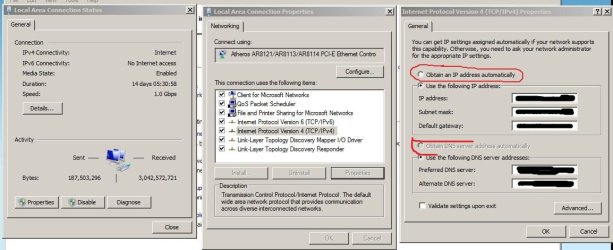
if you have your machine set to a static IP address--then the answer is no.
other than that--broadband internet connections are based on the IP address of the 'modem' and most people just use the standard router configuration with dynamic IPs for their machines through the DHCP server settings--if you have a 'static' IP address on your machine, you will need to reset it to 'obtain IP address automatically' in your network connection control panel and possibly also change DNS server to 'obtain DNS server address automatically (I believe the DNS server will automatically change when you change the 'obtain IP address..' setting)
Attachments
Capture.JPG
84.6 KB
· Views: 9
My Computer
Computer Manufacturer/Model Number
SALEON model 2.2b
OS
win7 ultimate 32bit
CPU
core2 Extreme QX6850-OCd to 3.15 GHz
Motherboard
ASUS P5G41-M LE
Memory
4 GB
Graphics Card(s)
NVidia 8600 GT
Monitor(s) Displays
23" acer
Hard Drives
one SATA 250GB partitioned equally in half
one SATA 160GB-internal storage
ok im trying to get web pages to load faster
i have a nice internet speed 12mb dl 1mb upload from charter but when i go to some pages they take a min. to load any way to speed that up im also using firefox
My Computer
OS
Microsoft Windows 7 Home Premium 32-bit
CPU
Intel(R) Pentium(R) D CPU 3.40GHz
Motherboard
Wolfdale 1333-D667 P1.40 w/ onboard sound and LAN, 4USB port
Memory
3.00 GB
Graphics Card(s)
mobo
Sound Card
High Definition Audio Device
Hard Drives
Western Digital 320GB-WDC WD3200AAKS-00VYA0 ATA Device
Seagate FA GoFlex Desk USB Device-External hard disk media-1.82 TB
(1) WDC WD3200AAKS-00VYA0 ATA Device (2) Seagate FA GoFlex Desk USB Device
Normally the browser will make one request to a web page at a time.
When you enable pipelining it will make several at
once, which really speeds up page loading.
2. Alter the entries as follows:
Set “network.http.pipelining” to “true”
Set “network.http.proxy.pipelining” to “true”
Set “network.http.pipelining.maxrequests” to some number like 30. This means it will make 30 requests at once.
3. Lastly right-click anywhere and select New-> Integer.
Name it “nglayout.initialpaint.delay” and set its value to “0″.
This value is the amount of time the browser waits before it acts on information it receives.
My Computer
Computer Manufacturer/Model Number
SALEON model 2.2b
OS
win7 ultimate 32bit
CPU
core2 Extreme QX6850-OCd to 3.15 GHz
Motherboard
ASUS P5G41-M LE
Memory
4 GB
Graphics Card(s)
NVidia 8600 GT
Monitor(s) Displays
23" acer
Hard Drives
one SATA 250GB partitioned equally in half
one SATA 160GB-internal storage