network problem

You can go right click on your computer and go to manage, then services and management, and services. Go down to bonjour. It will say beside it to the right if its started, enabled, or disabled.
 

My Computer

Computer Manufacturer/Model Number
Dell Vostro 220 mini
OS
Windows 7 Pro. 32 bit
CPU
2.93 GHz E7500 Intel Core 2 Duo
Motherboard
Dell
Memory
2 GB
Graphics Card(s)
Intel G45/G43
Sound Card
Realtek High Def.
Monitor(s) Displays
17" acer (I know...its bad)
Screen Resolution
1024x768
Hard Drives
WD 250 GB
Keyboard
Dell L100
Mouse
Dell optical (standard)
Internet Speed
100 Mbps 11.91 dl 12.46 ul
Other Info
Have questions, just ask.
Click Start
Right-click "Computer" and select "Manage".
Expand "Services and Applications"
Click "Services".
Find the Bonjour name or it sometimes only shows up as > ##Id_String1.6844F930_1628_4223_B5CC_5BB94B879762## in the list of services.
Double-click this to open up a Window.
Under the General Tab next to Start-up Type Select Disabled from the drop down.
Now test and see if you still have connectivity issues.
 

My Computer

Computer type
PC/Desktop
Computer Manufacturer/Model Number
Home built
OS
Windows 7 Ult, Windows 8.1 Pro,
CPU
Q9650-4.275GHz, E8600 4.5GHz, E6750-3.8GHz
Motherboard
Evga 780i FTW
Memory
G.Skill PC2 9600 1200Mhz 5 5 5 15 2T
Graphics Card(s)
GTX480
Sound Card
Asus Xonar D2
Monitor(s) Displays
HannsG
Screen Resolution
1680X1050
Hard Drives
GSkill Phoenix Pro 120GB SSD
PSU
ThermalTake Toughpower 1000Watt modular
Case
ThermalTake XaserV
Cooling
Xigmatek S1283
Keyboard
Logitech G15
Mouse
Logitech G9
Internet Speed
T1
Sorry guys but i dont have any bonjour or ##id.string(...) under Services
 

My Computer

OS
7
Can you post a screen shot of your ipconfig /all output? Just type ipconfig /all into your command prompt.
 

My Computer

Computer type
PC/Desktop
Computer Manufacturer/Model Number
Home built
OS
Windows 7 Ult, Windows 8.1 Pro,
CPU
Q9650-4.275GHz, E8600 4.5GHz, E6750-3.8GHz
Motherboard
Evga 780i FTW
Memory
G.Skill PC2 9600 1200Mhz 5 5 5 15 2T
Graphics Card(s)
GTX480
Sound Card
Asus Xonar D2
Monitor(s) Displays
HannsG
Screen Resolution
1680X1050
Hard Drives
GSkill Phoenix Pro 120GB SSD
PSU
ThermalTake Toughpower 1000Watt modular
Case
ThermalTake XaserV
Cooling
Xigmatek S1283
Keyboard
Logitech G15
Mouse
Logitech G9
Internet Speed
T1
Ok thanks missed that earlier, it's a mess needless to say. First you need to get rid of those bogus ipv6 entries and the msoft 6to4 adaptor entries.

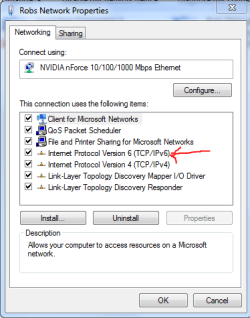
1. Open up network connections and disable IPv6 by unchecking it, picture below.

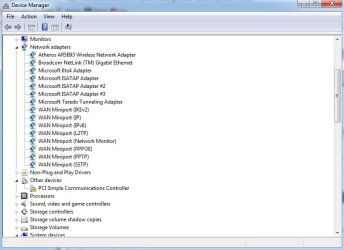
2. Open up device manager > (start > type "devmgmt.msc")
-go up to> View then select> Show Hidden Devices
- go to network adapters and delete all the ones called Microsoft 6to4 adapter or any that involve ipv6, also delate all the extra isatap# entries which there looks to be many of them.

That should get rid of all the extra networks. The problem seems to be that either your router or your network adaptor isn't working properly with the IPv6 protocol. You can either update the firmware on your router of try a different network driver which may solve the problem.

After updating the routers firmware or adaptor you can try to renable IPv6 which is used only on the LAN for Homegroups.
 

Attachments

  • IPv6 unchecking.PNG
    IPv6 unchecking.PNG
    13.4 KB · Views: 0

My Computer

Computer type
PC/Desktop
Computer Manufacturer/Model Number
Home built
OS
Windows 7 Ult, Windows 8.1 Pro,
CPU
Q9650-4.275GHz, E8600 4.5GHz, E6750-3.8GHz
Motherboard
Evga 780i FTW
Memory
G.Skill PC2 9600 1200Mhz 5 5 5 15 2T
Graphics Card(s)
GTX480
Sound Card
Asus Xonar D2
Monitor(s) Displays
HannsG
Screen Resolution
1680X1050
Hard Drives
GSkill Phoenix Pro 120GB SSD
PSU
ThermalTake Toughpower 1000Watt modular
Case
ThermalTake XaserV
Cooling
Xigmatek S1283
Keyboard
Logitech G15
Mouse
Logitech G9
Internet Speed
T1
Ok sorry but, which ones do I delete?
 

Attachments

  • 1280428806034.jpg
    1280428806034.jpg
    46.4 KB · Views: 8

My Computer

OS
7
delate the extra isotap# 2-3 entries and the msoft 6 to 4 adaptor entries. After that do an ipconfig /release *con* "this should get rid of all matching connection entries..., then do ipconfig /renew . Then do another ipconfig /all ,and post the results here.

Another problem I noticed is that your default gateway for IPv4 is showing up as 0.0.0.0 which usually causes problems with unidentified networks and could also be part of the problem.
Follow this link which shows you how to fix that problem.
http://pocketpccentral.net/blog/200...cess-no-internet-connection-problem-resolved/
 

My Computer

Computer type
PC/Desktop
Computer Manufacturer/Model Number
Home built
OS
Windows 7 Ult, Windows 8.1 Pro,
CPU
Q9650-4.275GHz, E8600 4.5GHz, E6750-3.8GHz
Motherboard
Evga 780i FTW
Memory
G.Skill PC2 9600 1200Mhz 5 5 5 15 2T
Graphics Card(s)
GTX480
Sound Card
Asus Xonar D2
Monitor(s) Displays
HannsG
Screen Resolution
1680X1050
Hard Drives
GSkill Phoenix Pro 120GB SSD
PSU
ThermalTake Toughpower 1000Watt modular
Case
ThermalTake XaserV
Cooling
Xigmatek S1283
Keyboard
Logitech G15
Mouse
Logitech G9
Internet Speed
T1
See if this works

Start, Programs\Accessories and right click on Command Prompt, select "Run as Administrator" to open a command prompt.

Reset WINSOCK entries to installation defaults: netsh winsock reset catalog
Reset IPv4 TCP/IP stack to installation defaults. netsh int ipv4 reset reset.log
Reset IPv6 TCP/IP stack to installation defaults. netsh int ipv6 reset reset.log

Reboot the machine.
 

My Computer

Computer type
PC/Desktop
Computer Manufacturer/Model Number
Bruce ... somewhere in his 40's
OS
Windows 7 Ultimate 32bit SP1
CPU
Intel(R) Core(TM)2 Quad CPU @ 2.40GHz, 2400 MHz
Motherboard
INTEL/D975XBX2
Memory
4 GB
Graphics Card(s)
ATI Radeon HD 2600 Pro
Monitor(s) Displays
Samsung SyncMaster 914v
Screen Resolution
1280 x 1024
Hard Drives
2/500GB each ... ST3500630AS ATA Device.
One is not connected
PSU
Rocketfish 700 W
Case
G.Skill Gigabyte Chassis
Keyboard
Standard PS/2 Keyboard
Mouse
Microsoft PS/2 Mouse
Internet Speed
DSL
Antivirus
Avira Internet Security
Browser
IE 11
Other Info
ATI HDMI Audio
Guys, I think one of those 2 solutions worked (if not both).
All I have now is Currently connected to:
RDS (the usual thing i use to connect to the internet)
Internet Connection
and
Unidentified Network (which i believe is the wireless)
No internet access
 

My Computer

OS
7
From what I saw in your first ipconfig output was a bogus default gateway of 0.0.0.0 which is a well known problem and easily fixed by following that link I posted earlier. It's just a matter of entering the correct default gateway manually into your ipv4 properties.

If you disabled IPv6 you will need to renable that in order for Homegroups to work.

If you could post another ipconfig we could confirm if the bogus default gateway was the original problem or not.

Either way i'm glad if the problem is fixed now. :)
 

My Computer

Computer type
PC/Desktop
Computer Manufacturer/Model Number
Home built
OS
Windows 7 Ult, Windows 8.1 Pro,
CPU
Q9650-4.275GHz, E8600 4.5GHz, E6750-3.8GHz
Motherboard
Evga 780i FTW
Memory
G.Skill PC2 9600 1200Mhz 5 5 5 15 2T
Graphics Card(s)
GTX480
Sound Card
Asus Xonar D2
Monitor(s) Displays
HannsG
Screen Resolution
1680X1050
Hard Drives
GSkill Phoenix Pro 120GB SSD
PSU
ThermalTake Toughpower 1000Watt modular
Case
ThermalTake XaserV
Cooling
Xigmatek S1283
Keyboard
Logitech G15
Mouse
Logitech G9
Internet Speed
T1
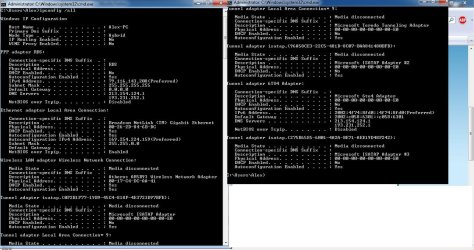
here you go
 

Attachments

  • ts.jpg
    ts.jpg
    152.1 KB · Views: 5

My Computer

OS
7
The IPv4 default gateway for the local area connection is still not showing up as it should be. I'm not too sure what the default gateway is for this router. But if you could find that out and type the gateway in manually it may help to keep this problem from coming back.

Other than that all the old entries seem to be gone because of the commands you did which is good but may come back unless the default gateway is correct.

If you havn't already done this, perform the procedure in this link below to get your default gateway back to normal.
http://pocketpccentral.net/blog/200...cess-no-internet-connection-problem-resolved/
 
Last edited:

My Computer

Computer type
PC/Desktop
Computer Manufacturer/Model Number
Home built
OS
Windows 7 Ult, Windows 8.1 Pro,
CPU
Q9650-4.275GHz, E8600 4.5GHz, E6750-3.8GHz
Motherboard
Evga 780i FTW
Memory
G.Skill PC2 9600 1200Mhz 5 5 5 15 2T
Graphics Card(s)
GTX480
Sound Card
Asus Xonar D2
Monitor(s) Displays
HannsG
Screen Resolution
1680X1050
Hard Drives
GSkill Phoenix Pro 120GB SSD
PSU
ThermalTake Toughpower 1000Watt modular
Case
ThermalTake XaserV
Cooling
Xigmatek S1283
Keyboard
Logitech G15
Mouse
Logitech G9
Internet Speed
T1
Back
Top