
guillaume133
New member
Hello,
I would like to acces a different computer over the current network I am using.
When I go on the "network" folder, it shows and displays the range of computers that are currently on my network..
(I have tried in vain to deactivate on the computer I would like to connect to all of the restrictions)
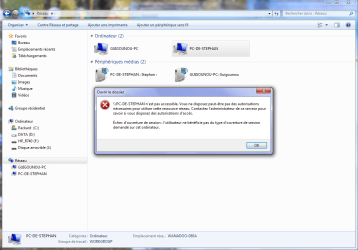
When I select the computer that I wish to connect to and double click, an error message pops up, (I have tagged the image that hopefully you will see)
I have tried everything but there just has to be something that I am missing.
Might it be helpful if I were to precise that the computer I wish to connect to via the network is under Windows Vista Premium. (--> yea I know this is the Windows 7 site but lol I myself am under windows 7 so.. yeah ! ^^)
I appreciate your help guys..
Gui x)
PS - sorry.. I am in france so I bought a french version of Windows 7 --> all of this to say that my default language is in french.
I hope that won't be too much of the problem nevertheless !
I would like to acces a different computer over the current network I am using.
When I go on the "network" folder, it shows and displays the range of computers that are currently on my network..
(I have tried in vain to deactivate on the computer I would like to connect to all of the restrictions)
When I select the computer that I wish to connect to and double click, an error message pops up, (I have tagged the image that hopefully you will see)
I have tried everything but there just has to be something that I am missing.
Might it be helpful if I were to precise that the computer I wish to connect to via the network is under Windows Vista Premium. (--> yea I know this is the Windows 7 site but lol I myself am under windows 7 so.. yeah ! ^^)
I appreciate your help guys..
Gui x)
PS - sorry.. I am in france so I bought a french version of Windows 7 --> all of this to say that my default language is in french.
I hope that won't be too much of the problem nevertheless !
Attachments
My Computer
- Computer Manufacturer/Model Number
- Packard Bell imedia S3720
- OS
- Windows 7 Premium 64 BIT
- CPU
- Pentium(R) Dual-Core CPU E5300
- Memory
- 2.60 GHZ
- Graphics Card(s)
- NVIDIA GeForce G210
- Sound Card
- Realteck 7.1 high definition audio
- Monitor(s) Displays
- Acer x223w
- Screen Resolution
- 1680 x 1050
- Hard Drives
- 230 GB internal hard drive
- Other Info
- 4GB of RAM
