Network Share - How to get prompted with user name and password again?

jjevans

New member
Local time
3:02 AM
Messages
4
I have a network share that I got to often. It used to prompt me in windows 7 for a user name and password. It no longer prompts me and kicks a message Windows cannot access \\TOWER\Share you do not have permission. Some how bad information was entered and saved in Windows 7 somewhere?


How can I get windows 7 to prompt me again so I can enter a new user name and password? Or How can I get rid of the bad auto logon information that is being stored somewhere in Win7?

I have removed and re-added information in Control Panel -> User Accounts -> Manage Your Credentials and still the same issue.


This share is on my NAS so I am the admin. The machine has full access rights configured on my NAS. Nothing has changed on my NAS.


Thank you,


Jim
 
Last edited:

My Computer My Computer

At a glance

Win 7 64 bit
OS
Win 7 64 bit
Hi Jim,
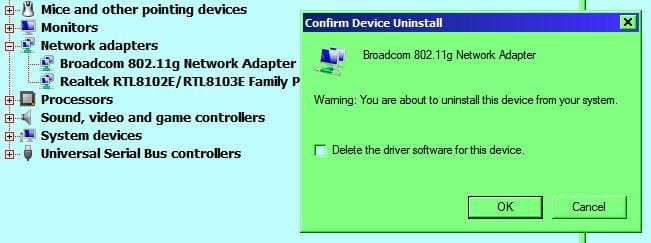
Open Device Manager, on the Network adapters, click to open. Right click and select Uninstall BUT keep the drivers. Re boot and repeat for other adapters.

RR.JPG
 

My Computer My Computer

At a glance

Win7 H.Prem. 32bit+SP1
Computer Manufacturer/Model Number
Look in my Signature.
OS
Win7 H.Prem. 32bit+SP1
Hi RR. I did that and I still have the same issue. This information is not linked to the Network Adapter.

Thank you for the post though.
 

My Computer My Computer

At a glance

Win 7 64 bit
OS
Win 7 64 bit
Have you tried to delete the SSID for the network in your wireless settings. I'm on my desktop now, and its a wired connection, so can't give exact wording.
 

My Computer My Computer

At a glance

Win7 H.Prem. 32bit+SP1
Computer Manufacturer/Model Number
Look in my Signature.
OS
Win7 H.Prem. 32bit+SP1
It is a wired network. So there is no SSID to remove.
 

My Computer My Computer

At a glance

Win 7 64 bit
OS
Win 7 64 bit
Hello,

Disconnect the mapped drive and restart your PC. Re-map the drive and it should prompt you for a password.

Do you have the same username and password on your PC/NAS? If you do, change the password on your PC and it will re-prompt. You can then change your password back if required.


Dave
 

My Computer My Computer

At a glance

Windows 7 Ultimate x64Intel Core i7 2600K (O/C 4.7GHz)8GB Corsair Vengeance LP, DDR3, 1600MhzNvidia GTX 460 Graphics Card
Computer type
PC/Desktop
Computer Manufacturer/Model Number
Custom
OS
Windows 7 Ultimate x64
CPU
Intel Core i7 2600K (O/C 4.7GHz)
Motherboard
Asus ROG Maximus IV Extreme-Z - Intel Z68 Chipset
Memory
8GB Corsair Vengeance LP, DDR3, 1600Mhz
Graphics Card(s)
Nvidia GTX 460 Graphics Card
Sound Card
Onboard
Monitor(s) Displays
Dell E228WFP
Hard Drives
2 x 500GB Samsung SpinPoint Drives (1 for OS, 1 for Data and Apps)
PSU
CoolerMaster 1000W
Case
CoolerMaster HAF
Cooling
Air
Internet Speed
Fibre - 60MB Down, 30MB Up
Antivirus
ESET NOD32 Antivirus
Hi Dave,

It is not a mapped drive. I just go to the share in the Network icon in windows explorer. Yes the same user and pass is on the NAS. I tried changing the password on the PC. It did not prompt me. I still do not have permission to this share. There is some information that is being auto allocated to this share somehow on the PC. I think this might be a registry edit to solve this?
 

My Computer My Computer

At a glance

Win 7 64 bit
OS
Win 7 64 bit
Hi jjevans,

You shouldnt need a registry edit. Does it work if you browse via the UNC path? I.e. \\TOWER\Share

Also do the following and see if the credentials are in there:
start-->run--> rundll32.exe keymgr.dll, KRShowKeyMgr


Dave
 

My Computer My Computer

At a glance

Windows 7 Ultimate x64Intel Core i7 2600K (O/C 4.7GHz)8GB Corsair Vengeance LP, DDR3, 1600MhzNvidia GTX 460 Graphics Card
Computer type
PC/Desktop
Computer Manufacturer/Model Number
Custom
OS
Windows 7 Ultimate x64
CPU
Intel Core i7 2600K (O/C 4.7GHz)
Motherboard
Asus ROG Maximus IV Extreme-Z - Intel Z68 Chipset
Memory
8GB Corsair Vengeance LP, DDR3, 1600Mhz
Graphics Card(s)
Nvidia GTX 460 Graphics Card
Sound Card
Onboard
Monitor(s) Displays
Dell E228WFP
Hard Drives
2 x 500GB Samsung SpinPoint Drives (1 for OS, 1 for Data and Apps)
PSU
CoolerMaster 1000W
Case
CoolerMaster HAF
Cooling
Air
Internet Speed
Fibre - 60MB Down, 30MB Up
Antivirus
ESET NOD32 Antivirus
can you see the share in tree? you should be able to right click and disconnect drive. you sure its not part of your log on scripts? if that is the case you would have to edit your log on scripts.
 

My Computer My Computer

At a glance

windows 7 ultimate 64 bitintel i.53 gigs
Computer Manufacturer/Model Number
lenovo g560
OS
windows 7 ultimate 64 bit
CPU
intel i.5
Memory
3 gigs
Back
Top