Network Shares problem

sasovics

New member
Local time
4:09 PM
Messages
5
I am experiencing a weird issue using the latest Win7 build 7057 when trying to share anything on drive C. Non of the shares work not even admin shares, even I made sure all the permissions are in place, Printer and File Sharing is enabled and not blocked by the firewall, but Anytime I am trying to access the shared folder on C drive from another computer I am getting the following message:

"SHARE1 is not accessible. You may not have permission to use network resource. Contact the administrator of this server to find out if you have access permissions."

The request is not supported."

Can anyone running 7057 build test if the network shares on drive C are accessible from other computers on the network ?

Thanks a bunch!
S.
 

My Computer

OS
Windows 7 x86 build 7100
Not only do I have that problem, but I also have a problem with My Network window not showing any of the other computers on my network as well. I can type the direct link in and reach them, but they don't show up in the Network folder at all.

I'm running 7057 as well.
 

My Computer

OS
Windows 7 Ultimate N x64
CPU
Intel Core i7-3770K Ivy Bridge 3.5GHz
Motherboard
ASUS P8Z77-V PREMIUM LGA 1155 Intel Z77
Memory
G.SKILL Trident X Series 32GB (4 x 8GB)
Monitor(s) Displays
42" Westinghouse LCD monitor
Hard Drives
(1) 240GB OCZ REVO3 X2

(1) 250GB OCZ Colossus
PSU
CORSAIR HX Series HX850 850W
Case
COOLER MASTER HAF X RC-942-KKN1
Internet Speed
100 Mbps
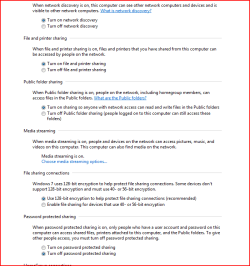
Have you been to Network And Sharing Center - Choose homegroup and sharing options - Change Advanced Sharing Settings

and selected the following? :
 

Attachments

  • Capture.PNG
    Capture.PNG
    18.3 KB · Views: 1,800

My Computer

Computer Manufacturer/Model Number
ENIAC
OS
Windows 7 RC 7100 32bit/64bit
CPU
Intel Core2Duo E4500 2.20 GHz
Motherboard
ASUS P5LD2-X/1333
Memory
2x1GB Kinsgston DDR2 800MHz
Graphics Card(s)
Nvidia 8500GT
Sound Card
Onboard High Definition Audio Device
Monitor(s) Displays
Sony Bravia 42"
Case
LINKW 2222
Cooling
Standard Intel
Keyboard
Some cheap one
Mouse
Microsoft Intellimouse something
Internet Speed
24MBps ADSL
Have you been to Network And Sharing Center - Choose homegroup and sharing options - Change Advanced Sharing Settings

and selected the following? :

Thanks for the reply, I can't speak for the other posters but I did that after setting up 7 and it hasn't made any difference for me.

My B-I-L is running the 32 bit version of 7057 and having the same problems.:(
 

My Computer

OS
Windows 7 Ultimate N x64
CPU
Intel Core i7-3770K Ivy Bridge 3.5GHz
Motherboard
ASUS P8Z77-V PREMIUM LGA 1155 Intel Z77
Memory
G.SKILL Trident X Series 32GB (4 x 8GB)
Monitor(s) Displays
42" Westinghouse LCD monitor
Hard Drives
(1) 240GB OCZ REVO3 X2

(1) 250GB OCZ Colossus
PSU
CORSAIR HX Series HX850 850W
Case
COOLER MASTER HAF X RC-942-KKN1
Internet Speed
100 Mbps
Not only do I have that problem, but I also have a problem with My Network window not showing any of the other computers on my network as well. I can type the direct link in and reach them, but they don't show up in the Network folder at all.

I'm running 7057 as well.


exactly the same boat but i think the not showing on the network seems to be a common bug with 7057.. no where near as annoying as not being able to open C:\ shares.

Limneos ive tried what you said but still no luck :(
 

My Computer

OS
Windows 7
Same problems here. Trying to share with a Vista machine. Not working very good.
 

My Computer

Computer Manufacturer/Model Number
Keeps changing - (Custom)
OS
Windows 7 Professional x64
CPU
Intel Core i7 860
Motherboard
Gigabyte GA-P55-UD4P
Memory
4GB DDR3 Mushkin 1600Mhz @ 7-8-7-20
Graphics Card(s)
MSI GTS250 1GB DDR3 Twin Frozr
Sound Card
Onboard realtek
Monitor(s) Displays
Samsung SyncMaster 24" P2450 + Samsung 20" 2033
Screen Resolution
1920 X 1080 and 1600 X 900 (#2 system 1440 X 900)
Hard Drives
Patriot Inferno 120GB SSD + 3 WD Blue 640GB drives
PSU
Corsair 750 HX Modular
Case
Lancool PC-K62
Cooling
Cooler Master TX3 CPU cooler and 4-140mm and 1-120mm case
Keyboard
Gigabyte USB keyboard
Mouse
Microsoft wireless laser mouse 5000
Internet Speed
7 Mb down 1.5 up
Other Info
System #2: AMD Phenom II X6 1055T (Freezer 7 Pro cooler) - Gigabyte 880GMA-UD2H - WD 500GB Black - 9500GT (1GB) 500W OCZ modular PSU - Antec 200 case. System #3 (LapTop) Core 2 Duo T6670 - 320GB 7200RPM HD - 4GB DDR3 RAM.
A few more suggestions:

1. Change the 128-bit encryption to 40-56 bit (look on the image I posted above)

2. Try changing the share path to be somewhere inside your user folder, not in the root folder, unless you are running with UAC off.

3. Make sure you have Allow Windows to manage Homegroup connections enabled and Password Protected Sharing off.

4. Make sure you have Turned on Network Discovery.

5. Try to connect to the computer using its IP address instead of its network name.
To find what IP address has the share-holder computer, open CMD on that computer and type IPCONFIG . You will get an IP address of the type: 192.168.1.2 or so. Use this as path adding \\ in the beginning. (e.g. open start and at the search type \\192.168.1.2 or whatever is your share-holder's IP.

6. Final and most important, make sure you have your network identified as Home Network

Hope it helps
 

My Computer

Computer Manufacturer/Model Number
ENIAC
OS
Windows 7 RC 7100 32bit/64bit
CPU
Intel Core2Duo E4500 2.20 GHz
Motherboard
ASUS P5LD2-X/1333
Memory
2x1GB Kinsgston DDR2 800MHz
Graphics Card(s)
Nvidia 8500GT
Sound Card
Onboard High Definition Audio Device
Monitor(s) Displays
Sony Bravia 42"
Case
LINKW 2222
Cooling
Standard Intel
Keyboard
Some cheap one
Mouse
Microsoft Intellimouse something
Internet Speed
24MBps ADSL
I *almost* want to install 57 just to figure this problem out. Cant understand this. Nice tips Limneos. It worked for me in 7000 with homegroup managing off and on... I have password protect on.

Of course one of the KEY ingredients not mentoned here and forgotten alot of times is to make sure the accounts on both machines/shares have passwords. But i dont think thats the problem here.
 

My Computer

Computer Manufacturer/Model Number
CUSTOM
OS
XP/win7 x86 build 7127
CPU
Athlon64 X2 DUAL 4200+ 2.21ghz
Motherboard
ASUS K8 PRO SLI
Memory
2GB Dual Chan DDR2 Corsair
Graphics Card(s)
Nvidia 6800GT
Sound Card
nvidia
Monitor(s) Displays
19' LCD
Screen Resolution
1280x1024
Hard Drives
WD 250, 2x500, 2x1TB IDE/USB
WD 250 SATA (system)
SEAGATE 120 Sata
PSU
coolermaster 450
Case
SUPERFLOWER
Cooling
1 HDD bay fan, 5x80mm Case Fans, AEROGATE II Fan/Temp
Keyboard
MS wireless
Mouse
MS Wireless
Internet Speed
fassssssssst
Bob's brother-in-law here....

Some more information: I tried sharing folders under the Users folder (ie .C:\Users\usernane\Desktop) and no matter what settings I used in Properties > Settings, I could not get the remote XP box to access. It would show the share but it would not permit viewing. I set the permissions to Everyone > Full and still no access. This was true for several folders that I tried to share under the Users folder

I then did the same thing with some other random folders on another hard drive (ie: d:\videos\to_watch) and I was able to see the shared folder from the XP box, and I could gain access to the folder (ie: view, play, etc.)

So from this, it looks like something having to do either with the User folder tree or with the drive on which Windows 7 is installed. I tried sharing a folder that I created on the root of C:, and again, I could see it but could not access it from the XP box.
 

My Computer

OS
Windows 7 Ultimate N x64
CPU
Intel Core i7-3770K Ivy Bridge 3.5GHz
Motherboard
ASUS P8Z77-V PREMIUM LGA 1155 Intel Z77
Memory
G.SKILL Trident X Series 32GB (4 x 8GB)
Monitor(s) Displays
42" Westinghouse LCD monitor
Hard Drives
(1) 240GB OCZ REVO3 X2

(1) 250GB OCZ Colossus
PSU
CORSAIR HX Series HX850 850W
Case
COOLER MASTER HAF X RC-942-KKN1
Internet Speed
100 Mbps
network problems are fixed in the new build... 7057 had a ton of network issues:(
 

My Computer

OS
win7
That's funny...7057 was a joy when it came to my home network. I thought the issues were fixed form 7048. haha. I guess it depends on the situation. 7057 works so well for me that I am not even going to grab 7068. (for a few days)
 

My Computer

Computer Manufacturer/Model Number
Keeps changing - (Custom)
OS
Windows 7 Professional x64
CPU
Intel Core i7 860
Motherboard
Gigabyte GA-P55-UD4P
Memory
4GB DDR3 Mushkin 1600Mhz @ 7-8-7-20
Graphics Card(s)
MSI GTS250 1GB DDR3 Twin Frozr
Sound Card
Onboard realtek
Monitor(s) Displays
Samsung SyncMaster 24" P2450 + Samsung 20" 2033
Screen Resolution
1920 X 1080 and 1600 X 900 (#2 system 1440 X 900)
Hard Drives
Patriot Inferno 120GB SSD + 3 WD Blue 640GB drives
PSU
Corsair 750 HX Modular
Case
Lancool PC-K62
Cooling
Cooler Master TX3 CPU cooler and 4-140mm and 1-120mm case
Keyboard
Gigabyte USB keyboard
Mouse
Microsoft wireless laser mouse 5000
Internet Speed
7 Mb down 1.5 up
Other Info
System #2: AMD Phenom II X6 1055T (Freezer 7 Pro cooler) - Gigabyte 880GMA-UD2H - WD 500GB Black - 9500GT (1GB) 500W OCZ modular PSU - Antec 200 case. System #3 (LapTop) Core 2 Duo T6670 - 320GB 7200RPM HD - 4GB DDR3 RAM.
Hey Bob

Make sure the account trying to access the folders in the User folder have NTFS permission to do so. In other words, not just permission in the Share properties, but in the Security properties tab as well.

Windows will first check the Sharing permissions to see if you can access the share. If you can, it will then check the file properties (Security tab) to see if you can access the file.

A "quick and dirty" practice some network admins use is to give the "Everyone" account Read and Write permissions in the Share. Then restrict actual access at the NTFS level. Hope this helps.
 

My Computer

Computer Manufacturer/Model Number
Custom
OS
Windows 7
CPU
Pentium D 2.66
Motherboard
Asus P5ND2-SLi
Memory
4 gigs DDR2
Graphics Card(s)
BFG nVidia 8600 GT OC
Sound Card
nForce 4 (realtek)
Monitor(s) Displays
Samsung 204B
Screen Resolution
1600x1200
Hard Drives
Western Digital Raptor 150
Western Digital 320 (both SATA)
PSU
BFG 600 watt
Cooling
fan
Keyboard
MS Natural
Mouse
MS Sidewinder
Internet Speed
10 mb
Back
Top