Network Sharing Permissions

tmlavy

New member
Local time
1:52 PM
Messages
7
I have a small network (not a homegroup). I am trying to share a file with one computer but block access to the same file for another computer. (2 computers 2 different permissions). The problem i am having is when i try to add a new user the only location is allows me to select is my local machine. :devil:
 
Last edited:

My Computer

Computer Manufacturer/Model Number
Compaq
OS
Windows 7 Ultimate
Seem as though all your machines depends upon local administration since they are not part of a domain.

How about if you join both computers to the same workgroup?

PC w/ the file (workgroup)> ACCESS
PC you want to access the file. (workgroup)>ACCESS

PC you do NOT want to have access (workgroup)NO ACCESS. Or just leave it with its default settings of WORKGROUP.

It would be nice if you stated what Platforms your PC's were running on as well?
 

My Computer

OS
XP
Thanks for the reply. Im new to windows 7 permissions, and kinda confused on what u are saying. All 3 systems are running windows 7 ultimate.
 

My Computer

Computer Manufacturer/Model Number
Compaq
OS
Windows 7 Ultimate

My Computer

Computer Manufacturer/Model Number
Home built
OS
Windows 7 Home Premium x64
CPU
AMD Phenom II X4 945
Motherboard
ASUS M4N98TD EVO AM3 NVIDIA nForce 980a SLI
Memory
8 GB G-Skill 1.5v DDR 3 1333Mhz
Graphics Card(s)
(2) MSI 512MB GTS 250 SLI
Sound Card
Soundblaster Audigy 2 platinum
Monitor(s) Displays
Samsung 2255BW 22"
Screen Resolution
1650 x 1050
Hard Drives
2 WD 250GB 7500RPM
PSU
Antec TP-750. The ultimate bang for the buck PSU
Case
Raidmax
Cooling
Sycthe Slipstream cooling fans(4)
Keyboard
Zboard Merc
Mouse
Logitech MX-518
Internet Speed
3MB
Other Info
LG Blu-Ray/DVD combo drive/LG DVD-RW w/ lightscribe
A Homegroup would be great if i could share a file with one computer and not the other
 

My Computer

Computer Manufacturer/Model Number
Compaq
OS
Windows 7 Ultimate
The user name situation is that computer A & B have the same user name the computers names are all different. C has a different user name.
 

My Computer

Computer Manufacturer/Model Number
Compaq
OS
Windows 7 Ultimate

My Computer

Computer Manufacturer/Model Number
SALEON model 2.2b
OS
win7 ultimate 32bit
CPU
core2 Extreme QX6850-OCd to 3.15 GHz
Motherboard
ASUS P5G41-M LE
Memory
4 GB
Graphics Card(s)
NVidia 8600 GT
Monitor(s) Displays
23" acer
Hard Drives
one SATA 250GB partitioned equally in half
one SATA 160GB-internal storage
PSU
500W Thermaltake
Case
mini tower
This dose not help me at all. I know how to set permissions my problem is setting a different permissions for different computers on my network. This link only tells how to create a group and add users to it, then set permissions for the group (not what i need).
 

My Computer

Computer Manufacturer/Model Number
Compaq
OS
Windows 7 Ultimate
Here's a link for adding all your pc's to the workgroup. When you can do that you should be able to control pc access to specific folders. This refers to what Mudd was talking about. Just make sure all the pc's share the same workgroup name. By default it is WORKGROUP.

Join or create a workgroup
 

My Computer

Computer Manufacturer/Model Number
Home built
OS
Windows 7 Home Premium x64
CPU
AMD Phenom II X4 945
Motherboard
ASUS M4N98TD EVO AM3 NVIDIA nForce 980a SLI
Memory
8 GB G-Skill 1.5v DDR 3 1333Mhz
Graphics Card(s)
(2) MSI 512MB GTS 250 SLI
Sound Card
Soundblaster Audigy 2 platinum
Monitor(s) Displays
Samsung 2255BW 22"
Screen Resolution
1650 x 1050
Hard Drives
2 WD 250GB 7500RPM
PSU
Antec TP-750. The ultimate bang for the buck PSU
Case
Raidmax
Cooling
Sycthe Slipstream cooling fans(4)
Keyboard
Zboard Merc
Mouse
Logitech MX-518
Internet Speed
3MB
Other Info
LG Blu-Ray/DVD combo drive/LG DVD-RW w/ lightscribe
A Homegroup would be great if i could share a file with one computer and not the other

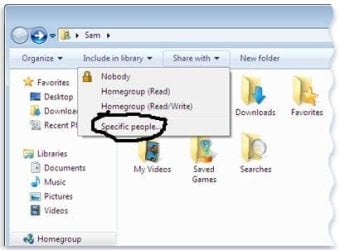
To my knowledge you can select a specific pc.
 

Attachments

  • 8371c183-f3a8-4b77-ab26-10e98d887b8a.jpg
    8371c183-f3a8-4b77-ab26-10e98d887b8a.jpg
    17.8 KB · Views: 25

My Computer

Computer Manufacturer/Model Number
Home built
OS
Windows 7 Home Premium x64
CPU
AMD Phenom II X4 945
Motherboard
ASUS M4N98TD EVO AM3 NVIDIA nForce 980a SLI
Memory
8 GB G-Skill 1.5v DDR 3 1333Mhz
Graphics Card(s)
(2) MSI 512MB GTS 250 SLI
Sound Card
Soundblaster Audigy 2 platinum
Monitor(s) Displays
Samsung 2255BW 22"
Screen Resolution
1650 x 1050
Hard Drives
2 WD 250GB 7500RPM
PSU
Antec TP-750. The ultimate bang for the buck PSU
Case
Raidmax
Cooling
Sycthe Slipstream cooling fans(4)
Keyboard
Zboard Merc
Mouse
Logitech MX-518
Internet Speed
3MB
Other Info
LG Blu-Ray/DVD combo drive/LG DVD-RW w/ lightscribe
There has to be someone on here who knows what they are talking about. First of all when you are connected to a homegroup your connected to those computers no matter what, It dosnt matter what workgroup you are in. Second "specific people" meaning a specific user on the local machine not on the homegroup. You can set a permission for "everyone" but that applies to the whole network not a specific computer. To set a permission for a specific computer the location to be searched has to be changed from the local machine (which is the only option in permissions window) to a machine on the network. Thanks for the replies but if you dont know what you are talking about then save me time and dont post!!!
 

My Computer

Computer Manufacturer/Model Number
Compaq
OS
Windows 7 Ultimate
copied this from another post it may help. essentially you should be able to create a second homegroup. I have not tried myself but it may help.

Go to Network and Sharing center. Change network type from Home to Public. Click Close.

Click "Change Advanced sharing settings". Click OK or Cancel

Change network type back to "Home" and then press Next. It should create a new Homegroup automatically
.
Links:
http://www.sevenforums.com/network-sharing/21351-multiple-homegroups.html#post232625

http://www.sevenforums.com/tutorials/122666-permissions-allow-deny-users-groups.html

http://www.sevenforums.com/tutorials/24232-sharing-permissions.html?filter

Raz
 

My Computer

Computer Manufacturer/Model Number
home built PC. Laptop studio1557
OS
windows 7 64 bit and dual boot Pinguyos
CPU
PC, intel i7 920 2.7ghz, laptop i7 720
Motherboard
PC, Asus P6t .laptop probably rubbish from dell
Memory
PC 6GB, laptop 2GB, me 2 seconds after 6 pints
Graphics Card(s)
PC Asus eah5870,laptop, ati hd 4580
Monitor(s) Displays
Sharp 42" HD TV using HDMI + HDMI to onkyo surround amp
Screen Resolution
1920x1080
Hard Drives
1x ssd OCZ 60GB, 2x250GB raid0, 2x1TB (storage),2TB
PSU
OCZ 700w
Case
antec 902
Cooling
antec khuler h20 920
Keyboard
logitek wave
Mouse
x8 sidewinder
Internet Speed
dog slow
This only worked for that guys because someone elts on his network already created a homegroup. He wasnt a part of the homegroup him self. He wasnt acually connected to 2 homegroups. Did you not see my last post?
 

My Computer

Computer Manufacturer/Model Number
Compaq
OS
Windows 7 Ultimate
Good luck.
 

My Computer

Computer Manufacturer/Model Number
Home built
OS
Windows 7 Home Premium x64
CPU
AMD Phenom II X4 945
Motherboard
ASUS M4N98TD EVO AM3 NVIDIA nForce 980a SLI
Memory
8 GB G-Skill 1.5v DDR 3 1333Mhz
Graphics Card(s)
(2) MSI 512MB GTS 250 SLI
Sound Card
Soundblaster Audigy 2 platinum
Monitor(s) Displays
Samsung 2255BW 22"
Screen Resolution
1650 x 1050
Hard Drives
2 WD 250GB 7500RPM
PSU
Antec TP-750. The ultimate bang for the buck PSU
Case
Raidmax
Cooling
Sycthe Slipstream cooling fans(4)
Keyboard
Zboard Merc
Mouse
Logitech MX-518
Internet Speed
3MB
Other Info
LG Blu-Ray/DVD combo drive/LG DVD-RW w/ lightscribe
Your right i should not have replied in fact with your attitude surprising any one will.
Do us a favour take a deep breath and wind your neck in.

Good luck
 

My Computer

Computer Manufacturer/Model Number
home built PC. Laptop studio1557
OS
windows 7 64 bit and dual boot Pinguyos
CPU
PC, intel i7 920 2.7ghz, laptop i7 720
Motherboard
PC, Asus P6t .laptop probably rubbish from dell
Memory
PC 6GB, laptop 2GB, me 2 seconds after 6 pints
Graphics Card(s)
PC Asus eah5870,laptop, ati hd 4580
Monitor(s) Displays
Sharp 42" HD TV using HDMI + HDMI to onkyo surround amp
Screen Resolution
1920x1080
Hard Drives
1x ssd OCZ 60GB, 2x250GB raid0, 2x1TB (storage),2TB
PSU
OCZ 700w
Case
antec 902
Cooling
antec khuler h20 920
Keyboard
logitek wave
Mouse
x8 sidewinder
Internet Speed
dog slow

My Computer

Computer type
Laptop
Computer Manufacturer/Model Number
a
OS
Windows 7 x64
CPU
a
Motherboard
a
Memory
a
Graphics Card(s)
a
Hard Drives
a
Antivirus
a
Browser
a
Back
Top