Network sharing stopped working? password required?

cokewithvanilla

New member
Member
Local time
5:25 AM
Messages
69
I have been using windows 7 as my sole operating system since build 7087 and have never had sharing issues. I have it setup so that my desktop is a file server for my laptop. I setup sharing using the advanced panel under drive properties, I also set the security through there. Everything is set on "Everyone: Full Control". Up until today it worked just fine. I uninstalled and reinstalled my wireless drivers on the desktop (which resolved my internet issues) and now I get a box "Enter Network Password". I don't even have a password on either of the computers.

I reset all the settings, changing them to something else then changing them back, but nothing works. I can't see how nothing works with all of the same settings.

I feel that the network setup for both vista and 7 is stupidly difficult. Its like they don't really want you to share an entire drive, so they make you jump through hoops to do so. Sharing should be simple, right click, share, say who can share, done. What's so hard about that?

oh, i also tried to just share a folder (which has always been much easier, and this doesn't work either)
Anyway, anyone have an idea on this one?
 

My Computer

OS
Windows 7 Ult x64
CPU
i5-520m
Memory
8gb Kingston HyperX
Graphics Card(s)
NVS 3100m
Monitor(s) Displays
15.6'' LG Matte
Screen Resolution
1920x1080
Hard Drives
Samsung 840
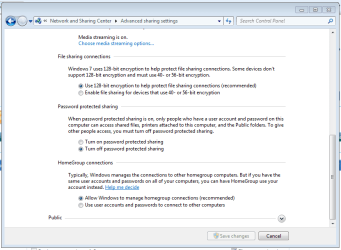
In Network & Sharing center, click 'Advanced sharing settings' and select 'Turn off password protected sharing' this will stop the annoying message. It's default value is ON.

Capture.PNG

Hope this helps :)


Jeff
 

My Computer

Computer Manufacturer/Model Number
Compaq Desktop
OS
Windows 7 Ultimate x64
CPU
AMD Sempron Dual Core
Memory
3GB
Graphics Card(s)
NVIDIA GeForce 6150SE nForce 430
Screen Resolution
1024x768
Hard Drives
150GB Sata
already off.

my settings are the SAME as they have always been, meaning no password required. I hate having to type a password to access my own damn files >_<

oh, and I even tried creating an account and password, this didnt work either
 

My Computer

OS
Windows 7 Ult x64
CPU
i5-520m
Memory
8gb Kingston HyperX
Graphics Card(s)
NVS 3100m
Monitor(s) Displays
15.6'' LG Matte
Screen Resolution
1920x1080
Hard Drives
Samsung 840

My Computer

Computer Manufacturer/Model Number
Compaq Desktop
OS
Windows 7 Ultimate x64
CPU
AMD Sempron Dual Core
Memory
3GB
Graphics Card(s)
NVIDIA GeForce 6150SE nForce 430
Screen Resolution
1024x768
Hard Drives
150GB Sata
I guess i could try that, I just dont understand what happened between yesterday and today. Is there any mass reset for ALL settings related to file sharing?
 

My Computer

OS
Windows 7 Ult x64
CPU
i5-520m
Memory
8gb Kingston HyperX
Graphics Card(s)
NVS 3100m
Monitor(s) Displays
15.6'' LG Matte
Screen Resolution
1920x1080
Hard Drives
Samsung 840
I'm not too sure, have you made any changes to your firewall settings that may have caused this?
 

My Computer

Computer Manufacturer/Model Number
Compaq Desktop
OS
Windows 7 Ultimate x64
CPU
AMD Sempron Dual Core
Memory
3GB
Graphics Card(s)
NVIDIA GeForce 6150SE nForce 430
Screen Resolution
1024x768
Hard Drives
150GB Sata
interesting. my computer has been having trouble connecting to my network, i thought I fixed the problem, but when I removed my network settings and tried to reconnect, I am once again unable to connect.

nope, don't believe I even have the firewall enabled.
 

My Computer

OS
Windows 7 Ult x64
CPU
i5-520m
Memory
8gb Kingston HyperX
Graphics Card(s)
NVS 3100m
Monitor(s) Displays
15.6'' LG Matte
Screen Resolution
1920x1080
Hard Drives
Samsung 840
Have you tried resetting your router? I've seen many connection issues fixed that way.

P.S i've gotta go, hopefully someone may be able to answer better than I have :p
 

My Computer

Computer Manufacturer/Model Number
Compaq Desktop
OS
Windows 7 Ultimate x64
CPU
AMD Sempron Dual Core
Memory
3GB
Graphics Card(s)
NVIDIA GeForce 6150SE nForce 430
Screen Resolution
1024x768
Hard Drives
150GB Sata
yeah, i have changed a bunch of settings on that router today )trying to get it to work on my desktop). it seems to be a pretty unstable router, but it works just fine on the laptop right now, and all the settings appear to be ok right now.
 

My Computer

OS
Windows 7 Ult x64
CPU
i5-520m
Memory
8gb Kingston HyperX
Graphics Card(s)
NVS 3100m
Monitor(s) Displays
15.6'' LG Matte
Screen Resolution
1920x1080
Hard Drives
Samsung 840
when you get asked for the password, does it ask you for a user as well? have you tried to enter your user/password?
 

My Computer

Computer Manufacturer/Model Number
home made
OS
Windows 7 7264x64(main), 7260x86(secendary), XP SP3 Triple Boot
CPU
Intel Core 2 Duo E7400 2.8Mhz
Motherboard
Intel G33 express chipset
Memory
2GB DD2 667
Graphics Card(s)
Intel(R) 82G33 Graphics and Memory Controller Hub
Sound Card
Realtek Built into the G31
Monitor(s) Displays
19"
Screen Resolution
1280x1024
Hard Drives
320GB SATA (Main), 160GB IDE (Backup)
Case
Gigabyte SETTO
Keyboard
Genius
Mouse
Logitech
Internet Speed
1MB Download, 128k Upload
nope, don't believe I even have the firewall enabled.

Yikes...especially with what would seem to be an unreliable router..
Sorry I can't help you with networking issues, not really my forte, but security IS so I had to post.
 

My Computer

Computer Manufacturer/Model Number
Personal Build
OS
Vista Ult 64bit - Windows 7 Ult 7264 64bit
CPU
Intel Core 2 Duo E6750
Motherboard
Asus Commando
Memory
4 G's Crucial Ballistix Tracer
Graphics Card(s)
BFG Nvidia 8800 GTS 340
Sound Card
Creative Sound Blaster X-FI Platinum FATAL1TY
Monitor(s) Displays
2-22" HP W2207 LCD
Screen Resolution
1920 x 1080
Hard Drives
3 x 500G WD Caviar SATA II
PSU
Enermax Noise Taker II 600W
Case
NZXT Lexa Classic (dual doored & windowed)
Cooling
Zalman 9700 CPU cooler - 4 x 120mm, 1 x 90mm fans
Keyboard
Logitech MX 5500
Mouse
Logitech MX Revolution
Internet Speed
Blazing...
Well, considering that none of my computers have a password, I did not type my password. However, I did set up a vpn, created a new account and password, even when not connected to the vpn if I use that account I can connect. After typing that account and password once, it is no longer asking me for it... I wonder what would happen if I delete that account.

Anyhow, my router is functioning properly now. As for security, I have never been a big fan. I haven't had any type of antivirus/malware in 7 years, and the most security I've ever had was windows firewall. I haven't ever experienced security problems or gotten a virus. It's always amazed me how peoples computers get so infected, even when they use all the crappy free antivirus software (avg, adaware, etc). I just blame it on the child porn, which I don't partake in.
 

My Computer

OS
Windows 7 Ult x64
CPU
i5-520m
Memory
8gb Kingston HyperX
Graphics Card(s)
NVS 3100m
Monitor(s) Displays
15.6'' LG Matte
Screen Resolution
1920x1080
Hard Drives
Samsung 840
My suspicion is that it's due to updates. I have the same problem and it only started after doing some updates this morning. I haven't found any solution and haven't yet tried rolling them back to see if it fixes it.
 

My Computer

OS
Windows 7 Home Premium x64
CPU
AMD Athlon 64 X2 4200+
Graphics Card(s)
Nvidia GeForce 8800GTS
same problem, different year

I have the same problem with a new WINDOWS 7 machine. Whenever I try to look at a shared file on this machine from another machine (both XP and 7 machines) I get the request for user and password. Did you ever solve the problem? If so, can you share (no pun intended) the solution.
 

My Computer

Computer Manufacturer/Model Number
Gateway
OS
Windows 7 Home Premium 64 bit
CPU
Intel i3
Motherboard
?
Memory
6 GB
Hard Drives
1TB
OK. My computer has a guest acct., and I have three computers networked together. I've turned off password sharing, and shared my public folders. One never did ask for credentials, to my memory. The other wanted me to give a U/P. I tried giving it "Guest" and an empty pass for its login. It then seems to have quit bothering me about it.
 

My Computer

Computer type
PC/Desktop
OS
Windows 7 Home 32bit
Back
Top