Network tries to reindentify itself now and then.

Walter zarl

New member
Local time
8:14 AM
Messages
9
When the computer starts up it connects itself to the router(ZTE 4G router) aoutomaticly, but after i have surfed the web for a while, it tries to indentify itself, meaning you get that little blue circle next to the little screen at the corner. When browsing it does not cause any problems, but if im streaming a video the video will then stop, ill have to refresh the page to make the video start again. And if im playing a game LoL for eg, the game will freeze for about 2 sec then continue again(due to lost connecion to the internet).

I have no virus on my computer, although i had before. I have reset my router, restarted my computer, updated my ethernet driver, checked so that the ipv4 is set on aoutomatic and tried diffrent router chanels. I have had this router for a few months and the problem just started recently.

I would be happy for any assistance.
 

My Computer My Computer

At a glance

windows 7
OS
windows 7
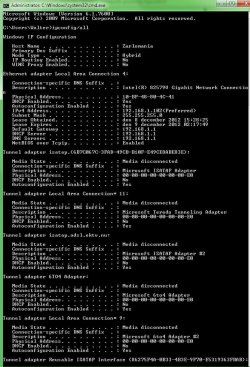
Here is the ipconfig photo
 

Attachments

  • pis.jpg
    pis.jpg
    97.5 KB · Views: 13

My Computer My Computer

At a glance

windows 7
OS
windows 7
The only problem I see with the ipconfig is that you are showing a few too many tunnel adaptors which can be problematic.

You might try removing them in Device Manager. You can safely remove them all and Windows will make a new one when required.
 

My Computer My Computer

At a glance

Windows 7 Ult, Windows 8.1 Pro,Q9650-4.275GHz, E8600 4.5GHz, E6750-3.8GHzG.Skill PC2 9600 1200Mhz 5 5 5 15 2TGTX480
Computer type
PC/Desktop
Computer Manufacturer/Model Number
Home built
OS
Windows 7 Ult, Windows 8.1 Pro,
CPU
Q9650-4.275GHz, E8600 4.5GHz, E6750-3.8GHz
Motherboard
Evga 780i FTW
Memory
G.Skill PC2 9600 1200Mhz 5 5 5 15 2T
Graphics Card(s)
GTX480
Sound Card
Asus Xonar D2
Monitor(s) Displays
HannsG
Screen Resolution
1680X1050
Hard Drives
GSkill Phoenix Pro 120GB SSD
PSU
ThermalTake Toughpower 1000Watt modular
Case
ThermalTake XaserV
Cooling
Xigmatek S1283
Keyboard
Logitech G15
Mouse
Logitech G9
Internet Speed
T1
Hi Walter,

I have started a thread which looked similar to your problem ( except for the yellow dot ). Perhaps it is helpfull even without a solution by now.
http://www.sevenforums.com/network-...-identifying-frequently-yellow-star-logo.html

I cleaned up also those tunnel adapters in dev.mgmt by deleting the hidden networkadapters but nothing helped. Ipv6 disabled everywhere (not in registry).
Blue circle of identifying keeps turning (time to time).
And yes, the identifying problem frequents more often when using the internet...
 

My Computer My Computer

At a glance

W7 Home Premium 64bitPentium Dual Core [email protected]4GBNVIDIA Geforce G 103M
Computer Manufacturer/Model Number
CQ71-420ED
OS
W7 Home Premium 64bit
CPU
Pentium Dual Core [email protected]
Motherboard
HP306c
Memory
4GB
Graphics Card(s)
NVIDIA Geforce G 103M
Screen Resolution
1600 x 900
Internet Speed
14Mbps
Thanks for the responds! i have cleared those adapters aswell, dont think it helped but always good to remove stuff you dont use. I have tried most of the things i have read on the forums, but the whole problem seems random, sometime it works without a problem and sometimes it starts indentifying again. But ill keep looking and ill post if i find something of use :) Thanks again för your time to respond
 

My Computer My Computer

At a glance

windows 7
OS
windows 7
Back
Top