network window freezes

angeltread

New member
Local time
5:40 PM
Messages
4
i got this new laptop... came with windows 7.
i assigned the wireless network of my house and everything was working fine and dandy... i then tried to connect tot he shared files of my other computers and they were not showing up. i noticed the workgroup name was called "homegroup" and my shared files on all my xp computer group is called "tss" so i go to the part whewe i can change the computer's name (i hadnt assigned it yet) and gave teh computer a name and changed the "homegroup" to "tss" i wanted to restart so i let it... since that restart... it wont connect to wireless. going to the network window makes it freeze. auto diagnosis the problem just freezes forever. help.
 

My Computer

OS
7
so yeah. my brand new computer wont even connect to wireless internet cause anything to do with networking seems to freeze.
 

My Computer

OS
7
Homegroups only work with other Win7 systems. If the other machines are XP then you'll need to change the *workgroup* name.

To change the workgroup go to Control Panel => System and Security => System and look at the "Computer Name, domain and workgroup settings." There's a link to the right that says "Change settings". From there look for the "Change" button. That will allow to to change the workgroup name.

Let me know if that works!
 

My Computer

Computer Manufacturer/Model Number
Dell C521
OS
W7 Ultimate 64bit W7 Premium 64bit W7 Premium 32bit WXP Home 32bit
CPU
Athlon 64X2 5000+
Motherboard
Dell
Memory
4GB
Graphics Card(s)
ATI X1300
Sound Card
On Board
Monitor(s) Displays
Dell 19" Flat
Screen Resolution
1280x1024
Hard Drives
500GB Western Digital Caviar Green
Mouse
Microsoft Wireless Intellimouse Explorer 2.0
Internet Speed
SBC DSL - 6Mbps
well unfortunately that was kinda what caused the problem. least as far as i can tell.

i changed the name of the computer (just to my name) and the workgroup name to match the xp workgroup's "TSS". it then said restart so i did. then ever since then anything do do with networking just freezes. the wireless icon down by the clock... clicking on that does nothing. going to the network icon within a "explorer" window just goes blank and freezes. everything else works fine....

i honestly must've found a bug or something, some ghost in the machine. maybe it was cause i didnt unassign the network from the "homegroup" i unintentionally started before changing the name... idk... i have since restored to factory defaults with the laptop and this time did not set up fresh homegroup. but rather just assigned the workgroup to the same as the xp computers. everything is going ok now.
 

My Computer

OS
7
The bug you found was that you can't use Homegroup if there are Vista or XP machines on the LAN. Although that isn't a bug, it's that way by design. Lots of people have been doing that lately.
 

My Computer

Computer type
PC/Desktop
Computer Manufacturer/Model Number
Home built
OS
Windows 7 Ult, Windows 8.1 Pro,
CPU
Q9650-4.275GHz, E8600 4.5GHz, E6750-3.8GHz
Motherboard
Evga 780i FTW
Memory
G.Skill PC2 9600 1200Mhz 5 5 5 15 2T
Graphics Card(s)
GTX480
Sound Card
Asus Xonar D2
Monitor(s) Displays
HannsG
Screen Resolution
1680X1050
Hard Drives
GSkill Phoenix Pro 120GB SSD
PSU
ThermalTake Toughpower 1000Watt modular
Case
ThermalTake XaserV
Cooling
Xigmatek S1283
Keyboard
Logitech G15
Mouse
Logitech G9
Internet Speed
T1
:D Welcome Angel
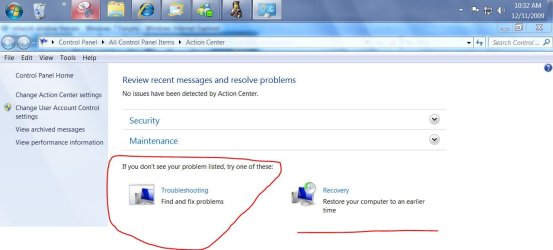
trouble shooter.JPG
 

My Computer

Computer Manufacturer/Model Number
Gateway GT5692
OS
Windows 7 Ulti. x64
CPU
AMD Phenom 8450 triple-core 2.10 ghz
Memory
4GB
Graphics Card(s)
ATI Radion HD 3200
Monitor(s) Displays
Gateway FPD1775W
Screen Resolution
1280x720
Hard Drives
465.6613 Gibibytes
Back
Top