Network windows 7 and XP

raccoon19

New member
Member
Local time
10:04 AM
Messages
72
Location
Near Durham city
Hi everyone. hope life is good for you. My question today is...
"I would like to set up my desktop machine which is windows 7, and my laptop which is XP to work on a network style system".
The main thing I want to do is be able to use the printer from the laptop. The printer is connected to the desktop via a cable.
I already have a wireless router that both computers work from at the same time. I have not set up either computer to have an individual address, only what the router gives them when starting up. (hope that makes sense).
I am not a novice but do get a bit confused when there is a lot of things to do. So if anyone can maybe give me some directions I would be gratefull.
 

My Computer

Computer Manufacturer/Model Number
HP
OS
windows 7
Memory
3 gig
Graphics Card(s)
on board
Sound Card
?
Monitor(s) Displays
19" HP
Hard Drives
1 TB
Internet Speed
Average 6.8kbps
Other Info
32 bit/64 bit
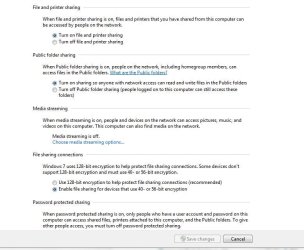
Go into your Network&sharingCenter under windows7 and the equivalent for XP and enable File and Printersharing and netbios over TCP/IP.
 

My Computer

OS
Windows 7
WOW that was a fast reply, cheers sOsO. Will have a go this afternoon.
 

My Computer

Computer Manufacturer/Model Number
HP
OS
windows 7
Memory
3 gig
Graphics Card(s)
on board
Sound Card
?
Monitor(s) Displays
19" HP
Hard Drives
1 TB
Internet Speed
Average 6.8kbps
Other Info
32 bit/64 bit
Never mind, I cannot do it. thanks anyway
 

My Computer

Computer Manufacturer/Model Number
HP
OS
windows 7
Memory
3 gig
Graphics Card(s)
on board
Sound Card
?
Monitor(s) Displays
19" HP
Hard Drives
1 TB
Internet Speed
Average 6.8kbps
Other Info
32 bit/64 bit
On the win7 machine make sure you have Discovery set to ON in the network options center. Also printer & files sharing checked as ON.
 

Attachments

  • network_options.JPG
    network_options.JPG
    73.4 KB · Views: 16
  • Network_Options2.JPG
    Network_Options2.JPG
    60.1 KB · Views: 11

My Computer

Computer type
PC/Desktop
Computer Manufacturer/Model Number
Built them myself, Science Experiments !
OS
Win7 Enterprise, Win7 x86 (Ult 7600), Win7 x64 Ult 7600, TechNet RTM on AMD x64 (2.8Ghz)
CPU
AMD fx8350 4ghz, AMD-32 2400mhz, AMD-64 3200mhz, AMDx64 2.8G
Motherboard
SIS 755, ECS-K8M890M-M (Ult 7600), GigaByte & others
Memory
2gb, 4gb on the Ult 7600, 4gb on Technet RTM, 32gb on FX8350
Graphics Card(s)
Draw my own Graphics, several nVidia cards
Sound Card
on motherboard
Monitor(s) Displays
19" flat scr, 28" I-Inc widescr,22" Emprex Widescr, 23" Acer
Screen Resolution
1280 x 1024, 1440 x 900, 1920 x 1080
Hard Drives
6 pata Ide HD's & 2 Sata HD's
added 80gb external on Ult 7600 computer,
numerous extra 1tb, 2TB, 3Tb SATA HD's
A collection of ext HD Docks w/ HDs
PSU
430w, 550w, 600w, 700, 800, etc
Case
All Generic Full Towers
Cooling
Open Air & a few fans, some w/ colored LEDs
Keyboard
Compaq & Dell recycled from GoodWill
Mouse
Made in China Optical Wired Mouse
Internet Speed
Fast Cable InterNet
Antivirus
AVG Free on 24 different Desktops, NO Problems!
Browser
IE 8 is preferred, but use FireFox sometimes
Other Info
Linksys Routers, switches, & Hubs
Too Many USB Flash Drives to count, Biggest is 64GB !
Eight computers in my home network.
Sixteen computers at my business network.
Linked via TeamViewer !
Lots of old used spare computer parts everywhere!
well if he sets the networksecurity policy to private iit should all be enabled.
So keep in mind the public securitypolicy also applies to you internet so you really don't want to tamper with that.
So mark the connection as private and you are good.
What I was talking about was changing the parameters directly for the ethernetcard.
 

My Computer

OS
Windows 7
Hi everyone. hope life is good for you. My question today is...
"I would like to set up my desktop machine which is windows 7, and my laptop which is XP to work on a network style system".
The main thing I want to do is be able to use the printer from the laptop. The printer is connected to the desktop via a cable.
I already have a wireless router that both computers work from at the same time. I have not set up either computer to have an individual address, only what the router gives them when starting up. (hope that makes sense).
I am not a novice but do get a bit confused when there is a lot of things to do. So if anyone can maybe give me some directions I would be gratefull.

I assume you have already installed the printer to the desktop and it's working fine.

Go Start > Control Panel > Device and Printers.
Right-click on the printer you want to share > Printer Properties > Sharing tab.
Click the Change Sharing Option buton.
Select Share this Printer option.
Type in the name and Click Apply then OK.

Then from the laptop, go into Device and Printers.
Click Add a printer
Click Add a network, wireless or Bluetooth printer (the second selection)
Click The printer that i want isn't listed option (just below the scanning bar)
Select the second option, type in the box the \\ipaddressofdesktop\sharenameoftheprinter.
Click Next.
..
..
If everything is correct, you will have the printer installed on your dekstop. Go in the Device and Printers page on the laptop and check.
 

My Computer

Computer Manufacturer/Model Number
Lenovo ThinkPad T60
OS
Windows 7 Ultimate 64Bit
CPU
GenuineIntel Intel(R) Core(TM) DuoCore T2400 @ 1.83GHz
Motherboard
Intel(R) 82801G (ICH7 Family)
Memory
2.00 GB
Graphics Card(s)
Mobile Intel(R) 945 Express Chipset
Sound Card
SoundMAX Integrated Digital HD Audio
Monitor(s) Displays
ThinkPad Display
Screen Resolution
1400x1050
Hard Drives
100Gb SATA
Keyboard
Standard Keyboard
Mouse
HID-compliant Mouse
Internet Speed
Cable Broadband - 54Mbps
Other Info
Intel(R) PRO/1000 PL Network Connection
11a/b/g Wireless LAN Mini PCI Express Adapter
Hi everyone. hope life is good for you. My question today is...
"I would like to set up my desktop machine which is windows 7, and my laptop which is XP to work on a network style system".
The main thing I want to do is be able to use the printer from the laptop. The printer is connected to the desktop via a cable.
I already have a wireless router that both computers work from at the same time. I have not set up either computer to have an individual address, only what the router gives them when starting up. (hope that makes sense).
I am not a novice but do get a bit confused when there is a lot of things to do. So if anyone can maybe give me some directions I would be gratefull.

This should help you set that up.

Share Files and Printers between Windows 7 and XP - the How-To Geek
 

My Computer

Computer type
PC/Desktop
Computer Manufacturer/Model Number
Home built
OS
Windows 7 Ult, Windows 8.1 Pro,
CPU
Q9650-4.275GHz, E8600 4.5GHz, E6750-3.8GHz
Motherboard
Evga 780i FTW
Memory
G.Skill PC2 9600 1200Mhz 5 5 5 15 2T
Graphics Card(s)
GTX480
Sound Card
Asus Xonar D2
Monitor(s) Displays
HannsG
Screen Resolution
1680X1050
Hard Drives
GSkill Phoenix Pro 120GB SSD
PSU
ThermalTake Toughpower 1000Watt modular
Case
ThermalTake XaserV
Cooling
Xigmatek S1283
Keyboard
Logitech G15
Mouse
Logitech G9
Internet Speed
T1
Back
Top