Network windows 7

dixie1006

New member
Local time
7:39 PM
Messages
7
Location
Cornwall, UK
Hi
I have a desktop pc running windows 7 64 bit. 2.00gb ram, intel (R) quad core. I
have a netgear wireless modem.
I also have another desktop running XP and 2 laptops running vista. For quite a
while I had all pc's networked and able to see each other and open each others
files and folders. I don't know what happened but now my windows 7 desktop has a
problem.
It cannot see the XP machine. It can see the 2 vistas but if I click to open the
other pc's I get an error message: *****is not accessable, you might not have
permission to use this resource, contact the administrator etc.
From any of the vistas and the XP, all computers are visible and are able to
open. It is just the w7 that has the problem.

I have tried various troubleshooters and none have cured the problem. I did see
on one of the troubleshooters something to do with the time. I have opened
date/time and checked it is UK and 'synchronized' but this didn't help.

All the computers are in the group 'Workgroup'. My W7 is set to 'Home' network
but I have also tried 'Work'. Everything is 'turned on' in the advance sharing
of network and sharing centre. In 'Network' the W7 sees itself but this too gets
the error message 'not accessable' when I click on it.

There must be something Im not doing but originally when I set the network up,
it all went smoothly!

Gail
 

My Computer

OS
Windows 7 Home 64 bit
Memory
2.00
Graphics Card(s)
Nvidia 8500GT
Hard Drives
Maxtor 300gb
Hi
I have a desktop pc running windows 7 64 bit. 2.00gb ram, intel (R) quad core. I
have a netgear wireless modem.
I also have another desktop running XP and 2 laptops running vista. For quite a
while I had all pc's networked and able to see each other and open each others
files and folders. I don't know what happened but now my windows 7 desktop has a
problem.
It cannot see the XP machine. It can see the 2 vistas but if I click to open the
other pc's I get an error message: *****is not accessable, you might not have
permission to use this resource, contact the administrator etc.
From any of the vistas and the XP, all computers are visible and are able to
open. It is just the w7 that has the problem.

I have tried various troubleshooters and none have cured the problem. I did see
on one of the troubleshooters something to do with the time. I have opened
date/time and checked it is UK and 'synchronized' but this didn't help.

All the computers are in the group 'Workgroup'. My W7 is set to 'Home' network
but I have also tried 'Work'. Everything is 'turned on' in the advance sharing
of network and sharing centre. In 'Network' the W7 sees itself but this too gets
the error message 'not accessable' when I click on it.

There must be something Im not doing but originally when I set the network up,
it all went smoothly!

Gail

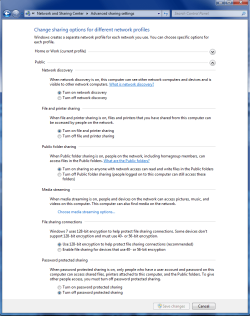
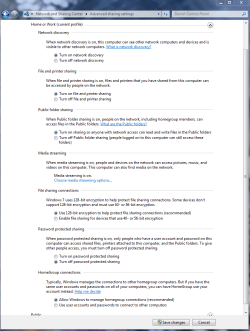
Try going into "both" of the advanced sharing settings "Public and Work-Home" and makinng sure that all the settings are like in the pictures below. These are two different windows.
 

Attachments

  • public sharing enabled all.PNG
    public sharing enabled all.PNG
    39.7 KB · Views: 155
  • Home or work homegroup enable.PNG
    Home or work homegroup enable.PNG
    45 KB · Views: 118

My Computer

Computer type
PC/Desktop
Computer Manufacturer/Model Number
Home built
OS
Windows 7 Ult, Windows 8.1 Pro,
CPU
Q9650-4.275GHz, E8600 4.5GHz, E6750-3.8GHz
Motherboard
Evga 780i FTW
Memory
G.Skill PC2 9600 1200Mhz 5 5 5 15 2T
Graphics Card(s)
GTX480
Sound Card
Asus Xonar D2
Monitor(s) Displays
HannsG
Screen Resolution
1680X1050
Hard Drives
GSkill Phoenix Pro 120GB SSD
PSU
ThermalTake Toughpower 1000Watt modular
Case
ThermalTake XaserV
Cooling
Xigmatek S1283
Keyboard
Logitech G15
Mouse
Logitech G9
Internet Speed
T1
Network Windows 7

Ive just gone into advanced sharing options and made sure all my settings for home/work/public are the same, this hasn't made any difference.
I have noticed since that if I look in 'computer-local diskC-users-dixie (name of my pc)' that the dixie folder has a padlock on. Would this be causing the problem, if so, I don't know how to unlock it?
Gail
 

My Computer

OS
Windows 7 Home 64 bit
Memory
2.00
Graphics Card(s)
Nvidia 8500GT
Hard Drives
Maxtor 300gb
Yes that would do it. For some reason your drive had it's sharing permissions removed, it's usually best to share the User folder rather than the entire drive.

You can right click the drive and choose the properties tab then you can use the security tab and then the "add" button. Add "Everyone" to the list and put check marks for full access.

Also use the sharing tab> advanced sharing to share the drive if you want, put a check mark to share this folder. You will probably need to add "Everyone" to the share with list in order to get it working. Also put check marks in the boxed for full access.

This is all standard procedure for sharing drives in Windows 7 so I'm not sure what the actual problem is here.
For sharing just folders and files use the tutorial below.
http://www.sevenforums.com/tutorials/24232-sharing-permissions.html?filter
 

My Computer

Computer type
PC/Desktop
Computer Manufacturer/Model Number
Home built
OS
Windows 7 Ult, Windows 8.1 Pro,
CPU
Q9650-4.275GHz, E8600 4.5GHz, E6750-3.8GHz
Motherboard
Evga 780i FTW
Memory
G.Skill PC2 9600 1200Mhz 5 5 5 15 2T
Graphics Card(s)
GTX480
Sound Card
Asus Xonar D2
Monitor(s) Displays
HannsG
Screen Resolution
1680X1050
Hard Drives
GSkill Phoenix Pro 120GB SSD
PSU
ThermalTake Toughpower 1000Watt modular
Case
ThermalTake XaserV
Cooling
Xigmatek S1283
Keyboard
Logitech G15
Mouse
Logitech G9
Internet Speed
T1
When I right click the C: drive properties and open the security tab there are 4 items in there under 'Group or usernames' : Authenticated users, System, Administrators (dixie\administrator) and Users (DIXIE\user).
There is no 'add' button on this. If I highlight the first one, there are no ticks under permissions for authenticated users. The other 3 items have ticks under all 'allow' items.

On the sharing tab under Network file and folder sharing it says C:\Not shared. Under Network Path it says Not Shared and the share button is greyed out. If I click on the advanced sharing button I have put a tick in the Share this folder box, it says C in the share name box. If I click 'permissions' button there is only 1 item in there 'everyone' and there are 3 ticks, full control, change and read.

Everything is still the same......the 'dixie' folder inside the users folder is still padlocked and I still get an error message when I dbl click on any item (vista pc) listed on my 'Network'. Error: \\Dixie is not accessable. You might not have permission to use this networek resource etc.

The user folder, if I right click-properties and click the sharing tab this too says it is not shared, however when I click on the advanced sharing button, 'share this folder' is ticked and full control is given to everyone and Administrators (DIXIE\\administrator). On the security tab there are 4 items and all have ticks for full control.

I hope I am explaining this ok. Even to take the xp pc out of the equation, when I can see the vistas in my network it won't let me access them. Just keep getting the ****is not accessable, might not have permission etc.

Gail
 

My Computer

OS
Windows 7 Home 64 bit
Memory
2.00
Graphics Card(s)
Nvidia 8500GT
Hard Drives
Maxtor 300gb
On the Security tab you would click "Edit" then "Add" then type in "Everyone" in the box although you should be able to share all the folders by just allowing sharing of the User folder. If the share button is greyed out then something else is wrong. Or for some reason you don't have ownership of the drive.

As for the user folder and the name "dixie" you should be able to right click that folder, choose "share with" then choose "specific people" then type "Everyone" then set up Everyone for read write access. This is standard procedure really so I'm not sure why that won't work for you.

It's crazy because everyone complains about sharing with Vista and XP yet I set up sharing with my old systems and Windows 7 over a year and a half ago and never had any problems at all. I will say that if you have any type of A/V software or third party firewall installed then all bets are off for getting this to work. You should always set up sharing and make sure it all works before installing any type of A/V software.
 

My Computer

Computer type
PC/Desktop
Computer Manufacturer/Model Number
Home built
OS
Windows 7 Ult, Windows 8.1 Pro,
CPU
Q9650-4.275GHz, E8600 4.5GHz, E6750-3.8GHz
Motherboard
Evga 780i FTW
Memory
G.Skill PC2 9600 1200Mhz 5 5 5 15 2T
Graphics Card(s)
GTX480
Sound Card
Asus Xonar D2
Monitor(s) Displays
HannsG
Screen Resolution
1680X1050
Hard Drives
GSkill Phoenix Pro 120GB SSD
PSU
ThermalTake Toughpower 1000Watt modular
Case
ThermalTake XaserV
Cooling
Xigmatek S1283
Keyboard
Logitech G15
Mouse
Logitech G9
Internet Speed
T1
The strange this is, all this was working a few months ago. I only noticed no access to it a few weeks ago and Ive been trying ever since to get it working. I am running the free version of avast, but I was before when it worked.
The 'dixie'(my pc name) folder in 'users' does not have the padlock on anymore. I was messing with the permissions last night and then just before I switched off, noticed the padlock gone.
Now when I go into 'My computer-Users' the dixie folder has no padlock on and when I right click properties, on the sharing tab it says this folder is not shared and the 'share' button is still greyed out.
Gail
 

My Computer

OS
Windows 7 Home 64 bit
Memory
2.00
Graphics Card(s)
Nvidia 8500GT
Hard Drives
Maxtor 300gb
Just to add to my previous post.......
Ive just gone back to the 'dixie' folder and on the sharing tab of the properties, the 'share' button is not greyed out now! It seems this keeps changing. I have just clicked on the share button and it opens a window with the green bar then eventually stops with the message 'this folder cannot be shared'???
Gail
 

My Computer

OS
Windows 7 Home 64 bit
Memory
2.00
Graphics Card(s)
Nvidia 8500GT
Hard Drives
Maxtor 300gb

My Computer

Computer type
PC/Desktop
Computer Manufacturer/Model Number
Home built
OS
Windows 7 Ult, Windows 8.1 Pro,
CPU
Q9650-4.275GHz, E8600 4.5GHz, E6750-3.8GHz
Motherboard
Evga 780i FTW
Memory
G.Skill PC2 9600 1200Mhz 5 5 5 15 2T
Graphics Card(s)
GTX480
Sound Card
Asus Xonar D2
Monitor(s) Displays
HannsG
Screen Resolution
1680X1050
Hard Drives
GSkill Phoenix Pro 120GB SSD
PSU
ThermalTake Toughpower 1000Watt modular
Case
ThermalTake XaserV
Cooling
Xigmatek S1283
Keyboard
Logitech G15
Mouse
Logitech G9
Internet Speed
T1
I downloaded the link last night and right clicked (dixie)-my pc, the cmd window opened and it took almost an hour to complete. It was moving quickly but I could make out that it was taking ownership, however, my problem still exsists.
I can see the vista pc's (On my W7 pc)but it won't give me permission to access them. It still remains that this W7 pc can be accessed from the vista's (and the XP)???
Gail
 

My Computer

OS
Windows 7 Home 64 bit
Memory
2.00
Graphics Card(s)
Nvidia 8500GT
Hard Drives
Maxtor 300gb
Try doing this adjustment on the XP machine that isn't being seen.

This will see the XP machine to Guest only "less secure" by going into the local security policies on the XP machine.

Go to... Control Panel > Administrative Tools > Local Security Policy > Local Policies > Security Options

Scroll down to... Network Access: Sharing and security model for local accounts

Select... Guest only and not Classic. I checked on XP machine and Guest seems to be the default.
 

My Computer

Computer type
PC/Desktop
Computer Manufacturer/Model Number
Home built
OS
Windows 7 Ult, Windows 8.1 Pro,
CPU
Q9650-4.275GHz, E8600 4.5GHz, E6750-3.8GHz
Motherboard
Evga 780i FTW
Memory
G.Skill PC2 9600 1200Mhz 5 5 5 15 2T
Graphics Card(s)
GTX480
Sound Card
Asus Xonar D2
Monitor(s) Displays
HannsG
Screen Resolution
1680X1050
Hard Drives
GSkill Phoenix Pro 120GB SSD
PSU
ThermalTake Toughpower 1000Watt modular
Case
ThermalTake XaserV
Cooling
Xigmatek S1283
Keyboard
Logitech G15
Mouse
Logitech G9
Internet Speed
T1
I followed your instructions but there is no 'Local Security policy' option in administrive tools. But the XP machine is seen on the vista's and will open from network on these, its just an issue with my W7, which doesn't see the XP and won't let me access any of the vistas that are showing in the network.
Gail
 

My Computer

OS
Windows 7 Home 64 bit
Memory
2.00
Graphics Card(s)
Nvidia 8500GT
Hard Drives
Maxtor 300gb
Back
Top