Networking and windows login screen

bbrixey

New member
Local time
2:47 PM
Messages
4
I am racking my brains trying to figure this out and probably easier then I am making it. We are a hospital moving from XP pro to 7 pro. We are a Novell shop (no laughing).
I have Novell loaded and get the novell signon, once I sign on I then get the "Log on to this Computer". I don't have a local account set other then the administrator account. Which has been enabled and a PW set. But will not let me go any further unles I setup a local account. More then one user will be signing onto any of the machines.
We do have users that log on to the computers with a local account so I can't disable the windows login.
Can anyone shed any light on this? Is it as clear as mud?
 

My Computer

Computer type
PC/Desktop
OS
Windows 7 Pro x64
bbrixey, welcome to the windows 7 forum.

Many times the login screen has a small check window to login to the local machine or the domain. That could your case.

Normally a local machine login is not necessary if you have the correct domain credentials.

there normally should be 3 windows.
userid
password
domain/local machine name.

Rich
 

My Computer

Computer type
Laptop
Computer Manufacturer/Model Number
Toshiba Laptop Qosimo X870
OS
Windows 7 Pro x64 SP1
CPU
Intel Core I7
Motherboard
Toshiba Qosmio
Memory
16 Gigs
Graphics Card(s)
NVIDIA GeForce GTX 670M
Monitor(s) Displays
17.7" laptop
Screen Resolution
1600 x 900
Hard Drives
256 Gig SanDisk SSD for C
256 Gig Intel SSD for D
Internet Speed
50/25 FIOS
Antivirus
Vipre (all you can eat for 10 machines)
Browser
IE and FF
Other Info
I have dos 6.22, wfwg 3.11, win98, 2000 and xp VHD's available for testing. MS's Virtual PC works great.
Rich, Thanks for the reply.
The only time I have ever seen the window for "Workstation only or Local Machine" is with XP or later. Have never seen it with windows 7 pro. Networking wise anyway.
Since Novell is loaded on this machine and I log into Novell, I do get a box that says "Change your Windows password to match your Novell password after a successful Login". I don't have a local profile set up on this machine. Doesn't matter if I check it or not. It will not let me go any further unless I enter the local Administrator password. I should not have to do this.
As I stated in the original post. We will have users that will log on with only a local account, we will also have users log in to a domain.
 

My Computer

Computer type
PC/Desktop
OS
Windows 7 Pro x64
bbrixey, When you can that Novell is loaded on the machine, do you mean that it is joined to a novell domain?
Assuming so, I am not sure that there is not the capability to log into your domain or you local machine via a toggle
either by prefacing your userid with the domain name\userid or just your userid which might mean just the local machine.

Can it be assumed that your the admin for the domain? if so then you can add your username to the local machine account
within the control panel.

Rich
 

My Computer

Computer type
Laptop
Computer Manufacturer/Model Number
Toshiba Laptop Qosimo X870
OS
Windows 7 Pro x64 SP1
CPU
Intel Core I7
Motherboard
Toshiba Qosmio
Memory
16 Gigs
Graphics Card(s)
NVIDIA GeForce GTX 670M
Monitor(s) Displays
17.7" laptop
Screen Resolution
1600 x 900
Hard Drives
256 Gig SanDisk SSD for C
256 Gig Intel SSD for D
Internet Speed
50/25 FIOS
Antivirus
Vipre (all you can eat for 10 machines)
Browser
IE and FF
Other Info
I have dos 6.22, wfwg 3.11, win98, 2000 and xp VHD's available for testing. MS's Virtual PC works great.
Maybe I'm working this completely wrong.
Example: Currently have XP Pro on most machines within the organization. Due to some of the work, there are users that log into a machine as a local user. This user has administrator rights, (I know, I know, don't ask). But on the same machine('s) a user can come on and log into the network.
When the person that is logging in to the local machine only, they make sure the "Local machine" box is checked. The person that gets onto that machine later and needs to sign into the network, unchecks that box and then is able to log into the network.
As simple as this sounds. I am having issues getting this to work on the Windows 7 pro machine.
I have built the local account and when the system boots up and I choose the local machine, i get in fine.
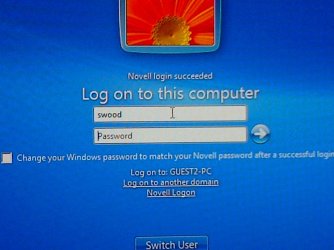
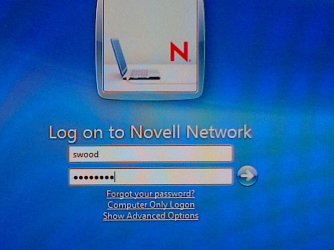
Now when I try to log into the network(novell client loaded on the machine). The login screen is up, I click on the "Log on the Novell Network" enter my user name and password, press enter, I get another login screen. This says "Novell Login succeded" and now wants me to log onto the local machine. This is the area I am having issues with. How do I bypass this screen?
Yes, If I add the same user to the local machine user it works. I sholdn't have to do that and not going to do that for all the users within the domain.
It does have a box to check that says "Change your windows password to match your novell password after a succesful login" I tried that and again, unless I create a local account for the novell user loggin it. It doesn't work.
I hope this makes better sense. Yes I am a bit frustrated. I am trying to get just one working then I get to start imaging a whole butt load of these that are sitting here.
 

My Computer

Computer type
PC/Desktop
OS
Windows 7 Pro x64
bbrixey, I think I am about at the end of my rope on this one. I am not that familiar with the newer versions of the novell server systems. If it was an old old one, I might be able to help but can you capture the screens and such for this weird login prompt?

Rich
 

My Computer

Computer type
Laptop
Computer Manufacturer/Model Number
Toshiba Laptop Qosimo X870
OS
Windows 7 Pro x64 SP1
CPU
Intel Core I7
Motherboard
Toshiba Qosmio
Memory
16 Gigs
Graphics Card(s)
NVIDIA GeForce GTX 670M
Monitor(s) Displays
17.7" laptop
Screen Resolution
1600 x 900
Hard Drives
256 Gig SanDisk SSD for C
256 Gig Intel SSD for D
Internet Speed
50/25 FIOS
Antivirus
Vipre (all you can eat for 10 machines)
Browser
IE and FF
Other Info
I have dos 6.22, wfwg 3.11, win98, 2000 and xp VHD's available for testing. MS's Virtual PC works great.
Attached are the pictures of the log in screens. I hope this helps.
 

Attachments

  • Novell signon.JPG
    Novell signon.JPG
    61.3 KB · Views: 1
  • After Novell signon.JPG
    After Novell signon.JPG
    62.9 KB · Views: 1

My Computer

Computer type
PC/Desktop
OS
Windows 7 Pro x64
Windows 7: Networking and windows login screen

You would only see a Windows Workstation Only box on an XP Pro machine. On Windows 7 you would have an option to log on to this computer, if your Novell is setup to have a local workstation login.

Check under Advanced Login in the Novell Properties and try turning off "Computer Only Logon" if you do not want to use the Windows login for an Active Directory or anything.
 

My Computer

Computer type
PC/Desktop
OS
32 and 64 bit machines
On our machines, the users use the switch user to get back and forth from Novell to the local login, but in our case the local log in can also log into a different domain our active directory for AD network, where our Novell only houses files, and shared drives and we are moving away from Novell to our Active Directory so our users only have to log on one time for everything.
 

My Computer

Computer type
PC/Desktop
OS
32 and 64 bit machines
Back
Top