
Networking Gurus please advise >>

tapsemi

New member
Local time
12:22 AM
Messages
3
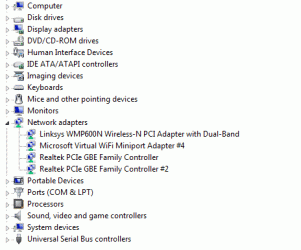
I was using a linksys WMP600N wirelessN pci adpater on my PC running winXP and I could get a solid 270Mbps connection always. Recently I build a PC running Win 7 and reinstalled the WMP600N. Then all hell broke loose. Windows will only connect at a Max 54Mbps and then randomly the connection speed will go down 54->48->24->1Mbps. sometimes to almost 0. I have updated all available software versions possible. Linksys tech support couldn't help after wasting quite a few many days. What is going on? I have attached a screen shot of my Device Manager window. Please advise.
 

Attachments
  • SCRSHOT_02.gif
    SCRSHOT_02.gif
    13.3 KB · Views: 7

My Computer My Computer

At a glance

Windows 7 Professional
OS
Windows 7 Professional
I was using a linksys WMP600N wirelessN pci adpater on my PC running winXP and I could get a solid 270Mbps connection always. Recently I build a PC running Win 7 and reinstalled the WMP600N. Then all hell broke loose. Windows will only connect at a Max 54Mbps and then randomly the connection speed will go down 54->48->24->1Mbps. sometimes to almost 0. I have updated all available software versions possible. Linksys tech support couldn't help after wasting quite a few many days. What is going on? I have attached a screen shot of my Device Manager window. Please advise.

Frist, I wonder if xp can recognize "N" routers. they may only have drivers for 54Mbs. whats the date of the driver??

Second have you tried changing the router channel to avoid interference from local devices?


Ken J
 

My Computer My Computer

At a glance

Win 8 Release candidate 8400[email protected]4 gigsNvidia 9600M
Computer Manufacturer/Model Number
HP Pavillion dv-7 1005 Tx
OS
Win 8 Release candidate 8400
CPU
[email protected]
Memory
4 gigs
Graphics Card(s)
Nvidia 9600M
Sound Card
HD built-in
Monitor(s) Displays
17" Wxga
Screen Resolution
1440x900
Cooling
none
Internet Speed
45Mb down 5Mb up
Yes I have changed channels, changed SSID, etc. I am using a Linksys WRT160Nv3 router. I think there is something happening in Windows 7 that is creating trouble.
 

My Computer My Computer

At a glance

Windows 7 Professional
OS
Windows 7 Professional
Yes I have changed channels, changed SSID, etc. I am using a Linksys WRT160Nv3 router. I think there is something happening in Windows 7 that is creating trouble.
Have you changed any settings on your router?
 

My Computer My Computer

At a glance

Windows 7 7600 1 X64AMD PHENOM II X 550 PROCESSOR 3.1 ghzCorsair 4 gig ddr 3ati radeon 3300
Computer Manufacturer/Model Number
Custom Build
OS
Windows 7 7600 1 X64
CPU
AMD PHENOM II X 550 PROCESSOR 3.1 ghz
Motherboard
ASUS M4A78-TE
Memory
Corsair 4 gig ddr 3
Graphics Card(s)
ati radeon 3300
Sound Card
ati hd
Monitor(s) Displays
syncmaster 2033sw
Screen Resolution
1600X900 60 hz refresh
Hard Drives
twin_seagates SATA's 1 TB & 500 Gig, hitachi_slimline 160 gig
PSU
antec_550 watt
Case
cooler master GLite
Cooling
stock_heat sink
Internet Speed
20mbs up/ 1.5mbs down
Other Info
favorite child "stewie"
favorite dog "brian"
Do a hardware reset. In the back of your router will be a small pinhole button and press it for 10 seconds, this will reset to factory.
 

My Computer My Computer

At a glance

Windows 7 7600 1 X64AMD PHENOM II X 550 PROCESSOR 3.1 ghzCorsair 4 gig ddr 3ati radeon 3300
Computer Manufacturer/Model Number
Custom Build
OS
Windows 7 7600 1 X64
CPU
AMD PHENOM II X 550 PROCESSOR 3.1 ghz
Motherboard
ASUS M4A78-TE
Memory
Corsair 4 gig ddr 3
Graphics Card(s)
ati radeon 3300
Sound Card
ati hd
Monitor(s) Displays
syncmaster 2033sw
Screen Resolution
1600X900 60 hz refresh
Hard Drives
twin_seagates SATA's 1 TB & 500 Gig, hitachi_slimline 160 gig
PSU
antec_550 watt
Case
cooler master GLite
Cooling
stock_heat sink
Internet Speed
20mbs up/ 1.5mbs down
Other Info
favorite child "stewie"
favorite dog "brian"
Well initially I did't do any changes in router. After I had this problem consistently, I upgraded the dd-wrt software on my router, reset it to factory defaults and then again configured its wireless settings. I still have the issue. My router is always set as mixed gn mode, since my laptop is wirelessG. No trouble with the laptop connection. Hence I don't think there is any issue with the router, it may be some in Win 7. Also if you see in the original picture of my device manager, there is this weird Microsoft Virtual WIFI Miniport Adapter. What is that? I tried disabling/uninstalling it, but it keeps coming back every time I reboot my PC.
 

My Computer My Computer

At a glance

Windows 7 Professional
OS
Windows 7 Professional
Well initially I did't do any changes in router. After I had this problem consistently, I upgraded the dd-wrt software on my router, reset it to factory defaults and then again configured its wireless settings. I still have the issue. My router is always set as mixed gn mode, since my laptop is wirelessG. No trouble with the laptop connection. Hence I don't think there is any issue with the router, it may be some in Win 7. Also if you see in the original picture of my device manager, there is this weird Microsoft Virtual WIFI Miniport Adapter. What is that? I tried disabling/uninstalling it, but it keeps coming back every time I reboot my PC.
Disable the wifi miniport.
Or uninstall.
 

My Computer My Computer

At a glance

Windows 7 7600 1 X64AMD PHENOM II X 550 PROCESSOR 3.1 ghzCorsair 4 gig ddr 3ati radeon 3300
Computer Manufacturer/Model Number
Custom Build
OS
Windows 7 7600 1 X64
CPU
AMD PHENOM II X 550 PROCESSOR 3.1 ghz
Motherboard
ASUS M4A78-TE
Memory
Corsair 4 gig ddr 3
Graphics Card(s)
ati radeon 3300
Sound Card
ati hd
Monitor(s) Displays
syncmaster 2033sw
Screen Resolution
1600X900 60 hz refresh
Hard Drives
twin_seagates SATA's 1 TB & 500 Gig, hitachi_slimline 160 gig
PSU
antec_550 watt
Case
cooler master GLite
Cooling
stock_heat sink
Internet Speed
20mbs up/ 1.5mbs down
Other Info
favorite child "stewie"
favorite dog "brian"
If you're using either WEP or TKIP security, that may be causing the problem. The current WIFI Alliance Draft N standards do no permit either WEP or TKIP security protocols in the High Throughput mode (HT Mode). Change to WPA or WPA2.

Microsoft does have a WIN7x32 driver which doesn't implement the above (as the standards keep changing). I believe it's a generic driver "802.11n Wireless LAN Card" driver. I believe the driver version is 3.0.0.41. (Since it's NOT 100% compliant with some of the standards, you'll probably get your 240 or 270 Mbps, but be aware that both WEP and TKIP HAVE BEEN CRACKED and as of now are not considered secure.
 

My Computer My Computer

At a glance

Windows 7 Pro
OS
Windows 7 Pro
Back
Top