i am using W7 build 7057. i find this release to be a bit buggy. one of the annoyances would be the disappearance of the Networking Icon in the s-Tray. i have followed all sorts of steps, ie registry tweaks/fixes/deletes. you name it i have tried it.
so i am hoping someone out there is having the same trouble or better yet had the same problem but found a working solution. it is really annoying. and yes, the Networking Icon option is grayed out so no way of making the change in the system icons settings.
Restarting the computer a few times is a usual workaround for this. You might also try uninstalling and reinstalling your network adapter driver in case it may be corrupted. If you might test temporarily disabling any security programs to see if they may be interfering. Another option is this tutorial from Vista on this same issue.
Thanks Brink,
i did all the various forum offered suggestions and also did the rebooting and the logging on off a # of times to no avail. however, i have not tried the network driver un-/reinstall. what strikes me as funny is the fact that build 7048 had fewer bugs than this one (7057). my System-T Icons were all there and none of the issues, ie desktop.ini file were an annoyance. so i am going to let you know if the network driver is what is causing the problem.
thanks
Hello Brink, reinstalling network adaptor driver did not do the trick. thus far nothing has solved the problem. is only i having this problem? quite strange indeed
no your not i have the same problem also my w7 doesnt see any xp pc's course networking discovery is broken and many homegroup/networkr elated services are set to manual and start with errors maybe this somehow affects this icon..
I also did try everyhting possible but this build is buggy fact..
My Computer
Computer Manufacturer/Model Number
HP 6720s
OS
Microsoft Windows 7 Ultimate
CPU
Mobile Intel Celeron M 530, 1733 MHz (13 x 133)
Motherboard
Intel Crestline GLE960/GME965
Memory
2038 MB (DDR2-667 DDR2 SDRAM)
Graphics Card(s)
Intel GMA X3100
Sound Card
Analog Devices AD1981HD @ Intel 82801HBM ICH8M
Monitor(s) Displays
AU Optronics B154EW02 V7 [15.4" LCD]
Screen Resolution
1280 x 800
Hard Drives
TOSHIBA MK1246GSX ATA Device (120 GB, 5400 RPM, SATA-II)
Maxtor 3200 USB Device (372 GB, USB)
yup, looks like maybe Microsoft should have left could enough alone with 7048 as that build seemed to work quite flawlessly, at least on my machine. hmmmm wonder if we are heading the Vista way..... flaw galore and i had such high hopes. just kidding after all we are only in the beginning stages
yup was able to look at screen shot now, thanks. of course no idea if that new option made the difference re networking icon display in n-tray. i can get the icon to display if i do the registry steps then end the explorer.exe task, relaunch explorer.exe (new task) however, on next reboot it is gone again. it is the only icon which does this disappearing act .
thanks anyway



 im not an expert about it


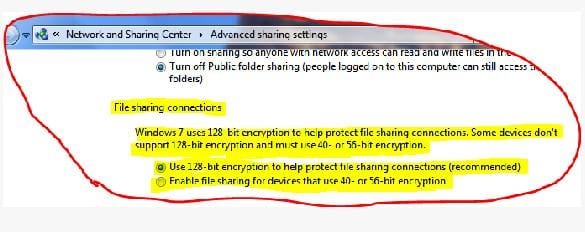
 .
.