
Networking my machines

ICIT2LOL

Confusion Therapist
Guru
Gold Member
VIP
Local time
9:28 AM
Messages
20,778
Location
Central West NSW
Have had a go at Brink's tutorial on setting up a home network (have three machines all plugged into the modem) so that I can send data from one to the other, but am getting to the password bit and it's telling me I can't use that password.

Now is the password for the UAC logon for any particular machine? or do I have to create one.

I am trying to do it with the cables to the modem / router - TP-Link TD-W8960n as I have my wireless disabled as I don't need it and prefer cables. Plus I would really like to be able to use the printer from each machine.

Sorry Brink but it looked so easy and I am now stuck for an answer.:o
 

My Computer

Computer type
PC/Desktop
Computer Manufacturer/Model Number
Own build (new) Desk1 / Asus ROG Win 7 / Desk2 1st build
OS
Desk1 7 Home Prem / Desk2 10 Pro / Main lap Asus ROG 10 Pro 2 laptop Toshiba 7 Pro Asus P2520 7 & 10
CPU
Desk1 i5 3750K / Laptop i7 GTX 860M / Desk2 i5 2500
Motherboard
Desk1 Asus P877-V / Desk2 Gigabyte H67 UD3H / Laptop ?
Memory
Desk1 8GB (1866) / Desk2 16GB (1333) / Laptop 8Gb DDR3
Graphics Card(s)
Desk 1& 2NVidia GTX 650 & Laptops on board Intel
Sound Card
Desk 1 & 2 -XONAR DG Realtek High Def audio Laptop
Monitor(s) Displays
Desk 1 Benq HD 2450 / Desk2 Philips 24" / Laptop 17.5"
Screen Resolution
1920x1080 D1 & D2 & Laptop 1
Hard Drives
Desk1 Samsung 120GB 830 SSD
Asus ROG 256GB 850 Pro SSD
Desk2 Samsung 840 256 SSD
Toshiba 120GB EVO
PSU
Desk 1 Corsair HX 1050/ Laptop ? / Desk 2 Corsair HX 650
Case
Desk 1 Cooler HAF XM ? Toshiba laptop / Desk2 Coolermaster
Cooling
Fans on all Desk1 -2 Desk2 - all Coolermasters 5 Laptop ?
Keyboard
Desk 1 MS Sidewinder X6 Desk 2 MS Sidewinder X 4
Mouse
Desk 1&2 - Gigabyte MS 900 gamer - laptop - Logitec wireless
Internet Speed
ADSL2+
Other Info
One other Desktop (tester) and spare Toshba laptop both with SSD's
Running Kaspersky 2016 ISS on all machines config'd identically
Logitec audio stereo systems on each machine (x3)
Canon MG5250MFC
Router/modem TP-Link running WPA2SK
One word: HomeGroup.

If all of the machines are Windows 7, HomeGroup it up. It's MUCH easier, IMO.

If you have public sharing turned on but are being asked for a password, it is because machine A is trying to access B yet B has an account with the same name as A so B says that A should supply the password for the account on B, regardless.

Can we have some deets on the OS setups, please?
 

My Computer

OS
Windows 7 Ultimate 64-bit
CPU
AMD Phenom II X6 1090T 3.2GHZ
Motherboard
MSI 890FXA-GD70
Memory
G.SKILL RipJaw 3x2GB DDR3-1066
Graphics Card(s)
2x HIS Radeon HD 6850 1 GB
Sound Card
VIA 8-channel
Monitor(s) Displays
2x 20 inch Acer LCDs, 1x 32" Sony LCD TV
Screen Resolution
4480x900
Hard Drives
1x Crucial 64GB SSD
3x 1TB HDDs (WD, Seagate, Hitatchi)
1x 500GB Seagate External
PSU
Kingwin 1000W Modular
Case
Coolermaster HAF 932
Cooling
1x 120mm, 3x 200mm, CoolerMaster Hyper 212+
Keyboard
Microsoft Wireless Keyboard 1000
Mouse
Microsoft Wiresless Mouse 5000
Internet Speed
20mbps
Other Info
Samsung BD-ROM/DVD-RW
firstly, there is nothing wrong at all with john's post above at all and will work the same.

this is just if you dont like homegroup, personally i dont like it and i'd rather use standard networking shares.

IF thats what your doing check your settings. (windows does have a slight habbit of changing them though now and again (from what i have found))

picture.php
 

My Computer

Computer Manufacturer/Model Number
Windows 7 Ultimate 64-bit
OS
Windows 7 Ultimate N 64-bit
CPU
AMD Black Edition - AMD Phenom X4 2.5 GHz Processor
Motherboard
Bio Star
Memory
8GB DDR2 800MHZ BRANDED
Graphics Card(s)
Palti NVIDIA GeForce GTX 460
Monitor(s) Displays
3D 23.6" & 22"
Screen Resolution
1920x1080@120Hz
Hard Drives
313GB SAMSUNG SAMSUNG HD321KJ
PSU
OCZ 600W StealthXStream PSU, PowerWhisper, Active PFC
Internet Speed
22793

My Computer

Computer type
PC/Desktop
Computer Manufacturer/Model Number
Own build (new) Desk1 / Asus ROG Win 7 / Desk2 1st build
OS
Desk1 7 Home Prem / Desk2 10 Pro / Main lap Asus ROG 10 Pro 2 laptop Toshiba 7 Pro Asus P2520 7 & 10
CPU
Desk1 i5 3750K / Laptop i7 GTX 860M / Desk2 i5 2500
Motherboard
Desk1 Asus P877-V / Desk2 Gigabyte H67 UD3H / Laptop ?
Memory
Desk1 8GB (1866) / Desk2 16GB (1333) / Laptop 8Gb DDR3
Graphics Card(s)
Desk 1& 2NVidia GTX 650 & Laptops on board Intel
Sound Card
Desk 1 & 2 -XONAR DG Realtek High Def audio Laptop
Monitor(s) Displays
Desk 1 Benq HD 2450 / Desk2 Philips 24" / Laptop 17.5"
Screen Resolution
1920x1080 D1 & D2 & Laptop 1
Hard Drives
Desk1 Samsung 120GB 830 SSD
Asus ROG 256GB 850 Pro SSD
Desk2 Samsung 840 256 SSD
Toshiba 120GB EVO
PSU
Desk 1 Corsair HX 1050/ Laptop ? / Desk 2 Corsair HX 650
Case
Desk 1 Cooler HAF XM ? Toshiba laptop / Desk2 Coolermaster
Cooling
Fans on all Desk1 -2 Desk2 - all Coolermasters 5 Laptop ?
Keyboard
Desk 1 MS Sidewinder X6 Desk 2 MS Sidewinder X 4
Mouse
Desk 1&2 - Gigabyte MS 900 gamer - laptop - Logitec wireless
Internet Speed
ADSL2+
Other Info
One other Desktop (tester) and spare Toshba laptop both with SSD's
Running Kaspersky 2016 ISS on all machines config'd identically
Logitec audio stereo systems on each machine (x3)
Canon MG5250MFC
Router/modem TP-Link running WPA2SK
sorry ICit2lol, why have u shown us your control pannel? the systems in use all being 7 was fair enough as we know what to deal with, but there are two answers above for what you need.
 

My Computer

Computer Manufacturer/Model Number
Windows 7 Ultimate 64-bit
OS
Windows 7 Ultimate N 64-bit
CPU
AMD Black Edition - AMD Phenom X4 2.5 GHz Processor
Motherboard
Bio Star
Memory
8GB DDR2 800MHZ BRANDED
Graphics Card(s)
Palti NVIDIA GeForce GTX 460
Monitor(s) Displays
3D 23.6" & 22"
Screen Resolution
1920x1080@120Hz
Hard Drives
313GB SAMSUNG SAMSUNG HD321KJ
PSU
OCZ 600W StealthXStream PSU, PowerWhisper, Active PFC
Internet Speed
22793
OK

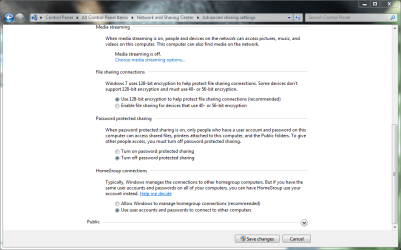
Sorry I am really new at this (and a bit dumb) so I just posted that pic.

I have seen your settings rich and copied them so is this how I should have it set?
 

Attachments

  • CaptureNETWORK2.PNG
    CaptureNETWORK2.PNG
    41.3 KB · Views: 10

My Computer

Computer type
PC/Desktop
Computer Manufacturer/Model Number
Own build (new) Desk1 / Asus ROG Win 7 / Desk2 1st build
OS
Desk1 7 Home Prem / Desk2 10 Pro / Main lap Asus ROG 10 Pro 2 laptop Toshiba 7 Pro Asus P2520 7 & 10
CPU
Desk1 i5 3750K / Laptop i7 GTX 860M / Desk2 i5 2500
Motherboard
Desk1 Asus P877-V / Desk2 Gigabyte H67 UD3H / Laptop ?
Memory
Desk1 8GB (1866) / Desk2 16GB (1333) / Laptop 8Gb DDR3
Graphics Card(s)
Desk 1& 2NVidia GTX 650 & Laptops on board Intel
Sound Card
Desk 1 & 2 -XONAR DG Realtek High Def audio Laptop
Monitor(s) Displays
Desk 1 Benq HD 2450 / Desk2 Philips 24" / Laptop 17.5"
Screen Resolution
1920x1080 D1 & D2 & Laptop 1
Hard Drives
Desk1 Samsung 120GB 830 SSD
Asus ROG 256GB 850 Pro SSD
Desk2 Samsung 840 256 SSD
Toshiba 120GB EVO
PSU
Desk 1 Corsair HX 1050/ Laptop ? / Desk 2 Corsair HX 650
Case
Desk 1 Cooler HAF XM ? Toshiba laptop / Desk2 Coolermaster
Cooling
Fans on all Desk1 -2 Desk2 - all Coolermasters 5 Laptop ?
Keyboard
Desk 1 MS Sidewinder X6 Desk 2 MS Sidewinder X 4
Mouse
Desk 1&2 - Gigabyte MS 900 gamer - laptop - Logitec wireless
Internet Speed
ADSL2+
Other Info
One other Desktop (tester) and spare Toshba laptop both with SSD's
Running Kaspersky 2016 ISS on all machines config'd identically
Logitec audio stereo systems on each machine (x3)
Canon MG5250MFC
Router/modem TP-Link running WPA2SK
ok looks good, just to make sure u also do have the options below selected.

turn on network discovery

turn on file and printer sharing

i personally do turn tunnelling off and also homegroup options as they are not needed if this is how your going to share, also check your firewall settings, but now u should be able to see each other on the network and from your ubuntu machine
 

My Computer

Computer Manufacturer/Model Number
Windows 7 Ultimate 64-bit
OS
Windows 7 Ultimate N 64-bit
CPU
AMD Black Edition - AMD Phenom X4 2.5 GHz Processor
Motherboard
Bio Star
Memory
8GB DDR2 800MHZ BRANDED
Graphics Card(s)
Palti NVIDIA GeForce GTX 460
Monitor(s) Displays
3D 23.6" & 22"
Screen Resolution
1920x1080@120Hz
Hard Drives
313GB SAMSUNG SAMSUNG HD321KJ
PSU
OCZ 600W StealthXStream PSU, PowerWhisper, Active PFC
Internet Speed
22793
Back
Top