Networking query

skunksmash

MIA
Guru
Local time
12:25 AM
Messages
2,587
Location
UK
Hi all.......;)

im currently Networking a HTPC with my main rig, now i can pass info from one machine to the other but it will only see the W7 HDD in the main rig..??, is there no way i can access the Vista HDD..??, or does it have to be the same OS to network..??

i tried to add a shortcut to the vista HDD into the user account on W7, but upon opening it on the HTPC all folders are empty..??
 

My Computer

Computer Manufacturer/Model Number
myself
OS
SEVEN x64
CPU
Q9450 @ 3.6GHZ 1.34v
Motherboard
ASUS P5K PREMIUM P35
Memory
8GB 1066 buffalo firestix @ 1152mhz CL5
Graphics Card(s)
Sapphire HD 5970 + GTX260 (physX)
Sound Card
Creative X-FI Xtreme Gamer
Monitor(s) Displays
SAMSUNG 20'' & SAMSUNG 23'' (dual screens)
Screen Resolution
2048x1152 & 1680x1050
Hard Drives
1x seagate 160gb IDE & 1x seagate 160gb SATA
PSU
XCILIO 850w (78A)
Case
CM590 1x 120x38mm & 2x92x38mm / 4x 120x25mm
Cooling
AC7 PRO @ 92x38mm blower, Lamptron military bus bay controll
Keyboard
LOGITECH E110
Mouse
logitech NX5
Internet Speed
2MB
Other Info
its a continual ''work in progress''....
Hi all.......;)

im currently Networking a HTPC with my main rig, now i can pass info from one machine to the other but it will only see the W7 HDD in the main rig..??, is there no way i can access the Vista HDD..??, or does it have to be the same OS to network..??

i tried to add a shortcut to the vista HDD into the user account on W7, but upon opening it on the HTPC all folders are empty..??

ok so it seems the network works between the machines right?
and have you setup shares for the then vista HDD so that you have access?
 

My Computer

Computer Manufacturer/Model Number
Tx2500z Tablet Pc/Homemade Server
OS
Windows 7 Ult x64(x2), HomePrem x32(x4), Server 08 (+VM), 08 R2 (VM) , SuSe 11.2 (VM), XP 32 (VM)
CPU
Turion X2 ultra (oh well came with laptop)/P4 @3.2 (yes P4)
Motherboard
IDK HP Motherboard / Intel DG965SS
Memory
OCZ Dual Channel 4GB kit/ 1gb Dual Channel
Graphics Card(s)
HD 3200 graphics /GMA x3100 (yay for intergrated!!)
Sound Card
Realtek HD Audio(mic working, well sort of)/Siig IC-70012
Monitor(s) Displays
built-in Hp 12" laptop screen/ Acer 19"
Screen Resolution
1280x800 /1440x900
Cooling
All Air Cooled
Mouse
Logi MX Rev. /MS Wheel Optical 1.1A /Logitech Optical Mouse
Internet Speed
College baby but its still routed through vpn to 1536k...
Other Info
love my wacom pen and pressure sensitivity...
wished it worked in 7, SUSE for that matter though
ok so it seems the network works between the machines right?
and have you setup shares for the then vista HDD so that you have access?

yep the ''sharing'' is activated & i can stream both ways from W7 (HTPC) to W7 (main rig), but when i try to access the network from vista it wont show the HTPC..?? :(
 

My Computer

Computer Manufacturer/Model Number
myself
OS
SEVEN x64
CPU
Q9450 @ 3.6GHZ 1.34v
Motherboard
ASUS P5K PREMIUM P35
Memory
8GB 1066 buffalo firestix @ 1152mhz CL5
Graphics Card(s)
Sapphire HD 5970 + GTX260 (physX)
Sound Card
Creative X-FI Xtreme Gamer
Monitor(s) Displays
SAMSUNG 20'' & SAMSUNG 23'' (dual screens)
Screen Resolution
2048x1152 & 1680x1050
Hard Drives
1x seagate 160gb IDE & 1x seagate 160gb SATA
PSU
XCILIO 850w (78A)
Case
CM590 1x 120x38mm & 2x92x38mm / 4x 120x25mm
Cooling
AC7 PRO @ 92x38mm blower, Lamptron military bus bay controll
Keyboard
LOGITECH E110
Mouse
logitech NX5
Internet Speed
2MB
Other Info
its a continual ''work in progress''....
yep the ''sharing'' is activated & i can stream both ways from W7 (HTPC) to W7 (main rig), but when i try to access the network from vista it wont show the HTPC..?? :(

hmm
do you have IPv6 enabled?

it should not matter if its the same OS (but it does help configure a network...
can you access the C$ share?
where "W7 machine" is the name of the Windows 7 machine....
\\"W7 machine"\C$
if it at least brings up a logon as prompt then you are good...;)

if not then see if you can ping each IP (should be in the 192.168.X.X range)
if you can ping then try accessing the HTPC by ip
\\X.X.X.X\C$

if you can then try to ping by machine name...
ping "W7 machine" (it will translate this to a IPv6 IP (if your router supports it))


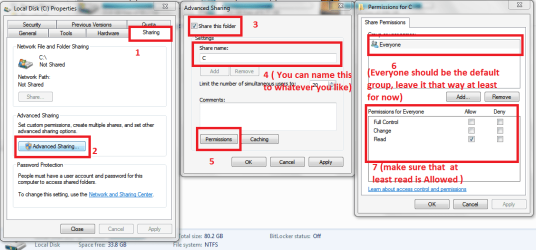
if you cannot access the C$ share (but you can ping the machine) then follow this...
then follow what the screenshot says...
sharing1.PNG
and see if you can access that share...
 

My Computer

Computer Manufacturer/Model Number
Tx2500z Tablet Pc/Homemade Server
OS
Windows 7 Ult x64(x2), HomePrem x32(x4), Server 08 (+VM), 08 R2 (VM) , SuSe 11.2 (VM), XP 32 (VM)
CPU
Turion X2 ultra (oh well came with laptop)/P4 @3.2 (yes P4)
Motherboard
IDK HP Motherboard / Intel DG965SS
Memory
OCZ Dual Channel 4GB kit/ 1gb Dual Channel
Graphics Card(s)
HD 3200 graphics /GMA x3100 (yay for intergrated!!)
Sound Card
Realtek HD Audio(mic working, well sort of)/Siig IC-70012
Monitor(s) Displays
built-in Hp 12" laptop screen/ Acer 19"
Screen Resolution
1280x800 /1440x900
Cooling
All Air Cooled
Mouse
Logi MX Rev. /MS Wheel Optical 1.1A /Logitech Optical Mouse
Internet Speed
College baby but its still routed through vpn to 1536k...
Other Info
love my wacom pen and pressure sensitivity...
wished it worked in 7, SUSE for that matter though
Back
Top