Networking question....

I found it... and it only took me 4 hours....

In my network adaptor settings...

Control Panel-> Device Manager -> Network Adaptor -> Properties

there is a setting called "Device Sleep on Disconnect".
Disabling that seems to have stopped the problem.


FWIW... The sheer level of clarity with which these options are named, never ceases to amaze me. :sarc:

I don't have this option on an: Intel(R) 82567LM-3 Gigabit network card.

That's ok... turns out that wasn't it, anyway...


Still no luck... a couple of minutes ago it spun every machine up again... I am however starting to notice a pattern... Sometimes it only hits the HTPC... other times it hits them all... The HTPC is on XP Professional...
 

My Computer

Computer Manufacturer/Model Number
Homebrew
OS
XP Pro SP3 X86 / Win7 Pro X86
CPU
Amd 64 x2 4200 (2.4ghz)
Motherboard
Asus M2N-MX SE Plus
Memory
Kingston DDR2 800 2gb
Graphics Card(s)
Nvidia GF-8400
Sound Card
Realtek on Motherboard
Monitor(s) Displays
Acer x-193bw
Screen Resolution
1440 x 900
Hard Drives
Western Digital 500g
PSU
350watt In-Win
Case
In-Win
Cooling
Air
Keyboard
yes
Mouse
yes
Internet Speed
5mpbs
Other Info
Also ASRock ION 330 as HTPC (on XP).
Acer Aspire as GP netbook (on XP).
Can anyone make sense of this?

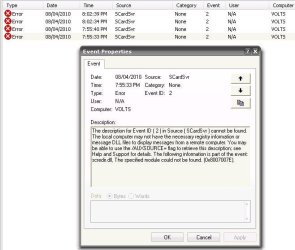
Capture.JPG

This is the error message from the HTPC.... I get 2 of these each time the main system wakes it up... I looked up the SCrdSver and it's the driver for smart cards... I have no such hardware on my systems and none of the related services are running?

?????????
 

My Computer

Computer Manufacturer/Model Number
Homebrew
OS
XP Pro SP3 X86 / Win7 Pro X86
CPU
Amd 64 x2 4200 (2.4ghz)
Motherboard
Asus M2N-MX SE Plus
Memory
Kingston DDR2 800 2gb
Graphics Card(s)
Nvidia GF-8400
Sound Card
Realtek on Motherboard
Monitor(s) Displays
Acer x-193bw
Screen Resolution
1440 x 900
Hard Drives
Western Digital 500g
PSU
350watt In-Win
Case
In-Win
Cooling
Air
Keyboard
yes
Mouse
yes
Internet Speed
5mpbs
Other Info
Also ASRock ION 330 as HTPC (on XP).
Acer Aspire as GP netbook (on XP).
If anyone is even still reading this here's the answer...

As long as one of the XP machines on the network is active the others won't spin up.
It has to do with the way the "Computer Browser" (shortcuts in "My Network") service works. So now my poor ole HTPC is not only on 24/7 it never sleeps... the monitor shuts off, the drive spins down but the computer never sleeps...

No I don't think this is a "fix"... at best it's a really poor workaround. But at least everyone got a decent nights sleep...

Tomorrow will be fun... everyone will be here for a "family meeting" and some decision will be made as to the future of our little "lan party"... It's been a month now since I started this, the LAN has been down about 50% of the time, stuff that needs to happen, isn't happening and it's time to make some decisions....
 

My Computer

Computer Manufacturer/Model Number
Homebrew
OS
XP Pro SP3 X86 / Win7 Pro X86
CPU
Amd 64 x2 4200 (2.4ghz)
Motherboard
Asus M2N-MX SE Plus
Memory
Kingston DDR2 800 2gb
Graphics Card(s)
Nvidia GF-8400
Sound Card
Realtek on Motherboard
Monitor(s) Displays
Acer x-193bw
Screen Resolution
1440 x 900
Hard Drives
Western Digital 500g
PSU
350watt In-Win
Case
In-Win
Cooling
Air
Keyboard
yes
Mouse
yes
Internet Speed
5mpbs
Other Info
Also ASRock ION 330 as HTPC (on XP).
Acer Aspire as GP netbook (on XP).
If anyone is even still reading this here's the answer...

As long as one of the XP machines on the network is active the others won't spin up.

Not for me, I have 2 XP machines on the network and I still have my Windows 7 machines boot up for no reason every once and a while. It is very random. Currently my machine and my wife's machine are on 24/7 to avoid them booting up randomly. However all the other Windows 7 machines are off when not in use and they turn on randomly, night or day, you never know. 1 of the XP machines is on 24/7 it is connected to the media area and provides music on demand throughout the house. Of course the Server is on 24/7. Hummmm…still looking for a solution.
 

My Computer

Computer type
PC/Desktop
Computer Manufacturer/Model Number
Dell OP7010
OS
Windows 7 Enterprise (x64); Windows Server 2008 R2 (x64)
Memory
16GB
Monitor(s) Displays
4 Dell 24" LCD
Screen Resolution
1280x1024
Keyboard
Dell
Mouse
Dell Optical
Internet Speed
40meg
If anyone is even still reading this here's the answer...

As long as one of the XP machines on the network is active the others won't spin up.

Not for me, I have 2 XP machines on the network and I still have my Windows 7 machines boot up for no reason every once and a while. It is very random. Currently my machine and my wife's machine are on 24/7 to avoid them booting up randomly. However all the other Windows 7 machines are off when not in use and they turn on randomly, night or day, you never know. 1 of the XP machines is on 24/7 it is connected to the media area and provides music on demand throughout the house. Of course the Server is on 24/7. Hummmm…still looking for a solution.

If they are doing startup from power off... this one is easy to fix (or should be)...

In your network adaptor's settings in Device Manager, simply disable "Wake from Power Off". You may also find a comperable BIOS setting in each computer that will also need to be disabled....

You want them to wake from *standby* on Magic Packet or Pattern but you really don't want them waking from full power off.
 

My Computer

Computer Manufacturer/Model Number
Homebrew
OS
XP Pro SP3 X86 / Win7 Pro X86
CPU
Amd 64 x2 4200 (2.4ghz)
Motherboard
Asus M2N-MX SE Plus
Memory
Kingston DDR2 800 2gb
Graphics Card(s)
Nvidia GF-8400
Sound Card
Realtek on Motherboard
Monitor(s) Displays
Acer x-193bw
Screen Resolution
1440 x 900
Hard Drives
Western Digital 500g
PSU
350watt In-Win
Case
In-Win
Cooling
Air
Keyboard
yes
Mouse
yes
Internet Speed
5mpbs
Other Info
Also ASRock ION 330 as HTPC (on XP).
Acer Aspire as GP netbook (on XP).
If anyone is even still reading this here's the answer...

As long as one of the XP machines on the network is active the others won't spin up.

Not for me, I have 2 XP machines on the network and I still have my Windows 7 machines boot up for no reason every once and a while. It is very random. Currently my machine and my wife's machine are on 24/7 to avoid them booting up randomly. However all the other Windows 7 machines are off when not in use and they turn on randomly, night or day, you never know. 1 of the XP machines is on 24/7 it is connected to the media area and provides music on demand throughout the house. Of course the Server is on 24/7. Hummmm…still looking for a solution.

If they are doing startup from power off... this one is easy to fix (or should be)...

In your network adaptor's settings in Device Manager, simply disable "Wake from Power Off". You may also find a comperable BIOS setting in each computer that will also need to be disabled....

You want them to wake from *standby* on Magic Packet or Pattern but you really don't want them waking from full power off.

Tried it, they still wake up randomly. I even thought it was a Dell Computer problem. 3 of the machines are newer Dell's and all had Windows XP on them originally. I never had a problem while they were loaded with Windows XP. When I was ready to update to Windows 7 I pulled out the Hard Drive(s) installed a new Hard Drive and loaded Windows 7 fresh on each machine. Then about 5 days later I would wonder why one of the machines would be on. I figured my wife or kids were just forgetting to turn it off even though they were good about making sure the computer was off. One night I had to stay up late working on a paper and the whole house was quite and the only computer on was the one I was working on in the office. While I was working on the paper I heard the main FAN power up and then the IL Beep. I looked over at my wife’s computer and it was booting up. I thought it was strange but did not give it much thought and shut the machine down. About 45 minutes later it powered up again. I turned it off again did some quick checking, gave up, and went to bed. In the morning my daughter’s computer was on and I started to think something was going on. With lots and lots of testing I found they turn on randomly and replacing motherboards, power supplies, cords, cables, and UPSs did not fix the problem. I even flashed the BIOS and worked with Dell Support and elevated support on 5 different occasions and was never able to fix this.
 

My Computer

Computer type
PC/Desktop
Computer Manufacturer/Model Number
Dell OP7010
OS
Windows 7 Enterprise (x64); Windows Server 2008 R2 (x64)
Memory
16GB
Monitor(s) Displays
4 Dell 24" LCD
Screen Resolution
1280x1024
Keyboard
Dell
Mouse
Dell Optical
Internet Speed
40meg
Not for me, I have 2 XP machines on the network and I still have my Windows 7 machines boot up for no reason every once and a while. It is very random. Currently my machine and my wife's machine are on 24/7 to avoid them booting up randomly. However all the other Windows 7 machines are off when not in use and they turn on randomly, night or day, you never know. 1 of the XP machines is on 24/7 it is connected to the media area and provides music on demand throughout the house. Of course the Server is on 24/7. Hummmm…still looking for a solution.

If they are doing startup from power off... this one is easy to fix (or should be)...

In your network adaptor's settings in Device Manager, simply disable "Wake from Power Off". You may also find a comperable BIOS setting in each computer that will also need to be disabled....

You want them to wake from *standby* on Magic Packet or Pattern but you really don't want them waking from full power off.

Tried it, they still wake up randomly. I even thought it was a Dell Computer problem. 3 of the machines are newer Dell's and all had Windows XP on them originally. I never had a problem while they were loaded with Windows XP. When I was ready to update to Windows 7 I pulled out the Hard Drive(s) installed a new Hard Drive and loaded Windows 7 fresh on each machine. Then about 5 days later I would wonder why one of the machines would be on. I figured my wife or kids were just forgetting to turn it off even though they were good about making sure the computer was off. One night I had to stay up late working on a paper and the whole house was quite and the only computer on was the one I was working on in the office. While I was working on the paper I heard the main FAN power up and then the IL Beep. I looked over at my wife’s computer and it was booting up. I thought it was strange but did not give it much thought and shut the machine down. About 45 minutes later it powered up again. I turned it off again did some quick checking, gave up, and went to bed. In the morning my daughter’s computer was on and I started to think something was going on. With lots and lots of testing I found they turn on randomly and replacing motherboards, power supplies, cords, cables, and UPSs did not fix the problem. I even flashed the BIOS and worked with Dell Support and elevated support on 5 different occasions and was never able to fix this.

Well there are other settings you can peek at... But I'll bet from your description, you've already been there...

In your BIOS power settings, what state do you have set for after a power loss?
I had one mine set to "On after Power Loss". Even the slightest power interruption --one that would normally go totally unnoticed-- would boot the thing up... and it took me a few days to figure it out...

Some BIOS also have scheduling. I maintain one office where they use this to fire up the computers at 8:00 every morning so they're ready when the staff arrives.

In some there are even settings for "Wake on Ring"... an incoming phone call will turn them on and boot them up... useful for FAX a pain in the butt otherwise.

Then there's the legeondary S1 state where you get wake on mouse or wake on keyboard. The theory is that wiggling the mouse will start the computer... what they didn't count on is Mouse Drift... even the slightest bit of dust on the mouse optics and the cursor will periodically move one mickey and the system starts up on it's own. Many motherboards have jumpers to enable this, usually labled "ps2-SB5" or such... The mouse and keyboard are placed on standby power, which is always on in the computer, and guess what... Walking across the room jars the mouse and boots the computer....

The thing is that an OS cannot boot up an off machine... The OS is dormant on the hard disk at that point... It has to be a network, power or bios issue....
 

My Computer

Computer Manufacturer/Model Number
Homebrew
OS
XP Pro SP3 X86 / Win7 Pro X86
CPU
Amd 64 x2 4200 (2.4ghz)
Motherboard
Asus M2N-MX SE Plus
Memory
Kingston DDR2 800 2gb
Graphics Card(s)
Nvidia GF-8400
Sound Card
Realtek on Motherboard
Monitor(s) Displays
Acer x-193bw
Screen Resolution
1440 x 900
Hard Drives
Western Digital 500g
PSU
350watt In-Win
Case
In-Win
Cooling
Air
Keyboard
yes
Mouse
yes
Internet Speed
5mpbs
Other Info
Also ASRock ION 330 as HTPC (on XP).
Acer Aspire as GP netbook (on XP).
The thing is that an OS cannot boot up an off machine... The OS is dormant on the hard disk at that point... It has to be a network, power or bios issue....

Yep I have tried them all, that is why I thought it was a hardware issue and had Dell replace so many parts.
 

My Computer

Computer type
PC/Desktop
Computer Manufacturer/Model Number
Dell OP7010
OS
Windows 7 Enterprise (x64); Windows Server 2008 R2 (x64)
Memory
16GB
Monitor(s) Displays
4 Dell 24" LCD
Screen Resolution
1280x1024
Keyboard
Dell
Mouse
Dell Optical
Internet Speed
40meg
The thing is that an OS cannot boot up an off machine... The OS is dormant on the hard disk at that point... It has to be a network, power or bios issue....

Yep I have tried them all, that is why I thought it was a hardware issue and had Dell replace so many parts.

LOL.. consdered replacing Dell?

My friend, you have one serious mystery on your hands...
 

My Computer

Computer Manufacturer/Model Number
Homebrew
OS
XP Pro SP3 X86 / Win7 Pro X86
CPU
Amd 64 x2 4200 (2.4ghz)
Motherboard
Asus M2N-MX SE Plus
Memory
Kingston DDR2 800 2gb
Graphics Card(s)
Nvidia GF-8400
Sound Card
Realtek on Motherboard
Monitor(s) Displays
Acer x-193bw
Screen Resolution
1440 x 900
Hard Drives
Western Digital 500g
PSU
350watt In-Win
Case
In-Win
Cooling
Air
Keyboard
yes
Mouse
yes
Internet Speed
5mpbs
Other Info
Also ASRock ION 330 as HTPC (on XP).
Acer Aspire as GP netbook (on XP).
Over all this time somehow I guess I ended up with all Dell machines. I would guess that is because we use them at work and over the years I have learned them well. All the machines I have purchase new or used have been Dell. Currently the only machine that is not Dell is my Server. Over the many years I have had Dell, Gateway, Compaq, HP, and Toshiba. Plus a bunch of others that are now completely gone. IBM, CompuAdd, Zeos, and AST. And the many custom built machines too.

This has been a true mystery.
 

My Computer

Computer type
PC/Desktop
Computer Manufacturer/Model Number
Dell OP7010
OS
Windows 7 Enterprise (x64); Windows Server 2008 R2 (x64)
Memory
16GB
Monitor(s) Displays
4 Dell 24" LCD
Screen Resolution
1280x1024
Keyboard
Dell
Mouse
Dell Optical
Internet Speed
40meg
Over all this time somehow I guess I ended up with all Dell machines. I would guess that is because we use them at work and over the years I have learned them well. All the machines I have purchase new or used have been Dell. Currently the only machine that is not Dell is my Server. Over the many years I have had Dell, Gateway, Compaq, HP, and Toshiba. Plus a bunch of others that are now completely gone. IBM, CompuAdd, Zeos, and AST. And the many custom built machines too.

This has been a true mystery.

One way to pin it down a little bit is to turn *everything* off, even your server and NAS... see if any of the machines will boot up when there's nothing else going on...
If they don't I'd say you can be reasonably sure something is sending wakeup packets ... which is what's happening on my Win7 machines... They both do it... I suspect the only reason the other machines don't start from power off is that I've prevented that at the BIOS level... but then again, most are on all the time anyway so I can't be sure it wouldn't happen....
 

My Computer

Computer Manufacturer/Model Number
Homebrew
OS
XP Pro SP3 X86 / Win7 Pro X86
CPU
Amd 64 x2 4200 (2.4ghz)
Motherboard
Asus M2N-MX SE Plus
Memory
Kingston DDR2 800 2gb
Graphics Card(s)
Nvidia GF-8400
Sound Card
Realtek on Motherboard
Monitor(s) Displays
Acer x-193bw
Screen Resolution
1440 x 900
Hard Drives
Western Digital 500g
PSU
350watt In-Win
Case
In-Win
Cooling
Air
Keyboard
yes
Mouse
yes
Internet Speed
5mpbs
Other Info
Also ASRock ION 330 as HTPC (on XP).
Acer Aspire as GP netbook (on XP).
CommonTater, and WindowsStar

Your problem might be a Magic Packet and/or Wake on pattern match, try disabling both..

In Device manger find your network adapters, and click properties, then click the Advanced tab and scroll down until you see either Magic Packet or Wake on pattern match (or both) and disable them..

Hope this Helps..
 

My Computer

Computer Manufacturer/Model Number
HP Pavilion dv5 Notebook PC
OS
Windows Seven x64
CPU
2.2 GHz Dual Core
Motherboard
Quanta 3600
Memory
4GB
Graphics Card(s)
ATI Mobility RADEON HD 3470
Sound Card
ATI
Monitor(s) Displays
Laptop
Hard Drives
ATA Hitachi HTS543215 (5400RPM)
Case
Laptop
Cooling
Fan
Internet Speed
Basic DSL 1.5 up and Down
CommonTater, and WindowsStar

Your problem might be a Magic Packet and/or Wake on pattern match, try disabling both..

In Device manger find your network adapters, and click properties, then click the Advanced tab and scroll down until you see either Magic Packet or Wake on pattern match (or both) and disable them..

Hope this Helps..

Yep, tried all that no difference.
 

My Computer

Computer type
PC/Desktop
Computer Manufacturer/Model Number
Dell OP7010
OS
Windows 7 Enterprise (x64); Windows Server 2008 R2 (x64)
Memory
16GB
Monitor(s) Displays
4 Dell 24" LCD
Screen Resolution
1280x1024
Keyboard
Dell
Mouse
Dell Optical
Internet Speed
40meg
CommonTater, and WindowsStar

Your problem might be a Magic Packet and/or Wake on pattern match, try disabling both..

In Device manger find your network adapters, and click properties, then click the Advanced tab and scroll down until you see either Magic Packet or Wake on pattern match (or both) and disable them..

Hope this Helps..

Ryan... please see my explanations of why I cannot do that. I need that functionality because these computers do have to wake up when needed... This is a family wide net scattered all over the house, some of us are on shift work, and some of our friends and relatives do sign in as guests at all hours day and night...

WindowStar has a much different problem than mine... his machines are turning themselves on at random and unpredicatable times...
 

My Computer

Computer Manufacturer/Model Number
Homebrew
OS
XP Pro SP3 X86 / Win7 Pro X86
CPU
Amd 64 x2 4200 (2.4ghz)
Motherboard
Asus M2N-MX SE Plus
Memory
Kingston DDR2 800 2gb
Graphics Card(s)
Nvidia GF-8400
Sound Card
Realtek on Motherboard
Monitor(s) Displays
Acer x-193bw
Screen Resolution
1440 x 900
Hard Drives
Western Digital 500g
PSU
350watt In-Win
Case
In-Win
Cooling
Air
Keyboard
yes
Mouse
yes
Internet Speed
5mpbs
Other Info
Also ASRock ION 330 as HTPC (on XP).
Acer Aspire as GP netbook (on XP).
I know this will sound obvious but couldn't you just turn all your PCs off at night when they're not being used?
Ditto. I could never understand why people leave their rigs running all the time. I turn mine off just to catch a 30 minute TV show, then fire it back up. I'm not a big fan of hibernation either. To each their own I guess.

Very easy to understand.
1) I am impatient, screw that boot time, I want to use the computer NOW.
In my case things are much worse, water cooling, Peltiers, heavy overclock so my pre-boot time is like 30 seconds while things stabilize.
2) Theoretically the computer lasts longer. Think inrush if you have the background.
3) No telling when someone will want my shared files or to add to mine
 

My Computer

Computer Manufacturer/Model Number
Alinor Engineering
OS
Win7 32 / 64 and XP 32 / 64 (on various other computers as well)
CPU
Intel 920's @ 3.6 and 4.0 GHz
Motherboard
Asus P6T
Memory
3Gb / 6Gb
Graphics Card(s)
ATI 4850 / ATI 4970
Sound Card
onboard
Monitor(s) Displays
24 / 27"
Hard Drives
SSD, 1Tb WD
SSD, 3 Raptors raid, 2Tb WD
PSU
PC Power & Cooling 1K
Case
Antec 900 (modded)
Cooling
air / Danger Den water
Keyboard
Logitech G15
Mouse
Logitech Performance MX
Internet Speed
ATT UVerse
CommonTater, and WindowsStar

Your problem might be a Magic Packet and/or Wake on pattern match, try disabling both..

In Device manger find your network adapters, and click properties, then click the Advanced tab and scroll down until you see either Magic Packet or Wake on pattern match (or both) and disable them..

Hope this Helps..

Ryan... please see my explanations of why I cannot do that. I need that functionality because these computers do have to wake up when needed... This is a family wide net scattered all over the house, some of us are on shift work, and some of our friends and relatives do sign in as guests at all hours day and night...

WindowStar has a much different problem than mine... his machines are turning themselves on at random and unpredicatable times...

CommonTater,
Sorry I missed that..after reading 6 pages on this issue, I was probably jumping to conclusions. my apologies .. (I am complexed about this issue)

WindowsStar,
You might have already checked, but did you check your BIOS, anything there that might say Wake on LAN? Also are your computers on a wireless network, or are they wired together??
 

My Computer

Computer Manufacturer/Model Number
HP Pavilion dv5 Notebook PC
OS
Windows Seven x64
CPU
2.2 GHz Dual Core
Motherboard
Quanta 3600
Memory
4GB
Graphics Card(s)
ATI Mobility RADEON HD 3470
Sound Card
ATI
Monitor(s) Displays
Laptop
Hard Drives
ATA Hitachi HTS543215 (5400RPM)
Case
Laptop
Cooling
Fan
Internet Speed
Basic DSL 1.5 up and Down
CommonTater,
Sorry I missed that..after reading 6 pages on this issue, I was probably jumping to conclusions. my apologies .. (I am complexed about this issue)

No need to apologize. This thread has gone places I didn't expect and still no real solutions in the offing. Perhaps I should clarify...

The original question --which quickly became a family problem-- was why would windows 7 wake every computer on my lan whenever I locally accessed a folder that just happened to be shared? For example: I share my downloads folder, if I click on it on my desktop it will bring the computer in my son's bedroom out of sleep, the one in the rec room spins up, my better half's machine wakes up and the HTPC spins up... The XP machines do not do this, only the two Win7 machines (mine and my wife's)
To this point we had problems with occasional spinups that started about a month ago and hadn't connected them to shared folders on the Win7 machines... It seems Win7 wants the entire network to be active all the time...

This became a family problem when my youngest was on night shift and was sleeping during the day... he was just getting asleep when I hit a folder here and his machine spun up, the monitor came on and of course the disturbance woke him up... I don't blame him for being upset... I would be too...

So, as the thread details I tried several experiments trying to see if there was a feature or service I could shut down to prevent this... and there isn't.

Subsequently I've realized that it's not just shared folders... it's ANY folder. But, if I turn off the navigation pane on the Win7 Explorer it only does it on shared folders... It's actually Win7's "network tree" in the navigation pane enumerating the network that's causing the spinups.

I've managed to stop the problem by jerry rigging the HTPC to never sleep (monitor off, disk drives off... otherwise fully awake) and disabling the Network Browser service in the other machines.

Now... this whole Win7 thing has grown into a big family debate... Some time ago we decided that we really should be updating the lan to something newer than XP... so we decided to spend the bucks and get all the kids a copy of Win7 Ultimate as a gift and get the thing up to modern specs. Well... it's been a month since I put it in my machine and started trying to sort it out so the kids would have "drop in" installs on theirs and in this last month I've done very little other than mess with this computer and fish this forum for answers to questions... It's really becoming a problem for us... the family wants their stable network back, my BH wants Win7 for a new venture she's rolling out in May... I don't much care what OS I'm on but I'm the one that's got to make this whole thing work...

Last week I had no choice but to XP back in the HTPC machine --or face a family rebellion-- after Win7 proved to be totally useless for playing multimedia files. It's an ASRock ION 330 box (Intel Atom dual core, 2gb ram, 500mb hd, Nvidia ION chipset)... Under 7 it couldn't even play mp3s, they would stutter make weird noises and change speeds for no apparent reason. Avi playback was bad, with frames being dropped and the sound sputtering. 1080p was impossible on that machine. Now that I put XP back in it, it can play 1080p from blueray, stream avis out the network and defrag the disks all at the same time...

So that's kinda where we are... The whole clan will be here later today for supper and to discuss this issue... I'm sure it will be an interesting conversation but not so sure what's going to come from it... I'm not too fond of having 6 copies of Win7 ultimate sitting unused in a box in the garage... Thats a total waste of $1200. But that's likely where this is heading.

In all my years in computing, nothing we've done has ever been so contentious as this Win7 upgrade...

 

My Computer

Computer Manufacturer/Model Number
Homebrew
OS
XP Pro SP3 X86 / Win7 Pro X86
CPU
Amd 64 x2 4200 (2.4ghz)
Motherboard
Asus M2N-MX SE Plus
Memory
Kingston DDR2 800 2gb
Graphics Card(s)
Nvidia GF-8400
Sound Card
Realtek on Motherboard
Monitor(s) Displays
Acer x-193bw
Screen Resolution
1440 x 900
Hard Drives
Western Digital 500g
PSU
350watt In-Win
Case
In-Win
Cooling
Air
Keyboard
yes
Mouse
yes
Internet Speed
5mpbs
Other Info
Also ASRock ION 330 as HTPC (on XP).
Acer Aspire as GP netbook (on XP).
CommonTater, and WindowsStar

Your problem might be a Magic Packet and/or Wake on pattern match, try disabling both..

In Device manger find your network adapters, and click properties, then click the Advanced tab and scroll down until you see either Magic Packet or Wake on pattern match (or both) and disable them..

Hope this Helps..

Ryan... please see my explanations of why I cannot do that. I need that functionality because these computers do have to wake up when needed... This is a family wide net scattered all over the house, some of us are on shift work, and some of our friends and relatives do sign in as guests at all hours day and night...

WindowStar has a much different problem than mine... his machines are turning themselves on at random and unpredicatable times...

CommonTater,
Sorry I missed that..after reading 6 pages on this issue, I was probably jumping to conclusions. my apologies .. (I am complexed about this issue)

WindowsStar,
You might have already checked, but did you check your BIOS, anything there that might say Wake on LAN? Also are your computers on a wireless network, or are they wired together??

Thanks, checked BIOS, checked all wake on LAN settings, not to mention that I don't have anything sending Wake Packets. I don't need them or use them. However I tried sending Wake Packets from 4 different software’s and no machine will wake up.
 

My Computer

Computer type
PC/Desktop
Computer Manufacturer/Model Number
Dell OP7010
OS
Windows 7 Enterprise (x64); Windows Server 2008 R2 (x64)
Memory
16GB
Monitor(s) Displays
4 Dell 24" LCD
Screen Resolution
1280x1024
Keyboard
Dell
Mouse
Dell Optical
Internet Speed
40meg
Back
Top