Networking will not see non-windows 7 computers.

iguana

New member
Local time
3:42 AM
Messages
15
Hello.

I've spent 2-3 days now trying to solve the networking mysteries of Win 7.

In a nutshell. This computer (win7-64) cannot see the other computers and shares on our small studio network except for the windows 7 machines (also win7-64). (the other computers/shares are all XP)

We have 2 identical machines side by side, one can see all the computers, this one cannot. Both are fresh installs.

There are approx 8 other machines/shares on the network.

Both computers have vista installed on a seperate drive that see the network fine if booted into.

Both have homegroup turned off, and have workgroup enabled with the same workgroup name "WORKGROUP". Both have discovery and file sharing enabled. Both use the same network controller, and have the same updated win7 driver.

-I have tried turning on/off iv6 (which I see some people think/don't think is an issue).
-I have disabled FIREWALL
-I have disabled anti-virus
-I have rebooted after each change
-I have tried different locations/cables on the hub
-I have tried the cable/hub location on the win7 computer that is seeing the network computers.

ps. I forgot to mention that if I type in the IP address in addres bar I can access one of the other machines, but it will not show up in the network window.


I am really at a loss, and have read about every post I can find, and tried every suggestion.

Any further assistance would be much appreciated.

Thank you.

Steve.
 

My Computer My Computer

OS
windows 7
Hello.

I've spent 2-3 days now trying to solve the networking mysteries of Win 7.

In a nutshell. This computer (win7-64) cannot see the other computers and shares on our small studio network except for the windows 7 machines (also win7-64). (the other computers/shares are all XP)

We have 2 identical machines side by side, one can see all the computers, this one cannot. Both are fresh installs.

There are approx 8 other machines/shares on the network.

Both computers have vista installed on a seperate drive that see the network fine if booted into.

Both have homegroup turned off, and have workgroup enabled with the same workgroup name "WORKGROUP". Both have discovery and file sharing enabled. Both use the same network controller, and have the same updated win7 driver.

-I have tried turning on/off iv6 (which I see some people think/don't think is an issue).
-I have disabled FIREWALL
-I have disabled anti-virus
-I have rebooted after each change
-I have tried different locations/cables on the hub
-I have tried the cable/hub location on the win7 computer that is seeing the network computers.

ps. I forgot to mention that if I type in the IP address in addres bar I can access one of the other machines, but it will not show up in the network window.


I am really at a loss, and have read about every post I can find, and tried every suggestion.

Any further assistance would be much appreciated.

Thank you.

Steve.

Do you mean, cannot see or cannot access? Do all machines have ''eveyone'' set in permissions?
 

My Computer My Computer

Computer Manufacturer/Model Number
Asus
OS
Windows 7 x64 Ultimate SP1
CPU
I5 875K Unlocked
Motherboard
P7P55D-E-PRO
Memory
Kingston HyperX Genesis DDR3-1600MHz 9-9-9-27 @ 1.65V XMP
Graphics Card(s)
EVGA GeForce GTX 570 HD 732 MHz GPU 1280 MB, 152 GB Mem
Sound Card
Onboard Via 1828S
Monitor(s) Displays
Samsung T240 HD
Screen Resolution
Dual 1920X1200 1027X768
Hard Drives
OCZ Vertex II Extended Sandforce SSD 60 Gig 2X WD Black Caviar 1 terabyte 6GBS Transer Sata 3 Marvell Chip
PSU
Corsair Gold fully Modular 80 Plus 850
Case
Coolermaster Half X Full Tower
Cooling
Noctua NH-U12P
Keyboard
MS
Mouse
MS
Internet Speed
Fast enough
Other Info
My fridge has a water tap
I mean I cannot "see" them, effectively.

The Network window shows only the windows 7 computers.

If I ping and directly type in the IP of one of the other computers (xp-64) I can access it through an explorer window. But I cannot get it to show up in the network window.

If you need any other info or clarification, please let me know.

Steve.
 

My Computer My Computer

OS
windows 7
Hello iguana and welcome to the forum. I have often found that your issues can be related to third party AntiVirus / Internet Security Suites and or third party firewalls and simply disabling them often does not prove to be enough to actually resolve the problem. Sometimes a reboot into safemode with networking will expose this problem or perhaps try uninstalling them temporarily for testing purposes. Just something to try.
 

My Computer My Computer

Computer Manufacturer/Model Number
PartsIsParts
OS
Windows 7 Ultimate 64bit
CPU
Intel Pentium D 3Ghz
Motherboard
ASRock G31M-S
Memory
4 Gigs PC 6400
Graphics Card(s)
Nvidia GeForce 8500 GT
Sound Card
Realtek High Definition Audio Integrated
Monitor(s) Displays
AOC 19inch X2
Screen Resolution
1024 X 768 (I'm Old)
Hard Drives
Segate ST3160815AS Serial ATAII
Western Digital WD1600AAJA-75PSA0 Serial ATAII
PSU
500 watt..don't know mfg.
Case
Giant Black 4u rackmount I've had for years
Cooling
Stock CPU extra 120s in case
Keyboard
Generic Made in China
Mouse
Logitech USB Optical Scroll
Internet Speed
What ever comcast decides to give me usually 21Mbps up/5mbps
I removed the ESET antivirus from the machine, and the firewall is disabled (MS Firewall).

It doesn't seem to make any difference.

:\

Steve.
 

My Computer My Computer

OS
windows 7
Sorry, that was not help. Eset is almost certainly not an issue, I don't remember hearing of any problems with it. Did you try the safe mode with networking thing, just to see if the problem persisted with no extraneous programs and services loading. Something his beating up on Network Discovery, not sure what it might be.
 

My Computer My Computer

Computer Manufacturer/Model Number
PartsIsParts
OS
Windows 7 Ultimate 64bit
CPU
Intel Pentium D 3Ghz
Motherboard
ASRock G31M-S
Memory
4 Gigs PC 6400
Graphics Card(s)
Nvidia GeForce 8500 GT
Sound Card
Realtek High Definition Audio Integrated
Monitor(s) Displays
AOC 19inch X2
Screen Resolution
1024 X 768 (I'm Old)
Hard Drives
Segate ST3160815AS Serial ATAII
Western Digital WD1600AAJA-75PSA0 Serial ATAII
PSU
500 watt..don't know mfg.
Case
Giant Black 4u rackmount I've had for years
Cooling
Stock CPU extra 120s in case
Keyboard
Generic Made in China
Mouse
Logitech USB Optical Scroll
Internet Speed
What ever comcast decides to give me usually 21Mbps up/5mbps
I booted into safe mode with networking, and went to the Network window. Nothing showed up in it.

But if I manually typed in the IP address of one of the winXP-64 boxes, I could access the shares, like I could in non-safe mode.

I can ping other computers, and from them can ping to this win7 box.

The original post still persists.

Thanks for any suggestions.


Steve.
 

My Computer My Computer

OS
windows 7
Check services...Start>run>services.msc, check SSDP Discovery and TCP/IP NetBIOS Helper make sure they are on.
 

My Computer My Computer

Computer Manufacturer/Model Number
PartsIsParts
OS
Windows 7 Ultimate 64bit
CPU
Intel Pentium D 3Ghz
Motherboard
ASRock G31M-S
Memory
4 Gigs PC 6400
Graphics Card(s)
Nvidia GeForce 8500 GT
Sound Card
Realtek High Definition Audio Integrated
Monitor(s) Displays
AOC 19inch X2
Screen Resolution
1024 X 768 (I'm Old)
Hard Drives
Segate ST3160815AS Serial ATAII
Western Digital WD1600AAJA-75PSA0 Serial ATAII
PSU
500 watt..don't know mfg.
Case
Giant Black 4u rackmount I've had for years
Cooling
Stock CPU extra 120s in case
Keyboard
Generic Made in China
Mouse
Logitech USB Optical Scroll
Internet Speed
What ever comcast decides to give me usually 21Mbps up/5mbps
yes both are running, (Started), Manual, Local Service.

(frustrating isn't it).

Steve.
 

My Computer My Computer

OS
windows 7
Been trying to duplicate you issue here and was able to do so by disabling Netbios over TCP/IP on my nic under the wins tab for tcp/ip v.4, Take a look and see if perhaps you have that set to disable, if so just set it to enable and see if helps. May have to reboot not sure
 

My Computer My Computer

Computer Manufacturer/Model Number
PartsIsParts
OS
Windows 7 Ultimate 64bit
CPU
Intel Pentium D 3Ghz
Motherboard
ASRock G31M-S
Memory
4 Gigs PC 6400
Graphics Card(s)
Nvidia GeForce 8500 GT
Sound Card
Realtek High Definition Audio Integrated
Monitor(s) Displays
AOC 19inch X2
Screen Resolution
1024 X 768 (I'm Old)
Hard Drives
Segate ST3160815AS Serial ATAII
Western Digital WD1600AAJA-75PSA0 Serial ATAII
PSU
500 watt..don't know mfg.
Case
Giant Black 4u rackmount I've had for years
Cooling
Stock CPU extra 120s in case
Keyboard
Generic Made in China
Mouse
Logitech USB Optical Scroll
Internet Speed
What ever comcast decides to give me usually 21Mbps up/5mbps
Both Homegroups and Workgroups won't work on cross Op systems, those are made for your Windows 7 machines only.

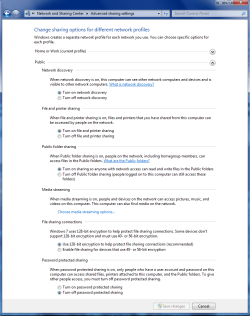
For machines running something other than Windows 7 use the public file sharing option, set everything as shown below on the shared Windows 7 machine. You will also need to enable sharing with full access rights on the Vista and XP machines.

You can use the Public password protected option "on or off" to toggle if a machine can be accessed or not.
 

Attachments

  • public sharing enabled all.PNG
    public sharing enabled all.PNG
    39.7 KB · Views: 264

My Computer My Computer

Computer type
PC/Desktop
Computer Manufacturer/Model Number
Home built
OS
Windows 7 Ult, Windows 8.1 Pro,
CPU
Q9650-4.275GHz, E8600 4.5GHz, E6750-3.8GHz
Motherboard
Evga 780i FTW
Memory
G.Skill PC2 9600 1200Mhz 5 5 5 15 2T
Graphics Card(s)
GTX480
Sound Card
Asus Xonar D2
Monitor(s) Displays
HannsG
Screen Resolution
1680X1050
Hard Drives
GSkill Phoenix Pro 120GB SSD
PSU
ThermalTake Toughpower 1000Watt modular
Case
ThermalTake XaserV
Cooling
Xigmatek S1283
Keyboard
Logitech G15
Mouse
Logitech G9
Internet Speed
T1
I had tried that previously actually. I had put it back to Default as the other Win-7 machine is working at default.

Anyway, I just put it to enable again, and rebooted. It didn't seem to have any effect.

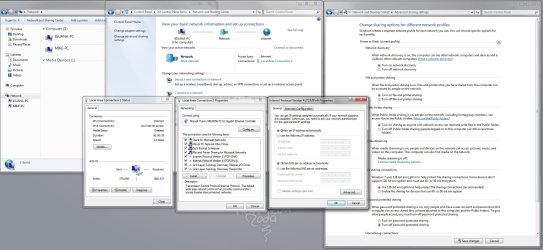
I'm attaching a screen shot of the main setting windows to see if theres something that seems out of wack that I'm oblivious to.

Thanks for your continued help.

Steve.
 

Attachments

  • network.jpg
    network.jpg
    243.2 KB · Views: 122

My Computer My Computer

OS
windows 7
Yes, I do understand the homegroup/workgroup situation.

I said in the initial message that homegroups were disabled, and that workgroup was enabled.

All discovery and sharing options are on, (as per my last message's attached screenshot). And the settings are the same on the two windows 7 machines as far as I can tell (iguana-PC and Mike-PC). The iguana-PC cannot see any other machines on the network except for the Mike-PC (also running windows 7), while the Mike-PC can see everything.

The iguana-PC can open an explorer window with access to the shares on the one of the other network boxes (xp-64) by typing in the IP address directly, and can ping it, and from it ping to the Iguana-PC. But cannot see anything but the other win 7 machine in the network window. (There is another win7 machine in the network that is currently off, which it can see as well).

They are both clean installs.


I hope that clarifies the situation.

Thank you for any further help.


Steve.
 

My Computer My Computer

OS
windows 7
If Mike can see xp and Iguana can't, then it means that there is something blocking the view of that machine.

Did you try to map a network drive from iguana to xp?

\\XP machine\Drive

At least it would be a start.
 

My Computer My Computer

Computer Manufacturer/Model Number
Asus
OS
Windows 7 x64 Ultimate SP1
CPU
I5 875K Unlocked
Motherboard
P7P55D-E-PRO
Memory
Kingston HyperX Genesis DDR3-1600MHz 9-9-9-27 @ 1.65V XMP
Graphics Card(s)
EVGA GeForce GTX 570 HD 732 MHz GPU 1280 MB, 152 GB Mem
Sound Card
Onboard Via 1828S
Monitor(s) Displays
Samsung T240 HD
Screen Resolution
Dual 1920X1200 1027X768
Hard Drives
OCZ Vertex II Extended Sandforce SSD 60 Gig 2X WD Black Caviar 1 terabyte 6GBS Transer Sata 3 Marvell Chip
PSU
Corsair Gold fully Modular 80 Plus 850
Case
Coolermaster Half X Full Tower
Cooling
Noctua NH-U12P
Keyboard
MS
Mouse
MS
Internet Speed
Fast enough
Other Info
My fridge has a water tap
I tried the network mapping, and it works fine. It works the same as if I type in the IP address of one of the other boxes manually.

ie: 192.168.6.xx = \\computername\drive

At the top of the explorer window it says Network > computername > drive if I click back on the Network part it takes me to the Network explorer window but that computer will not be visible in the list.

There are several computers and drives that need to be accessible, so mapping them all out is not the solution I was hoping for as they change over time. But it is weird that I can access them manually, but not via the network explorer.

Any other thoughts? and as usual thanks for your continues help.

Steve.
 

My Computer My Computer

OS
windows 7
OK,

Try this.

In the XP machines, go to Administrative Tools>Services, start/stop the Computer Browser. Choose stop for all XP. Reboot and try again.
 

My Computer My Computer

Computer Manufacturer/Model Number
Asus
OS
Windows 7 x64 Ultimate SP1
CPU
I5 875K Unlocked
Motherboard
P7P55D-E-PRO
Memory
Kingston HyperX Genesis DDR3-1600MHz 9-9-9-27 @ 1.65V XMP
Graphics Card(s)
EVGA GeForce GTX 570 HD 732 MHz GPU 1280 MB, 152 GB Mem
Sound Card
Onboard Via 1828S
Monitor(s) Displays
Samsung T240 HD
Screen Resolution
Dual 1920X1200 1027X768
Hard Drives
OCZ Vertex II Extended Sandforce SSD 60 Gig 2X WD Black Caviar 1 terabyte 6GBS Transer Sata 3 Marvell Chip
PSU
Corsair Gold fully Modular 80 Plus 850
Case
Coolermaster Half X Full Tower
Cooling
Noctua NH-U12P
Keyboard
MS
Mouse
MS
Internet Speed
Fast enough
Other Info
My fridge has a water tap
The other thing that I would try is creating a static dns connection to all machines

Machine 1 (main) 198.168.0.100
Machine 2 198.168.0.101

And so on

You can use open dns server

208.67.222.222
208.67.220.220
 

My Computer My Computer

Computer Manufacturer/Model Number
Asus
OS
Windows 7 x64 Ultimate SP1
CPU
I5 875K Unlocked
Motherboard
P7P55D-E-PRO
Memory
Kingston HyperX Genesis DDR3-1600MHz 9-9-9-27 @ 1.65V XMP
Graphics Card(s)
EVGA GeForce GTX 570 HD 732 MHz GPU 1280 MB, 152 GB Mem
Sound Card
Onboard Via 1828S
Monitor(s) Displays
Samsung T240 HD
Screen Resolution
Dual 1920X1200 1027X768
Hard Drives
OCZ Vertex II Extended Sandforce SSD 60 Gig 2X WD Black Caviar 1 terabyte 6GBS Transer Sata 3 Marvell Chip
PSU
Corsair Gold fully Modular 80 Plus 850
Case
Coolermaster Half X Full Tower
Cooling
Noctua NH-U12P
Keyboard
MS
Mouse
MS
Internet Speed
Fast enough
Other Info
My fridge has a water tap
Hey there,..

I tried the stop services, and it didn't make any difference except that I can't manually drill over the xp machine I've been testing with via IP anymore.

It immediately jumps to saying The Internet, and then says Windows cannot access this folder.

I can still get over to it by the \\computername\drive process.


As for going and adjusting all the IP's and DNS's on the machines is really not feasible as it would disrupt the other machines on the network (which are several)... and as only 2 of the win 7 machines are having this problem while 2 others aren't, and the mac/xp machines on the network are working fine.

really frustrating... any other thoughts are always appreciated.


Steve.
 

My Computer My Computer

OS
windows 7
I'm sorry iguana, I don't understand (maybe cause I'm French ;))

Did you say that you could not acccess folders at all from the XP machine once you stopped Computer browser on the XP machines?
 

My Computer My Computer

Computer Manufacturer/Model Number
Asus
OS
Windows 7 x64 Ultimate SP1
CPU
I5 875K Unlocked
Motherboard
P7P55D-E-PRO
Memory
Kingston HyperX Genesis DDR3-1600MHz 9-9-9-27 @ 1.65V XMP
Graphics Card(s)
EVGA GeForce GTX 570 HD 732 MHz GPU 1280 MB, 152 GB Mem
Sound Card
Onboard Via 1828S
Monitor(s) Displays
Samsung T240 HD
Screen Resolution
Dual 1920X1200 1027X768
Hard Drives
OCZ Vertex II Extended Sandforce SSD 60 Gig 2X WD Black Caviar 1 terabyte 6GBS Transer Sata 3 Marvell Chip
PSU
Corsair Gold fully Modular 80 Plus 850
Case
Coolermaster Half X Full Tower
Cooling
Noctua NH-U12P
Keyboard
MS
Mouse
MS
Internet Speed
Fast enough
Other Info
My fridge has a water tap
Hiya,..

I can access files on the xp machine by doing a network map to the drive

\\COMPUTERNAME\drive

I cannot connect via IP anymore (which I could before) afp:\\192.168.1.xx

I can ping the xp box, and the xp box can ping the win7 box.

The win 7 box cannot see the xp box in the Network explorer (or any other xp machine on the network, only the other win7 machines).

does that make it clearer?

Thanks again.


Steve.
 

My Computer My Computer

OS
windows 7
Back
Top