Never a system restore point

millylilly

New member
Local time
9:35 AM
Messages
5
Acwe Aspire 6935. Help please anyone!
I have never been able to have a System Restore Point stored on this laptop in over a year's use.
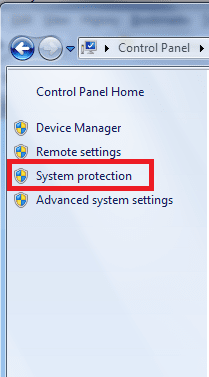
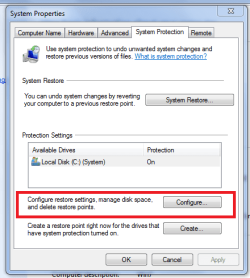
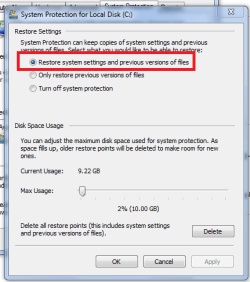
So far as I know I have set all the system protection settings correctly. I have increased the storage space. Last week I downloaded W 7 Service Pack 1 and the latest Internet Explorer. Both instals said "creating system restore point" but there was none stored. I created a couple manually over the next few days but they were not stored either. No threads here connected with this subject show any "never" instances.
millylilly
 

My Computer

Computer Manufacturer/Model Number
Acer Aspire 6935
OS
Windows 7 Home Premium 32bit + Service Pack 1
CPU
Intel core 2 duo T6400 @ 2GHz
Memory
4 GB
Graphics Card(s)
NVIDIA GeForce 9600M GT
Sound Card
NVIDIA & Realtek HD Audio
Monitor(s) Displays
Laptop
Hard Drives
WDC WD3200BEVT-22ZCT0
PSU
Mains and battery
Case
Laptop
Welcome
The most common reasons for this problem is a lack of space to store the points
http://www.sevenforums.com/tutorials/335-system-protection-change-disk-space-usage.html

Software, maybe antivirus, that blocks or deletes the points
Try with clean boot.
http://support.microsoft.com/kb/929135

A virus or malware
Make a full anti virus scan and download and make a scan with malwarebytes.

The service is turned off or other problems
http://www.sevenforums.com/tutorials/57746-system-restore-general-troubleshooting-fix-issues.html
 

My Computer

Computer type
PC/Desktop
Computer Manufacturer/Model Number
Dell XPS 420
OS
Windows 10, Home Clean Install
CPU
Intel Core2 processsor Q8200(2.33Ghz 1333FSB) Quad Core Tech
Motherboard
Dell
Memory
6 gb
Graphics Card(s)
ATI Radeon 256MB HD3650
Sound Card
Intergrated 7.1 Channel Audio
Monitor(s) Displays
Dell SP2009W 20"
Hard Drives
640 GB Serial ATA Hard drive
Cooling
Fan
Keyboard
Dell USB Keyboard
Mouse
Dell Premium Optical USB
Internet Speed
DSL 2.85

Attachments

  • sys protection.PNG
    sys protection.PNG
    12.7 KB · Views: 4
  • System restore.PNG
    System restore.PNG
    16.9 KB · Views: 6
  • enable sys restore.PNG
    enable sys restore.PNG
    15.7 KB · Views: 3
Last edited by a moderator:

My Computer

Computer type
PC/Desktop
Computer Manufacturer/Model Number
Packard Bell
OS
Windows 7 Home Premium 64bit
CPU
Intel(R) Core(TM) i3-2120 CPU @ 3.30GHz
Motherboard
Packard Bell IPISB-AG
Memory
3.00 GB
Graphics Card(s)
(1) Intel(R) HD Graphics (2) VNC Mirror Driver
Sound Card
Realtek High Definition Audio
Monitor(s) Displays
AIO LCD
Screen Resolution
1920 x 1080
Hard Drives
WDC WD10EADX-22TDHB0 ATA Device
Fixed hard disk media
4 partitions
931.51 GB
Keyboard
Wireless
Mouse
Wireless
Antivirus
Microsoft Security Essentials
Browser
IE; Firefox
Other Info
Also:
Samsung N220 Plus Netbook - Windows 7 Home
HP laptop
iPad 5
Many thanks, Irene. I had done this.
Many thanks too to Riche46. I am going to try the software idea now. I have also printed Capt. Jack Sparrow's "System Restore Gen. Troubleshooting to Fix Issues" which looks useful - and time-consuming!
We'll get there with this Forum's help I am sure.
millylilly
 

My Computer

Computer Manufacturer/Model Number
Acer Aspire 6935
OS
Windows 7 Home Premium 32bit + Service Pack 1
CPU
Intel core 2 duo T6400 @ 2GHz
Memory
4 GB
Graphics Card(s)
NVIDIA GeForce 9600M GT
Sound Card
NVIDIA & Realtek HD Audio
Monitor(s) Displays
Laptop
Hard Drives
WDC WD3200BEVT-22ZCT0
PSU
Mains and battery
Case
Laptop
Back
Top