

Win 7 Home Premium - I am administrator and have error reporting enabled for all users, which is me!
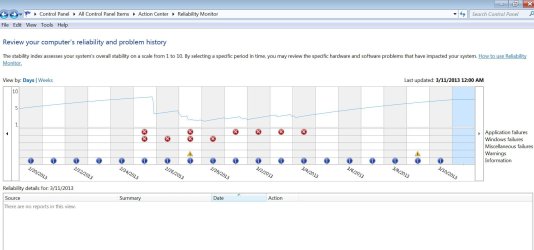
I've had all my settings for errors and problem reporting completely enabled with all possible options enabled to report and receive solutions for errors. Once in a while I will get a message that there was an issue connecting to the error reporting site, but that's temporary and I'm usually able to connect and send "All Problems" withing 24 hours. I report problems both automatically and will manually resend all the reports to check for solutions. I have checked under Reliability Monitor and my reports ARE being sent. The only response I ever see is "No solutions found - solutions will be shown in action center if there is a solution found". Something like that.
But I never get a single solution. The only solutions I'll ever see are that I need to set up "Backup", which I do manually, and that I don't have Windows Update completely automatic. That's because I want to review any updates and decide if I want them or not, like Bing, or other extras I'm not interested in.
So is it just me, or does everyone seem to see the same pattern? If it is just me, is there a solution available? Ill include some snips of my settings. Thanks!
I've had all my settings for errors and problem reporting completely enabled with all possible options enabled to report and receive solutions for errors. Once in a while I will get a message that there was an issue connecting to the error reporting site, but that's temporary and I'm usually able to connect and send "All Problems" withing 24 hours. I report problems both automatically and will manually resend all the reports to check for solutions. I have checked under Reliability Monitor and my reports ARE being sent. The only response I ever see is "No solutions found - solutions will be shown in action center if there is a solution found". Something like that.
But I never get a single solution. The only solutions I'll ever see are that I need to set up "Backup", which I do manually, and that I don't have Windows Update completely automatic. That's because I want to review any updates and decide if I want them or not, like Bing, or other extras I'm not interested in.
So is it just me, or does everyone seem to see the same pattern? If it is just me, is there a solution available? Ill include some snips of my settings. Thanks!
Attachments



My Computer
At a glance
Windows 7 Home Premium 64 bit SP1Intel Core i7-3610QM CPU @ 2.30GHz Max 3.3Ghz16MB PC3-12800(1600MHz) DDR3 SODIMM 4 Modules...NVIDIA GeForce GTX 675M 2048 MB GDDR5 Ram
- Computer Manufacturer/Model Number
- Samsung "Series 7 Gamer" Model: NP700G7C-S01US 17.3" Notebook
- OS
- Windows 7 Home Premium 64 bit SP1
- CPU
- Intel Core i7-3610QM CPU @ 2.30GHz Max 3.3Ghz
- Motherboard
- SAMSUNG_NP1234567890 SEC_SW_REVISION_1234567890ABCD
- Memory
- 16MB PC3-12800(1600MHz) DDR3 SODIMM 4 Modules of 4MB Each
- Graphics Card(s)
- NVIDIA GeForce GTX 675M 2048 MB GDDR5 Ram
- Sound Card
- NVIDIA Hi Def Audio(4x), Realtek Hi Def, DolbyVrs7.2.7000.7
- Monitor(s) Displays
- 17.3" LED full HD(1920 x 1080), HDMI to Philips47"TV Full HD
- Hard Drives
- Samsung 830 SSD 256GB MZ-7PC256N/AM - (drive 0) O.S. Drive:C
SanDisk iSSD P4 8GB (drive 1)- supposed to be for ExpresseCache, but EC is turned off, as I have an SSD, which is faster. I'll use the 8GB For Storage.
Hitachi Travelstar HDD 750GB 7K
- PSU
- NOTEBOOK
- Case
- NOTEBOOK
- Cooling
- NOTEBOOK Cooling Plus Cooling Stand W/2 Self Powered Fans


