New Ad aware problems

blackramair

New member
Local time
10:33 AM
Messages
10
So I have been trying to solve a redirect problem on my Windows 7 64 bit. I ran malebytes, MSE, Norton online scan, and spybot. All came back clean, and I have run all of these for a week now everyday trying to solve this problem. So I downloaded the new ad aware and ran it. It found 4 items, I hit the recommend fix and rebooted as per ad aware upon reboot none of my 32bit programs would run not even internet explorer. So I am in the process of running a repair install of windows. Just thought I would post my issue to help others who may be having the same problems.
 

My Computer

OS
windows 7
CPU
q6600
Motherboard
DFI X48 TR2
Memory
4GB G Skill 800mhz
Graphics Card(s)
Asus 4850
Sound Card
Audigy 2 ZS Plat
Monitor(s) Displays
HW191D Hanns G
Screen Resolution
1440x900
Hard Drives
Seagate 250GB
PSU
Corsair 100w
Case
Armor
Cooling
Ninja B
Keyboard
Logitech
Mouse
Logitech
Internet Speed
10Mb
Hi, blackramair.

As an Administrator at the former Lavasoft Support Forums, I can honestly say that I have not used Ad-Aware since 2004. That said, instead of random scans with multiple scanners, perhaps the next time you'll seek assistance here or at one of the well known security forums.
 

My Computer

OS
Windows 7 & Windows Vista Ultimate
Well I have searched several forums, and followed the advice of multiple threads I came across. Do be honest I could have done more in terms of asking but what is done is done. I only posted to let others know to maybe not follow my mistakes. All seemed fine while running scans checking for my trouble. Once adaware was installed it stopped the redirects so I followed with a scan. Once it was complete I used the recommended settings and reboot. Upon reboot was my issue of no program except IE 64 bit would start. This included adaware so I could undo it's actions. This seemed like a pit fall to me thus the reason for the thread.
With every dumb action comes knowledge to not make the action again.
 

My Computer

OS
windows 7
CPU
q6600
Motherboard
DFI X48 TR2
Memory
4GB G Skill 800mhz
Graphics Card(s)
Asus 4850
Sound Card
Audigy 2 ZS Plat
Monitor(s) Displays
HW191D Hanns G
Screen Resolution
1440x900
Hard Drives
Seagate 250GB
PSU
Corsair 100w
Case
Armor
Cooling
Ninja B
Keyboard
Logitech
Mouse
Logitech
Internet Speed
10Mb
You could have probably done a system restore, provided it is not turned off, to fix you problem. Any restore point before the reboot you mentioned would have gotten everything working again and we could help make sure you did not let Adaware remove any false positives.

Also, if you do turn system restore off, please turn it back on. It is one thing to turn it off to clear it out if you thing viruses could have been backed up to it, but it should not be turned off permanently. On almost a daily basis I read a thread where someone had a problem that they themselves caused through an honest mistake or random occurance that they could have easily fixed with a system restore, but could not because they turned it off.
 

My Computer

Computer type
Laptop
Computer Manufacturer/Model Number
Toshiba P775-S7100
OS
Windows 7 Professional SP1 64-bit
CPU
Intel Core i5-2450M @2.5 GHz
Memory
6 GB DDR3 1333MHz
Graphics Card(s)
Intel HD 3000
Monitor(s) Displays
Built-in 17.3" LED; 22" Insignia NS-L22Q-10A
Screen Resolution
1600x900; 1360x768
Hard Drives
750 GB Hitachi
1TB Seagate FreeAgent External
Internet Speed
Verizon DSL Speed(Down/Up): 3360 Kbps / 800 Kbps
Antivirus
MSE and MBAM Pro
Browser
IE10
System restore was turned off to try to rid computer of the virus/ maleware. So that option was not there. As per instructions from other sites system restore was to be turned off. Great feature but sucks when you have to turn it off due to maleware reinstalling itself from your restore point.
 

My Computer

OS
windows 7
CPU
q6600
Motherboard
DFI X48 TR2
Memory
4GB G Skill 800mhz
Graphics Card(s)
Asus 4850
Sound Card
Audigy 2 ZS Plat
Monitor(s) Displays
HW191D Hanns G
Screen Resolution
1440x900
Hard Drives
Seagate 250GB
PSU
Corsair 100w
Case
Armor
Cooling
Ninja B
Keyboard
Logitech
Mouse
Logitech
Internet Speed
10Mb
Hi, blackramair.

What ever sites you went to were wrong. Malware will not reinstall itself from a restore point unless you restore the computer to an infected point. However, an infected restore point is better than none at all -- most particularly for those who do not do a proper backup or have managed to lose the CD. The correct method is to clean the computer, create a fresh restore point and then use Disk Cleanup to remove all but the most recent restore point.
 

My Computer

OS
Windows 7 & Windows Vista Ultimate
The most affective redirect fix I've seen doesn't require a scan or download fix at all.
In the folder options "view" tab, place a dot next to "Show hidden files and folders". Close folder options.
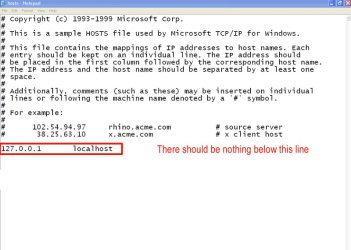
Next, navigate to C:\Windows\system32\drivers\etc. Open the "Hosts" file in notepad. At the bottom, look for
127.0.0.1 localhost

There should be no other data below this line. It should look like this, or something similar:

ScreenShot001.jpg

Delete the data below that line and save and exit notepad. Restart your browser and try again.
 

My Computer

Computer Manufacturer/Model Number
Custom Build
OS
Windows 7 Pro/32 Academic. Build 7600
CPU
Intel 2.3 Duo core
Motherboard
EliteGroup G31T-M
Memory
4 GB DDR
Graphics Card(s)
Nvidia GeForce 9500 GT
Sound Card
Built in
Monitor(s) Displays
Viewsonic 15" 4:3
Screen Resolution
1280 x 1024
Hard Drives
WD Caviar Black 750 GB
WD 250 GB External
PSU
Antec 450w
Keyboard
Standard windows
Mouse
Logitech USB
Internet Speed
Bellsouth DSL 6.0
The host file was clean. When you had any browser open for about 10-15 minutes it would randomly open another window an go to random url's sometimes opening three tabs in the process. This was the reason for multiple scans and with different what I thought was trusted programs. I haven't used ad aware in years but after nothing found by mse, norton or malewarebytes. I thought as suggested by google searching to give ad aware a try. After scanning with it, it found something and recommended placing it in quarantine so I did and revolted as the program said. Upon boot it cleaned the files and started my computer. Once restarted only my 64 bit programs would open nothing else. I could not even open ad aware to undo what it had done. What's done is done. No big harm as I keep all my personal files on a separate partition just for that reason. I only posted to let others no that ad aware may not be a viable program anymore and to use at your own risk. It could have just been a fluke with my system but felt it was worth mentioning. This is a first time I have ever had to reinstall due to a virus or maleware.
 

My Computer

OS
windows 7
CPU
q6600
Motherboard
DFI X48 TR2
Memory
4GB G Skill 800mhz
Graphics Card(s)
Asus 4850
Sound Card
Audigy 2 ZS Plat
Monitor(s) Displays
HW191D Hanns G
Screen Resolution
1440x900
Hard Drives
Seagate 250GB
PSU
Corsair 100w
Case
Armor
Cooling
Ninja B
Keyboard
Logitech
Mouse
Logitech
Internet Speed
10Mb
If you don't want to use system restore, you can always create 'images' of your drives using tools like Macrium Refect or even with the windows's inbuilt system image tool and restore with within minutes in case of any serious trouble.
 

My Computer

Computer Manufacturer/Model Number
HCL
OS
Winbdows 7 ultimate x64 | Ubuntu 12.04 x64 LTS
CPU
Core 2 Duo e7400 @ 2.90GHz
Motherboard
Gigabyte G31M-ES2L
Memory
3GB DDR2
Graphics Card(s)
Asus Nvidia GTX 560Ti 1GB
Sound Card
On-board
Monitor(s) Displays
HCL eZeeBee 18.5" LCD
Screen Resolution
1366x768 @ 60Hz
Hard Drives
Western Digital 320GB
PSU
Corsair CX500 V2 500W
Cooling
Stock
Keyboard
Stock
Mouse
Stock
Internet Speed
15-25kBps D/L | 10kBps U/L | Hey Don't laugh
The host file was clean. When you had any browser open for about 10-15 minutes it would randomly open another window an go to random url's sometimes opening three tabs in the process. This was the reason for multiple scans and with different what I thought was trusted programs. I haven't used ad aware in years but after nothing found by mse, norton or malewarebytes. I thought as suggested by google searching to give ad aware a try. After scanning with it, it found something and recommended placing it in quarantine so I did and revolted as the program said. Upon boot it cleaned the files and started my computer. Once restarted only my 64 bit programs would open nothing else. I could not even open ad aware to undo what it had done. What's done is done. No big harm as I keep all my personal files on a separate partition just for that reason. I only posted to let others no that ad aware may not be a viable program anymore and to use at your own risk. It could have just been a fluke with my system but felt it was worth mentioning. This is a first time I have ever had to reinstall due to a virus or maleware.
I apologize, I thought you had a redirect issue.
 

My Computer

Computer Manufacturer/Model Number
Custom Build
OS
Windows 7 Pro/32 Academic. Build 7600
CPU
Intel 2.3 Duo core
Motherboard
EliteGroup G31T-M
Memory
4 GB DDR
Graphics Card(s)
Nvidia GeForce 9500 GT
Sound Card
Built in
Monitor(s) Displays
Viewsonic 15" 4:3
Screen Resolution
1280 x 1024
Hard Drives
WD Caviar Black 750 GB
WD 250 GB External
PSU
Antec 450w
Keyboard
Standard windows
Mouse
Logitech USB
Internet Speed
Bellsouth DSL 6.0
I called it a redirect issue due to not really knowing what to call it. I was not upset by your post, I was only trying to better explain what happened. I do normally run system restore but had only turned it off as to try and clean the system. I do remember there were times with xp that system restore had to be turned off to clean certain virus' from your system.
 

My Computer

OS
windows 7
CPU
q6600
Motherboard
DFI X48 TR2
Memory
4GB G Skill 800mhz
Graphics Card(s)
Asus 4850
Sound Card
Audigy 2 ZS Plat
Monitor(s) Displays
HW191D Hanns G
Screen Resolution
1440x900
Hard Drives
Seagate 250GB
PSU
Corsair 100w
Case
Armor
Cooling
Ninja B
Keyboard
Logitech
Mouse
Logitech
Internet Speed
10Mb
I called it a redirect issue due to not really knowing what to call it. I was not upset by your post, I was only trying to better explain what happened. I do normally run system restore but had only turned it off as to try and clean the system. I do remember there were times with xp that system restore had to be turned off to clean certain virus' from your system.
No worries, nobody's upset. :) With your personal data on a separate drive, it might be a good time for a clean install. If you don't want to go to that extreme, you could always do a http://www.sevenforums.com/tutorials/3413-repair-install.html
 

My Computer

Computer Manufacturer/Model Number
Custom Build
OS
Windows 7 Pro/32 Academic. Build 7600
CPU
Intel 2.3 Duo core
Motherboard
EliteGroup G31T-M
Memory
4 GB DDR
Graphics Card(s)
Nvidia GeForce 9500 GT
Sound Card
Built in
Monitor(s) Displays
Viewsonic 15" 4:3
Screen Resolution
1280 x 1024
Hard Drives
WD Caviar Black 750 GB
WD 250 GB External
PSU
Antec 450w
Keyboard
Standard windows
Mouse
Logitech USB
Internet Speed
Bellsouth DSL 6.0
Yeah tried a repair install and that didn't work computer was still locked so I did a clean install. Things are back up and running. Thanks for the suggestions that I can remember the next time it happens. Fully hoping it doesn't happen again. I don't think I will have a problem opening 32 bit programs as I have thrown ad aware off my list of programs to help clean a computer.
 

My Computer

OS
windows 7
CPU
q6600
Motherboard
DFI X48 TR2
Memory
4GB G Skill 800mhz
Graphics Card(s)
Asus 4850
Sound Card
Audigy 2 ZS Plat
Monitor(s) Displays
HW191D Hanns G
Screen Resolution
1440x900
Hard Drives
Seagate 250GB
PSU
Corsair 100w
Case
Armor
Cooling
Ninja B
Keyboard
Logitech
Mouse
Logitech
Internet Speed
10Mb
Ad-Aware Pro has compatibility problems

Yeah tried a repair install and that didn't work computer was still locked so I did a clean install. Things are back up and running. Thanks for the suggestions that I can remember the next time it happens. Fully hoping it doesn't happen again. I don't think I will have a problem opening 32 bit programs as I have thrown ad aware off my list of programs to help clean a computer.

I had used Ad-Aware for years, but recently I had to uninstall the paid Pro version from my laptops (Win 7 Pro 64-bit and XP).

The main reason was that Ad-Aware gave incompatibility problems with Norton 360. After Lavasoft made some major changes to Ad-Aware, it became impossible to use: Slow start-ups, laptops hanging, Ad-Aware crashing and clashing with other anti-malware like SUPERantispyware.

Lavasoft's technical support instructed me to remove Norton 360, but I wouldn't dream of trying to replace Norton 360 with Ad-Aware Pro only. No matter, if they refer to some good results achieved in the occasional VirusBulletin tests. Very bad advice, indeed.

Another bad customer experience was that I did get no refund for the purchase of Ad-Aware Pro.

You better be careful if you plan to install Ad-Aware Pro on any machine, that has another real-time protection installed. I was stupid enough to ignore the complaints made by my machines, and finally had to reinstall the operating system on the Win 7 Pro laptop.

Ad-Aware and its latest database update is a huge installation package to download (almost 200 MB). It leaves you with a feeling, that the old code has been patched too many times.

I returned to my basic setup with Norton 360 v4 as the main protection and Malwarebytes and Iobit 360 as additional scanners (free versions). And Secunia PSI (free) to keep my software up-to-date. These work fine together, at least so far (December, 2011).

The reason why I use more than one protection, is of course the fact, that no single software is capable of protecting from all threats, and these provide at least a usable solution with three of them finding occasionally different types of malware.

Malwarebytes is solid package, with which I have never had any significant problems. Iobit security 360 is in my opinion a bit underrated, even though I would use it only as an additional scanner. There was a lot of talk about Iobit offending the intellectual property rights of Malwarebytes. It is clear, however, that it detects some threats better than Malwarebytes or Norton 360. And it is fast, which you appreciate every now and then.

Any additional malware detection by using Ad-Aware? There must be, but I only found one IP address, that Ad-Aware blocked access to while downloading torrents. I have had that IP under surveillance now, but no malware has come from there so far. I believe Lavasoft are still using Vipre virus definitions.

I think that the companies that sell Internet security software should pay extra attention to compatibility - at least as long as they are going more or less solo in keeping their detection databases up-to-date.

 
Last edited:

My Computer

OS
Windows 7 Professional
Back
Top