New Battery Problem

treblesum81

New member
Local time
5:11 PM
Messages
46
Hi All,

Recently the battery in my wife's laptop died (full charge would last about 15-30 min at best), so we replaced it. The problem is that Windows 7 still thinks the battery is dead, and immediately pops up a warning when the computer boots saying basically "warning, your battery has 4 hours and 30 minutes of charge left, you should change it or plug it in." Now, in and of itself, this wouldn't be a problem, but along with this, the OS will randomly hibernate the computer as it would to prevent data from being lost from a dead battery, only it never does it at 10%-15% battery, but rather 50%-90% battery.

Is there some setting or process that needs to take place to get the computer to stop thinking of this battery as a bad battery? Or is the battery bad and we should just send it back?

Thanks,
Greg
 

My Computer

OS
Windows 7
You might simply change the setting so that when the laptop is plugged it, it has NO OFF -BUT ALWAYS ON.
I USE THIS SETTING - all the time to stop just that. even leave the system on doing nothing for 2 or 3 hours to fully charge the battery.
also most laptops have a two color indicator on the battery which you can see when the lid is closed... wait for it to indicate full charge.
THE MANUFACTURE SHOULD HAVE SENT YOU A MEMO. MOST NEW BATTERIES ARE NOT EFFECIENT UNTILL CHARGED/RAN DOWN - THREE TIMES. If you set at least one day to do this... you can charge-rundown and recharge at least 3 times in 9 to 12 hours. I also usually run down in the dvd usage to FULL erase and record on a DVD RW- wow that does take the power. Set the ERASE to FULL ERASE not FAST.
PS: you might also retest the old BATTERY, this way....depends on how old your battery is.. it is suppost to be NO BRAIN so this erronous info does not happen.
 
We've had the battery for a couple of weeks without any change in the behavior. In that time we've run it down and filled it up many times and it still doesn't work right. It seems that windows thinks that the new, working battery, is the old not working battery, hence the warnings and shutdowns, even though windows itself admits the battery has hours of use in it...
 

My Computer

OS
Windows 7
What is the make and model number of the laptop in question?
 

My Computer

Computer type
PC/Desktop
Computer Manufacturer/Model Number
Dwarf Dwf/11/2012 r09/2013
OS
Windows 8.1 Pro RTM x64
CPU
Intel Core-i5-3570K 4-core @ 3.4GHz (Ivy Bridge) (OC 4.4GHz)
Motherboard
ASRock Z77 Extreme4-M
Memory
4 x 4GB DDR3-1600 Corsair Vengeance CMZ8GX3M2A1600C9B (16GB)
Graphics Card(s)
MSI GeForce GTX770 Gaming OC 2GB
Sound Card
Realtek High Definition on board solution (ALC 898)
Monitor(s) Displays
ViewSonic VA1912w Widescreen (VGA)
Screen Resolution
1440x900
Hard Drives
OCZ Agility 3 SSD 120GB SATA III x2 (RAID 0)
Samsung HD501LJ 500GB SATA II x2
Hitachi HDS721010CLA332 1TB SATA II
Iomega 1.5TB Ext USB 2.0
WD 2.0TB Ext USB 3.0
PSU
XFX Pro Series 850W Semi-Modular
Case
Gigabyte IF233
Cooling
1 x 120mm Front Inlet 1 x 120mm Rear Exhaust
Keyboard
Microsoft Comfort Curve Keyboard 3000 (USB)
Mouse
Microsoft Comfort Mouse 3000 for Business (USB)
Internet Speed
NetGear DG834Gv3 ADSL Modem/Router (Ethernet) ~4.0 Mb/s (O2)
Antivirus
Avast! 8.0.1497
Browser
IE 11
Other Info
Optical Drive: HL-DT-ST BD-RE BH10LS30 SATA Bluray
Lexmark S305 Printer/Scanner/Copier (USB)
WEI Score: 8.1/8.1/8.5/8.5/8.25
Asus Eee PC 1011PX Netbook (Windows 7 x86 Starter)
I dont think its a Windows 7 issue. I m using it on my laptop and my battery lasts for 3 hrs on an average.
 

My Computer

Computer Manufacturer/Model Number
Samsung NP530U4B-S02IN
OS
Windows® 8 Pro (64-bit)
CPU
Intel® Core™ i5 Processor 2467M (1.60GHz, 3MB L3 Cache)
Motherboard
Samsung Electronics
Memory
6GB DDR3 System Memory at 1,333MHz (on BD 4GB + 2GB x 1)
Graphics Card(s)
AMD Radeon™ HD7550M 1GB DDR3 (Ext. Graphic)
Sound Card
Realtek High Definition Audio
Monitor(s) Displays
35.56cm (14.0) SuperBright 300nit HD LED Display
Screen Resolution
1366x768
Hard Drives
1TB S-ATA II Hard Drive (5400RPM) with ExpressCache 16GB SSD
Internet Speed
sucks
Antivirus
Microsoft Security Essentials
Browser
Google Chrome (Sync enabled)
You might try a BIOS refresh.
I have not had the problem in Win 7, and I have not seen anybody else with the ?? problem. So I'm thinking it might be in the BIOS.
You have verified that the NEW BATTERY is 100% then same as recommended by the manufacture. (OEM) type.
Verify the battery model # against the manufacture site for equal to or same as.

If your technical ability allows: remove the battery, locate the master NEG and POS terminals. should be approx 11 to 14 volts. locate a 12volt lamp, small in size, amps can be either large or small, I prefer small amps to DRAIN batteries.
attach carefully the Pos and Neg terminals of the lamp to the battery. (yes, carefully)
it might take 2 or 3 days to run the battery DEAD. the smaller the amps to make the lite work the longer it takes. the longer it takes the more accurate you are... from like t flashlite battery (12 vt) i then switch to a LED (very small amp) lite. as long as the lite works the battery still has a charge. I do the same for C-phone batteries. and it allows the last 30% normally not used to drain, when the battery recharges it see longer in need and many times restores almost original battery life.

BE PATIENT - not sure it will work but I'd try it If i was 100% sure the new battery was the SA the old battery... or play with the old battery and see if it fixes it.
 
The laptop is a Dell Inspiron 8200 (I think on the number...), and the battery we bought was the dell model built and specified for that laptop. The new battery is 100% as is verified by the fact that, aside from the windows warnings, and the preventative shutdowns, it does indeed last for 3-5 hours on a charge. Also, the two batteries won't have the same product numbers as the new one is an extended life battery and the original is not.
 

My Computer

OS
Windows 7
You might simply change the setting so that when the laptop is plugged it, it has NO OFF -BUT ALWAYS ON.
I USE THIS SETTING - all the time to stop just that. even leave the system on doing nothing for 2 or 3 hours to fully charge the battery.
also most laptops have a two color indicator on the battery which you can see when the lid is closed... wait for it to indicate full charge.
THE MANUFACTURE SHOULD HAVE SENT YOU A MEMO. MOST NEW BATTERIES ARE NOT EFFECIENT UNTILL CHARGED/RAN DOWN - THREE TIMES. If you set at least one day to do this... you can charge-rundown and recharge at least 3 times in 9 to 12 hours. I also usually run down in the dvd usage to FULL erase and record on a DVD RW- wow that does take the power. Set the ERASE to FULL ERASE not FAST.
PS: you might also retest the old BATTERY, this way....depends on how old your battery is.. it is suppost to be NO BRAIN so this erronous info does not happen.

Snuffy, can you please avoid using very dark / black fonts when posting? your first post in this thread above looks like this:

Black text.PNG
 

My Computers

System One System Two

  • Computer type
    PC/Desktop
    Computer Manufacturer/Model Number
    The Beast Model A (homebrew)
    OS
    Windows 11 21H2 Current build
    CPU
    AMD Ryzen 9 3950X
    Motherboard
    MSI MEG X570 GODLIKE
    Memory
    4 * 32 GB - Corsair Vengeance 3600 MHz
    Graphics Card(s)
    EVGA GeForce RTX 3080 Ti XC3 ULTRA GAMING (12G-P5-3955-KR)
    Sound Card
    Realtek® ALC1220 Codec
    Monitor(s) Displays
    2x Eve Spectrum ES07D03 4K Gaming Monitor (Matte) | Eve Spec
    Screen Resolution
    3x 3840 x 2160
    Hard Drives
    3x Samsung 980 Pro NVMe PCIe 4 M.2 2 TB SSD (MZ-V8P2T0B/AM) } 3x Sabrent Rocket NVMe 4.0 1 TB SSD
    PSU
    PC Power & Cooling’s Silencer Series 1050 Watt, 80 Plus Plat
    Case
    Fractal Design Define 7 XL Dark ATX Full Tower Case
    Cooling
    SteelSeries Apex Pro Wired Gaming Keyboard
    Keyboard
    SteelSeries Apex Pro
    Mouse
    Logitech MX Master 3S | MX Master 3 for business
    Internet Speed
    AT&T LightSpeed Gigabit Duplex Ftth
    Antivirus
    Windows Defender + MB 3
    Browser
    Nightly (default) + Firefox (stable),Chrome, Edge
  • Computer type
    PC/Desktop
    System Manufacturer/Model Number
    Dell Latitude E5470
    OS
    ChromeOS Flex Dev Channel (current)
    CPU
    Intel(R) Core(TM) i5-6300U CPU @ 2.40GHz, 2501 Mhz, 2 Core(s), 4 Logical Processor(s)
    Motherboard
    Dell
    Memory
    16 GB
    Graphics Card(s)
    Intel(R) HD Graphics 520
    Sound Card
    Intel(R) HD Graphics 520 + RealTek Audio
    Monitor(s) Displays
    Dell laptop display 15"
    Screen Resolution
    1920 * 1080
    Hard Drives
    Toshiba 128GB M.2 22300 drive
    INTEL Cherryville 520 Series SSDSC2CW180A 180 GB SATA III SSD
    PSU
    Dell
    Case
    Dell
    Cooling
    Dell
    Keyboard
    Dell
    Mouse
    Logitech MX Master 3S (shared w. Sys 1) | Dell TouchPad
    Internet Speed
    AT&T LightSpeed Gigabit Duplex Ftth
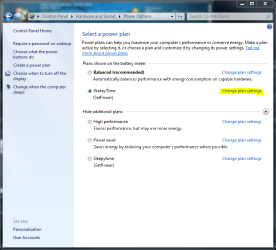
You can check to see if the settings were screwed up in your power settings.

Go to Control Panel\Hardware and Sound\Power Options

Battery Settings #1.PNG

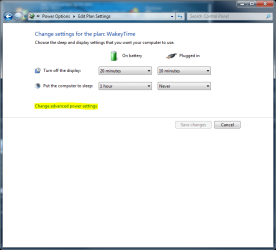
Click change plan settings

Battery Settings #2.PNG

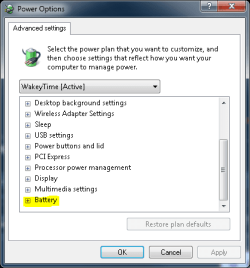
click Change advanced power settings

Battery Settings #3.PNG

click Change settings that are currently unavailable

Battery Settings #4.PNG

expand Batter

Battery Settings #5.PNG

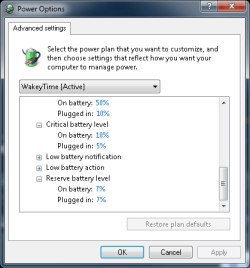
expand Low battery level, Critical battery level, and Reserve battery level

Battery Settings #6.PNG

(mine by example)

Now, post the screen shot of yours as I have of mine (last screen shot).
 

My Computers

System One System Two

  • Computer type
    PC/Desktop
    Computer Manufacturer/Model Number
    The Beast Model A (homebrew)
    OS
    Windows 11 21H2 Current build
    CPU
    AMD Ryzen 9 3950X
    Motherboard
    MSI MEG X570 GODLIKE
    Memory
    4 * 32 GB - Corsair Vengeance 3600 MHz
    Graphics Card(s)
    EVGA GeForce RTX 3080 Ti XC3 ULTRA GAMING (12G-P5-3955-KR)
    Sound Card
    Realtek® ALC1220 Codec
    Monitor(s) Displays
    2x Eve Spectrum ES07D03 4K Gaming Monitor (Matte) | Eve Spec
    Screen Resolution
    3x 3840 x 2160
    Hard Drives
    3x Samsung 980 Pro NVMe PCIe 4 M.2 2 TB SSD (MZ-V8P2T0B/AM) } 3x Sabrent Rocket NVMe 4.0 1 TB SSD
    PSU
    PC Power & Cooling’s Silencer Series 1050 Watt, 80 Plus Plat
    Case
    Fractal Design Define 7 XL Dark ATX Full Tower Case
    Cooling
    SteelSeries Apex Pro Wired Gaming Keyboard
    Keyboard
    SteelSeries Apex Pro
    Mouse
    Logitech MX Master 3S | MX Master 3 for business
    Internet Speed
    AT&T LightSpeed Gigabit Duplex Ftth
    Antivirus
    Windows Defender + MB 3
    Browser
    Nightly (default) + Firefox (stable),Chrome, Edge
  • Computer type
    PC/Desktop
    System Manufacturer/Model Number
    Dell Latitude E5470
    OS
    ChromeOS Flex Dev Channel (current)
    CPU
    Intel(R) Core(TM) i5-6300U CPU @ 2.40GHz, 2501 Mhz, 2 Core(s), 4 Logical Processor(s)
    Motherboard
    Dell
    Memory
    16 GB
    Graphics Card(s)
    Intel(R) HD Graphics 520
    Sound Card
    Intel(R) HD Graphics 520 + RealTek Audio
    Monitor(s) Displays
    Dell laptop display 15"
    Screen Resolution
    1920 * 1080
    Hard Drives
    Toshiba 128GB M.2 22300 drive
    INTEL Cherryville 520 Series SSDSC2CW180A 180 GB SATA III SSD
    PSU
    Dell
    Case
    Dell
    Cooling
    Dell
    Keyboard
    Dell
    Mouse
    Logitech MX Master 3S (shared w. Sys 1) | Dell TouchPad
    Internet Speed
    AT&T LightSpeed Gigabit Duplex Ftth
Back
Top