New Build - Drive Recognition Problems

jiroband

New member
Local time
9:28 PM
Messages
8
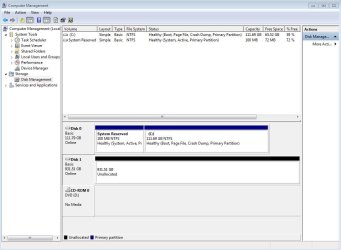
I just finished my first desktop build and installed Windows 7 Professional 64-bit. I've got 2 drives: Drive #1 (OCZ Vertex 3 SSD - 120G) and Drive #2 (WD Caviar Black - 1TB). I'm using Drive #1 as the Boot Disk where "programs only" will be installed, and Drive #2 will be used for storage. Everything seemed to go fine, except after installation, Explorer did not recognize Drive #2; but, the Device Manager did see it. It is calling Drive #1, "Disk 1." It is calling Drive #2, "Disk 0."

Under Device Properties/ Volumes Tab, this is what my Disk #2 (the WD Caviar Black) is showing:

Disk: Disk 0
Type: Unknown
Status: Not Initialized
Partition Type: Not applicable
Capacity: 953870 MB
Unallocated Space: 0 MB
Reserved Space: 0 MB

After searching various forums for information, this is what I did:
1. I accessed the disk this way: Control Panel>Administrative Tools>Computer Management>Storage>Disk Management
2. I located the disk under Disk Management, then right-clicked and chose Initialize Disk

This seemed to work, however, it was now recognized as Drive E, since Drive D was the name already given to my DVD drive. I should have stopped there, but since I am very picky and want everything to be just so, I temporarily renamed my DVD drive to Drive F, so that I could rename the newly recognized Drive E to Drive D. Then, after renaming Drive E to Drive D, I noticed something strange --my newly renamed Drive D (the WD Caviar Black - 1TB), showed a total capacity of 99.9 MB! As it turned out, what happened is that 99.9 MB of my Drive C got partitioned into a Drive D. I have no idea how this happened -- I have been extremely careful. Now I'm stuck. My WD Caviar Black - 1TB, is back to being unrecognized by Explorer, but is recognized by the Device Manager. . . and my OCZ Vertex 3 has been partitioned into Drives C and D, which I don't want.

Can anyone help me figure out how to remove the partition on the OCZ drive, and help me to get Explorer to recognize my WD drive?
 
Last edited:

My Computer

Computer Manufacturer/Model Number
My own build
OS
Windows 7 Professional 64-bit
CPU
Intel i7-970
Motherboard
Gigabyte G1.Sniper
Memory
Corsair XMS3 - 12GB
Graphics Card(s)
Nvidia Quadro 4000
PSU
OCZ ZX Series 1250W
Case
Lian Li PC-A05N
Cooling
Noctua NH-D14
Theog,

I just tried to boot up my new build so that I could do the screen capture, but the boot failed. It says that BOOTMGR is missing. I had previously tried to remove the "D" partition myself, but it must have contained some data. I did check on this first before deleting, but it said the partition was empty -- it must have lied to me.

This is a new build -- the only thing installed was Windows 7 -- I had not yet gotten to the point of registration or checking for updates. If it is best to wipe everything out and start over from scratch, I have no hesitation in doing that. If that is recommended, I just need to know the best way to do this. Obviously, I have much to learn -- I know just enough to be dangerous!

If I do a reinstall, is there something I should do in BIOS first to get the system to recognize my second drive? Do I need to initialize my second drive somehow before installing Windows 7?
 

My Computer

Computer Manufacturer/Model Number
My own build
OS
Windows 7 Professional 64-bit
CPU
Intel i7-970
Motherboard
Gigabyte G1.Sniper
Memory
Corsair XMS3 - 12GB
Graphics Card(s)
Nvidia Quadro 4000
PSU
OCZ ZX Series 1250W
Case
Lian Li PC-A05N
Cooling
Noctua NH-D14
What happened is since you had both drives installed when you installed Windows 7, it saw the 1TB drive as drive 0 and installed the 100MB reserved boot partition there. (It always installs this on the first drive it sees, in this case drive 0)
Then it installed the operating system on the SSD.
I would disconnect the TB drive and reinstall Windows 7 on the SSD.
Then reinstall the 1TB drive.
Then make sure that the SSD is the first drive in the boot priority in the BIOS.

Edit: Where are you connecting the SSD?
 

My Computer

Computer type
PC/Desktop
Computer Manufacturer/Model Number
Custom Built
OS
Windows 10 Pro x64, Windows 8.1 Pro x64, Windows 7 Ultimate x64 SP1,
CPU
INTEL i9-7920X LGA 2066
Motherboard
Gigabyte X299-WU8 F3
Memory
64 GB (4 X 16 GB) G-Skill V Series DDR4 3200 Quad Channel
Graphics Card(s)
EVGA GTX 1060 SC 3 GB
Sound Card
Realtek Onboard ALC1220
Monitor(s) Displays
2 x Samsung S27E310
Screen Resolution
1920x1080
Hard Drives
Samsung 2 x 970 EVO Plus 500 GB NVMe
1 x 6TB WD 6003FZBX SATA
1 x 6TB WD 60EFRX SATA
12 x 3TB WD 30EFRX SATA
PSU
Seasonic X-1050
Case
Thermaltake Armor+
Cooling
Corsair H80i V2 Liquid AOI Cooler
Keyboard
Logitech G510s
Mouse
Logitech MX Master 2S
Internet Speed
200 Mb/s
Antivirus
ESET NOD32 13.1
Browser
EDGE (Dev, Canary, Beta), Chrome
Other Info
ASUS RT-AC68U router
Malwarebytes 4.0.4
pbcopter,

Both the SSD and the HDD are SATA3. I have two SATA3 ports on my motherboard – so that’s where they are connected. I made sure to get a motherboard with the new Marvell 88SE9182 chip so that my Vertex 3 would be able to operate at its full potential. The SSD is set to boot first under BIOS, followed by the DVD drive. I thought that would prevent any problems.

So, you are saying that all I need to do is disconnect the HDD, put in the Windows 7 disk and reinstall Windows 7? Will this create any duplicate files that will clutter my SSD? Do I need to run FDISK on the SDD, or do something else to wipe it clean first? Do I need to do something to remove the partition first, or will reinstalling Windows 7 remove the partition?
 

My Computer

Computer Manufacturer/Model Number
My own build
OS
Windows 7 Professional 64-bit
CPU
Intel i7-970
Motherboard
Gigabyte G1.Sniper
Memory
Corsair XMS3 - 12GB
Graphics Card(s)
Nvidia Quadro 4000
PSU
OCZ ZX Series 1250W
Case
Lian Li PC-A05N
Cooling
Noctua NH-D14

My Computer

Computer type
PC/Desktop
Computer Manufacturer/Model Number
Custom Built
OS
Windows 10 Pro x64, Windows 8.1 Pro x64, Windows 7 Ultimate x64 SP1,
CPU
INTEL i9-7920X LGA 2066
Motherboard
Gigabyte X299-WU8 F3
Memory
64 GB (4 X 16 GB) G-Skill V Series DDR4 3200 Quad Channel
Graphics Card(s)
EVGA GTX 1060 SC 3 GB
Sound Card
Realtek Onboard ALC1220
Monitor(s) Displays
2 x Samsung S27E310
Screen Resolution
1920x1080
Hard Drives
Samsung 2 x 970 EVO Plus 500 GB NVMe
1 x 6TB WD 6003FZBX SATA
1 x 6TB WD 60EFRX SATA
12 x 3TB WD 30EFRX SATA
PSU
Seasonic X-1050
Case
Thermaltake Armor+
Cooling
Corsair H80i V2 Liquid AOI Cooler
Keyboard
Logitech G510s
Mouse
Logitech MX Master 2S
Internet Speed
200 Mb/s
Antivirus
ESET NOD32 13.1
Browser
EDGE (Dev, Canary, Beta), Chrome
Other Info
ASUS RT-AC68U router
Malwarebytes 4.0.4
pbcopter,

Thanks for the tip! I downloaded and did the Secure Erase on the Vertex 3 SSD. Then I shut down, unhooked the WD HDD, rebooted and installed Windows 7. I then restarted and did all 74 windows updates. Then I shut down, plugged the WD HDD back in, restarted, and checked Explorer for the WD HDD – but it was not there. As before, I can find it under the Device Manager.

What do I do now to get Explorer to recognize this WD HDD?

By the way, in case you are wondering why my Vertex 3 SSD is nearly half full, I've also installed Office Professional 2010 and Adobe CS5 Design Premium Suite.
 

Attachments

  • DM.JPG
    DM.JPG
    73.5 KB · Views: 62

My Computer

Computer Manufacturer/Model Number
My own build
OS
Windows 7 Professional 64-bit
CPU
Intel i7-970
Motherboard
Gigabyte G1.Sniper
Memory
Corsair XMS3 - 12GB
Graphics Card(s)
Nvidia Quadro 4000
PSU
OCZ ZX Series 1250W
Case
Lian Li PC-A05N
Cooling
Noctua NH-D14
Is there anything on the 1TB drive?
If there is nothing on the 1TB drive, just right click on it in disk management and create a simple volume and quick format it.
 

My Computer

Computer type
PC/Desktop
Computer Manufacturer/Model Number
Custom Built
OS
Windows 10 Pro x64, Windows 8.1 Pro x64, Windows 7 Ultimate x64 SP1,
CPU
INTEL i9-7920X LGA 2066
Motherboard
Gigabyte X299-WU8 F3
Memory
64 GB (4 X 16 GB) G-Skill V Series DDR4 3200 Quad Channel
Graphics Card(s)
EVGA GTX 1060 SC 3 GB
Sound Card
Realtek Onboard ALC1220
Monitor(s) Displays
2 x Samsung S27E310
Screen Resolution
1920x1080
Hard Drives
Samsung 2 x 970 EVO Plus 500 GB NVMe
1 x 6TB WD 6003FZBX SATA
1 x 6TB WD 60EFRX SATA
12 x 3TB WD 30EFRX SATA
PSU
Seasonic X-1050
Case
Thermaltake Armor+
Cooling
Corsair H80i V2 Liquid AOI Cooler
Keyboard
Logitech G510s
Mouse
Logitech MX Master 2S
Internet Speed
200 Mb/s
Antivirus
ESET NOD32 13.1
Browser
EDGE (Dev, Canary, Beta), Chrome
Other Info
ASUS RT-AC68U router
Malwarebytes 4.0.4

My Computer

Computer Manufacturer/Model Number
* BFK Customs *
OS
W 7 64-bit Ultimate
CPU
Intel Q9550 Yorkfield
Motherboard
ASUS P5Q Pro
Memory
8GB Dominator 8500C5D
Graphics Card(s)
ATI : XFX 5870
Sound Card
Realtek HD Audio 7-1
Monitor(s) Displays
1x 47" LCD HDMI & 3x 26" LCD HDMI
Screen Resolution
1920x1080P & 1920x1200
Hard Drives
1x 80GB Intel X25-M G2 SSD : 1x 500GB & 1x 640GB WD Caviar Black(s)
PSU
Corsair 620HX
Case
Cooler Master RC-690
Cooling
Tuniq Tower 120, 2x 140mm and 3x 120mm case fans
Keyboard
Microsoft 500
Mouse
Razer Diamondback 3G
Internet Speed
14 Mb/s
Other Info
1x Koutech 3Gb/s SATA HDD Hot Swap Rack
pbcopter,

Thanks - the right-click, Create Simple Volume, then Quick Format worked
! (By the way, I did the Secure Erase on that drive first -- to make sure it was clean.)
 

My Computer

Computer Manufacturer/Model Number
My own build
OS
Windows 7 Professional 64-bit
CPU
Intel i7-970
Motherboard
Gigabyte G1.Sniper
Memory
Corsair XMS3 - 12GB
Graphics Card(s)
Nvidia Quadro 4000
PSU
OCZ ZX Series 1250W
Case
Lian Li PC-A05N
Cooling
Noctua NH-D14
Thanks, Bare Foot Kid, for the great information!
 

My Computer

Computer Manufacturer/Model Number
My own build
OS
Windows 7 Professional 64-bit
CPU
Intel i7-970
Motherboard
Gigabyte G1.Sniper
Memory
Corsair XMS3 - 12GB
Graphics Card(s)
Nvidia Quadro 4000
PSU
OCZ ZX Series 1250W
Case
Lian Li PC-A05N
Cooling
Noctua NH-D14
My drive problems seem to be resolved, but now I have a NEW issue:
My computer will not start up unless I press the "ON" button 2 or 3 times.

I happened to notice that just after the first press of the "ON" button, the lights on my keyboard flash for a second, then go off. I also just noticed that after only one press of the "ON" button, my laser mouse HAS power (when I lift it up, I can see the light underneath), although my computer has not booted up, and no lights are on on the motherboard, and no fans are running.

One online information search I did came back with results saying that needing to press the "ON" button multiple times to boot up indicates problems with the PSU. My PSU is brand new (although I guess it is possible that it may be bad), but then why does my laser mouse have power after one press while my computer remains off? After pressing the "ON" button again, booting up Windows 7, and then shutting down, the light under my mouse is now off.

Is it set up in some kind of sleep mode? Do I need to do something in BIOS? This seemed to have happend sometime after installing Windows 7, or the software that came with my Gigabyte motherboard. I've tried to search for information on both, but haven't come up with anything helpful yet. I've also sent an email to Gigabyte Support, but haven't heard back yet.

Any ideas?

Also, is there anything I can do to speed up booting Windows 7? I thought that with my new Vertex 3 SSD, Windows would start almost instantly. (It's taking about 50 seconds.)
 

My Computer

Computer Manufacturer/Model Number
My own build
OS
Windows 7 Professional 64-bit
CPU
Intel i7-970
Motherboard
Gigabyte G1.Sniper
Memory
Corsair XMS3 - 12GB
Graphics Card(s)
Nvidia Quadro 4000
PSU
OCZ ZX Series 1250W
Case
Lian Li PC-A05N
Cooling
Noctua NH-D14
Try just pressing the on button once and then wait.
I have seen some gigabyte boards cycle power once then continue to start after awhile.
 
Last edited:

My Computer

Computer type
PC/Desktop
Computer Manufacturer/Model Number
Custom Built
OS
Windows 10 Pro x64, Windows 8.1 Pro x64, Windows 7 Ultimate x64 SP1,
CPU
INTEL i9-7920X LGA 2066
Motherboard
Gigabyte X299-WU8 F3
Memory
64 GB (4 X 16 GB) G-Skill V Series DDR4 3200 Quad Channel
Graphics Card(s)
EVGA GTX 1060 SC 3 GB
Sound Card
Realtek Onboard ALC1220
Monitor(s) Displays
2 x Samsung S27E310
Screen Resolution
1920x1080
Hard Drives
Samsung 2 x 970 EVO Plus 500 GB NVMe
1 x 6TB WD 6003FZBX SATA
1 x 6TB WD 60EFRX SATA
12 x 3TB WD 30EFRX SATA
PSU
Seasonic X-1050
Case
Thermaltake Armor+
Cooling
Corsair H80i V2 Liquid AOI Cooler
Keyboard
Logitech G510s
Mouse
Logitech MX Master 2S
Internet Speed
200 Mb/s
Antivirus
ESET NOD32 13.1
Browser
EDGE (Dev, Canary, Beta), Chrome
Other Info
ASUS RT-AC68U router
Malwarebytes 4.0.4
pbcopter,

After pressing it once and waiting nearly an hour, nothing happens -- except that my mouse has power.
 

My Computer

Computer Manufacturer/Model Number
My own build
OS
Windows 7 Professional 64-bit
CPU
Intel i7-970
Motherboard
Gigabyte G1.Sniper
Memory
Corsair XMS3 - 12GB
Graphics Card(s)
Nvidia Quadro 4000
PSU
OCZ ZX Series 1250W
Case
Lian Li PC-A05N
Cooling
Noctua NH-D14
Back
Top