Solved New build w/Old Components tons of grief

I can't win

No idea what went wrong
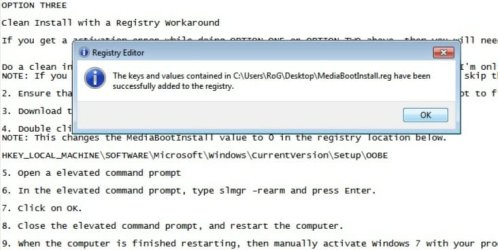
After I put the mediabootinstall on the desktop,command prompt in admin,
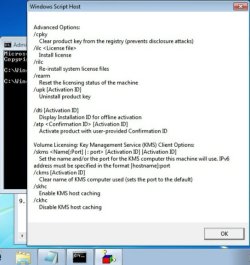
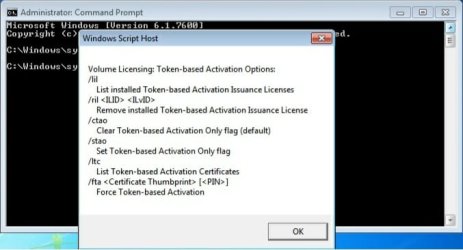
I typed in slmgr -rearm and clicked enter, then I got two of the screens that I clicked OK on.
It might have been three screens I clicked OK in.

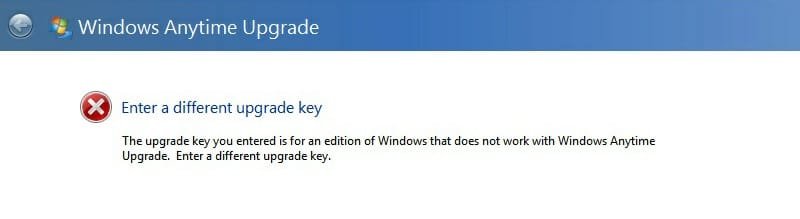
Couldn't find any registration tab until I saw the windows anytime upgrade in the start menu, all programs sidebar. The first code I typed in gave me invalid, then when I changed a letter with a number in the second set of numbers in the product code, It
went to a different screen.Seemed like it was going to activate and then I got the last screen cap.Wrong upgrade key.
Sorry guys.
What next?
 

Attachments
  • After regkey screen cap.jpg
    After regkey screen cap.jpg
    44.9 KB · Views: 4
  • click yes 1.jpg
    click yes 1.jpg
    43.7 KB · Views: 4
  • click yes two or three.jpg
    click yes two or three.jpg
    34.5 KB · Views: 3
  • wrong upgrade key.jpg
    wrong upgrade key.jpg
    15.8 KB · Views: 2
Last edited:

My Computer My Computer

At a glance

Windows 7 Pro x64 SP1
OS
Windows 7 Pro x64 SP1
You don't want Windows Anytime Upgrade, which is used to upgrade to a higher version from the installed version.

Hold down the Windows key on keyboard, press Pause (Break) key to open System Properties box, scroll down to Activation Link to Activate after you have completed Option Three registry workaround given here to activate Upgrade version on wiped HD: Clean Install with a Upgrade Windows 7 Version
 
success

Alright, it's now activated.

Reading through the RAM Test page you linked to me, it says, "Some motherboards have very specific slots required for the number of RAM sticks installed."
How do I find out if the ASUS Rampage II Genie is one of these Mobo"s?
Thought I read that in the book, but I can't find it.

GR, thanks for having patience with my dumba$$.
Will try to figure out the RAM Test next.
 

My Computer My Computer

At a glance

Windows 7 Pro x64 SP1
OS
Windows 7 Pro x64 SP1
Alright, it's now activated.

Reading through the RAM Test page you linked to me, it says, "Some motherboards have very specific slots required for the number of RAM sticks installed."
How do I find out if the ASUS Rampage II Genie is one of these Mobo"s?
Thought I read that in the book, but I can't find it.

See page 2-15 of manual version E4442. (It's available for download from support.asus.com.) There are recommendations for 2, 3, 4,and 6 DIMMs.

BTW, it's a Rampage II Gene.
 

My Computer My Computer

At a glance

Windows 7 Pro X64 SP1Intel Core I7-3930k16 GB Gskill DDR3-2133eVGA GTX680
Computer Manufacturer/Model Number
homegrown
OS
Windows 7 Pro X64 SP1
CPU
Intel Core I7-3930k
Motherboard
Asus P9X79 Pro
Memory
16 GB Gskill DDR3-2133
Graphics Card(s)
eVGA GTX680
Sound Card
Creative X-Fi Titanium
Monitor(s) Displays
As PA246Q
Screen Resolution
1920 X 1200
Hard Drives
Corsair Force GT, 120 GB
WDC 1.5TB Caviar Black
PSU
PCP&C Silencer 750 Crossfire
Case
Silverstone FT02
Cooling
Noctua NH-D14
Keyboard
cheap Logitech USB
Mouse
Microsoft Intellimouse Explorer (old optical) USB
Internet Speed
6Mb cable
Other Info
Pioneer BDR-205
Samsung SH-203B
Monsoon 5.1 speakers
Sorry to bother you guys again, but. . . .

The Mobo I used for this build is gone. Removed.
It had issues.
I have purchased a Sabertooth X58 Mobo and am trying to install everything again.
I want to wipe the OCZ 90Gb SSD clean again and start all over but no matter what I do,
Command Prompt says this,
"Virtual Disk Service error
Clean is not allowed on the disk containing current boot, system, pagefile, crashdump or hibernation volume."
Tried it in Safe Mode w/Command Prompt and then I unplugged the second HDD and thought it was working but after some minutes I got the above message again.
How do I get this thing to wipe the SSD again and install the W7 64bit OS that gave me so much trouble at the beginning of this post.
Also strange is the fact that this Sabertooth X 58 Mobo/SSD is booting from the Rampage II GENE Mobo drivers,desktop without any issues.
 

My Computer My Computer

At a glance

Windows 7 Pro x64 SP1
OS
Windows 7 Pro x64 SP1
You can't format the boot disk from the boot disk.

One way to format if by booting from a Win7 install DVD (or a USB key drive set up as an installer). You can even format using an upgrade version.

It's not all that unusual to successfully boot from a HD with different motherboard drivers, although a clean install of Win7 is recommended.
 

My Computer My Computer

At a glance

Windows 7 Pro X64 SP1Intel Core I7-3930k16 GB Gskill DDR3-2133eVGA GTX680
Computer Manufacturer/Model Number
homegrown
OS
Windows 7 Pro X64 SP1
CPU
Intel Core I7-3930k
Motherboard
Asus P9X79 Pro
Memory
16 GB Gskill DDR3-2133
Graphics Card(s)
eVGA GTX680
Sound Card
Creative X-Fi Titanium
Monitor(s) Displays
As PA246Q
Screen Resolution
1920 X 1200
Hard Drives
Corsair Force GT, 120 GB
WDC 1.5TB Caviar Black
PSU
PCP&C Silencer 750 Crossfire
Case
Silverstone FT02
Cooling
Noctua NH-D14
Keyboard
cheap Logitech USB
Mouse
Microsoft Intellimouse Explorer (old optical) USB
Internet Speed
6Mb cable
Other Info
Pioneer BDR-205
Samsung SH-203B
Monsoon 5.1 speakers
question

Did the "note" at the beginning of the link you sent me and all I get is disk management. No place here to right click and run as administrator.
I have tried to CMD @ boot and I get the error message, "Virtual Disk Service error
Clean is not allowed on the disk containing current boot, system, pagefile, crashdump or hibernation volume."
 

My Computer My Computer

At a glance

Windows 7 Pro x64 SP1
OS
Windows 7 Pro x64 SP1
You have to boot the Windows installation media to run the clean all to the "System" partition/HDD, it can't be run from the Windows desktop.


DISKPART : At PC Startup
 

My Computer My Computer

At a glance

W 7 64-bit UltimateIntel Q9550 Yorkfield8GB Dominator 8500C5DATI : XFX 5870
Computer Manufacturer/Model Number
* BFK Customs *
OS
W 7 64-bit Ultimate
CPU
Intel Q9550 Yorkfield
Motherboard
ASUS P5Q Pro
Memory
8GB Dominator 8500C5D
Graphics Card(s)
ATI : XFX 5870
Sound Card
Realtek HD Audio 7-1
Monitor(s) Displays
1x 47" LCD HDMI & 3x 26" LCD HDMI
Screen Resolution
1920x1080P & 1920x1200
Hard Drives
1x 80GB Intel X25-M G2 SSD : 1x 500GB & 1x 640GB WD Caviar Black(s)
PSU
Corsair 620HX
Case
Cooler Master RC-690
Cooling
Tuniq Tower 120, 2x 140mm and 3x 120mm case fans
Keyboard
Microsoft 500
Mouse
Razer Diamondback 3G
Internet Speed
14 Mb/s
Other Info
1x Koutech 3Gb/s SATA HDD Hot Swap Rack
When I first turned this on

I went in to the bios first thing and set the boot priority.
Checked it after all this and it was not set right so I set it right and looks like it finally is working (booting from disk)
The cursor is ticking away after I got to clean all.
See what happens.
Thanks
To think I have to go through this again. . . . .arggghhhh
 

My Computer My Computer

At a glance

Windows 7 Pro x64 SP1
OS
Windows 7 Pro x64 SP1
OK So far

Will try the "Clean Install with a Registry Workaround" in the morning.
 

My Computer My Computer

At a glance

Windows 7 Pro x64 SP1
OS
Windows 7 Pro x64 SP1
Almost like clockwork

If it hadn't been for the boot order giving me the slip at the beginning, I might have done it this time around w/o you guys babysitting me again.
Like a charm! Plus this Mobo doesn't have a bad RAM slot and hasn't froze up once.
Gotta love it.
I plan to take it back to the kid I bought it from and get my money back.
Have this in a CoolerMaster HAF 932 Advanced case and really dig it also.
Only thing I don't like is the the Noctua CPU Cooler appears to vibrated more than I like.
Was going to ask you some RAM questions, then I found some on Feebay and am going to run it and not worry about it.
We'll see.
Thanks again you guys.
Huge relief
 

My Computer My Computer

At a glance

Windows 7 Pro x64 SP1
OS
Windows 7 Pro x64 SP1
Good to see you got it sorted and thanks for the update.
 

My Computer My Computer

At a glance

W 7 64-bit UltimateIntel Q9550 Yorkfield8GB Dominator 8500C5DATI : XFX 5870
Computer Manufacturer/Model Number
* BFK Customs *
OS
W 7 64-bit Ultimate
CPU
Intel Q9550 Yorkfield
Motherboard
ASUS P5Q Pro
Memory
8GB Dominator 8500C5D
Graphics Card(s)
ATI : XFX 5870
Sound Card
Realtek HD Audio 7-1
Monitor(s) Displays
1x 47" LCD HDMI & 3x 26" LCD HDMI
Screen Resolution
1920x1080P & 1920x1200
Hard Drives
1x 80GB Intel X25-M G2 SSD : 1x 500GB & 1x 640GB WD Caviar Black(s)
PSU
Corsair 620HX
Case
Cooler Master RC-690
Cooling
Tuniq Tower 120, 2x 140mm and 3x 120mm case fans
Keyboard
Microsoft 500
Mouse
Razer Diamondback 3G
Internet Speed
14 Mb/s
Other Info
1x Koutech 3Gb/s SATA HDD Hot Swap Rack
Back
Top