New Canon Printer & Win Fax & Scan "Select Pages From Scanner" Broken
With my old printer this worked fine even though it was a FAX machine as well as being the usual alll-in-one.
It died on its 10th birthday so I bought a new Canon Pixma G4210. It's fully functional as an all-in-one including it's own fax.
My PC is also connected so I've always had the choice of using the WFS on the PC or scanning the pages on the printer and sending via it's telephone connection.
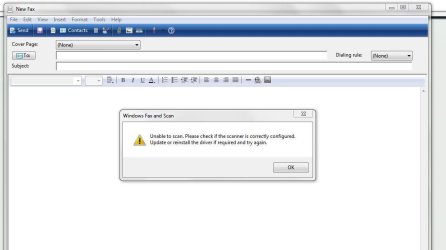
Pic 1 shows the error I get when doing a new fax and selecting "Send pages from scanner"
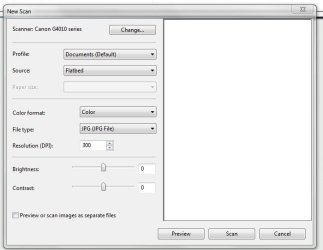
Pic 3 shows that WFS is seeing the scanner when I select "New Scan" in WFSrather than "New Fax"
In Devices & Hardware the old machine appeared twice as a printer and then a fax.
The new one appears once only as the default printer. (Pic 2)
Attachments
zzzzz1.JPG
48.5 KB
· Views: 1
zzzzz2.JPG
33.3 KB
· Views: 18
zzzzz3.JPG
22.1 KB
· Views: 1
My Computer
At a glance
Win 7 Ult SP1/Win 10 Pro (all x64)Intel® Core™ i7-975 Extreme O/C to 4.02 GHz, ...24GB Corsair Vengeance DDR3 SDRAM at 1600MHz ...1792 MB NVIDIA® GeForce® GTX 295 Dual Core
Computer type
PC/Desktop
Computer Manufacturer/Model Number
Alienware® ALX X58
OS
Win 7 Ult SP1/Win 10 Pro (all x64)
CPU
Intel® Core™ i7-975 Extreme O/C to 4.02 GHz, 8MB Cache
Motherboard
Asus® P6T Deluxe V2 X58 LGA1366
Memory
24GB Corsair Vengeance DDR3 SDRAM at 1600MHz - 6 x 4096MB
Yes, done and done. I made sure all the previous software (& drivers) were long gone. Unfortunately I can’t check anything else as I triple boot with 2 Windows 10’s and due to a bad update I’m having trouble rebooting into 7.
I may have to use a DVD of the OS to do a Startup Repair.
Doing this on my iPad
My Computer
At a glance
Win 7 Ult SP1/Win 10 Pro (all x64)Intel® Core™ i7-975 Extreme O/C to 4.02 GHz, ...24GB Corsair Vengeance DDR3 SDRAM at 1600MHz ...1792 MB NVIDIA® GeForce® GTX 295 Dual Core
Computer type
PC/Desktop
Computer Manufacturer/Model Number
Alienware® ALX X58
OS
Win 7 Ult SP1/Win 10 Pro (all x64)
CPU
Intel® Core™ i7-975 Extreme O/C to 4.02 GHz, 8MB Cache
Motherboard
Asus® P6T Deluxe V2 X58 LGA1366
Memory
24GB Corsair Vengeance DDR3 SDRAM at 1600MHz - 6 x 4096MB
OK boot repaired successfully!
I've also uninstalled and reinstalled the printer, twice now.
Strange that the main body of WF&S can see the scanner but Create New Fax / Select pages from scanner wont.
Last edited:
My Computer
At a glance
Win 7 Ult SP1/Win 10 Pro (all x64)Intel® Core™ i7-975 Extreme O/C to 4.02 GHz, ...24GB Corsair Vengeance DDR3 SDRAM at 1600MHz ...1792 MB NVIDIA® GeForce® GTX 295 Dual Core
Computer type
PC/Desktop
Computer Manufacturer/Model Number
Alienware® ALX X58
OS
Win 7 Ult SP1/Win 10 Pro (all x64)
CPU
Intel® Core™ i7-975 Extreme O/C to 4.02 GHz, 8MB Cache
Motherboard
Asus® P6T Deluxe V2 X58 LGA1366
Memory
24GB Corsair Vengeance DDR3 SDRAM at 1600MHz - 6 x 4096MB
What nobody pointed out to me - none of the so-called Help files or Instructions say, was that if you put the page to be scanned into the document feeder (DCF) on top (as distinct from simply laying it on the scanner surface like with all my printers before), it now senses something and magically scans and attaches it to the FAX as a .tif....so I'm posting this to help others using this printer and experiencing that.
Last edited:
My Computer
At a glance
Win 7 Ult SP1/Win 10 Pro (all x64)Intel® Core™ i7-975 Extreme O/C to 4.02 GHz, ...24GB Corsair Vengeance DDR3 SDRAM at 1600MHz ...1792 MB NVIDIA® GeForce® GTX 295 Dual Core
Computer type
PC/Desktop
Computer Manufacturer/Model Number
Alienware® ALX X58
OS
Win 7 Ult SP1/Win 10 Pro (all x64)
CPU
Intel® Core™ i7-975 Extreme O/C to 4.02 GHz, 8MB Cache
Motherboard
Asus® P6T Deluxe V2 X58 LGA1366
Memory
24GB Corsair Vengeance DDR3 SDRAM at 1600MHz - 6 x 4096MB