

NIC TEAMING Cisco SG200-08 Switch/Gigabyte EP45-UD3P/Realtek 81xx
I just received my new Cisco SG200-08 GB Managed Switch yesterday! Requirements were future proofing my network with IPv6, POE, VOIP, VPN,... Actually this thing has too many features... for now! Awesome switch @ $117!!! Newegg.com - Cisco Small Business SLM2008T-NA 10/100/1000Mbps SG200-08 8-Port Gigabit Ethernet Switch 8 x RJ45
After setting up the switch and rewiring both Realtek 81xx gigabit nics to the new switch with cat6, I set out for all the info on TEAMING the 2 NICs on my Gigabyte EP45 UD3P Mobo. KEY ISSUE HERE: DO YOUR HOMEWORK ON YOUR NICS, MOBO, & "TEAMING UTILITY". This worked for me because I run a mobo with dual nics that support this "teaming" feature. I have a Gigabyte EP45-UD3P utilizing dual Realtek 81xx NICs, which do support "Bundling" the NICs. Any similar mobo with dual 81xx realteks should work the same... read on!
First off, to anybody who thinks this is going to be a magic cure... it isnt! Your 2.0 Gbps possible bandwidth on a pair of teamed NICs isnt going to make the Internet any faster... most "high" speed Internet connections here in USA top out at 50-60 mbps. This teaming, or more correctly link aggregation, can help if you run a media, file, or game server ON A LOCAL NETWORK. It might also help if you are a LAN party fanatic ! ...BYOS (Bring Your Own Switch)!
Link aggregation is often abbreviated LAG. Other terms include: trunking, link bundling, Ethernet/network/NIC bonding, NIC teaming, port channel, EtherChannel, Multi-Link Trunking, and IEEE 802.3ad.
Another thing... This will only work if your switch, or switch/router supports Link Aggregation or one of the other names for it above. Luckily, this was a prerequisite for my network switch upgrade and the Cisco SG200-08 does support it and more!
Next... off to visit the Gigabyte support site and download the drivers for your correct MOBO, OS, and NIC. This should be available for any mobos that have dual Realtek 81xx NICs and possibly others. I run Win7 Ultimate, and chose the most recent driver (dated 02/2011)... also make sure you get the Realtek Ethernet Diagnostic Utility http://download.gigabyte.us/FileList/Driver/mb_driver_lan_realtek_rtltool.exe
Upgrade the drivers first, then install the Realtek Ethernet Diagnostic Utility (REDU). Once installed, I chose Teaming right in the middle of the app, then chose each of my nics, named the "team", and a new 3rd virtual nic was creted showing 2.0 Gbps!
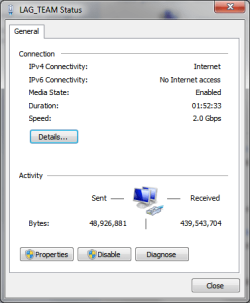
Finally, I configured the new switch to link the two ports into which the "teamed" nics were plugged. My Cisco switch supports up to 4 LAGs, with 8 ports per LAG. If you own the same switch you will find the settings under Port Management > Link Aggregation > LAG Management.
My PC functions as a media server, and it does seem like this has helped improve my local network speeds.
Now, I need to run some tests... any ideas on how or what I can use to test this?
I just received my new Cisco SG200-08 GB Managed Switch yesterday! Requirements were future proofing my network with IPv6, POE, VOIP, VPN,... Actually this thing has too many features... for now! Awesome switch @ $117!!! Newegg.com - Cisco Small Business SLM2008T-NA 10/100/1000Mbps SG200-08 8-Port Gigabit Ethernet Switch 8 x RJ45
After setting up the switch and rewiring both Realtek 81xx gigabit nics to the new switch with cat6, I set out for all the info on TEAMING the 2 NICs on my Gigabyte EP45 UD3P Mobo. KEY ISSUE HERE: DO YOUR HOMEWORK ON YOUR NICS, MOBO, & "TEAMING UTILITY". This worked for me because I run a mobo with dual nics that support this "teaming" feature. I have a Gigabyte EP45-UD3P utilizing dual Realtek 81xx NICs, which do support "Bundling" the NICs. Any similar mobo with dual 81xx realteks should work the same... read on!
First off, to anybody who thinks this is going to be a magic cure... it isnt! Your 2.0 Gbps possible bandwidth on a pair of teamed NICs isnt going to make the Internet any faster... most "high" speed Internet connections here in USA top out at 50-60 mbps. This teaming, or more correctly link aggregation, can help if you run a media, file, or game server ON A LOCAL NETWORK. It might also help if you are a LAN party fanatic ! ...BYOS (Bring Your Own Switch)!
Link aggregation is often abbreviated LAG. Other terms include: trunking, link bundling, Ethernet/network/NIC bonding, NIC teaming, port channel, EtherChannel, Multi-Link Trunking, and IEEE 802.3ad.
Another thing... This will only work if your switch, or switch/router supports Link Aggregation or one of the other names for it above. Luckily, this was a prerequisite for my network switch upgrade and the Cisco SG200-08 does support it and more!
Next... off to visit the Gigabyte support site and download the drivers for your correct MOBO, OS, and NIC. This should be available for any mobos that have dual Realtek 81xx NICs and possibly others. I run Win7 Ultimate, and chose the most recent driver (dated 02/2011)... also make sure you get the Realtek Ethernet Diagnostic Utility http://download.gigabyte.us/FileList/Driver/mb_driver_lan_realtek_rtltool.exe
Upgrade the drivers first, then install the Realtek Ethernet Diagnostic Utility (REDU). Once installed, I chose Teaming right in the middle of the app, then chose each of my nics, named the "team", and a new 3rd virtual nic was creted showing 2.0 Gbps!
Finally, I configured the new switch to link the two ports into which the "teamed" nics were plugged. My Cisco switch supports up to 4 LAGs, with 8 ports per LAG. If you own the same switch you will find the settings under Port Management > Link Aggregation > LAG Management.
My PC functions as a media server, and it does seem like this has helped improve my local network speeds.
Now, I need to run some tests... any ideas on how or what I can use to test this?
Last edited:
My Computer
At a glance
Windows 7 Ultimate 64 bit Steve Ballmer Signa...Intel Core 2 Quad - Q9550 - 2.83GHz stock - O...4GB DDR2 800MHz (PC6400) OCZ ReaperNvidia GE Force 8800 GTS
- Computer Manufacturer/Model Number
- Homebrew PC - "Alpha_Dawg"
- OS
- Windows 7 Ultimate 64 bit Steve Ballmer Signature Edition
- CPU
- Intel Core 2 Quad - Q9550 - 2.83GHz stock - OC'd to 3.6GHz
- Motherboard
- Gigabyte EP45-UD3P
- Memory
- 4GB DDR2 800MHz (PC6400) OCZ Reaper
- Graphics Card(s)
- Nvidia GE Force 8800 GTS
- Sound Card
- Asus Xonar DX
- Monitor(s) Displays
- Samsung SyncMaster 2333HD
- Screen Resolution
- 1920 x 1080
- Hard Drives
- WD Caviar Black 750GB - 7200RPM - 32MB cache
WD Caviar Green 1.5TB - 5400RPM - 64MB cache
WD Caviar Green 2.0TB - 5400RPM - 64MB cache
- PSU
- PC Power & Cooling Silencer 750
- Case
- Gigabyte 3D Aurora
- Cooling
- Case is Air - 5ea. 120mm fans (mix of Arctic and Xigmatec)
- Keyboard
- MS Natural Wireless KB
- Mouse
- MS Wireless Mouse
- Internet Speed
- 50 mbps down/5 mbps up
- Other Info
- AVerMedia - AVerTVHD G2 Dual Tuner Card


 I have created the 2.0 GB virtual LAN and I have the Cisco SG-200-08 Switch up and running, but I’m not too sure that I have correctly set-up the LAG parameters. This is where I need your advice.