New computer drops internet randomly/false negatives

MasterGberry

New member
Local time
11:50 PM
Messages
6
I just built this computer a week or two ago. It's been working fine for the most part except that my network port seems to randomly disconnect on occasion. Sometimes it disconnects and I can't do anything except disable and re-enable it (fixes). Sometimes it says "no internet connectivity" but I am using internet applications without any issues.

This is by far the weirdest bug I have ever encountered with windows and drivers. I am using the Sabertooth x79 Motherboard along with the intel 82579v gigabit ethernet port on it. I have the most up to date drivers from intel's website. I'm not really sure what information you guys need to help me work through this problem. So please request anything you guys feel will help me. Kind of hard to test it out because it happens randomly and may not happen for a day or two.

Thanks
 

My Computer

OS
Windows 7 Pro x64

My Computer

Computer Manufacturer/Model Number
Insane hobo technologies. ;-)
OS
Windows 7 x64
CPU
Intel i7 2600k
Motherboard
Asrock z68 extreme 4 gen 3
Memory
G.skill Ripjaw 16gigs @ 1866
Graphics Card(s)
Nvidia gtx580 (evga)
Sound Card
Integrated HD audio + hdmi
Monitor(s) Displays
24" ASUS widescreen + 42" insignia
Screen Resolution
1080p (1920x1080)
Hard Drives
128 Samsung 830
256 Samsung 840
3 x 1tb storage drive (various)
1 western digital 1tb (eSATA)
1 Seagate 1tb (eSATA)
PSU
1 kilowatt SLI/Crossfire rated Silverstone modular
Case
NZXT Phantom + additional 220 fan
Cooling
Zalmann
Keyboard
Microsoft wireless 3000 (v2)
Mouse
MS - wireless 5000 (bluetrack)
Internet Speed
depends on if you ask me or my provider.
Other Info
The above information is provided as is, and the author assumes no responsibility for issues it may cause with your sanity or fanboyism.
http://www.sevenforums.com/tutorials/1538-sfc-scannow-command-system-file-checker.html
Before doing anything could you give that a run, Afterwards if you could follow the steps in option 3 and upload the text log that may be helpful too.
I just want to make sure your windows installation is proper before we start troubleshooting this.

Hi. Thanks for the response. I really appreciate it. I have completed the sfc as requested and here is the cmd output:

Code:
Microsoft Windows [Version 6.1.7601]
Copyright (c) 2009 Microsoft Corporation.  All rights reserved.

C:\Windows\system32>sfc /scannow

Beginning system scan.  This process will take some time.

Beginning verification phase of system scan.
Verification 100% complete.

Windows Resource Protection did not find any integrity violations.

C:\Windows\system32>findstr /c:"[SR]" %windir%\Logs\CBS\CBS.log >"%userprofile%\
Desktop\sfcdetails.txt"

C:\Windows\system32>

I also have attached sfcdetails.txt to the post. Thanks :)
 

Attachments

My Computer

OS
Windows 7 Pro x64
Okay you're clean in that respect.

Next possible culprit could be third party firewall. Is one in use? If so try snoozing it and see if the problem still occurs. Are there any other computers on this network. If another machine connects with the same network ip it usually results in one of the machines being booted off the network when the router can't resolve it.
 

My Computer

Computer Manufacturer/Model Number
Insane hobo technologies. ;-)
OS
Windows 7 x64
CPU
Intel i7 2600k
Motherboard
Asrock z68 extreme 4 gen 3
Memory
G.skill Ripjaw 16gigs @ 1866
Graphics Card(s)
Nvidia gtx580 (evga)
Sound Card
Integrated HD audio + hdmi
Monitor(s) Displays
24" ASUS widescreen + 42" insignia
Screen Resolution
1080p (1920x1080)
Hard Drives
128 Samsung 830
256 Samsung 840
3 x 1tb storage drive (various)
1 western digital 1tb (eSATA)
1 Seagate 1tb (eSATA)
PSU
1 kilowatt SLI/Crossfire rated Silverstone modular
Case
NZXT Phantom + additional 220 fan
Cooling
Zalmann
Keyboard
Microsoft wireless 3000 (v2)
Mouse
MS - wireless 5000 (bluetrack)
Internet Speed
depends on if you ask me or my provider.
Other Info
The above information is provided as is, and the author assumes no responsibility for issues it may cause with your sanity or fanboyism.
Hi. I am not using any external firewalls, just the integrated windows firewall. I have never had any issues with this before. I am at my college with the dorm internet. The dorm internet actually assigns individual ips to each and every device as I am fairly sure the internet is connected to the backbone of the internet (100mb up and down). So we don't have individual routers per say.

I have a virtual machine that I have running but this issue was going on before I installed that, and it actually crashes as a result of the windows network disconnecting. So....not really sure the firewall or the VM is an issue. I honestly wonder if it's just a bad connection on the MB. But I want to further debug this with you. What is next?

I have not yet been able to test this computer on another network as it's at school with me and I don't have access to any other networks since it's a desktop. I have also used this internet before with my previous computers and never had these issues
 

My Computer

OS
Windows 7 Pro x64
Yeah since it's a huge shared network like that I can't really say. Script kiddies do ever so much like to knock people offline using old linux tricks. Usually just refreshing the ipconfig dns data will fix that though

cmd
ipconfig /flushdns

Try that next time it goes off and see if it brings the connection back.
Actually before doing that do an
ipconfig /all
so we can see what the connection data looks like when this problem is occurring (screenshot will do can attach here using paperclip icon so long as the size of the image is within reason)

This isn't much use if done while the connection is working we want to see what the info looks like when it's giving you the problem.
 

My Computer

Computer Manufacturer/Model Number
Insane hobo technologies. ;-)
OS
Windows 7 x64
CPU
Intel i7 2600k
Motherboard
Asrock z68 extreme 4 gen 3
Memory
G.skill Ripjaw 16gigs @ 1866
Graphics Card(s)
Nvidia gtx580 (evga)
Sound Card
Integrated HD audio + hdmi
Monitor(s) Displays
24" ASUS widescreen + 42" insignia
Screen Resolution
1080p (1920x1080)
Hard Drives
128 Samsung 830
256 Samsung 840
3 x 1tb storage drive (various)
1 western digital 1tb (eSATA)
1 Seagate 1tb (eSATA)
PSU
1 kilowatt SLI/Crossfire rated Silverstone modular
Case
NZXT Phantom + additional 220 fan
Cooling
Zalmann
Keyboard
Microsoft wireless 3000 (v2)
Mouse
MS - wireless 5000 (bluetrack)
Internet Speed
depends on if you ask me or my provider.
Other Info
The above information is provided as is, and the author assumes no responsibility for issues it may cause with your sanity or fanboyism.
Ok I will not actually be around my desktop this weekend, so when I come back on Sunday evening I am sure it will have broken at some point and I will give you the screenshot of the ipconfig /all. Will be back in 2 days. I really appreciate the help :)
 

My Computer

OS
Windows 7 Pro x64
alright I've subbed the thread so I'll see it.
 

My Computer

Computer Manufacturer/Model Number
Insane hobo technologies. ;-)
OS
Windows 7 x64
CPU
Intel i7 2600k
Motherboard
Asrock z68 extreme 4 gen 3
Memory
G.skill Ripjaw 16gigs @ 1866
Graphics Card(s)
Nvidia gtx580 (evga)
Sound Card
Integrated HD audio + hdmi
Monitor(s) Displays
24" ASUS widescreen + 42" insignia
Screen Resolution
1080p (1920x1080)
Hard Drives
128 Samsung 830
256 Samsung 840
3 x 1tb storage drive (various)
1 western digital 1tb (eSATA)
1 Seagate 1tb (eSATA)
PSU
1 kilowatt SLI/Crossfire rated Silverstone modular
Case
NZXT Phantom + additional 220 fan
Cooling
Zalmann
Keyboard
Microsoft wireless 3000 (v2)
Mouse
MS - wireless 5000 (bluetrack)
Internet Speed
depends on if you ask me or my provider.
Other Info
The above information is provided as is, and the author assumes no responsibility for issues it may cause with your sanity or fanboyism.
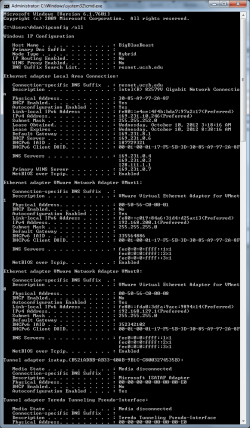
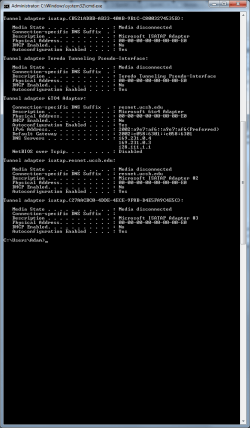
Okay I am back and experience the issue when my computer was turned on this time. I have attached the screenshots. Thanks
 

Attachments

  • ss1.png
    ss1.png
    32.8 KB · Views: 5
  • ss2.png
    ss2.png
    23.5 KB · Views: 2

My Computer

OS
Windows 7 Pro x64
I'm confused by your school's overall setup to be honest. Nothing in that suggest you should have lost connection. However the fact that they are using 3 dns servers could cause all kinds of strange issues to pop up on various configurations. I don't really understand why they've done that, there are better way to subdivide a large network like that.

All that said I am honestly not sure I'm going to be able to help you now. I'm going to drop a message to one of the few guys around here I know has a better grasp of this than me, hopefully he'll at least have some ideas for you. Don't know his schedule so give him a bit of time to respond.
 

My Computer

Computer Manufacturer/Model Number
Insane hobo technologies. ;-)
OS
Windows 7 x64
CPU
Intel i7 2600k
Motherboard
Asrock z68 extreme 4 gen 3
Memory
G.skill Ripjaw 16gigs @ 1866
Graphics Card(s)
Nvidia gtx580 (evga)
Sound Card
Integrated HD audio + hdmi
Monitor(s) Displays
24" ASUS widescreen + 42" insignia
Screen Resolution
1080p (1920x1080)
Hard Drives
128 Samsung 830
256 Samsung 840
3 x 1tb storage drive (various)
1 western digital 1tb (eSATA)
1 Seagate 1tb (eSATA)
PSU
1 kilowatt SLI/Crossfire rated Silverstone modular
Case
NZXT Phantom + additional 220 fan
Cooling
Zalmann
Keyboard
Microsoft wireless 3000 (v2)
Mouse
MS - wireless 5000 (bluetrack)
Internet Speed
depends on if you ask me or my provider.
Other Info
The above information is provided as is, and the author assumes no responsibility for issues it may cause with your sanity or fanboyism.
I just built this computer a week or two ago. It's been working fine for the most part except that my network port seems to randomly disconnect on occasion. Sometimes it disconnects and I can't do anything except disable and re-enable it (fixes). Sometimes it says "no internet connectivity" but I am using internet applications without any issues.

This is by far the weirdest bug I have ever encountered with windows and drivers. I am using the Sabertooth x79 Motherboard along with the intel 82579v gigabit ethernet port on it. I have the most up to date drivers from intel's website. I'm not really sure what information you guys need to help me work through this problem. So please request anything you guys feel will help me. Kind of hard to test it out because it happens randomly and may not happen for a day or two.

Thanks

You should try disabling any unused network adaptors in Device Manager, including and especially the VMware or virtual adaptors as these often cause connection problems with Windows 7.

I'm still not sure which network adaptor you are trying to connect with, assume Intel Gigabit.

Another possible problem is with the DNS servers that are showing up for the Intel Gigabit Network connection, those DNS server addresses are not valid DNS servers and are not able to resolve the host. So you might try going into the IPv4 properties of the connection you want to use and type in two valid DNS servers like Google at 8.8.8.8 and 8.8.4.4
 

My Computer

Computer type
PC/Desktop
Computer Manufacturer/Model Number
Home built
OS
Windows 7 Ult, Windows 8.1 Pro,
CPU
Q9650-4.275GHz, E8600 4.5GHz, E6750-3.8GHz
Motherboard
Evga 780i FTW
Memory
G.Skill PC2 9600 1200Mhz 5 5 5 15 2T
Graphics Card(s)
GTX480
Sound Card
Asus Xonar D2
Monitor(s) Displays
HannsG
Screen Resolution
1680X1050
Hard Drives
GSkill Phoenix Pro 120GB SSD
PSU
ThermalTake Toughpower 1000Watt modular
Case
ThermalTake XaserV
Cooling
Xigmatek S1283
Keyboard
Logitech G15
Mouse
Logitech G9
Internet Speed
T1
Back
Top