New computer, keyboard issue, please help!

LykosEcho

New member
Local time
4:44 PM
Messages
13
My grandmother bought me a brand new Dell XPS 8100 for an early Xmas gift, so I could actually have a 'home office' of my own, in my bedroom. It works good, nice and quiet and speedy. It's running Windows 7 (though I'm not sure how you tell what version?).

Now I'm having an issue with the keyboard. The drivers are all up to date/installed. I'm a novelist, so I need a functional keyboard and I went to write tonight and: on the '/" key, my " turns into @, but the ' works? And my # button becomes my " Any ideas? I cannot write like that!

I unplugged the keyboard (which is a Microsoft Ergonomic 4000, brand new) and plugged it into my kitchen computer, which is an old dimension dell, running XP Home SP2. All the keys worked fine. So it's not that keyboard. Still, Microsoft's troubleshooting site told me that perhaps it was my keyboard port. That's fine.

So I go back into my room, and pull out the keyboard that CAME with the XPS from Dell (it's a typical flat wired keyboard, I don't prefer them, so I bought an ergo 4000) and installed/plugged it into a different port (one of the top USBs). Same exact key problems. I need my "" key to work!

So... It's the computer. It has to be. Or is it a problem with 7 that...I can't obviously live with this. Is it fixable, or will I have to send it back and get a new one? But I -just- got everything set up. >< Helpppp me.

Thanks-Kodi
 

My Computer

OS
Windows 7
Hi Kodi,

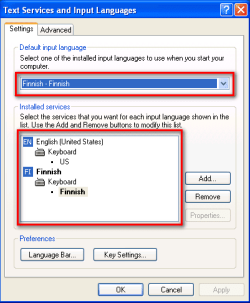
The issue is the "region" that the keyboard is picking up : the US keyboard has a slighlty different layout to the UK keyboard. This is easily fixed, and no need to replace any hardware.

Steps:
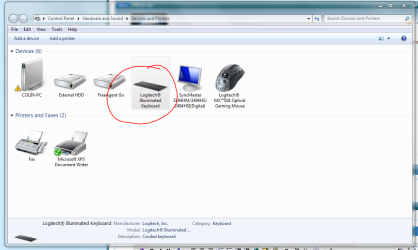
1. Click Start > Devices and Printers
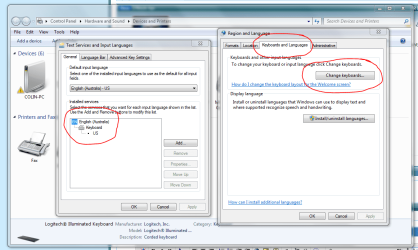
2. Right-click on your keyboard, then click the Region & Language option
3. Click the Change Keyboards option, and then select either US, or UK, depending on where you are.

The image below will help you. Let us know how you get on.
Golden


Regards,
Golden
 

Attachments

  • Capture.PNG
    Capture.PNG
    52.2 KB · Views: 3
  • Capture1.PNG
    Capture1.PNG
    67.9 KB · Views: 5

My Computer

Computer type
PC/Desktop
Computer Manufacturer/Model Number
Golden Mk. I.4
OS
Windows 10 Pro x64 ; Xubuntu x64
CPU
Intel i7 860 @ 2.80 GHz O/C'ed to 4.0GHz
Motherboard
Gigabyte P55A-UD3R Rev.1. Award BIOS F13
Memory
16GB Corsair Vengance DDR3 @ 661 MHz Dual Channel (9-9-9-24)
Graphics Card(s)
EVGA NVidia GTX 560 1024MB
Sound Card
Realtek Integrated
Monitor(s) Displays
Dual Samsung SyncMaster 2494HS
Screen Resolution
1920*1080 and 1920*1080
Hard Drives
1*Samsung 840 EVO 120GB SSD;
1*OCZ Vertex 2 60GB SSD;
2*Samsung F3 SpinPoint 1TB in RAID0;
1*Samsung F1 SpinPoint 1TB;
2*Western Digital 1TB External USB 3.0
1*Western Digital 500GB External USB 3.0
1*Seagate 500GB External USB 2.0
PSU
Thermaltake ToughPower QFan 750W
Case
Thermaltake Element S VK60001W2Z
Cooling
Corsair H60 Water Cooling, 2*230mm and 2*80mm case fans
Keyboard
Logitech G110
Mouse
Logitech MX518
Hi Kodi, welcome to the Seven Forums.

This is most probably a keyboard layout issue. If so, it's easy to fix.

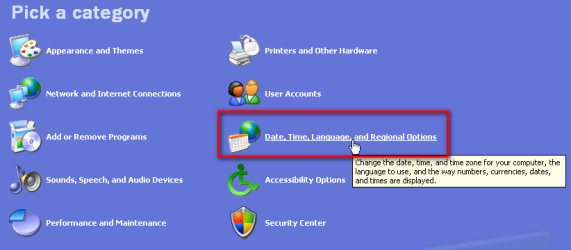
First, check which keyboard layout your XP machine is using. Open XP's Control Panel. If you have the Control Panel in Category view, click Date, time, Language and Regional Options:

XP_language_1.png

Now click Regional and Language Options:

XP_language_2.png

If your Control Panel opens in Classic View, click Regional and Language Options icon:

XP_language_3.png

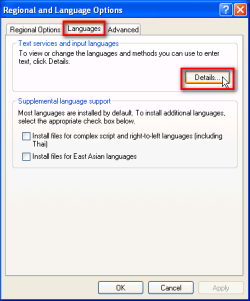
Now open the Languages tab and click Details:

XP_language_4.png

Check which keyboard layouts you have installed, and which layout is set default:

XP_language_5.png

Go back to your new Windows 7 computer, and change the layout to that of your XP computer. Here's a tutorial to show you how that can be done: http://www.sevenforums.com/tutorials/86239-keyboard-layout-change.html

Please come back to tell if that did not solve your issue.

Kari
 
Last edited:

My Computer

Computer type
Laptop
Computer Manufacturer/Model Number
HP ENVY 17-1150eg
OS
Windows 10 Pro x64 EN-GB
CPU
1.6 GHz Intel Core i7-720QM Processor
Memory
6 GB
Graphics Card(s)
ATI Mobility Radeon HD 5850 Graphics
Sound Card
Beats sound system with integrated subwoofer
Monitor(s) Displays
17" laptop display, 22" LED and 32" Full HD TV through HDMI
Screen Resolution
1600*900 (1), 1920*1080 (2&3)
Hard Drives
Internal: 2 x 500 GB SATA Hard Disk Drive 7200 rpm
External: 2TB for backups, 3TB USB3 network drive for media
Cooling
As Envy runs a bit warm, I have it on a Cooler Master pad
Keyboard
Logitech diNovo Media Desktop Laser (bluetooth)
Mouse
Logitech Performance Mouse MX
Internet Speed
50/10 Mbps VDSL
Antivirus
Windows Defender 4.3.9431.0
Browser
Maxthon 3.5.2., IE11
Yay!

Thank you -so- much guys. It took a bit of fiddling, but that was the issue and it WORKS. Thank you! I was so worried I'd have to send the comp back and we juuuust set it up lol. So relieved -hugs everyone-

I'm definitely bookmarking this site for future reference!
 

My Computer

OS
Windows 7
Nice to hear you got it fixed.
 

My Computer

Computer type
Laptop
Computer Manufacturer/Model Number
HP ENVY 17-1150eg
OS
Windows 10 Pro x64 EN-GB
CPU
1.6 GHz Intel Core i7-720QM Processor
Memory
6 GB
Graphics Card(s)
ATI Mobility Radeon HD 5850 Graphics
Sound Card
Beats sound system with integrated subwoofer
Monitor(s) Displays
17" laptop display, 22" LED and 32" Full HD TV through HDMI
Screen Resolution
1600*900 (1), 1920*1080 (2&3)
Hard Drives
Internal: 2 x 500 GB SATA Hard Disk Drive 7200 rpm
External: 2TB for backups, 3TB USB3 network drive for media
Cooling
As Envy runs a bit warm, I have it on a Cooler Master pad
Keyboard
Logitech diNovo Media Desktop Laser (bluetooth)
Mouse
Logitech Performance Mouse MX
Internet Speed
50/10 Mbps VDSL
Antivirus
Windows Defender 4.3.9431.0
Browser
Maxthon 3.5.2., IE11
Thank you -so- much guys. It took a bit of fiddling, but that was the issue and it WORKS. Thank you! I was so worried I'd have to send the comp back and we juuuust set it up lol. So relieved -hugs everyone-

I'm definitely bookmarking this site for future reference!

Happy days :cool:
 

My Computer

Computer type
PC/Desktop
Computer Manufacturer/Model Number
Golden Mk. I.4
OS
Windows 10 Pro x64 ; Xubuntu x64
CPU
Intel i7 860 @ 2.80 GHz O/C'ed to 4.0GHz
Motherboard
Gigabyte P55A-UD3R Rev.1. Award BIOS F13
Memory
16GB Corsair Vengance DDR3 @ 661 MHz Dual Channel (9-9-9-24)
Graphics Card(s)
EVGA NVidia GTX 560 1024MB
Sound Card
Realtek Integrated
Monitor(s) Displays
Dual Samsung SyncMaster 2494HS
Screen Resolution
1920*1080 and 1920*1080
Hard Drives
1*Samsung 840 EVO 120GB SSD;
1*OCZ Vertex 2 60GB SSD;
2*Samsung F3 SpinPoint 1TB in RAID0;
1*Samsung F1 SpinPoint 1TB;
2*Western Digital 1TB External USB 3.0
1*Western Digital 500GB External USB 3.0
1*Seagate 500GB External USB 2.0
PSU
Thermaltake ToughPower QFan 750W
Case
Thermaltake Element S VK60001W2Z
Cooling
Corsair H60 Water Cooling, 2*230mm and 2*80mm case fans
Keyboard
Logitech G110
Mouse
Logitech MX518
Back
Top