New Computer

Spredas

New member
Local time
3:48 PM
Messages
12
Location
United Kingdom
Hello guys, Im planing to buy a new desktop computer after summer. And I want want to ask you which are good and which are bad comparing to performance/price. I found dell XPS 435, it would be great for me. Btw I will use this computer for gaming/graphic things. So if anyone have any ideas/know where to find high-end pc, place them here. Or its better to build a pc for myself?
 

My Computer My Computer

Computer Manufacturer/Model Number
Acer 7720G
OS
Windows 7
CPU
2.0 GHz Intel @ Core 2 Duo Processor T5720
Memory
3GB DDR2
Graphics Card(s)
Geforce 9300M
Monitor(s) Displays
17" WXGA+ Acer CrystalBrite LCD
Hard Drives
250GB HDD
I would recommend building your own actually.
 

My Computer My Computer

OS
Windows 7 x64 Pro
CPU
Intel 990X
Motherboard
Asus P6T Deluxe V2
Memory
CORSAIR XMS3 6GB SDRAM DDR3 1600 (7-7-7-20)
Graphics Card(s)
2 x BFG 285 GTX OCXs in SLI
Sound Card
X-fi Elite Pro
Monitor(s) Displays
HP LP 3065
Screen Resolution
2560 x 1600
Hard Drives
2 x 150 gb Velociraptors RAID 0
PSU
PC Power & Cooling 750W
Case
CM Stacker 832
Cooling
Stock cooler
Keyboard
Saitek Eclipse II
Mouse
Logitech MX Revolution
Its cheaper to build it yourself, But It dosent come with any support outside the warranties.
 

My Computer My Computer

OS
Windows 7 Ultimate 32bit, Mac OS Snow Leopard 10.6
CPU
P4 2.4ghz @ 2.56Ghz
Memory
1gb DDR
Graphics Card(s)
7600GT AGP 4X
Sound Card
Onboard
Monitor(s) Displays
19LG
Screen Resolution
1280x1024
Hard Drives
120GB WD Caviar
80 Seagate Barracuda
PSU
430W Thermaltake
Keyboard
Logitech Media Keyboard
Internet Speed
1.5MB
I would second both the above posts. Doing the research for the parts, figuring out which video card will provide you with the performance you would like to see in your games, the processor that will provide you with the grunt you need/want to do the various things you want to do (graphics - more grunt is better :) ) - that can be more the 1/2 the fun of a new computer.

But, like was mentioned above, going this route you have to provide your own tech support. You can, sometimes, get tech support from the MBO and/or video card manufacturers, but sometimes not.

I've probably built 7 or 8 machines over the course of the last 10 years and so far I've only had one problem. In the most recent build, the the CPU socket on the MBO was damaged and I had to RMA it back to NewEgg.com (a painless process).
 

My Computer My Computer

Computer Manufacturer/Model Number
Cobbled together :)
OS
Win7 Ultimate, x64
CPU
i7 920, currently NOT OC
Motherboard
Asrock X58 Deluxe
Memory
OCZ Platinum 12GB (6 x 2GB) 240-Pin DDR3 SDRAM DDR3 1600
Graphics Card(s)
nvidia geforce 7600 gt
Sound Card
integrated
Monitor(s) Displays
Samsung SyncMaster 204t (dual monitors)
Screen Resolution
1600 x 1200
Hard Drives
WDC WD2000JS-00MHB0 ATA
WDC WD5000AAKS-65YGA0 ATA
PSU
750w
Cooling
Air, 4 120mm
+1, 2 & 3 for the above comments.

A custome build is 1 way to guarantee that you've got the machine you want :p
 

My Computer My Computer

Computer Manufacturer/Model Number
Compaq Desktop
OS
Windows 7 Ultimate x64
CPU
AMD Sempron Dual Core
Memory
3GB
Graphics Card(s)
NVIDIA GeForce 6150SE nForce 430
Screen Resolution
1024x768
Hard Drives
150GB Sata
Its cheaper to build it yourself, But It dosent come with any support outside the warranties.

Actually I disagree -- It's usually NOT cheaper to build it yourself - you can't compare huge manufacturing volumes with a 1-off build.

Cheap manufacture in Taiwan and elsewhere means you can pick up a reasonable rig for a very cheap price these days.

However if you do "Roll your own" you'll get a really good purpose built rig which should be just fine for what you need to do.

Don't make the big mistake of thinking that it's actually cheaper however.

(Note if you ALREADY have parts that you can re-use such as memory, power supply, monitor, case etc. then it *can* be cheaper since you don't have to source every component from scratch).

BTW I'm NOT against building your own -- on the contrary - I'm all in favour but it's NOT cheaper.

Cheers
jimbo
 

My Computer My Computer

Computer type
PC/Desktop
Computer Manufacturer/Model Number
Custom built, several laptops HP/ASUS
OS
Linux CENTOS 7 / various Windows OS'es and servers
CPU
Intel i7 Intel i5
Memory
8GB, 16GB
Graphics Card(s)
On Motherboard
Sound Card
Realtek HD audio
Monitor(s) Displays
Apple Cinema display, Samsung LCD
Screen Resolution
1920 X 1080
Hard Drives
4 X 1TB SATA
Mouse
Toshiba wireless laser
Internet Speed
> 20MB up
well....lets put that assumption to the test shall we jimbo ;)


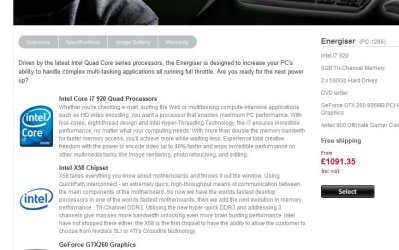
here is a gaming rig i googled from one of the largest UK ''E-tailors''

well....JPG


now lets match the spec of this tower ourselves, using the same E-tailor for the separate components....

i7 920.......£225

x58 board......£150

6gb Tri channel DDR3.......£77

GTX260.....£120

Antec 900 gaming case........£82

2x 500gb HDD's........£84

DVDRW.......£16

KEYBOARD & MOUSE.....£73 (personally i'd never spend that amount on this product)


total......£827

retail.....£1091

as you can see im able to save myself quite a bit by building this rig myself :p even more could be saved by loosing that ''mouse & keyboard'', all components also have 1 year RTB on them....(which is the same as the actual warranty you get from the retail tower)...

building it yourself is the logical option.....;)


:)SK
 

My Computer My Computer

Computer Manufacturer/Model Number
myself
OS
SEVEN x64
CPU
Q9450 @ 3.6GHZ 1.34v
Motherboard
ASUS P5K PREMIUM P35
Memory
8GB 1066 buffalo firestix @ 1152mhz CL5
Graphics Card(s)
Sapphire HD 5970 + GTX260 (physX)
Sound Card
Creative X-FI Xtreme Gamer
Monitor(s) Displays
SAMSUNG 20'' & SAMSUNG 23'' (dual screens)
Screen Resolution
2048x1152 & 1680x1050
Hard Drives
1x seagate 160gb IDE & 1x seagate 160gb SATA
PSU
XCILIO 850w (78A)
Case
CM590 1x 120x38mm & 2x92x38mm / 4x 120x25mm
Cooling
AC7 PRO @ 92x38mm blower, Lamptron military bus bay controll
Keyboard
LOGITECH E110
Mouse
logitech NX5
Internet Speed
2MB
Other Info
its a continual ''work in progress''....
Cheers for that skunksmash. I have seen some cases where the DIY builds do get a bit pricier especially if it is the first computer you are building since you dont have any existing parts that you can scavenge from. But usually it works out best if you do your own build first.

I love doing builds but the art of cable management to get maximized airflow through the system eludes me.
 

My Computer My Computer

OS
Windows 7 x64 Pro
CPU
Intel 990X
Motherboard
Asus P6T Deluxe V2
Memory
CORSAIR XMS3 6GB SDRAM DDR3 1600 (7-7-7-20)
Graphics Card(s)
2 x BFG 285 GTX OCXs in SLI
Sound Card
X-fi Elite Pro
Monitor(s) Displays
HP LP 3065
Screen Resolution
2560 x 1600
Hard Drives
2 x 150 gb Velociraptors RAID 0
PSU
PC Power & Cooling 750W
Case
CM Stacker 832
Cooling
Stock cooler
Keyboard
Saitek Eclipse II
Mouse
Logitech MX Revolution
On reflection (and re-reading what I wrote) I have to agree - it's not cheaper. But, you can get a better bang/buck ratio by building your own.

And, like jimbo says, once you go down that path you can sometimes pull parts from your old machine to build the new machine. My current machine (i7 920, 6GB, ....) only cost me about $700 to piece together because I had all I needed except the X58 MBO, the i7, and the memory.
 

My Computer My Computer

Computer Manufacturer/Model Number
Cobbled together :)
OS
Win7 Ultimate, x64
CPU
i7 920, currently NOT OC
Motherboard
Asrock X58 Deluxe
Memory
OCZ Platinum 12GB (6 x 2GB) 240-Pin DDR3 SDRAM DDR3 1600
Graphics Card(s)
nvidia geforce 7600 gt
Sound Card
integrated
Monitor(s) Displays
Samsung SyncMaster 204t (dual monitors)
Screen Resolution
1600 x 1200
Hard Drives
WDC WD2000JS-00MHB0 ATA
WDC WD5000AAKS-65YGA0 ATA
PSU
750w
Cooling
Air, 4 120mm
As somebody who has built most of his desktops, I'd say it's not really worth it unless you have a lot of free time and are trying to save every dollar possible.

It's not too hard to clobber a pc together, but to really make a solid build, you need to know a lot of details such as PSU rails, effective case cooling, RAID setup (if applicable). And you always run that chance that some piece of hardware you get has a crummy driver or just so happens to act wonky with another. You'll occasionally run into problems where a new build just simply won't boot and install an OS and it might take you all day screwing with it. (I had a problem where Vista simply hung during install and apparently it was some obscure conflict the motherboard was throwing up. This is despite the motherboard coming with a Vista certified emblem)

But if you do have loads of free time, not much cash, and want a very specific build, then go for it. It's just not always as pain-free as it's made out to be.
 

My Computer My Computer

OS
Windows 7
If you want to read about a ridiculous build, see here.

And I motivation poster I made, for additional inspiration. Sure, building your own PC is a blast, just make sure you have money and time.
 

Attachments

  • Watercooling.jpg
    Watercooling.jpg
    56.7 KB · Views: 2,088

My Computer My Computer

Computer type
PC/Desktop
Computer Manufacturer/Model Number
Custom Build/Mod
OS
Windows 7 Home Premium x64
CPU
Intel QX9650 Extreme 4.0 GHz
Motherboard
ASUS Rampage Extreme Rev2
Memory
8GB (4x2) Corsair Dominator DDR3
Graphics Card(s)
2x Radeon R390X [8GB]
Sound Card
SupremeFX X-Fi
Monitor(s) Displays
Dell 2408WFP 26" Panel
Screen Resolution
1920x1200
Hard Drives
4x WD 2TB (8TB+ Total)
2x Crucial SSD 128GB (RAID-0)
1x LG Blu-ray read/write
1x Phillips LightScribe DVD read/write
PSU
Corsair HX1000
Case
CoolerMaster - Cosmos S
Cooling
Custom Liquid - 320mm rad w/ 3x 80mm fans, CPU/NB/SB Blocks
Keyboard
Logitech Illuminater Pro
Mouse
Logitech
Internet Speed
Fractional T1 - 125Mbps
Antivirus
ESET Security Suite / Microsoft Security Essentials
Browser
Cyberfox Intel x64
Other Info
OC'd to 5.0GHz @ 44c under full load
As somebody who has built most of his desktops, I'd say it's not really worth it unless you have a lot of free time and are trying to save every dollar possible.

It's not too hard to clobber a pc together, but to really make a solid build, you need to know a lot of details such as PSU rails, effective case cooling, RAID setup (if applicable). And you always run that chance that some piece of hardware you get has a crummy driver or just so happens to act wonky with another. You'll occasionally run into problems where a new build just simply won't boot and install an OS and it might take you all day screwing with it. (I had a problem where Vista simply hung during install and apparently it was some obscure conflict the motherboard was throwing up. This is despite the motherboard coming with a Vista certified emblem)

But if you do have loads of free time, not much cash, and want a very specific build, then go for it. It's just not always as pain-free as it's made out to be.


I spent maybe a month watching you tube videos on building computers before doing my first build.( Not what I would call an expensive education) I spent about the same time on sites like Newegg and Tiger Direct reading product reviews before buying the parts for my first build. It took me 3 hours to assemble my computer and it posted the first time I pressed power. Been up and running almost a year now and stable as rock. I will never purchase another name brand computer....with there proprietary crap. I spent around 1,500 dallars on my system and when I was done I compared it to comparable Dell system coming in around 2,500 dollars. Then there is the satifaction factor. I built this computer it's my baby and know one knows it better than I do. I vote build it youself! Now if you will excuse me my computer and I have made plans to go out to dinner tonight.:sarc:
 

My Computer My Computer

Computer Manufacturer/Model Number
Self Built:kellymac35/TOSHIBA LAPTOP X775 3DV78
OS
WINDOWS 7 Ultimate x64 Full
CPU
INTEL i7 930/INTEL i7 2630QM 2.9 GHz With Turbo Boost
Motherboard
EVGA X58 3X SLI CLASSIFIED/TOSHIBA
Memory
MUSHKIN ENHANCED 12GB/8GB SAMSUNG DDR3 1333 MHz
Graphics Card(s)
EVGA GTX570 S.C(SLI) FERMI /GTX560M 1.5GB of GDDR 5 DISCRETE
Sound Card
REALTEK ON BOARD /BUILT IN HARMAN KARDON STEREO SPKS
Monitor(s) Displays
TOSHIBA 32'' /17.3" LCD 3D READY 120 Hz LED BACKLIT
Screen Resolution
1360x768/1920x1080
Hard Drives
MUSHKIN Enhanced Callisto Deluxe SSD X 2 240GB RAID 0/MUSHKIN Enhanced Callisto Deluxe 240 GB SSD 750 GB Serial ATA Hard Drive
PSU
CORSAIR Professional Series AX1200 1200W
Case
THERMALTAKE Xaser VI
Cooling
CORSAIR HYDRO SERIES H70
Keyboard
Logitech MX 3200/PREMIUM RAISED TILE LED BACKLIT
Mouse
Logitech
Internet Speed
DSL
Other Info
(SPDIF) To Kenwood VR-6070 Lucasfilm THX Select Surround EX
It's just not always as pain-free as it's made out to be.

+1 ;) But finally nailing a niggling issue is pretty damn rewarding. If you've got the time to flap about that is :p

But if you're looking to get a higher end rig for a lower cost, then sourcing and building it yourself is the way to go.
 

My Computer My Computer

Computer type
PC/Desktop
Computer Manufacturer/Model Number
Systems by SmartEyeball
OS
8 Pro x64
CPU
i7 3770K 4.6GHz
Motherboard
ASUS P8Z77 WS
Memory
16GB G.Skill Trident X 2666mhz
Graphics Card(s)
x2 EVGA 780 Ti Superclocked SLI
Sound Card
SB X-FI Surround 5.1 PRO USB / ATH-AD900 Headphones
Monitor(s) Displays
x3 Dell U2410 / 58" Samsung
Screen Resolution
5760*1200/ 1920*1200
Hard Drives
2x Intel 520 240GB (RAID 0) * 2x WD Caviar Blacks 2TB (RAID 0) * 2TB WD Caviar Black * Sony Optirac DVD
PSU
Silverstone Strider Evolution 1200W
Case
Thermaltake Level 10 GT Snow Edition
Cooling
Noctua NH-D14
Keyboard
Topre Realforce // Ducky Shine MX Black // Filco Ninja TKL
Mouse
Thermaltake Theron (Highly Recommended) + Razer Imperator
Antivirus
MSE
Browser
IE, FF, WaterFox
Other Info
GT Extreme V2 Sim Racing Cockpit + 40" LCD and K/B Mouse stand ▼
Fanatec CSR Elite Wheel + Clubsport V1 Pedals + CSR shifter/7G-H ▼Saitek X52 Pro ▼ TrackIR 5 Pro
Buttkicker v2 Seat Rumbler with Dedicated 5.1 and Sub Woofer attached to frame ▼
=
Bloody Big Grin
All in all, the best bet is to build it yourself. Hands down. I would have built my own laptop instead of customizing it, but that was a big hassle.

It may be a little bit more to build it yourself, but the difference is QUALITY. When you buy a PB pos, you are getting (sometimes) the lowest quality parts. This is so that the rig is less expensive. However, that just means that the computer sucks.

Also, I find it EXTREMELY difficult to find a computer (PB) that has EXACTLY what I want. When I built my computer though, I could.

In the end, it IS the best deal.

~Lordbob
 

My Computer My Computer

Computer Manufacturer/Model Number
Hera
OS
Windows 7 Ultimate x64, Mint 9
CPU
Intel i5-2500k
Motherboard
ASUS P8P67 Pro
Memory
2x 4Gb Corsair VENGEANCE DDR3-1600
Graphics Card(s)
NVidia GeForce N260GTX Twin Frozr
Sound Card
Realtek HD OnBoard Audio
Monitor(s) Displays
ASUS 24" Monitor
Screen Resolution
1920x1080
Hard Drives
G.SKILL Phoenix Series 60GB SATA II MLC Internal Solid State Drive (SSD)
SAMSUNG Spinpoint F3R 1TB 7200 RPM 32MB Cache SATA II
PSU
Cooler Master Real Power Pro 750W
Case
Cooler Master Haf 932
Cooling
Fans
Keyboard
Razer Tarantula
Mouse
Razer Lachesis
Internet Speed
not fast enough
If you decide to purchase, stay away from the XPS series... unless you go with a 630. They are all BTX cases/motherboards, which means upgrading in the future would be very difficult. I have a 630 and when I purchased it I had no idea what ATX/BTX cases were... but I lucked out. I have a BTX case (right side opening, usually considered to have better ventilation inside) but the 630 was specially manufactured to take an ATX motherboard (mounts upside down).

Anyways, a build is easily the way to go. I built a computer for designing and rendering at work with 8GB Patriot DDR2 800MHz memory, 2x320GB Seagate Barracuda HDD in RAID0, Core2Quad 2.83GHz, Gigabyte EP45-UD3P MoBo, Coolermaster case, and ATI FireGL 3600 video card for $830. Granted, it still needed a monitor (I already had 2)and a keyboard and mouse (already had those also).

It runs SolidWorks Premium 2009 and all of the nice add-ons flawlessly!

BUILD IT.

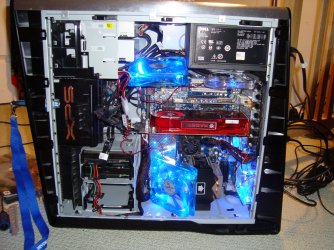
P.S. That same computer, plus a different CPU cooler and a few fans would be an amazing gaming computer. Almost up to spec with my XPS (except I have a Diamond Radeon HD 4890 XOC, 3.0GHz Core2Duo @ 3.2GHz, and 8GB OCZ Platinum 1066MHz memory and lots of blue fans.

See attached.
 

Attachments

  • DSC00804.JPG
    DSC00804.JPG
    248.8 KB · Views: 64
  • DSC00803.JPG
    DSC00803.JPG
    495.3 KB · Views: 63

My Computer My Computer

OS
Windows 7 Professional x64
CPU
Intel Core i7 970
Motherboard
Gigabyte GA-X58A-UD9
Memory
6GB STT Speed (Hypers)
Graphics Card(s)
Nvidia GTX 570, 470
Monitor(s) Displays
Dell 22"
Screen Resolution
1680x1050
Hard Drives
WD Caviar Black 500GB
WD Caviar Black 1TB
Samsung Spinpoint F3 1TB
Seagate Barracuda
PSU
Corsair HX1000
Back
Top