New Computer

AlexRD

New member
Pro User
Local time
12:15 AM
Messages
505
Location
Ponta Porã, MS
I finally managed to save some money for a new computer, about three thousand and i wanted to buy a state of the art computer.

I wanted to know your opinions on which memory, motherboard, everything that i should get. Like, should i get the new generation of i7 or should i get the sixcore?
Which SSD should i get? Which RAM and how much should i buy? Which brand?
You know, that kind of stuff.


Processor: I was thinking on getting a sixcore i7 or the new generation of i7.
Memory: I was thinking OCZ, 2133 MHz GOLD or REAPER.
HD: I was thinking something like RevoDrive or whichever is the best and cheapest.
Motherboard: I was thinking EVGA Classified or Asus Rampage III
Video Card: GTX 580
DVD: I have no idea. I wanted a blu ray reader and burner.
PSU: I have no idea.
Case: I wanted an alienware case but thats a no go. Any ideas will help.


I'm also considering to have a notebook, so if you know a very good cheap notebook let me know :)
 

My Computer

Computer Manufacturer/Model Number
Custom Built
OS
Windows 7 Professional x64
CPU
Intel Core i7 2600k - 3.4 GHz
Motherboard
Asus Maximus IV Z68 - Extreme
Memory
4x4 Ripjaws X79 Series 2133 MHz (9-11-10-28)
Graphics Card(s)
1x eVGA GTX 580 - 3GB Classified
Sound Card
Realtek ALC 889 HD Audio
Monitor(s) Displays
Full HD Philips TV 32"
Screen Resolution
1920x1080
Hard Drives
1x Crucial m4 SSD 512 GB
PSU
800W Coolermaster Silentpro Gold
Case
Sentey - Renegade GS-6200
Cooling
Stock
Keyboard
Logitech K800 Wireless
Mouse
Logitech Performance MX Laser
Internet Speed
10MB Internet Connection
Look at another ram manufacturer,

http://www.sevenforums.com/news/136970-ocz-stops-making-dram-focuses-ssds.html

For the rest of it start with the power supply before anything else with the components you're looking at. Thinking SLI down the road? If so going to need a bigger PSU than what you would need for a single card, and better to have it to begin with.

As for which CPU to go with, I would tend to go with the new i7 over the hexa-core if for no other reason than for the most part the hexa-core will cost almost as much as the quad.
 

My Computer

Computer type
PC/Desktop
Computer Manufacturer/Model Number
Me
OS
Win 7 Ultimate x64
CPU
FX-8350 @ 4.6 GHz so far
Motherboard
Asus M5A97 EVO
Memory
ADATA XPG V1 Series Black 8GB DDR3 1600
Graphics Card(s)
Sapphire R9 270x Dual-X
Sound Card
Xonar DGX w/ Corsair Vengence 1300
Monitor(s) Displays
Acer S232HL Abid
Screen Resolution
1920x1080
Hard Drives
120 GB OCZ Vertex 3
500 GB Seagate 7200.12
PSU
Antec Earthwatts 650W Green
Case
Antec Three Hundred
Cooling
Cooler Master 212 EVO
Keyboard
Logitech G510
Mouse
Logitech G500s
Internet Speed
35000/3000
FWIW, I tend to agree with Stormy13- I would choose one of the new intel CPUS . It is hard to give advice without knowing exactly what you want to do with the new computer. If you are interested in overclocking, go with one of the 2 K versions and a P67 board. I tend to like the Cooler Master HAF cases because of very good air flow and easier cable management. Maybe start out with 8 GB of DDR3-1600 ram. Get 2 4 GB sticks to allow you to increase it later if needed. You will have to chose your own graphics cards, DVD/CD and HD. At this point I may wait on the SSD as Intel, Crucial and OCZ are going to be coming out with new versions which are supposed to be cheaper. As far as PSU, again it depends on what you are going to put into the case - but I believe you should go higher than what you think you will need. Also, I am willing to pay little extra for modular- it makes cable management so much easier.

These are just a few of my opinions, you will have to make your own choices.
 

My Computers

System One System Two

  • Computer type
    PC/Desktop
    Computer Manufacturer/Model Number
    ALWAYS UNDER CONSTRUCTION
    OS
    Windows 11 Pro
    CPU
    Ryzen 9 5900X
    Motherboard
    Asus X570 Crosshair Viii Hero
    Memory
    32GB G Skill DDR4-3600
    Graphics Card(s)
    EVGA RTX 3080 FTW 3 Ultra
    Sound Card
    On Board/Sennheiser PC37X Headset
    Monitor(s) Displays
    3 X Asus 27"
    Screen Resolution
    2560x1440
    Hard Drives
    2 X 1 TB NVME drives
    PSU
    EVGA 850
    Case
    Phanteks Eclipse P400A
    Cooling
    EVGA 280 AIO
    Keyboard
    Logitech G510s/ Logitech G13
    Mouse
    Logitech G502
    Internet Speed
    24/1
    Antivirus
    ESET/MBAM Pro/SAS Pro
    Browser
    Chrome/ Firefox/ Edge
  • Computer type
    Laptop
    System Manufacturer/Model Number
    Dell 16 Plus
    OS
    Windows 11 Pro
    CPU
    Intel Ultra 9 288V
    Memory
    32 GB LPDDR5X 8533
    Monitor(s) Displays
    16" Mini-LED HDR600 Touch 90 Hz
    Screen Resolution
    2560X1600
    Hard Drives
    1 TB NVME
A few observations:

For the Sandy Bridge CPUs you also need a new P67 board. Both will still be error prone because they are brand new. I would go for something that has gone around for a while. But if you get the p67 board, make sure it is Asus. Btw: 6 way may not buy you a lot. I would prefer a higher clocked quad.

OCZ SSDs are a good choice. I have two Vertex and they are excellent. Since you are probably going to use it for the Operating system, a Revo drive is an overkill. It has faster read/write, but that is unimportant for the OS. It is the access time that counts. And a Revo is 0.1ms - just like a Vertex2. Rather buy a little bigger Vertex. BTW: Raid does not buy you anything either (the Revo is a 4x Raid)

For PSU I recommend Antec. But there are other good ones.

Remember: Your system will be old iron when you are done building it. Going overboard with leading edge components just costs you a lot of money. And components that are early in the cycle are to be avoided anyhow - too many bugs. For half the money you can build a system that works just as well - and then you have money left over to build a new one in 2 years (for half the money).
 

My Computer

Computer Manufacturer/Model Number
HP, Dell, Gateway, Toshiba - 4 laptops and 2 desktops
OS
Vista, Windows7, Mint Mate, Zorin, Windows 8
CPU
from 1.6GHz Duo to i7
Monitor(s) Displays
2x HP w2207
Hard Drives
5x HDD, 7x SSD, 12x Externals
Keyboard
with trackball - no mices
Mouse
Trackball mice
Internet Speed
DSL 6000
WHS, good observations. I was thinking of trying to build with one of the new Intel CPUs but was hesitant because of the new technology. It's going to have bugs just like the first gen SSDs. But, that does not mean I won't do it anyway.:D
As they say, 'no guts, no glory'.
 

My Computers

System One System Two

  • Computer type
    PC/Desktop
    Computer Manufacturer/Model Number
    ALWAYS UNDER CONSTRUCTION
    OS
    Windows 11 Pro
    CPU
    Ryzen 9 5900X
    Motherboard
    Asus X570 Crosshair Viii Hero
    Memory
    32GB G Skill DDR4-3600
    Graphics Card(s)
    EVGA RTX 3080 FTW 3 Ultra
    Sound Card
    On Board/Sennheiser PC37X Headset
    Monitor(s) Displays
    3 X Asus 27"
    Screen Resolution
    2560x1440
    Hard Drives
    2 X 1 TB NVME drives
    PSU
    EVGA 850
    Case
    Phanteks Eclipse P400A
    Cooling
    EVGA 280 AIO
    Keyboard
    Logitech G510s/ Logitech G13
    Mouse
    Logitech G502
    Internet Speed
    24/1
    Antivirus
    ESET/MBAM Pro/SAS Pro
    Browser
    Chrome/ Firefox/ Edge
  • Computer type
    Laptop
    System Manufacturer/Model Number
    Dell 16 Plus
    OS
    Windows 11 Pro
    CPU
    Intel Ultra 9 288V
    Memory
    32 GB LPDDR5X 8533
    Monitor(s) Displays
    16" Mini-LED HDR600 Touch 90 Hz
    Screen Resolution
    2560X1600
    Hard Drives
    1 TB NVME
Three thousand Euros, US Dollars, UK pounds? (May not matter, unless you can buy stuff from the US.)

In the USA, the I7-980x costs about $1k. The I7-970 is less than $900.

The highest-end Sandy Bridge CPU, the I7-2600K, costs about $330 (4 cores, plus hyperthreading). The I7-2500K is similar, but it lacks hyperthreading, and it's $225. The K CPUs (unlocked multipliers) are of interest mainly for overclocking, but the price differential over the locked ones is small. The main thing that you lose with the current Sandy Bridge CPUs is triple channel RAM; SB is dual channel. That won't arrive until later this year, in completely incompatible CPUs/motherboards.

SSD: the Revodrive is high performance, but if you want to use it for the OS (as most people do with SSDs), it requires a motherboard that can boot from PCI-E. Some (like my Asus P6T Deluxe) can't.

For the RAM, have a look here:

The Best Memory for Sandy Bridge | bit-tech.net

There's not much about brands, though. If I was buying some tomorrow, I'd probably be looking at Gskill.

I'd probably start with 8 GB (2 X 4GB). You'd need Win7 X64.

The GTX580 is a good graphics card. You may want to compare it to the ATI Radeon HD 6970.

PSU: Corsair is well regarded, but they have had some compatibility problems with Asus motherboards. eVGA recommends at least 600W (with at least 42A available at +12V) for a single GTX580. If you ever want to use two cards in SLI, nVidia has a certified list:

Build an SLI PC - Certified SLI-Ready Power Supplies

(The weakest PSUs on it for a pair of 580s are 900W.)

DVD (Bluray): anything but Lite-On. ;)

Case: Cooler Master HAF 932. (If you can tolerate a full tower.)
 

My Computer

Computer Manufacturer/Model Number
homegrown
OS
Windows 7 Pro X64 SP1
CPU
Intel Core I7-3930k
Motherboard
Asus P9X79 Pro
Memory
16 GB Gskill DDR3-2133
Graphics Card(s)
eVGA GTX680
Sound Card
Creative X-Fi Titanium
Monitor(s) Displays
As PA246Q
Screen Resolution
1920 X 1200
Hard Drives
Corsair Force GT, 120 GB
WDC 1.5TB Caviar Black
PSU
PCP&C Silencer 750 Crossfire
Case
Silverstone FT02
Cooling
Noctua NH-D14
Keyboard
cheap Logitech USB
Mouse
Microsoft Intellimouse Explorer (old optical) USB
Internet Speed
6Mb cable
Other Info
Pioneer BDR-205
Samsung SH-203B
Monsoon 5.1 speakers
The soon to be released SSD drive maybe cheaper, as essenbe stated, in addition they will be faster as well. OCZ showed off their SATA III SSD drive recently at read speed of 550MB/s; that will make my six month old Crucial C300 SATA III SSD drive with 350MB/s look so old...
 

My Computer

Computer type
PC/Desktop
Computer Manufacturer/Model Number
Custom built at Home
OS
Windows 7 64-bit, Windows 8.1 64-bit, OSX El Capitan, Windows 10 (VMware)
CPU
Intel i5-3350P 3.1 GHz
Motherboard
Gigabyte GA-Z77X-UP5 TH
Memory
16 GBs GSkill Sniper
Graphics Card(s)
Radeon HD 7850
Sound Card
VIA HD Audio
Monitor(s) Displays
Dell U2410 24"
Screen Resolution
1920x1200
Hard Drives
1 x Intel 520 240 GBs
1 x Seagate 1TBs SATA 2.0,
1 x Seagate 1TBs eSATA 2.0
PSU
Thermaltake 850W
Case
Antec P183
Cooling
Noctua NH-D14 Heatsink 2 x 120mm fans, 4 x 120mm case fans
Keyboard
Dell Multimedia keyboard
Mouse
Logitech Trackball
Internet Speed
28.5 Mb/s
Its actually three thousand dollars, and in order to answer all other questions i first must know whats dual, or triple channel?

I know its very stupid to not know this, but its always something i skipped to learn.
My guess would be that its like how many slots you use?

Dual Channel 2x2gb
Triple Channel 3x3gb


If so, what are the differences?
 

My Computer

Computer Manufacturer/Model Number
Custom Built
OS
Windows 7 Professional x64
CPU
Intel Core i7 2600k - 3.4 GHz
Motherboard
Asus Maximus IV Z68 - Extreme
Memory
4x4 Ripjaws X79 Series 2133 MHz (9-11-10-28)
Graphics Card(s)
1x eVGA GTX 580 - 3GB Classified
Sound Card
Realtek ALC 889 HD Audio
Monitor(s) Displays
Full HD Philips TV 32"
Screen Resolution
1920x1080
Hard Drives
1x Crucial m4 SSD 512 GB
PSU
800W Coolermaster Silentpro Gold
Case
Sentey - Renegade GS-6200
Cooling
Stock
Keyboard
Logitech K800 Wireless
Mouse
Logitech Performance MX Laser
Internet Speed
10MB Internet Connection

My Computer

Computer Manufacturer/Model Number
HP, Dell, Gateway, Toshiba - 4 laptops and 2 desktops
OS
Vista, Windows7, Mint Mate, Zorin, Windows 8
CPU
from 1.6GHz Duo to i7
Monitor(s) Displays
2x HP w2207
Hard Drives
5x HDD, 7x SSD, 12x Externals
Keyboard
with trackball - no mices
Mouse
Trackball mice
Internet Speed
DSL 6000

My Computer

Computer type
PC/Desktop
Computer Manufacturer/Model Number
Me
OS
Win 7 Ultimate x64
CPU
FX-8350 @ 4.6 GHz so far
Motherboard
Asus M5A97 EVO
Memory
ADATA XPG V1 Series Black 8GB DDR3 1600
Graphics Card(s)
Sapphire R9 270x Dual-X
Sound Card
Xonar DGX w/ Corsair Vengence 1300
Monitor(s) Displays
Acer S232HL Abid
Screen Resolution
1920x1080
Hard Drives
120 GB OCZ Vertex 3
500 GB Seagate 7200.12
PSU
Antec Earthwatts 650W Green
Case
Antec Three Hundred
Cooling
Cooler Master 212 EVO
Keyboard
Logitech G510
Mouse
Logitech G500s
Internet Speed
35000/3000
I can't use 6gb of memory if i use the new processors?
 

My Computer

Computer Manufacturer/Model Number
Custom Built
OS
Windows 7 Professional x64
CPU
Intel Core i7 2600k - 3.4 GHz
Motherboard
Asus Maximus IV Z68 - Extreme
Memory
4x4 Ripjaws X79 Series 2133 MHz (9-11-10-28)
Graphics Card(s)
1x eVGA GTX 580 - 3GB Classified
Sound Card
Realtek ALC 889 HD Audio
Monitor(s) Displays
Full HD Philips TV 32"
Screen Resolution
1920x1080
Hard Drives
1x Crucial m4 SSD 512 GB
PSU
800W Coolermaster Silentpro Gold
Case
Sentey - Renegade GS-6200
Cooling
Stock
Keyboard
Logitech K800 Wireless
Mouse
Logitech Performance MX Laser
Internet Speed
10MB Internet Connection
I can't use 6gb of memory if i use the new processors?

Dual channel is typically used in multiples of 2, beginning with 2:

2 or 4 or 8 or 16.

Triple channel is typically used in multiples of 2, beginning with 3:

3 or 6 or 12.
 

My Computer

Computer type
PC/Desktop
Computer Manufacturer/Model Number
Ignatz Special; 4 speed manual gearbox; factory air conditioning; one of one
OS
Windows 7 Home Premium SP1, 64-bit
CPU
Intel Skylake i5-6600K, not overclocked
Motherboard
AsRock Z170M Extreme 4, micro ATX
Memory
8 GB HyperX DDR4-2666 (2 x 4 GB)
Graphics Card(s)
none; graphics are integrated on CPU
Sound Card
onboard: Realtek ALC1150; external: USB Behringer UF0-202
Monitor(s) Displays
Dell S2340M 23 inch IPS
Screen Resolution
1600 x 900
Hard Drives
System: Crucial MX100 series SSD, 128 GB;
Data: Samsung Spinpoint 103SJ, 1 TB;
Backup: WD Caviar Green WD30EZRX-00D8PB0, 3 TB
PSU
Rosewill SilentNight 500 watt fanless, semi-modular
Case
Antec Solo II
Cooling
Noctua NH-U12S; Noctua F12 intake, Noctua S12A exhaust
Keyboard
Microsoft 200 6JH-00001 USB
Mouse
Dell or Microsoft optical wired; USB
Antivirus
Microsoft Security Essentials and Malwarebytes Premium
Browser
Pale Moon
Other Info
All fans PWM; speeds at idle: CPU circa 500 rpm; intake circa 600 rpm; exhaust circa 600 rpm; CPU temps 27 idle and 47 C load in a warm room (27 C/81 F) when running Intel Extreme Tuning Utility stress test.
Any other suggestions?
 

My Computer

Computer Manufacturer/Model Number
Custom Built
OS
Windows 7 Professional x64
CPU
Intel Core i7 2600k - 3.4 GHz
Motherboard
Asus Maximus IV Z68 - Extreme
Memory
4x4 Ripjaws X79 Series 2133 MHz (9-11-10-28)
Graphics Card(s)
1x eVGA GTX 580 - 3GB Classified
Sound Card
Realtek ALC 889 HD Audio
Monitor(s) Displays
Full HD Philips TV 32"
Screen Resolution
1920x1080
Hard Drives
1x Crucial m4 SSD 512 GB
PSU
800W Coolermaster Silentpro Gold
Case
Sentey - Renegade GS-6200
Cooling
Stock
Keyboard
Logitech K800 Wireless
Mouse
Logitech Performance MX Laser
Internet Speed
10MB Internet Connection
Maybe you want to post what you finally decided on. Then we can have another look before you go on the shopping spree. And again my advice: Stay away from components that are just a few days old. I made that mistake a couple of times in the past and I had a hell of a time.
 

My Computer

Computer Manufacturer/Model Number
HP, Dell, Gateway, Toshiba - 4 laptops and 2 desktops
OS
Vista, Windows7, Mint Mate, Zorin, Windows 8
CPU
from 1.6GHz Duo to i7
Monitor(s) Displays
2x HP w2207
Hard Drives
5x HDD, 7x SSD, 12x Externals
Keyboard
with trackball - no mices
Mouse
Trackball mice
Internet Speed
DSL 6000
One thing I did notice in your specs is that you chose the K model CPU and the P67 board. That tells me you intend to overclock it. If that is true, I might be looking at an aftermarket CPU cooler.
 

My Computers

System One System Two

  • Computer type
    PC/Desktop
    Computer Manufacturer/Model Number
    ALWAYS UNDER CONSTRUCTION
    OS
    Windows 11 Pro
    CPU
    Ryzen 9 5900X
    Motherboard
    Asus X570 Crosshair Viii Hero
    Memory
    32GB G Skill DDR4-3600
    Graphics Card(s)
    EVGA RTX 3080 FTW 3 Ultra
    Sound Card
    On Board/Sennheiser PC37X Headset
    Monitor(s) Displays
    3 X Asus 27"
    Screen Resolution
    2560x1440
    Hard Drives
    2 X 1 TB NVME drives
    PSU
    EVGA 850
    Case
    Phanteks Eclipse P400A
    Cooling
    EVGA 280 AIO
    Keyboard
    Logitech G510s/ Logitech G13
    Mouse
    Logitech G502
    Internet Speed
    24/1
    Antivirus
    ESET/MBAM Pro/SAS Pro
    Browser
    Chrome/ Firefox/ Edge
  • Computer type
    Laptop
    System Manufacturer/Model Number
    Dell 16 Plus
    OS
    Windows 11 Pro
    CPU
    Intel Ultra 9 288V
    Memory
    32 GB LPDDR5X 8533
    Monitor(s) Displays
    16" Mini-LED HDR600 Touch 90 Hz
    Screen Resolution
    2560X1600
    Hard Drives
    1 TB NVME
Processor: Sandy Bridge 2600k
Memory: I was thinking OCZ, 2133 MHz GOLD or REAPER.
HD: OCZ Vertex 2 or Crucial RealSSD Sata III
Motherboard: I was thinking EVGA Classified or Asus Rampage III
Video Card: GTX 580

I first must know

1)What is the difference between x58 and p67 and which one better suits my needs?

2) Is corsair a good memory ram brand? i wanted a good set of memory for my computer.

3) Also for the SSD part, which one is very good and also cheap?
And also, is SATA 3 really worth it?

4) What are the requirements for the Sandry Bridge one? Does it need the p67 or is it just like the 900 series but improved?


Thanks,
Alex.
 

My Computer

Computer Manufacturer/Model Number
Custom Built
OS
Windows 7 Professional x64
CPU
Intel Core i7 2600k - 3.4 GHz
Motherboard
Asus Maximus IV Z68 - Extreme
Memory
4x4 Ripjaws X79 Series 2133 MHz (9-11-10-28)
Graphics Card(s)
1x eVGA GTX 580 - 3GB Classified
Sound Card
Realtek ALC 889 HD Audio
Monitor(s) Displays
Full HD Philips TV 32"
Screen Resolution
1920x1080
Hard Drives
1x Crucial m4 SSD 512 GB
PSU
800W Coolermaster Silentpro Gold
Case
Sentey - Renegade GS-6200
Cooling
Stock
Keyboard
Logitech K800 Wireless
Mouse
Logitech Performance MX Laser
Internet Speed
10MB Internet Connection

My Computer

Computer Manufacturer/Model Number
HP, Dell, Gateway, Toshiba - 4 laptops and 2 desktops
OS
Vista, Windows7, Mint Mate, Zorin, Windows 8
CPU
from 1.6GHz Duo to i7
Monitor(s) Displays
2x HP w2207
Hard Drives
5x HDD, 7x SSD, 12x Externals
Keyboard
with trackball - no mices
Mouse
Trackball mice
Internet Speed
DSL 6000
If you want a Sandy Bridge processor, your chipset choices are P67 and H67. X58 is used on another platform (socket 1366??).

The K models are intended for overclocking. If you don't intend to overclock, the 2600 will save you a few bucks.

If you insisted on socket 1366 and X58, you would have to spend considerably more money on a processor/motherboard combination to equal the performance of the 2600K--and even then, the advantage would be dubious and highly dependent on your intended use. For the vast majority of people, the 2600K is a better choice.

Use a motherboard with the H67 chipset if you want to use the integrated graphics. If you use a P67 motherboard, you MUST buy a separate video card.

Crucial and Corsair are both good memory brands, but you better pay attention to the voltage requirements. The standard advice on a Sandy Bridge processor is to stay with RAM rated at 1.5 volts. You can't just go out and buy DDR3 240 pin RAM and expect it to work. The Crucial configurator is a good thing to look at.

SATA 3 is not a huge deal, but most or all Sandy Bridge motherboards will have it anyway.

Not all Sandy Bridge motherboards have eSATA and you may want it. I think it's faster than USB 3.0.

Decide if you want an ATX motherboard or micro ATX. Not many people need a full ATX board anymore. If you plan to use only 1 video card and don't need a PCI slot, it's tough to recommend full ATX.
 

My Computer

Computer type
PC/Desktop
Computer Manufacturer/Model Number
Ignatz Special; 4 speed manual gearbox; factory air conditioning; one of one
OS
Windows 7 Home Premium SP1, 64-bit
CPU
Intel Skylake i5-6600K, not overclocked
Motherboard
AsRock Z170M Extreme 4, micro ATX
Memory
8 GB HyperX DDR4-2666 (2 x 4 GB)
Graphics Card(s)
none; graphics are integrated on CPU
Sound Card
onboard: Realtek ALC1150; external: USB Behringer UF0-202
Monitor(s) Displays
Dell S2340M 23 inch IPS
Screen Resolution
1600 x 900
Hard Drives
System: Crucial MX100 series SSD, 128 GB;
Data: Samsung Spinpoint 103SJ, 1 TB;
Backup: WD Caviar Green WD30EZRX-00D8PB0, 3 TB
PSU
Rosewill SilentNight 500 watt fanless, semi-modular
Case
Antec Solo II
Cooling
Noctua NH-U12S; Noctua F12 intake, Noctua S12A exhaust
Keyboard
Microsoft 200 6JH-00001 USB
Mouse
Dell or Microsoft optical wired; USB
Antivirus
Microsoft Security Essentials and Malwarebytes Premium
Browser
Pale Moon
Other Info
All fans PWM; speeds at idle: CPU circa 500 rpm; intake circa 600 rpm; exhaust circa 600 rpm; CPU temps 27 idle and 47 C load in a warm room (27 C/81 F) when running Intel Extreme Tuning Utility stress test.
What do you guys think of the Asu Maximus IV Extreme?
 

My Computer

Computer Manufacturer/Model Number
Custom Built
OS
Windows 7 Professional x64
CPU
Intel Core i7 2600k - 3.4 GHz
Motherboard
Asus Maximus IV Z68 - Extreme
Memory
4x4 Ripjaws X79 Series 2133 MHz (9-11-10-28)
Graphics Card(s)
1x eVGA GTX 580 - 3GB Classified
Sound Card
Realtek ALC 889 HD Audio
Monitor(s) Displays
Full HD Philips TV 32"
Screen Resolution
1920x1080
Hard Drives
1x Crucial m4 SSD 512 GB
PSU
800W Coolermaster Silentpro Gold
Case
Sentey - Renegade GS-6200
Cooling
Stock
Keyboard
Logitech K800 Wireless
Mouse
Logitech Performance MX Laser
Internet Speed
10MB Internet Connection

Attachments

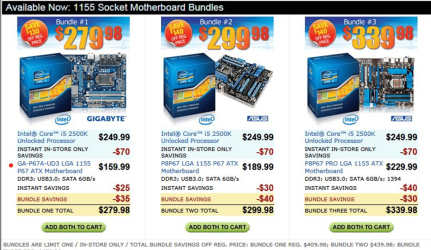
  • 2011-01-14_2226.png
    2011-01-14_2226.png
    239.2 KB · Views: 12

My Computer

Computer Manufacturer/Model Number
HP, Dell, Gateway, Toshiba - 4 laptops and 2 desktops
OS
Vista, Windows7, Mint Mate, Zorin, Windows 8
CPU
from 1.6GHz Duo to i7
Monitor(s) Displays
2x HP w2207
Hard Drives
5x HDD, 7x SSD, 12x Externals
Keyboard
with trackball - no mices
Mouse
Trackball mice
Internet Speed
DSL 6000
Back
Top