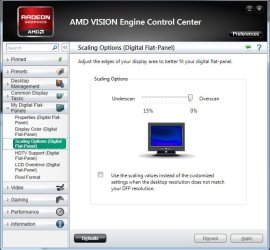
I bought a new Dell S2440L for my PC which you can see in the specs below. I opted for the 24" because it had HDMI connectivity. The image shown from my PC is 1920x1080 however it is not using the full LCD screen. There are black bars around the edge of the screen. It seems like everything on the monitor as far as adjustments goes are disabled when using HDMI  so i can't alter anything with the monitor settings. The auto-adjust feature is also disabled when using HDMI. Why? I have no idea. Anyways I was wondering what settings I could have missed or check from the PC / GFX card side of things.
Any help would be much appreciated!
so i can't alter anything with the monitor settings. The auto-adjust feature is also disabled when using HDMI. Why? I have no idea. Anyways I was wondering what settings I could have missed or check from the PC / GFX card side of things.Any help would be much appreciated!
My Computer
At a glance
Windows 7 64-bit HomeIntel Core i7-870 Lynnfield 2.93 Ghz8GB 4x2 A-Data 1333 MhzHIS Radeon HD 5850 1GB
- Computer type
- PC/Desktop
- Computer Manufacturer/Model Number
- My First Build
- OS
- Windows 7 64-bit Home
- CPU
- Intel Core i7-870 Lynnfield 2.93 Ghz
- Motherboard
- Asus P7P55D-E Pro
- Memory
- 8GB 4x2 A-Data 1333 Mhz
- Graphics Card(s)
- HIS Radeon HD 5850 1GB
- Sound Card
- Onboard
- Monitor(s) Displays
- Dell S2440L 24"
- Screen Resolution
- 1080p
- Hard Drives
- 120 GB Intel X25-M SATA Solid State Drive ///
1 TB Western Digital Caviar Black SATA 6gb/s 7200rpm Drive
- PSU
- Corsair 650TX 650 Watt
- Case
- Antec Three Hundred
- Cooling
- Stock Intel /// 4 Antec Case Fans /// NZXT Sentry-2
- Keyboard
- Logitech LX 710
- Mouse
- Logitech LX 710
- Other Info
- LG Blu-Ray Drive