So today when I started up my PC, windows suddenly wanted to do some drivescan on startup. It started checking and indexing files. I thought this had something to do with the fact that I had reinstalled Windows the day before.
Ive tried it twice and both times the indexing froze halfway. Once at 59% and once at 77%. I assume it froze since nothing happened for over 20 minutes each time.
The third time I decided to just skip the scan.
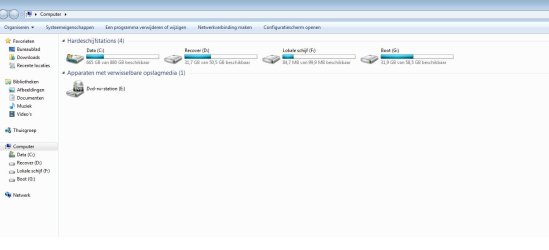
When my pc booted up and I went to check on my drives (since the indexing got me curious) there suddenly are 2 new ones. One drive is named Local Drive F: the other one is named Boot G:
The F drive has 84,7 MB free out of 99.9. When opened up it shows no files.
The G drive had 31.9 GB free out of 58.5 GB. It contains Program files/Windows folders.
Is this something I should worry about? I have no idea why they are there or what their function is.
Attachments
drives1.jpg
43.5 KB
· Views: 7
drives2.jpg
114.5 KB
· Views: 9
My Computer
At a glance
Windows 7 Home Premium 64bitIntel Core i7-2600 @ 3.40Ghz6144MB RAMnVidia GeForce GTX 550 Ti
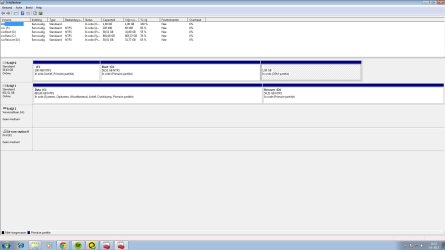
F is the Windows 7 system reserved partition. It normally wouldn't have a drive letter and be hidden. It would only show up in disk management. You should be able to remove the drive letter with no side effects. Right click that partition and select "change drive letter and paths". Then click remove. G may be an OEM partition that also shouldn't have a drive letter. I can't say for sure but that's my guess. System reserved has recovery utilities, etc on it. Now that it has a drive letter it will be indexed and accessed by system restore. If enough restore points get saved it will eventually run out of space and you'll get a low disk space warning. Same deal for the other drive.
My Computer
At a glance
Windows 10 Education 64 bitAMD Phenom II X4 980 Black Edition Deneb 3.7GHz8GB 4GBx2 Kingston PC10600 DDR3 1333 MemoryZotac NVIDIA Geforce GT640 2 Gig DDR3 PCIe
Computer type
PC/Desktop
Computer Manufacturer/Model Number
Home Built
OS
Windows 10 Education 64 bit
CPU
AMD Phenom II X4 980 Black Edition Deneb 3.7GHz
Motherboard
Asus M4N68T-M V2 µATX Motherboard
Memory
8GB 4GBx2 Kingston PC10600 DDR3 1333 Memory
Graphics Card(s)
Zotac NVIDIA Geforce GT640 2 Gig DDR3 PCIe
Sound Card
VIA VT1708s High Definition Audio 8-channel Onboard
F is most likely "system reserved", although it hasn't a label. G is most likely an old winOS. You have 2 disks in the system, you must remember you did install windows on it before.
My Computer
At a glance
Microsoft Windows 7 Home Premium 64-bits 7601...Intel(R) Core(TM) i3 CPU M 370 @ 2.40GHz4,00 GBATI Mobility Radeon HD 5400 Series
Computer type
Laptop
Computer Manufacturer/Model Number
ACER ASPIRE 5742G
OS
Microsoft Windows 7 Home Premium 64-bits 7601 Multiprocessor Free Service Pack 1
CPU
Intel(R) Core(TM) i3 CPU M 370 @ 2.40GHz
Motherboard
Acer Aspire 5742G
Memory
4,00 GB
Graphics Card(s)
ATI Mobility Radeon HD 5400 Series
Sound Card
(1) AMD High Definition Audio Device (2) Realtek High Defi
My C: drive was actually used to store my old WindowsOS I think. Anyway, I havent done anything since I made this post besides some gaming (no reboots or anything) and suddenly the drives have dissappeared. They dont show up in Disk Management anymore either.
What I did do is stop windows from indexing in the future.
I was told that when im not using the search function all that much, I might as well stop indexing.
Would that be considered wise? Or would it be better if I turned it back on?
My Computer
At a glance
Windows 7 Home Premium 64bitIntel Core i7-2600 @ 3.40Ghz6144MB RAMnVidia GeForce GTX 550 Ti
You can delete volume F and G in disk managerment if you are sure you never use them. Delete the OEM partition as well. F, G and OEM aren't involved at all in the boot process.
Groetjes uit Beverwijk
My Computer
At a glance
Microsoft Windows 7 Home Premium 64-bits 7601...Intel(R) Core(TM) i3 CPU M 370 @ 2.40GHz4,00 GBATI Mobility Radeon HD 5400 Series
Computer type
Laptop
Computer Manufacturer/Model Number
ACER ASPIRE 5742G
OS
Microsoft Windows 7 Home Premium 64-bits 7601 Multiprocessor Free Service Pack 1
CPU
Intel(R) Core(TM) i3 CPU M 370 @ 2.40GHz
Motherboard
Acer Aspire 5742G
Memory
4,00 GB
Graphics Card(s)
ATI Mobility Radeon HD 5400 Series
Sound Card
(1) AMD High Definition Audio Device (2) Realtek High Defi
Once you move the data off and delete F and G in Disk Mgmt, I'd partition it Logical to keep it from derailing the boot files from C if you ever do a repair or reinstall. Partition / Extended : Logical Drives - Windows 7 Forums
This is why its best to have your Win7 drive always in the DISK0 slot, set to boot first. You can move it now if you want, or if it's easier partition the data drive Logical so it can't accept System Boot files.