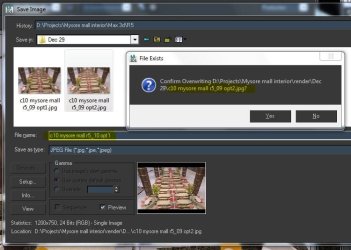
Solved New file name save problem

pwimpenny

New member
Local time
3:25 PM
Messages
15
Can anyone out there help please. Whenever I save a new file I usually click on a previous file and then change the files name but Windows 7 always wants to overwrite. For example I change scene1 to scene2 when I press save it always ask "are you sure you want to overwrite scene1". I always have to write the file from scratch which is time consuming when you are saving many files a day. It did the same in vista but is fine in XP. Any solutions welcome?
 

My Computer

Computer Manufacturer/Model Number
Pcspecialist
OS
windows 7 Professional
CPU
Intel® Core™2 Quad Q9550 (2.83GHz)
Motherboard
ASUS® P5Q WS
Memory
4GB CORSAIR XMS2 DUAL-DDR2 800MHz
Graphics Card(s)
PNY QUADRO FX580 512MB GDDR3
Sound Card
ONBOARD 8 CHANNEL (7.1) HIGH DEF AUDIO
Monitor(s) Displays
Samsung 23" W P2370
Screen Resolution
1950x1050
Hard Drives
250GB SERIAL ATA 3-Gb/s HARD DRIVE WITH 8MB CACHE (7,200rpm)
PSU
350W Dual Rail PSU + 120mm Case Fan
Case
SILVER/BLACK TRIDENT CASE + 2 FRONT USB
Cooling
SUPER QUIET 22dBA TRIPLE COPPER HEATPIPE CPU COOLER
Keyboard
Logitech LX700
Mouse
Logitech LX700
Internet Speed
8mb
What happens if you take 'ownership' of the file?
 

My Computer

Computer type
PC/Desktop
Computer Manufacturer/Model Number
Bruce ... somewhere in his 40's
OS
Windows 7 Ultimate 32bit SP1
CPU
Intel(R) Core(TM)2 Quad CPU @ 2.40GHz, 2400 MHz
Motherboard
INTEL/D975XBX2
Memory
4 GB
Graphics Card(s)
ATI Radeon HD 2600 Pro
Monitor(s) Displays
Samsung SyncMaster 914v
Screen Resolution
1280 x 1024
Hard Drives
2/500GB each ... ST3500630AS ATA Device.
One is not connected
PSU
Rocketfish 700 W
Case
G.Skill Gigabyte Chassis
Keyboard
Standard PS/2 Keyboard
Mouse
Microsoft PS/2 Mouse
Internet Speed
DSL
Antivirus
Avira Internet Security
Browser
IE 11
Other Info
ATI HDMI Audio
Ive not looked into ownerships yet but I was having a play last night and it only happens when i am saving in 3ds max 2009 so Im guessing its a bug in the program. Other versions of 3ds max did the same thing in vista so I think I need to visit the autodesk forums for an answer unless the sevenforums guys have a clue.
I will check permissions tonight.
 

My Computer

Computer Manufacturer/Model Number
Pcspecialist
OS
windows 7 Professional
CPU
Intel® Core™2 Quad Q9550 (2.83GHz)
Motherboard
ASUS® P5Q WS
Memory
4GB CORSAIR XMS2 DUAL-DDR2 800MHz
Graphics Card(s)
PNY QUADRO FX580 512MB GDDR3
Sound Card
ONBOARD 8 CHANNEL (7.1) HIGH DEF AUDIO
Monitor(s) Displays
Samsung 23" W P2370
Screen Resolution
1950x1050
Hard Drives
250GB SERIAL ATA 3-Gb/s HARD DRIVE WITH 8MB CACHE (7,200rpm)
PSU
350W Dual Rail PSU + 120mm Case Fan
Case
SILVER/BLACK TRIDENT CASE + 2 FRONT USB
Cooling
SUPER QUIET 22dBA TRIPLE COPPER HEATPIPE CPU COOLER
Keyboard
Logitech LX700
Mouse
Logitech LX700
Internet Speed
8mb
Hi, I'm having the same problem. Found any solution yet?
 

My Computer

OS
Windows 7 professional
I should say that I do not have this problem.

If I want to save a file in whatever program then as usual an Explorer window shows up with some sort of suggestion for the new file name. If I want to use a name similar to an existing file, I simply click on that file in the directory tree, then change the name as I want and then save the new file with the chosen name. I can put it in any directory as well.

I am not familiar with 3ds max 2009 though, so if this software does not use the Explorer dialog, then maybe it has a bug or something. With the software I usually use there is no problem.
 

My Computer

Computer Manufacturer/Model Number
Dell Inspiron 530
OS
Windows 7 Ultimate (x64)
CPU
Q6600
Memory
8 GB
Graphics Card(s)
ATI Radeon HD 2600 XT
Monitor(s) Displays
Samsung Syncmaster P2450
Screen Resolution
1920x1080
Hard Drives
Samsung HD103UJ
Samsung HD501LJ
Internet Speed
25 Mb/s
I'm having this problem in 3ds max and in sketchup. Other programs don't seem to have this problem. :confused:

Attaching a screenshot showing the problem -
 

Attachments

  • Capture.JPG
    Capture.JPG
    56.6 KB · Views: 43

My Computer

OS
Windows 7 professional
Back
Top