Solved New graphics card - low graphics memory ?

clloyd21

New member
Local time
2:44 PM
Messages
54
Hey i recently invested in a 1gb asus gtx 550 ti graphics card, but for some reason the total memory is 4046mb ?

I'm using:
m5a78L motherboard
8GB corsair RAM
AMD phenom II x 4 3.4ghz

I experience quite bad flickering in games that makes them unplayable. Tried old and new graphics drivers to no avail... please help
 

My Computer

OS
Windows 7 home premium 64bit
CPU
AMD phenom II x4 3.4Ghz
Motherboard
ASUS m5a78L
Memory
8gb ddr3 Corsair
Graphics Card(s)
Asus Nvidia gtx 570 direct cu II
Sound Card
-
Monitor(s) Displays
HD tv 22' Grundig
Screen Resolution
1680 x 1050
PSU
800w (900w Peak) Xenta Unit
Case
CM 680 II
Cooling
4 standard case fans/ Arctic cooler Xtreme revision cpu fan
Keyboard
microsoft standard keyboard
Mouse
razer Lachesis 5600
Internet Speed
50mb fibre optic ( get around 42mb)
The total memory shown is not your actualy gpu memory,i thought it was something like shared system memory,so no need to worry about that.About your flickering problem,can be due to alot of things.Make sure all your cables are connected tightly,and i would uninstall all your mobo,gpu drivers and get the newest ones,make sure you install directX latest version aswell.

Edit:Nevermind all that,ive just read your other threads and i think the best thing to do is to reinstall windows and start from scratch.
 

My Computer

OS
Windows 7 Ultimate 64 Bit
CPU
Amd Phenom II X4 965BE - OC @ 4.0 Ghz
Motherboard
M4N98TD - EVO
Memory
Corsair XMP 1600 - 8gb
Graphics Card(s)
GTX 560 Ti - OC @ Core - 950mhz - Mem- 2100 mhz
Sound Card
xx
Monitor(s) Displays
Philips 20Ie
Edit:Nevermind all that,ive just read your other threads and i think the best thing to do is to reinstall windows and start from scratch.

Yeah well I upgraded to windows 64 bit the other day so I really don't think it's anything to do with the OS. It's kind of annoying that I've upgraded the mobo but it's made things worse =/
 

My Computer

OS
Windows 7 home premium 64bit
CPU
AMD phenom II x4 3.4Ghz
Motherboard
ASUS m5a78L
Memory
8gb ddr3 Corsair
Graphics Card(s)
Asus Nvidia gtx 570 direct cu II
Sound Card
-
Monitor(s) Displays
HD tv 22' Grundig
Screen Resolution
1680 x 1050
PSU
800w (900w Peak) Xenta Unit
Case
CM 680 II
Cooling
4 standard case fans/ Arctic cooler Xtreme revision cpu fan
Keyboard
microsoft standard keyboard
Mouse
razer Lachesis 5600
Internet Speed
50mb fibre optic ( get around 42mb)
Have you installed the right drivers for your motherboard ? You can also try a bios update ( If you know how to do so ).
 

My Computer

OS
Windows 7 Ultimate 64 Bit
CPU
Amd Phenom II X4 965BE - OC @ 4.0 Ghz
Motherboard
M4N98TD - EVO
Memory
Corsair XMP 1600 - 8gb
Graphics Card(s)
GTX 560 Ti - OC @ Core - 950mhz - Mem- 2100 mhz
Sound Card
xx
Monitor(s) Displays
Philips 20Ie
Hmm well I have the motherboard support CD I'll take a look at in a second, and as for bios updates I've never done one nor know how to lol
 

My Computer

OS
Windows 7 home premium 64bit
CPU
AMD phenom II x4 3.4Ghz
Motherboard
ASUS m5a78L
Memory
8gb ddr3 Corsair
Graphics Card(s)
Asus Nvidia gtx 570 direct cu II
Sound Card
-
Monitor(s) Displays
HD tv 22' Grundig
Screen Resolution
1680 x 1050
PSU
800w (900w Peak) Xenta Unit
Case
CM 680 II
Cooling
4 standard case fans/ Arctic cooler Xtreme revision cpu fan
Keyboard
microsoft standard keyboard
Mouse
razer Lachesis 5600
Internet Speed
50mb fibre optic ( get around 42mb)
Well lets first try to install your motherboard drivers,i think you forgot to install those.But before you do,uninstall your gpu drivers,after that reboot and install your motherboard drivers,reboot,and install your gpu drivers.
 

My Computer

OS
Windows 7 Ultimate 64 Bit
CPU
Amd Phenom II X4 965BE - OC @ 4.0 Ghz
Motherboard
M4N98TD - EVO
Memory
Corsair XMP 1600 - 8gb
Graphics Card(s)
GTX 560 Ti - OC @ Core - 950mhz - Mem- 2100 mhz
Sound Card
xx
Monitor(s) Displays
Philips 20Ie
Well lets first try to install your motherboard drivers,i think you forgot to install those.But before you do,uninstall your gpu drivers,after that reboot and install your motherboard drivers,reboot,and install your gpu drivers.

Okay I've tried that, and nothing seems to have happened apart from maybe i get further into a game before it starts happening, say 10 seconds.

I just took my GFX card out and checked the socket for dust and the power for dust.. just put it back in and still no difference =/

Edit: Got into game fine and the game ran smoothly! and then about 40 seconds later it went back to normal. I'm considering getting a new gfx card ...


Also just checked my PSU which has 12v1 (17) 12v2 (15) 12v3 (14) 12v4 (14) ... I'm really not sure if that means this psu doesn't run the card or not if anyone knows ? does this mean i add all the numbers together so the +12v is at 60 ?
 

My Computer

OS
Windows 7 home premium 64bit
CPU
AMD phenom II x4 3.4Ghz
Motherboard
ASUS m5a78L
Memory
8gb ddr3 Corsair
Graphics Card(s)
Asus Nvidia gtx 570 direct cu II
Sound Card
-
Monitor(s) Displays
HD tv 22' Grundig
Screen Resolution
1680 x 1050
PSU
800w (900w Peak) Xenta Unit
Case
CM 680 II
Cooling
4 standard case fans/ Arctic cooler Xtreme revision cpu fan
Keyboard
microsoft standard keyboard
Mouse
razer Lachesis 5600
Internet Speed
50mb fibre optic ( get around 42mb)

My Computer

Computer Manufacturer/Model Number
Hopalong/ Godzilla
OS
Windows7 Pro 64bit SP-1; Windows XP Pro 32bit
CPU
Intel Core i7-870 Lynnfield 2.93GHz LGA 1156 95W Quad-Core
Motherboard
ASUS P7P55D-E PRO
Memory
8GB@1400MHz Crucial Ballistix DDR3-1600 4x2GB
Graphics Card(s)
ASUS ENGTX460 DirectCU/2DI/1GD5 1GB 256-bit GDDR5
Sound Card
VIA Onboard
Monitor(s) Displays
Asus VS248H-P 24"; Samsung SyncMaster 941BW 19"ws
Screen Resolution
1920x1080; 1440x900
Hard Drives
Samsung 830 120GB SSD
Intel 320 120GB SSD
Western Digital Caviar Black WD7501AALS 750GB 7200 RPM SATA 3.0Gb/s
Western Digital Caviar Black WD6401AALS 640GB 7200 RPM SATA 3.0Gb/s
PSU
COOLER MASTER Silent Pro RS850-AMBAJ3-US 850W Modular
Case
COOLER MASTER HAF 932 RC-932-KKN5-GP Black
Cooling
Scythe "Mugen-2 Rev.B" (2 ScytheKaze-Jyuni PWM fans)
Keyboard
Logitech K-320
Mouse
Kensington
Antivirus
Avast Inernet Suite
Browser
IE 9 ; Chrome
Newest driver for your video card here.> NVIDIA DRIVERS 280.26 WHQL

Yeah have them drivers on, still no luck... help =(

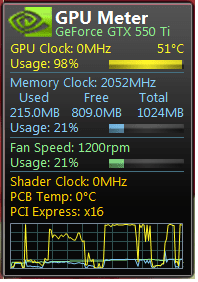
GPU.png


That was a quick Print of when i get into the dues ex game, showing at 98% usage and that was with the game not in full screen so that I could capture the GPU meter, when in a small window the game seems to run fine ?
 

My Computer

OS
Windows 7 home premium 64bit
CPU
AMD phenom II x4 3.4Ghz
Motherboard
ASUS m5a78L
Memory
8gb ddr3 Corsair
Graphics Card(s)
Asus Nvidia gtx 570 direct cu II
Sound Card
-
Monitor(s) Displays
HD tv 22' Grundig
Screen Resolution
1680 x 1050
PSU
800w (900w Peak) Xenta Unit
Case
CM 680 II
Cooling
4 standard case fans/ Arctic cooler Xtreme revision cpu fan
Keyboard
microsoft standard keyboard
Mouse
razer Lachesis 5600
Internet Speed
50mb fibre optic ( get around 42mb)
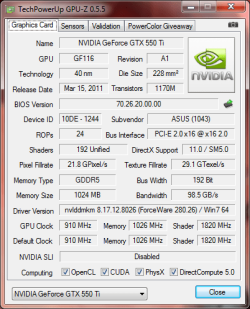
Quick picture of my GPU-Z too, just incase that helps,
running on a AMD phenom II x4 3.4ghz


GPU-Z.png
 

My Computer

OS
Windows 7 home premium 64bit
CPU
AMD phenom II x4 3.4Ghz
Motherboard
ASUS m5a78L
Memory
8gb ddr3 Corsair
Graphics Card(s)
Asus Nvidia gtx 570 direct cu II
Sound Card
-
Monitor(s) Displays
HD tv 22' Grundig
Screen Resolution
1680 x 1050
PSU
800w (900w Peak) Xenta Unit
Case
CM 680 II
Cooling
4 standard case fans/ Arctic cooler Xtreme revision cpu fan
Keyboard
microsoft standard keyboard
Mouse
razer Lachesis 5600
Internet Speed
50mb fibre optic ( get around 42mb)
What is the screen refresh rate you have set? Also, what is the right screen refresh rate for your monitor? (you can check this in Nvidia Control Panel) usually flickering screen is a bad refresh rate.

Also, check the games are set to the same refresh rate in Graphic options
 

My Computer

Computer type
PC/Desktop
Computer Manufacturer/Model Number
Medion Erazer (note to self: insert model number) - with custom additions
OS
Windows 10 Pro x64
CPU
Intel Core i5 7400 @ 3.00GHz
Motherboard
OEM supllied with PC
Memory
8GB 2133Mhz DDR4 (OEM supplied)
Graphics Card(s)
Gygabyte Windforce GTX 1050Ti (Factory Overclocked)
Sound Card
Realtek
Monitor(s) Displays
Acer Al1980 + HKC
Screen Resolution
1360*768(HKC) / 1280*1024(Acer)
Hard Drives
1TB Toshiba
1TB WD Caviar Green
120GB Samsung Evo 840
PSU
OEM supplied (no power rating on case)
Case
OEM Supplied
Cooling
Stock
Keyboard
Logitech Wireless
Mouse
Logitect Wireless
Internet Speed
40Mb/s Down 10Mb/s Up
Antivirus
Defender
Browser
Firefox
What is the screen refresh rate you have set? Also, what is the right screen refresh rate for your monitor? (you can check this in Nvidia Control Panel) usually flickering screen is a bad refresh rate.

Also, check the games are set to the same refresh rate in Graphic options

refresh rates set to 75 both in game and monitor.

I feel its the GFX can't keep up =/ even though with the older motherboard it ran like a dream ?
 

My Computer

OS
Windows 7 home premium 64bit
CPU
AMD phenom II x4 3.4Ghz
Motherboard
ASUS m5a78L
Memory
8gb ddr3 Corsair
Graphics Card(s)
Asus Nvidia gtx 570 direct cu II
Sound Card
-
Monitor(s) Displays
HD tv 22' Grundig
Screen Resolution
1680 x 1050
PSU
800w (900w Peak) Xenta Unit
Case
CM 680 II
Cooling
4 standard case fans/ Arctic cooler Xtreme revision cpu fan
Keyboard
microsoft standard keyboard
Mouse
razer Lachesis 5600
Internet Speed
50mb fibre optic ( get around 42mb)
When you say flickering, do you mean the screen is physically flickering? Or you are getting framerate lag?

If you could fill out the rest of your System Specs http://www.sevenforums.com/profile.php?do=extra, we may be able to help you further
 

My Computer

Computer type
PC/Desktop
Computer Manufacturer/Model Number
Medion Erazer (note to self: insert model number) - with custom additions
OS
Windows 10 Pro x64
CPU
Intel Core i5 7400 @ 3.00GHz
Motherboard
OEM supllied with PC
Memory
8GB 2133Mhz DDR4 (OEM supplied)
Graphics Card(s)
Gygabyte Windforce GTX 1050Ti (Factory Overclocked)
Sound Card
Realtek
Monitor(s) Displays
Acer Al1980 + HKC
Screen Resolution
1360*768(HKC) / 1280*1024(Acer)
Hard Drives
1TB Toshiba
1TB WD Caviar Green
120GB Samsung Evo 840
PSU
OEM supplied (no power rating on case)
Case
OEM Supplied
Cooling
Stock
Keyboard
Logitech Wireless
Mouse
Logitect Wireless
Internet Speed
40Mb/s Down 10Mb/s Up
Antivirus
Defender
Browser
Firefox
When you say flickering, do you mean the screen is physically flickering? Or you are getting framerate lag?

If you could fill out the rest of your System Specs http://www.sevenforums.com/profile.php?do=extra, we may be able to help you further

I have a feeling It's framerate lag, which makes sense as reducing game resolution or un-checking full screen does reduce the amount it happens.

Started when I changed my motherboard from the asus m4a78 to the m5a78L.

I've also updated all the spec's for the link you gave me

Thanks
 

My Computer

OS
Windows 7 home premium 64bit
CPU
AMD phenom II x4 3.4Ghz
Motherboard
ASUS m5a78L
Memory
8gb ddr3 Corsair
Graphics Card(s)
Asus Nvidia gtx 570 direct cu II
Sound Card
-
Monitor(s) Displays
HD tv 22' Grundig
Screen Resolution
1680 x 1050
PSU
800w (900w Peak) Xenta Unit
Case
CM 680 II
Cooling
4 standard case fans/ Arctic cooler Xtreme revision cpu fan
Keyboard
microsoft standard keyboard
Mouse
razer Lachesis 5600
Internet Speed
50mb fibre optic ( get around 42mb)
Back
Top