pnkpanther
New member
- Local time
- 2:17 PM
- Messages
- 4
So i got a new Hard drive (1Tb), formatted it, and installed windows 7 on it. however when i try to boot directly from it in bios it fails to work. I boot from my old hard drive and select the new copy of windows and it loads fine, it being installed on my new hard drive.
so my question is, how do i set my new hard drive as the primary partition, active, and the system hard drive so that that copy of windows can boot from it and i can erase my old hard drive?
also how can i get rid of the start up screen asking me which copy of windows 7 to boot from?
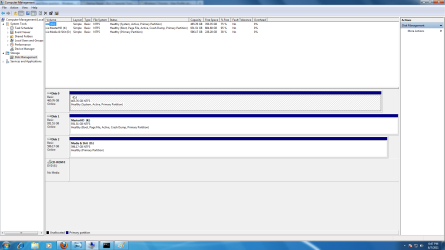
the status for the drives under computer management is as follows
C: (0ld) system, active, primary partition
K: (new) boot, page file, active, crash dump, primary partition
so my question is, how do i set my new hard drive as the primary partition, active, and the system hard drive so that that copy of windows can boot from it and i can erase my old hard drive?
also how can i get rid of the start up screen asking me which copy of windows 7 to boot from?
the status for the drives under computer management is as follows
C: (0ld) system, active, primary partition
K: (new) boot, page file, active, crash dump, primary partition
My Computer
- Computer Manufacturer/Model Number
- Custom rig by Me model #1
- OS
- windows 7 64 bit
- CPU
- AMD Phenom II X4 965 Black Edition 3.4GHz (OC to 4.0GHz)
- Motherboard
- ASUS M4A88TD-V EVO/USB3 AM3 AMD 880G HDMI SATA 6Gb/s USB 3.0
- Memory
- G.SKILL Ripjaws Series 8GB (2 x 4GB) 240-Pin DDR3 SDRAM DDR3
- Graphics Card(s)
- Nvidia 9800GTX+ (BFG factory OC)
- Sound Card
- Creative Fatal1ty
- Monitor(s) Displays
- Acer 23"
- Screen Resolution
- 1920 X 1080
- Hard Drives
- C: 500 gig WD
W: 640 gig WD
K: 1000 gig Samsung
- PSU
- 800Watt Thermaltake Toughpower
- Case
- Thermaltake Armor+MX
- Cooling
- Thermaltake Bigwater760is with AM3 upgraded waterblock
- Keyboard
- zBoard Merc
- Mouse
- Razer lachesis
- Internet Speed
- 6mb DSL (at&t 3:)
- Other Info
- lotsa LEDs and Cold Cathodes and extra fans