Solved New icon appears on Taskbar

crgibson

New member
Member
VIP
Local time
7:05 PM
Messages
145
Location
Southern Oregon
I have a FireFox icon on my Taskbar. This morning I find that when I click on it to start the service, another Firefox icon appears on the Taskbar. The new icon is the "running" program and the other icon does not show running.

Have run Malware Anti-Malware, Spybot and Super AntiSpyware with nothing showing.

Any help with this?:sarc:

Thanks
 

My Computer

Computer type
PC/Desktop
Computer Manufacturer/Model Number
Custom
OS
Win 7 HP 64bit w/SP1
CPU
AMD Athlon 64 X2 5200+
Motherboard
Gigabyte Technology Co., Ltd. GA-MA770-UD3 (Socket M2)
Memory
6.0GB Dual-Channel DDR2 @ 387MHz (5-5-5-18)
Graphics Card(s)
Acer AL1906 @ 1280x1024 512MB GeForce 9500 GT (XFX Pine Grou
Sound Card
Realtek High Definition Audio
Monitor(s) Displays
Acer Generic PnP Monitor
Hard Drives
Crucial 128 gig M4 SSD
Seagate Backup 5T
Seagate GoFlex 2T
WDC WD1600JS-00NCB1 USB 1500 Gig
Seagate Backup 3T
Keyboard
Logitech HID-Compliant Keyboard
Mouse
PS/2 Compatible Mouse
Internet Speed
Cable broadband (up to 50Mbps)
Other Info
Nightly runs of Super AntiSpyware, CCleaner and Malware Anti-Malware and System Restore.
did you update firefox recently?
 

My Computer

Computer Manufacturer/Model Number
Hewlett packard/p6512uk
OS
Microsoft Windows 7 Home Premium 64-bit 7600
CPU
IIx4 amd athelon 635 processor
Motherboard
FOXCONN 2AA9
Memory
2x2gb
Graphics Card(s)
ati radeon HD 5450
Sound Card
(1) Realtek High Definition Audio (2) AMD High Definition
Monitor(s) Displays
samsung lcd tv 32"
Screen Resolution
1360x 768
Hard Drives
(1) WDC WD10 01FAES-60Z2A0 SATA Disk Device (2) Maxtor OneTouch USB Device (3) ST310003 33AS USB Device (4) WD My Book 1111 USB Device
PSU
?
Cooling
air!
Keyboard
wireless hp
Mouse
wireless Hp,optical
Internet Speed
1.10mb/s
Antivirus
MSE
Browser
Firefox
I updated from FF5 to FF6.0.1 last week. This is the first problem.
 

My Computer

Computer type
PC/Desktop
Computer Manufacturer/Model Number
Custom
OS
Win 7 HP 64bit w/SP1
CPU
AMD Athlon 64 X2 5200+
Motherboard
Gigabyte Technology Co., Ltd. GA-MA770-UD3 (Socket M2)
Memory
6.0GB Dual-Channel DDR2 @ 387MHz (5-5-5-18)
Graphics Card(s)
Acer AL1906 @ 1280x1024 512MB GeForce 9500 GT (XFX Pine Grou
Sound Card
Realtek High Definition Audio
Monitor(s) Displays
Acer Generic PnP Monitor
Hard Drives
Crucial 128 gig M4 SSD
Seagate Backup 5T
Seagate GoFlex 2T
WDC WD1600JS-00NCB1 USB 1500 Gig
Seagate Backup 3T
Keyboard
Logitech HID-Compliant Keyboard
Mouse
PS/2 Compatible Mouse
Internet Speed
Cable broadband (up to 50Mbps)
Other Info
Nightly runs of Super AntiSpyware, CCleaner and Malware Anti-Malware and System Restore.
That will be why ,i had it as well, the non running ff icon is the old shortcut , if you run firefox, pin the new running icon to the taskbar then unpin the old non running icon it will be fine . left click the new icon and drag it to where you had the old one pinned and eveything will be as before.
i think this happens with everyone who upgrades.
 

My Computer

Computer Manufacturer/Model Number
Hewlett packard/p6512uk
OS
Microsoft Windows 7 Home Premium 64-bit 7600
CPU
IIx4 amd athelon 635 processor
Motherboard
FOXCONN 2AA9
Memory
2x2gb
Graphics Card(s)
ati radeon HD 5450
Sound Card
(1) Realtek High Definition Audio (2) AMD High Definition
Monitor(s) Displays
samsung lcd tv 32"
Screen Resolution
1360x 768
Hard Drives
(1) WDC WD10 01FAES-60Z2A0 SATA Disk Device (2) Maxtor OneTouch USB Device (3) ST310003 33AS USB Device (4) WD My Book 1111 USB Device
PSU
?
Cooling
air!
Keyboard
wireless hp
Mouse
wireless Hp,optical
Internet Speed
1.10mb/s
Antivirus
MSE
Browser
Firefox
Thank you boohbah!! Your suggestion worked.

Thanks again.:D
 

My Computer

Computer type
PC/Desktop
Computer Manufacturer/Model Number
Custom
OS
Win 7 HP 64bit w/SP1
CPU
AMD Athlon 64 X2 5200+
Motherboard
Gigabyte Technology Co., Ltd. GA-MA770-UD3 (Socket M2)
Memory
6.0GB Dual-Channel DDR2 @ 387MHz (5-5-5-18)
Graphics Card(s)
Acer AL1906 @ 1280x1024 512MB GeForce 9500 GT (XFX Pine Grou
Sound Card
Realtek High Definition Audio
Monitor(s) Displays
Acer Generic PnP Monitor
Hard Drives
Crucial 128 gig M4 SSD
Seagate Backup 5T
Seagate GoFlex 2T
WDC WD1600JS-00NCB1 USB 1500 Gig
Seagate Backup 3T
Keyboard
Logitech HID-Compliant Keyboard
Mouse
PS/2 Compatible Mouse
Internet Speed
Cable broadband (up to 50Mbps)
Other Info
Nightly runs of Super AntiSpyware, CCleaner and Malware Anti-Malware and System Restore.
your welcome :D
 

My Computer

Computer Manufacturer/Model Number
Hewlett packard/p6512uk
OS
Microsoft Windows 7 Home Premium 64-bit 7600
CPU
IIx4 amd athelon 635 processor
Motherboard
FOXCONN 2AA9
Memory
2x2gb
Graphics Card(s)
ati radeon HD 5450
Sound Card
(1) Realtek High Definition Audio (2) AMD High Definition
Monitor(s) Displays
samsung lcd tv 32"
Screen Resolution
1360x 768
Hard Drives
(1) WDC WD10 01FAES-60Z2A0 SATA Disk Device (2) Maxtor OneTouch USB Device (3) ST310003 33AS USB Device (4) WD My Book 1111 USB Device
PSU
?
Cooling
air!
Keyboard
wireless hp
Mouse
wireless Hp,optical
Internet Speed
1.10mb/s
Antivirus
MSE
Browser
Firefox
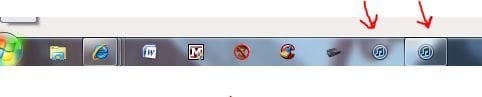
This works for other icons on the taskbar too. iTunes always showed a second taskbar icon for me after I opened it. I thought that was how it was supposed to be. Followed these instructons and now I only get one icon when it is opened. Thanks!

edit: I just realized that after making the change described the iTunes icon in taskbar is now labeled "iTunes(2)". So for now I have gone back to the original set up where clicking the iTunes icon opens a second icon in the taskbar. Unless someone knows how to rename that second shortcut I think I'll keep it this way.
 

Attachments

  • itunes.JPG
    itunes.JPG
    12.7 KB · Views: 5
Last edited:

My Computer

Computer Manufacturer/Model Number
HP p6608f
OS
Win 7 Home Premium x64
CPU
Intel Core i3-540 3.07 GHz
Motherboard
MS-7613 (Iona-GL8E)
Memory
4 GB (2 X 2) Dual-Channel PC-10600 DDR3 @ 665MHz (9-9-9-24)
Graphics Card(s)
Integrated Intel H57
Sound Card
Integrated Realtek ALC888S Audio
Monitor(s) Displays
17" SDM-HS73 (a vestige from my old computer)
Screen Resolution
1280 X 1024
Hard Drives
750GB SATA 7200 RPM
PSU
250W
Keyboard
HP USB keyboard
Mouse
HP USB optical mouse
Internet Speed
15Mbps/1Mbps
Back
Top