New Install - Drive Letter Assignment

riskreversal

New member
Local time
10:26 AM
Messages
6
Hi,

First time poster, long time reader.

After quite some time I have decided to build a new desktop pc. At this stage I wanted to dual boot XP and Win7 (may add Linux later).

I have to confess that this will be the first system that I have build with Win 7 ! so please be gentle with me.

I have assembled my pc and am testing things out. I have an SSD drive and have installed XP as 1st partition and Win7 as 2nd. There is a also an extended partition with a logical volume. SSD has MBR.

I have a queery as regards drive letter assignment and also how I can stop the Win7 boot loader from activating as I would prefer to change partitions manually via third party software.

I also want to stop the Windows XP partition showing in Windows 7 and visa versa.

I have noticed from my test install (and read) that once Win7 is installed (after XP) the Windows 7 boot loader comes into play and drive letters are assigned which cannot be changed.

What I was going to do was as follows:

1. Create a 1st partition and install XP in it.
2. Hide the XP partition and create a 2nd partition (after the XP partition) and install Win7 in it.

What I want to achieve is

a. a situation where only the 'active / boot' partition is visible and shown in My Computer as C:\ in either Win7 or XP (so XP partition not visible in XP and visa versa).
b. Drive letters that are orderly in My Computer.

If I install as per point 1 and 2 above and manually (via third party software) change the boot partition, will I achieve point a and b. Obviously, with the third pary boot loader in order to change partitions, I would hide one partiton, unhide and make active the other partition and boot.

Would this work.

I hope that I have explained myself clearly.

Many thanks for any info provided

Cheers
 

My Computer

Computer type
PC/Desktop
OS
Dual Boot: XP 32bit - Win7 32bit
CPU
AMD FX6300 @stock
Motherboard
Gigabyte GA970A DS3P (Rev2.1) (4+1 VRM)
Memory
8 GB (2x4GB) Corsair Vengence 9-9-9-24 1.5v @1333Mhz
Graphics Card(s)
MSI GTX 660
Sound Card
Creative Audigy
Hard Drives
SSD Samsung Pro 850 1TB
PSU
Corsair RM650i
Case
Lian Li PC-7HA
Welcome to the forum. You can change drive letters simply at anytime. You wonthide the paritions they will show up you can unasign a drive letter so they wont be visable only in disk manager. The only way to hide is to change aprition type which may then stop it booting
 

My Computer

Computer type
PC/Desktop
OS
win 8 32 bit
Welcome to the Forum.

To help us to help you, please edit your profile with all your hardware specs. Use Brink tutorial System Info - See Your System Specs - Windows 7 Help Forums

To hide a drive from been seeing in Win 7, open disk management (C:\Windows\System32\diskmgmt.msc) right click on the partition - Change drive letter and path - Remove.

Reboot and try to boot win XP.
 

My Computers

System One System Two

  • Computer type
    PC/Desktop
    Computer Manufacturer/Model Number
    custom build
    OS
    Windows 7 HP 64
    CPU
    i5 6600K - 800MHz to 4200MHz
    Motherboard
    GA-Z170-HD3P
    Memory
    4+4G GSkill DDR4 3000
    Graphics Card(s)
    IG - Intel 530
    Monitor(s) Displays
    Samsung 226BW
    Screen Resolution
    1680x1050
    Hard Drives
    (1) -1 SM951 – 128GB M.2 AHCI PCIe SSD drive for Windows 7 and Lubuntu
    (2) -1 WD SATA 3 - 1T for Data
    (3) -1 WD SATA 3 - 1T for backup
    PSU
    Thermaltake 450W TR2 gold
    Keyboard
    Old and good Chicony mechanical keyboard
    Mouse
    Logitech mX performance - 9 buttons (had to disable some)
    Internet Speed
    500Mb/s
    Browser
    Firefox 64
    Other Info
    TinyWall firewall
  • Computer type
    Laptop
    System Manufacturer/Model Number
    Asus Q550LF
    OS
    Windows 7 Pro
    CPU
    i7-4500U 800MHz to 3.0GHz
    Motherboard
    Asus Q550LF
    Memory
    (4+4)G DDR3 1600
    Graphics Card(s)
    IG intel 4400 + NVIDIA GeForce GT 745M
    Sound Card
    Realtek
    Monitor(s) Displays
    LG Display LP156WF4-SPH1
    Screen Resolution
    1920 x 1080
    Hard Drives
    BX500 120G SSD for Windows and programs +
    1T HDD for data
    Internet Speed
    500 Mb/s
    Browser
    Firefox
    Other Info
    TinyWall firewall
Welcome to the forum. You can change drive letters simply at anytime. You wonthide the paritions they will show up you can unasign a drive letter so they wont be visable only in disk manager. The only way to hide is to change aprition type which may then stop it booting

Thank you. Below is a screenshot of what I have in Win 7. I Tried changing drive letters in Win 7 (Computer Management) and it did not let me change any (excluding Data partition E:\).

5aad6cb3e8735_Win7DriveLetters.jpg.20f30550e4f697ce20342e354e194756.jpg


Below is what I have in XP. The only drive letter I was allowed to change was that of Win 7 from E:\ to Z:\ (excluding D:\ & X:\).

5aad6da22d9ee_XPDriveLetters.JPG.dd930eaf3bc3379d03d899448aa9cf13.JPG


Welcome to the Forum.

To help us to help you, please edit your profile with all your hardware specs. Use Brink tutorial System Info - See Your System Specs - Windows 7 Help Forums

I have updated my systems specs.

To hide a drive from been seeing in Win 7, open disk management (C:\Windows\System32\diskmgmt.msc) right click on the partition - Change drive letter and path - Remove.

Reboot and try to boot win XP.

I understand that there are ways of hiding partitions in o/s (see link to tutorial below). I also understand that it is not only adviseable but recommended to hide o/s system partitions from one another ie in XP hide Win7 partition and visa versa.

Backup Restore - System Restore Points - Stop XP Dual Boot Delete | Vista Forums

I want to install both o/s in such a way that o/s drive letters that are not required automatically don't show up where not needed ie are not shown and assigned a drive letter in other partitions because they are hidden. I know that Computer management will show the partitions but without a drive letter. I also don't want the boot Windows 7 boot loader to come into play at all.

Hence me asking my question. If on a clean disk I install XP, then prior to the installation of Win7, I hide the XP partition and then install Win 7, so that when Win 7 installs it does not see XP (and assigns a drive letter) because the XP partition is hidden.

I can then use a third party boot loader (not the Win 7 one) and boot into XP by making that partition visible and active and hidding the Win 7 partition.

I am testing all this on a test system and was just tying to save some time really.

Many thanks for any info provided

Cheers
 

My Computer

Computer type
PC/Desktop
OS
Dual Boot: XP 32bit - Win7 32bit
CPU
AMD FX6300 @stock
Motherboard
Gigabyte GA970A DS3P (Rev2.1) (4+1 VRM)
Memory
8 GB (2x4GB) Corsair Vengence 9-9-9-24 1.5v @1333Mhz
Graphics Card(s)
MSI GTX 660
Sound Card
Creative Audigy
Hard Drives
SSD Samsung Pro 850 1TB
PSU
Corsair RM650i
Case
Lian Li PC-7HA
Why do you want to hide the drive? Have you thought of using free virtual box and run Do as a virtual PC
 

My Computer

Computer type
PC/Desktop
OS
win 8 32 bit
Why do you want to hide the drive?
I actually prefer it that way, less chance of making a mistake and if any accidents happen then they will be contained.

Have you thought of using free virtual box and run Do as a virtual PC

I run Virtual Box on the pc that is about to be de-commissioned which I use for testing progs and which I will use again but I don't want to run XP fully from a VM from Win7.

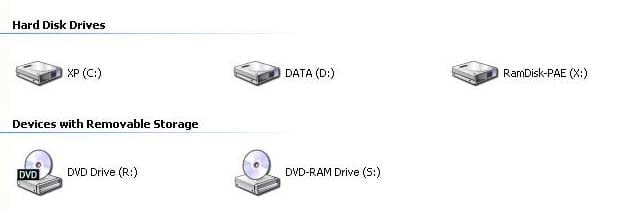
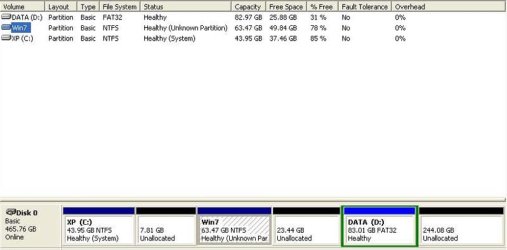
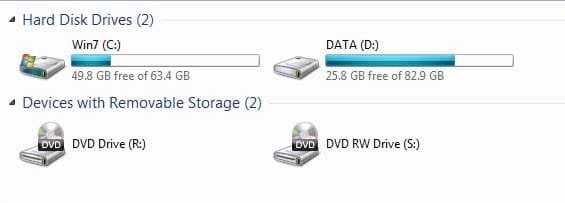
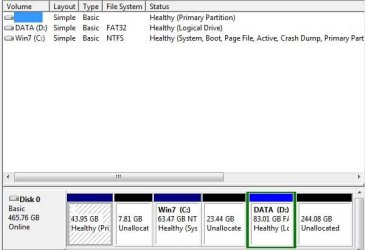
Well I resolved my issue and in so doing it also removed the Win7 bootloader, which is what I wanted.
Now XP and Win7 do not show the o/s of the other system and I can move and resize partitions without having boot errors. Much better.

In case if anyone is wondering how.
1. Install XP into 1st partition
2. Prior to installing Win7, hide XP partition and take off 'active' flag
3. Install Win7 on 2nd partition
4. Get the 3rd Party boot loader of your choice
5. You will able to resize/move any o/s partition without the fear of the dreaded boot error.

Luckily I had images of XP prior to Win7 install which made the process of testing this easier.

Cheers

XP My Computer_forum.jpg

XP Computer Management_forum.jpg

Win7 My Computer_forum.jpg

Win 7 Computer Management_forum.jpg
 

My Computer

Computer type
PC/Desktop
OS
Dual Boot: XP 32bit - Win7 32bit
CPU
AMD FX6300 @stock
Motherboard
Gigabyte GA970A DS3P (Rev2.1) (4+1 VRM)
Memory
8 GB (2x4GB) Corsair Vengence 9-9-9-24 1.5v @1333Mhz
Graphics Card(s)
MSI GTX 660
Sound Card
Creative Audigy
Hard Drives
SSD Samsung Pro 850 1TB
PSU
Corsair RM650i
Case
Lian Li PC-7HA
Back
Top